
Action plan and minutes
Manual — Energy Management · chapter 7 of 13
The action plan says what the company will do to improve performance, who is responsible, how much it costs and how the saving will be measured. The minutes record top management’s decisions about it.Objectives and targets
Section titled “Objectives and targets”- On the Action plan tab, click New objective.
- Write the objective and choose the Level (strategic, tactical or operational).
- Enter the Target in %. A negative number is a reduction: −5 means reducing by 5 %.
- Optional: link it to an indicator and enter the Reference year and the Due date.
Measures
Section titled “Measures”Each measure is a concrete action. The form carries the items the regulation requires the plan to contain.
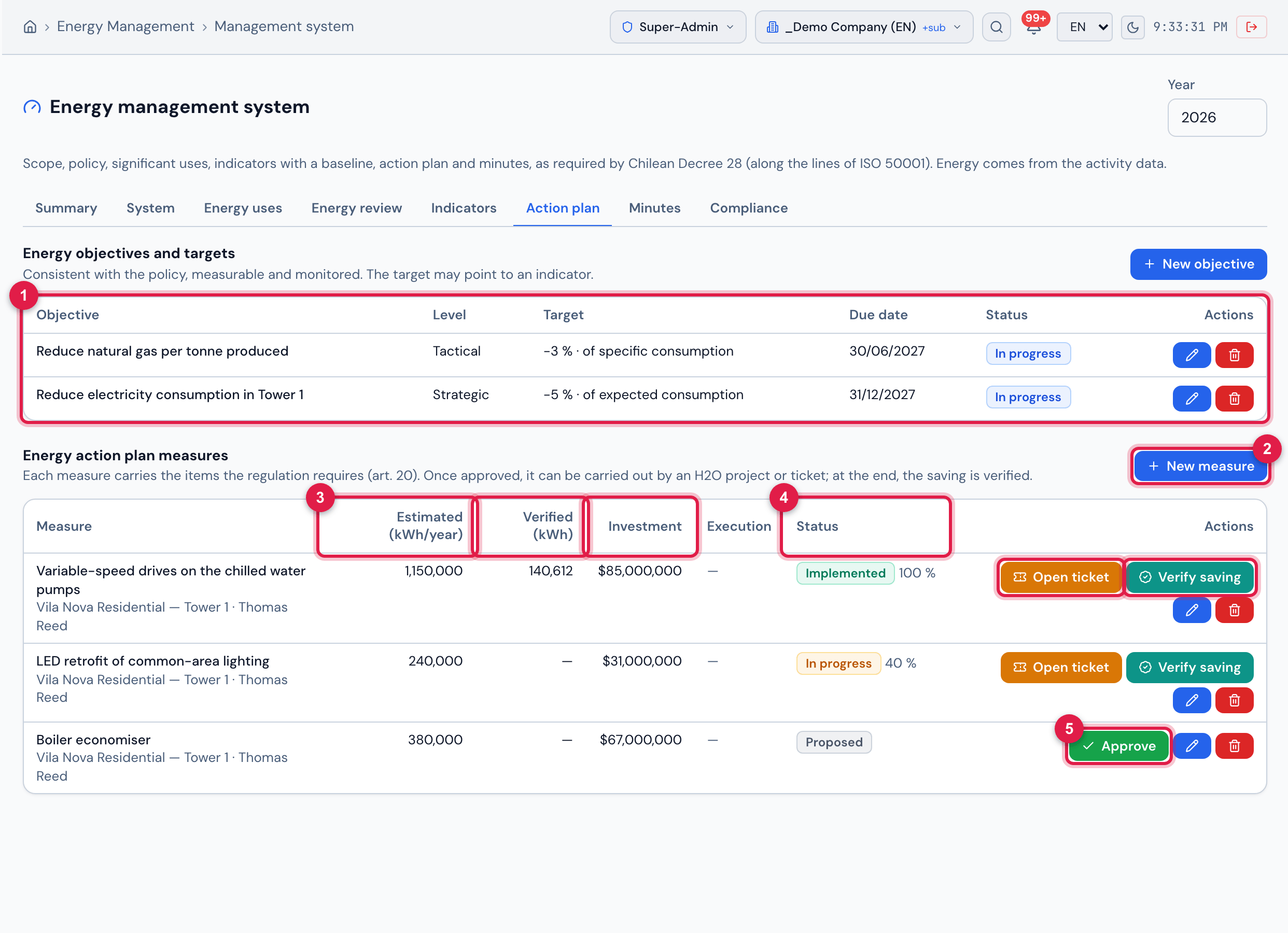
Figure 16. The Action plan tab.
- 1The objectives and targets, with level, target, due date and status.
- 2New measure.
- 3Each measure with the Estimated saving, the Verified one and the Investment.
- 4The Status and the progress.
- 5Approve a proposed measure; Open ticket to carry it out; Verify saving when it is done.
| Status | What it means | Next step |
|---|---|---|
| Proposed | on record, awaiting a decision | Approve |
| Approved | will be carried out | open a ticket or link it to a project |
| In progress | under way, with the percentage | follow up |
| Implemented | completed | verify the saving |
| Cancelled | not going ahead | — |
Execution uses what H2O already has: Open ticket creates a ticket for the system’s group, with the summary of the measure; or link the measure to a Project, and the schedule and the costs are followed there.
Verifying the saving
Section titled “Verifying the saving”An estimated saving is a promise; the verified one is what was measured. H2O compares the consumption of a reference period, before the measure, with that of a reporting period, after it.
- On the implemented measure, click Verify saving.
- Check the reference period (set in the measure) and enter the Reporting period.
- H2O fetches both consumptions from the activity data. If there was a change unrelated to the measure (higher production, an extra piece of equipment), enter the adjustment.
- Write the note and click Calculate and save.
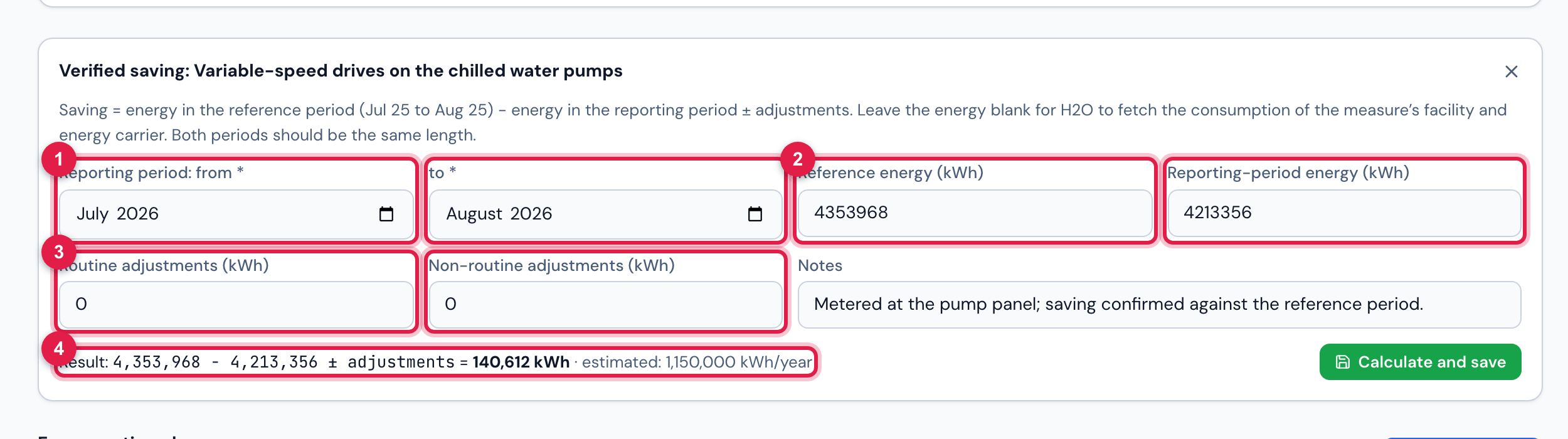
Figure 17. Verifying the saving of a measure.
- 1The Reporting period. The reference one comes from the measure record and appears in the text above.
- 2The consumption of each period, taken from the activity data.
- 3The routine and non-routine adjustments.
- 4The Result: reference minus reporting period, with the adjustments, next to the estimated saving.
Minutes
Section titled “Minutes”The regulation requires two meetings per half-year: the action plan evaluation and the top management review. Each one becomes a set of minutes.
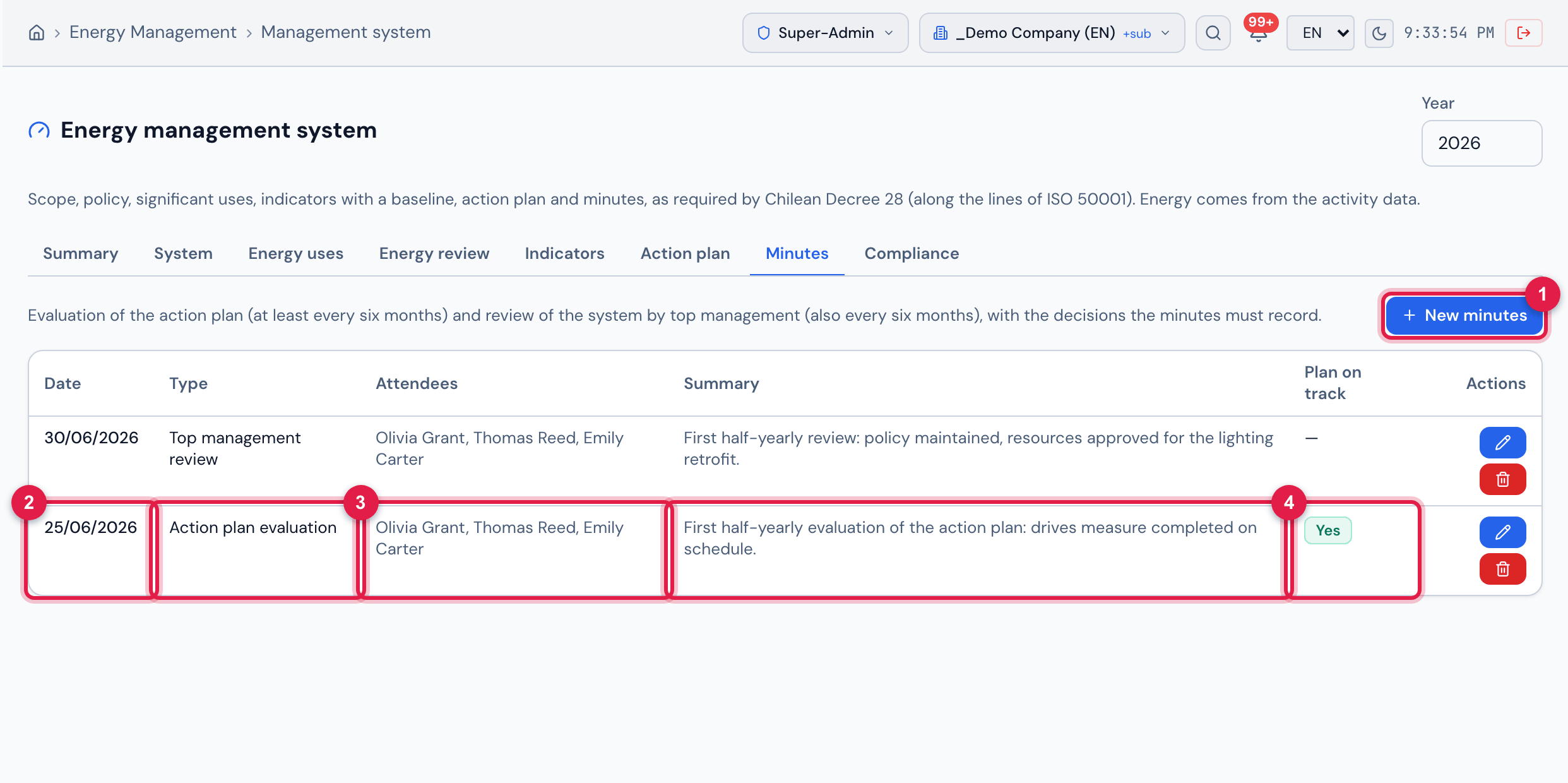
Figure 18. The Minutes tab.
- 1New minutes.
- 2The Type and the date of the meeting.
- 3The attendees and the summary.
- 4Plan on track: in the plan evaluation, whether it is meeting its objective.
- Click New minutes and choose the Type.
- Enter the Date, the Attendees and the Summary.
- In the plan evaluation, say whether it is on track and, if not, the corrective action. In the top management review, record the decisions by topic.
- Attach the signed file and save.
The dashboard counts the minutes of each type in the half-year: this is how the half-yearly obligations become Done.
Was this page helpful?
Thanks for the feedback!
Got it — we will improve this page.