
Sources and monitoring, refrigerants and chemicals
Manual — Environment · chapter 6 of 11
The Sources, monitoring, refrigerants and chemicals screen has three tabs and a site filter at the top.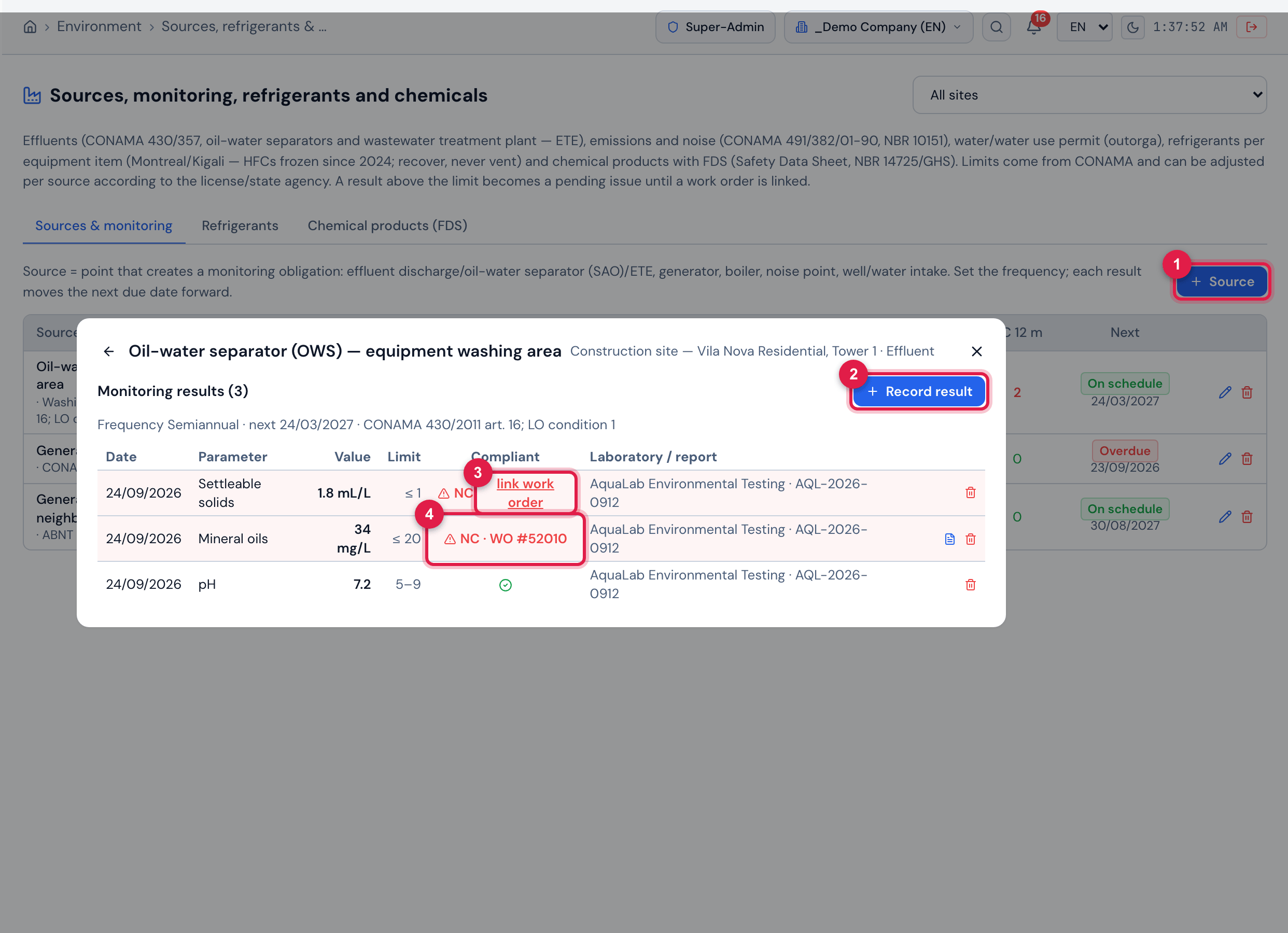
Figure 16. The Sources & monitoring tab with the oil-water separator (OWS) open: semi-annual frequency, next monitoring and legal basis; the Monitoring results (3) with date, parameter, value, limit, compliance and laboratory/report — pH compliant, mineral oils at 34 mg/L NC already linked to WO #52010 and settleable solids at 1.8 mL/L NC still without a work order, with the link work order link. In the background, the list of sources with NC 12 m (2 at the OWS) and the next monitoring (the generator exhaust Overdue).
- 1+ Source.
- 2Record result — parameter, date, value, laboratory, report and file.
- 3link work order — an NC result is a pending issue until it has a work order.
- 4NC result with the corrective work order linked.
Register the source (+ Source button: e.g. oil-water separator, generator, stack, noise point, well) with the linked asset (optional), location, legal basis or license condition, the Monitoring frequency (monthly, quarterly, semiannual, annual or occasional) and the Next monitoring. On the source, Record result: choose the parameter, the measurement date, the value, the laboratory, the report number and attach the lab report.
The catalog has 30 parameters (pH, temperature, mineral oils, BOD (DBO), metals, daytime/night-time noise, opacity, turbidity…); 19 already carry the default limit from CONAMA or Portaria GM/MS 888/2021, and the others (COD (DQO), suspended solids, NOx, particulate matter, permitted flow…) depend on the limit in the license or set by the state agency. Enter your license’s limit in Applied limit — it prevails over the default — and the Limit type (maximum, minimum or range). With no limit at all, the result shows “no limit” and is not judged.
Each recorded result pushes the next monitoring forward by the source’s frequency (occasional does not push it). A non-compliant result shows in red with NC and the message “Result recorded — NON-COMPLIANT (open a work order and link it)”; it becomes a pending issue until you click link work order and enter the number of the corrective work order.
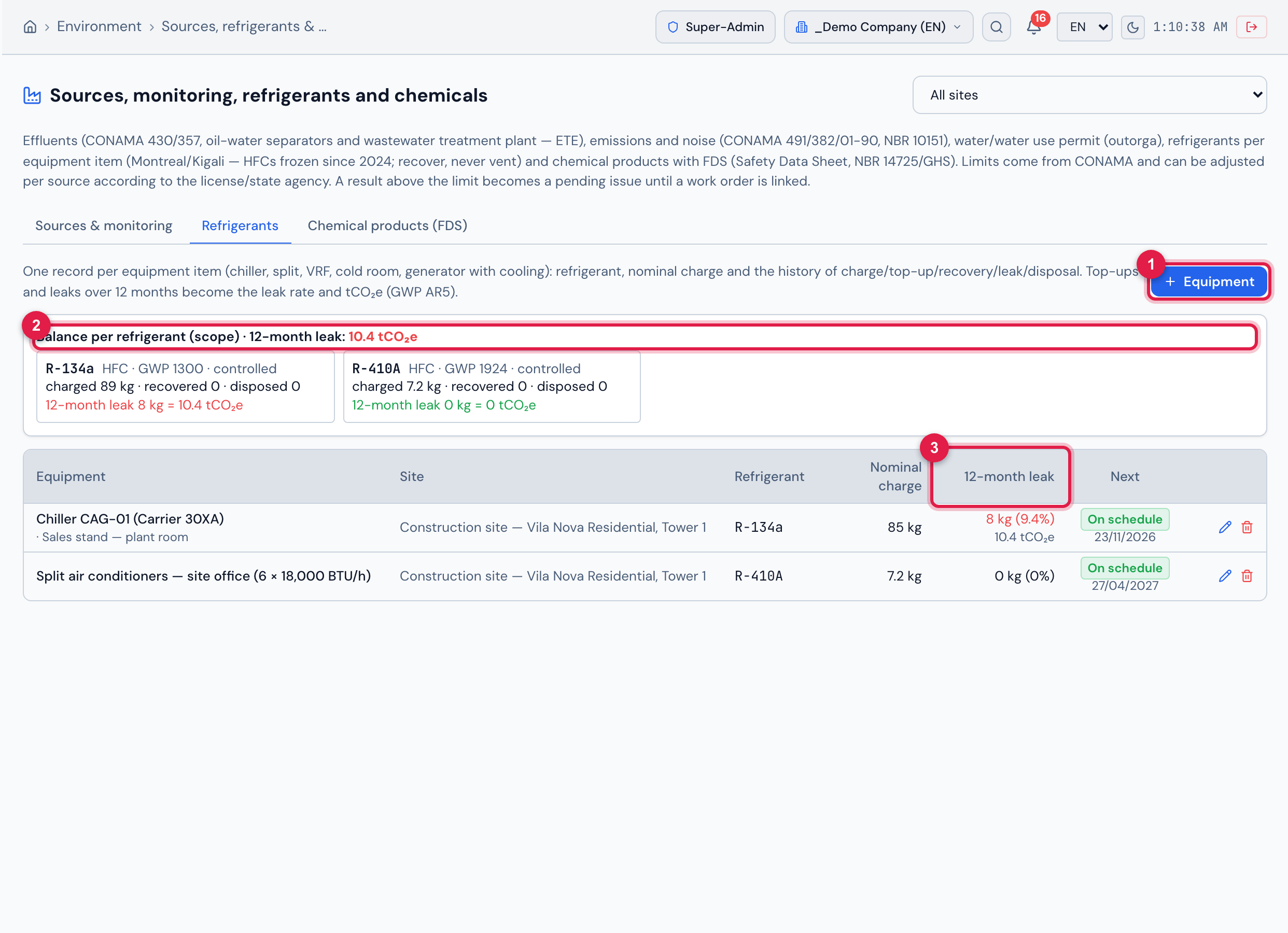
Figure 17. The Refrigerants tab: at the top, the Balance per refrigerant — R-134a (89 kg charged, 12-month leak of 8 kg = 10.4 tCO₂e) and R-410A (no leaks); below, one record per equipment item — chiller CAG-01 with an 85 kg charge and 8 kg (9.4%) leaked in 12 months, and the site office split units — with site, refrigerant, nominal charge and the next leak-tightness test (On schedule). Click the equipment item to see the summary and the Refrigerant history.
- 1+ Equipment.
- 2Balance per refrigerant with the total leaks in tCO₂e.
- 312-month leak column (kg, % of the charge and tCO₂e).
Register the equipment with + Equipment (refrigerant, nominal charge, linked asset and the date of the next Leak-tightness test) and, at each intervention, use Log operation: initial charge, top-up, recovery, leak detected, leak-tightness test or disposal (reclamation/destruction), with quantity, date, technician, cylinder/batch, leak cause and the related work order. The system calculates the balance (charged − recovered), the 12-month leak rate (leak + top-up ÷ nominal charge) and the tCO₂e from the refrigerant’s GWP (18 refrigerants in the catalog, GWP AR5).
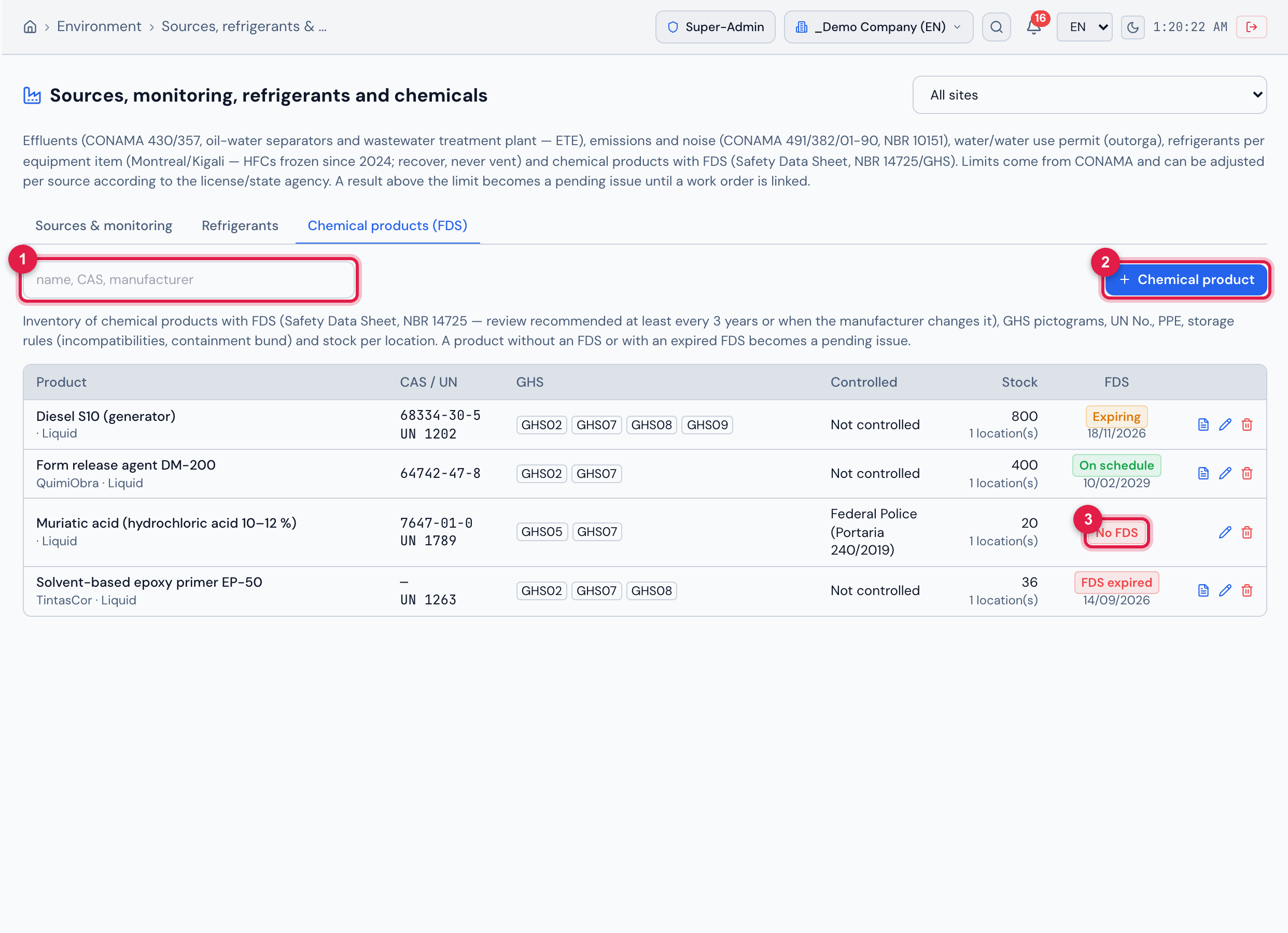
Figure 18. The Chemical products (FDS) tab: the search box and the list with CAS/UN, GHS pictograms, control (muriatic acid is controlled by the Federal Police), stock and number of locations and the FDS status — Expiring (diesel, review by 18/11/2026), On schedule (form release agent), No FDS (muriatic acid) and FDS expired (epoxy primer). The document icon opens the FDS; click the product to see the Stock by location.
- 1Search by name, CAS or manufacturer.
- 2+ Chemical product.
- 3No FDS status — a pending issue of the module.
In + Chemical product, enter trade name, manufacturer, physical state, CAS No., UN No., whether it is controlled, the GHS pictograms, the hazard statements (H), the required PPE, the storage rules and the FDS (revision, date, review by and the file). With the FDS file and date, an empty review by becomes the FDS date + 3 years. On the product, Add / update location records the stock per site and location, with the containment flag.
Was this page helpful?
Thanks for the feedback!
Got it — we will improve this page.