
What the collector is and when to use it
Manual — Data collectors · chapter 1 of 10
The data collector (H2O Link Coletor) reads the customer equipment by itself — energy meters, UPSs, switchboards, BMS, PLCs, sensors — over the customer’s own network and stores the values in the asset measurements of H2O. What used to depend on a technician writing down the reading during the round now arrives minute by minute, with a chart, a range and an automatic ticket when the value leaves the normal range.The collector stays on the customer network; H2O stays outside it. For H2O, the collector is a record (Overview › Collectors) with the assets it reads and the points of each asset. The screen sums it up like this: Programs or devices installed on the customer network that read the equipment and store the measurements on the assets. Everything is configured here; the collector only executes.
How the pieces fit together
Section titled “How the pieces fit together”| Piece | What it is | Where it is configured |
|---|---|---|
| Collector | the program (or the device) installed on the customer network. It belongs to a site and can read the selected subsites | Overview › Collectors (chapter 3) |
| Pairing token | the single-use code that connects the installed program to the collector record | Pairing card of the collector screen (chapter 3) |
| Linked asset | an asset already registered in H2O, with its protocol and its address on the customer network | Equipment tab of the collector (chapter 5) |
| Point | a value read from the equipment (a register, an object, an OID) and the asset measurement that receives that value | Points tab of the collector (chapter 5) |
| Asset measurement | the metric of the Metering tab of the asset record: name, unit, normal and critical range. The history and the chart stay in the asset | asset record (manual Assets, chapter 6) |
The path of a reading: the collector asks the equipment at the point interval, converts the value (scale, offset, formula), groups the readings in batches and sends them to H2O. H2O stores each reading in the measurement history, checks the range and, if the measurement asks for it, opens the ticket (chapter 7).
Program on Windows or device
Section titled “Program on Windows or device”The record offers two types of collector:
| Type | What it is | How it is paired | Status |
|---|---|---|---|
| Software | program installed on a Windows computer on the customer network, running as a service | with the token generated on the collector screen, typed into the installer | available today — it is what this manual teaches |
| H2O Link Collector device | DIN rail box, for panels | through the H2O app, by reading the QR code on the label (Bluetooth) | the screen warns: This option arrives with the device; for now use the token. |
Everything that comes after pairing — assets, points, discovery, health, commands, alerts — is the same for both types.
Outbound connection only
Section titled “Outbound connection only”The collector never receives a connection: it is always the one that calls H2O, over HTTPS. The collector screen carries the notice to show to the customer IT team: Nothing is configured on the customer machine. The collector only makes outbound connections (HTTPS) to H2O; no port needs to be opened on the network.
Even the requests made from the screen (read a point now, scan the network, restart) work this way: H2O puts the request in a queue and the collector fetches the queue every 15 seconds (chapter 7). The network sheet for the IT team is in chapter 2.
Protocols the screen offers
Section titled “Protocols the screen offers”The protocol is chosen when linking the asset (chapter 5). There are eight:
| Protocol | What it is for | What you enter about the equipment |
|---|---|---|
| Modbus TCP | meters, multimeters, PLCs and gateways on the network | IP address, port (default 502) and device id |
| Modbus RTU (serial) | equipment on RS-485/RS-232 connected to the collector computer | serial port, baud rate, parity, stop bits and device id |
| BACnet/IP | building automation (BMS, HVAC controllers) | IP address, port (default 47808) and device instance |
| SNMP | UPSs, PDUs, network equipment | IP address, port (default 161), version (1 or 2c) and community |
| MQTT | sensors and gateways that publish to a broker | broker address and port (default 1883), TLS, user, password and topics |
| HTTP/JSON | equipment and systems that answer in JSON | base URL, method, headers and how often to call |
| Serial | equipment that answers a text request over the serial line | serial port, baud rate, parity, stop bits and line ending |
| Ping (ICMP) | knowing whether a piece of equipment is up and how long it takes to answer | IP address or name |
Where it is
Section titled “Where it is”The menu is Overview › Collectors. The list shows the collectors of the sites you can see.
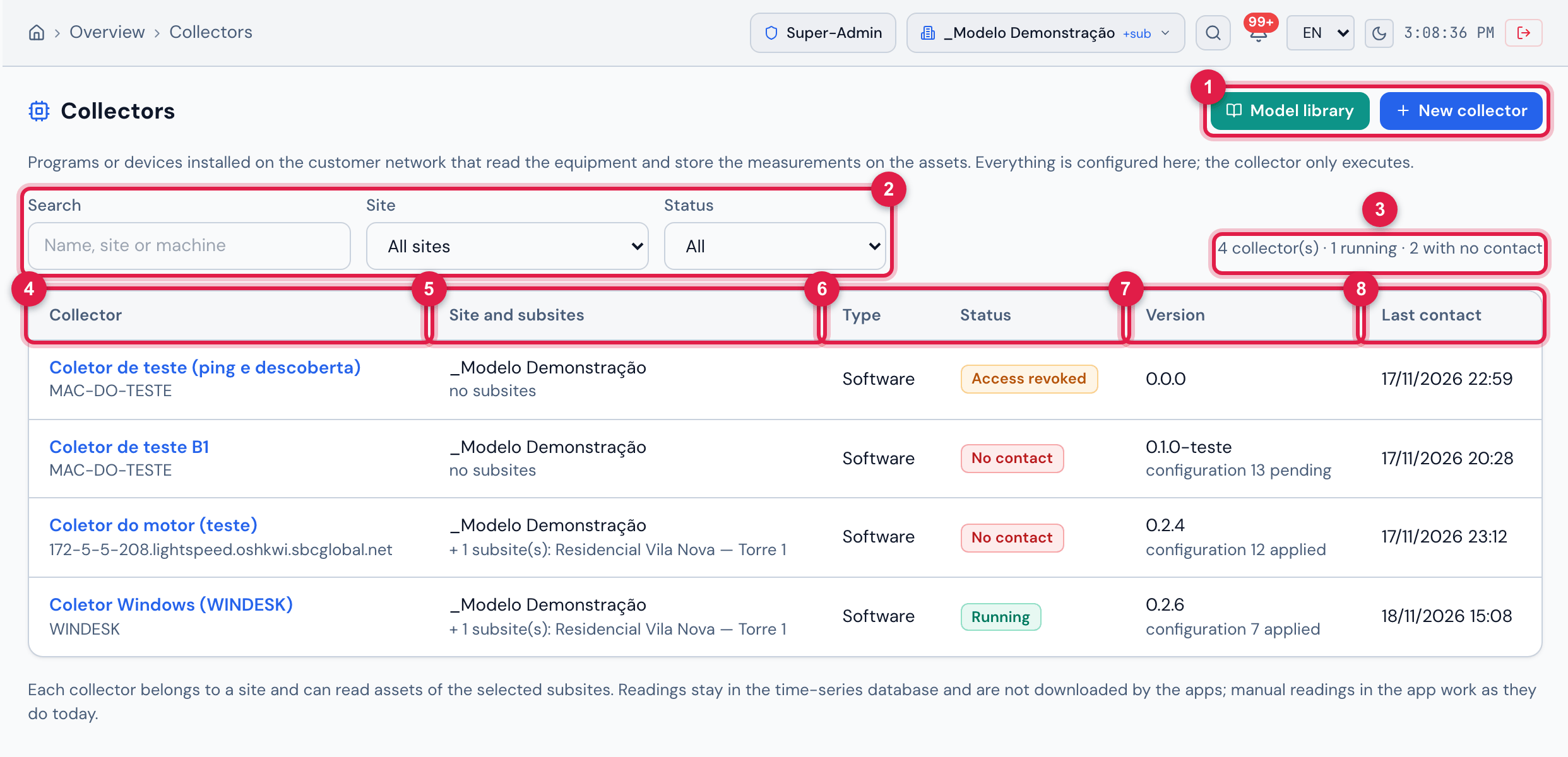
Figure 1. The Collectors screen: the list with the collector Coletor Windows (WINDESK) of the site _Modelo Demonstração.
- 1Model library (point maps stored to be reapplied — chapter 5) and New collector (chapter 3).
- 2Search by name, site or machine, and the filters Site and Status.
- 3The summary: how many collectors, how many running and how many with no contact.
- 4Collector column: the name and, below it, the computer where it is installed (or waiting for installation).
- 5Site and subsites column: the collector site and the subsites it can read.
- 6Type and Status columns — the statuses are in chapter 7.
- 7Version column: the program version and, below it, whether the configuration made in H2O has already been applied on the collector.
- 8Last contact column. Clicking the row opens the collector page.
The list footer recalls two rules: Each collector belongs to a site and can read assets of the selected subsites. Readings stay in the time-series database and are not downloaded by the apps; manual readings in the app work as they do today.
When to use it (and when not to)
Section titled “When to use it (and when not to)”| Situation | Use the collector? |
|---|---|
| equipment with communication (Modbus, BACnet, SNMP, MQTT, HTTP, serial) and a Windows computer that can reach it over the network | yes |
| wanting to know only whether the equipment is up | yes, with a Ping (ICMP) point |
| meter without communication (dial, pressure gauge, mechanical water meter) | no — the reading remains manual, in the Metering tab of the asset or in the app |
| same measurement read by the collector and written down by the technician | avoid it: choose one source per measurement. Each measurement accepts a single point (chapter 5) |
| customer without a computer that stays on all the time on the equipment network | wait for the H2O Link Collector device or agree on a machine with the IT team (it can be virtual) |
Was this page helpful?
Thanks for the feedback!
Got it — we will improve this page.