
Following the collector
Manual — Data collectors · chapter 7 of 10
Once installed and configured, the collector works by itself. H2O shows whether it is up, what stopped answering and what happened — and warns when something leaves the normal range, through the bell and by ticket.The collector statuses
Section titled “The collector statuses”The status appears in the list of collectors and in the header of the collector page.
| Status | Colour | Meaning | What to do |
|---|---|---|---|
| Running | green | paired, active and reporting | nothing |
| No contact | red | paired and active, but not reporting for more than 3 minutes | check the customer computer and internet (chapter 9) |
| Not paired | grey | created in H2O, but no installation has used the token yet | install the program with the token (chapter 4) |
| Access revoked | amber | someone clicked Revoke access: H2O refuses the installation | generate another token and pair again (chapter 8) |
| Inactive | grey | paired, but with Collector active unchecked: H2O refuses its calls | check Collector active on the Settings tab |
In the Version column of the list, below the program version, a line says whether the collector already has the latest configuration: configuration N applied or configuration N pending. Pending for more than a few minutes, with the collector running, calls for a Reload configuration (below).
The Health tab
Section titled “The Health tab”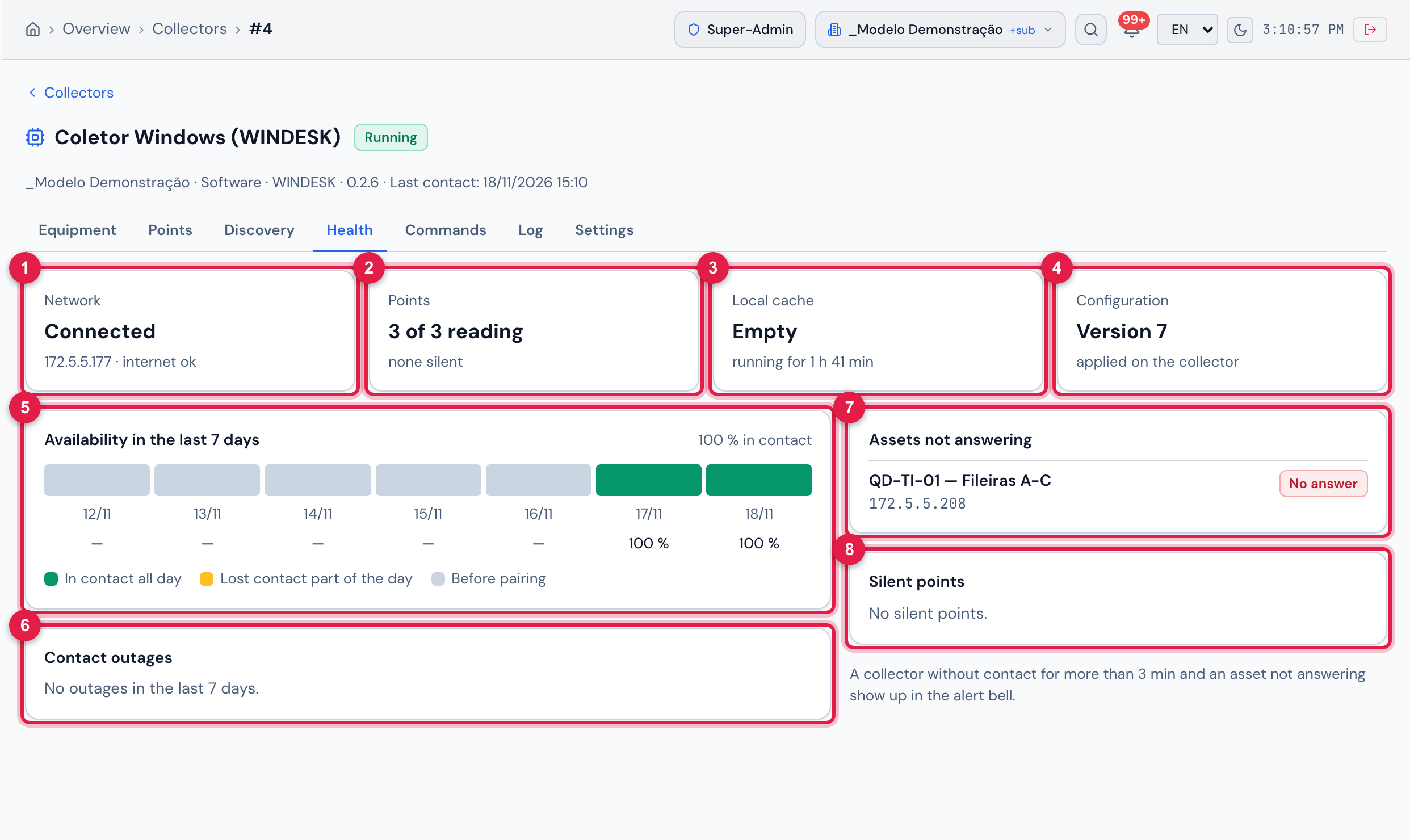
Figure 13. The Health tab of the collector Coletor Windows (WINDESK).
- 1Network card: the connection type of the computer, the address and whether there is internet.
- 2Points card: how many are reading, out of the total, and how many are silent.
- 3Local cache card: the readings kept on the computer, waiting to be sent.
- 4Configuration card: the version made in H2O and whether the collector has already applied it.
- 5Availability in the last 7 days: one bar per day, with the percentage of the day in contact.
- 6Contact outages: from when to when and the duration of each outage.
- 7Assets not answering: the equipment the collector cannot read.
- 8Silent points: the points that deliver no reading.
| Card | What it shows | Attention when |
|---|---|---|
| Network | Cable (Ethernet), Wi-Fi, Cellular, Connected or Unknown; the address; internet ok or no internet | no internet |
| Points | N of T reading and N silent or none silent | there are silent points |
| Local cache | Empty (with how long the program has been running) or the total of readings waiting to be sent and the date of the oldest one | the cache keeps growing: the collector reads, but cannot send |
| Configuration | Version N and applied on the collector, the collector still uses version N or the collector has not reported yet | the version is not applied after a few minutes |
In Availability in the last 7 days, the green bar is In contact all day, the amber one is Lost contact part of the day and the grey one is Before pairing. The total for the period appears at the top of the card, as % in contact.
In Contact outages, each row is an outage, with From, To and Duration; the one that has not ended yet appears with the badge ongoing. Without outages: No outages in the last 7 days.
| Card | What goes in | What each row shows |
|---|---|---|
| Assets not answering | linked and enabled asset that the collector reported as not answering | the asset, the address, since when and the error reported. With none: All linked assets are answering. |
| Silent points | enabled point that the collector marked as without communication, or that has had no reading for more than three intervals (at least 5 minutes) | the point, the asset and no communication with the equipment, last reading on date or never read. With none: No silent points. |
Before the first report from the collector, the tab warns The collector has not sent a health report yet. The footer recalls: A collector without contact for more than 3 min and an asset not answering show up in the alert bell.
The Commands tab
Section titled “The Commands tab”H2O does not reach the collector: it leaves the request in a queue. The screen explains: H2O does not call the collector: the request goes to a queue and the collector fetches it within 15 seconds. If it has no contact, the request waits until it expires.
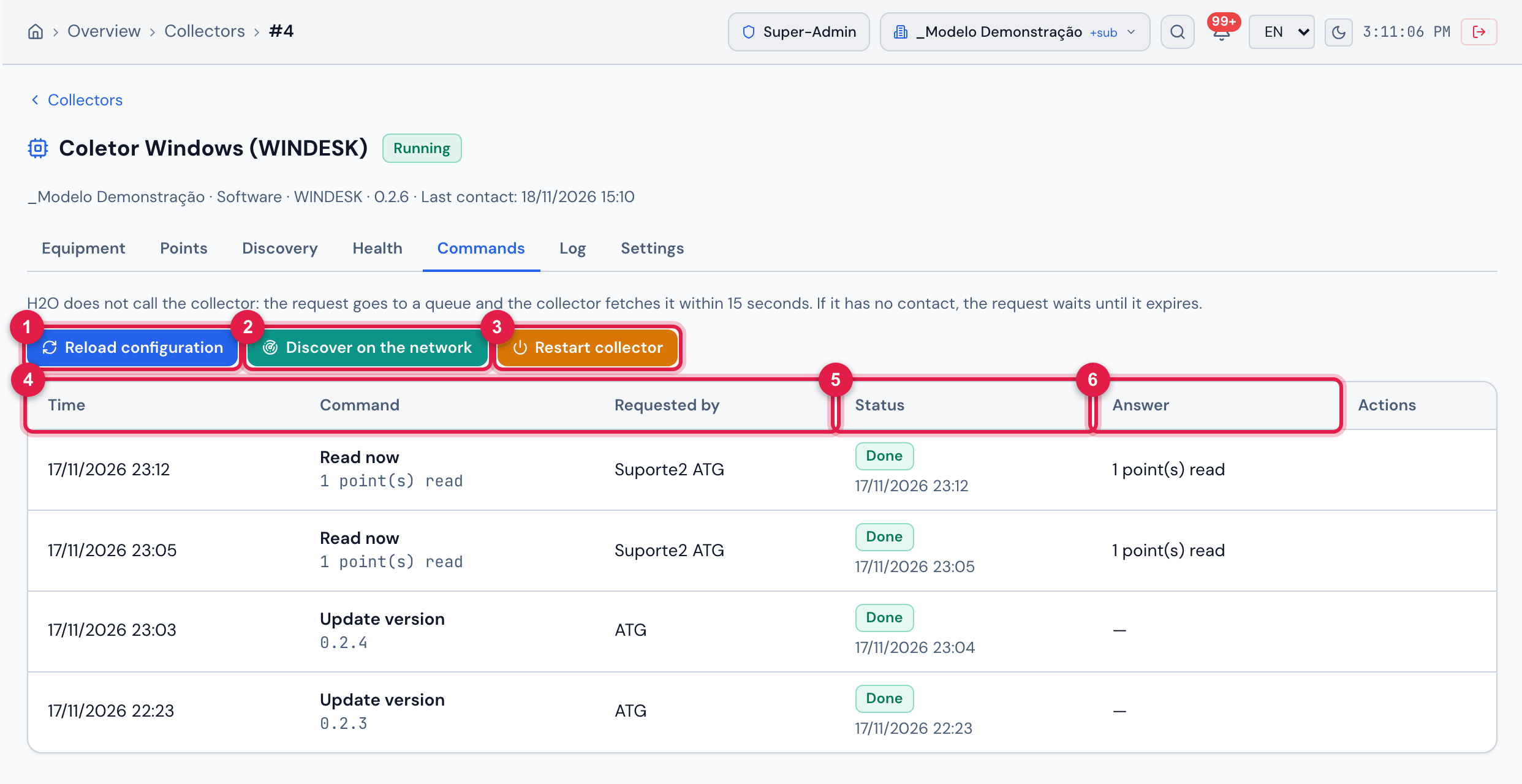
Figure 14. The Commands tab of the collector.
- 1Reload configuration — the collector downloads now the configuration made in H2O.
- 2Discover on the network — opens the Network to scan field and the Send button (the same request as on the Discovery tab, with the default options).
- 3Restart collector — the button becomes Confirm: restarts now.
- 4Time, Command and Requested by columns.
- 5Status column, with the time the command ended.
- 6Answer column: what the collector returned, or the error.
| Command | What it does | Valid for |
|---|---|---|
| Reload configuration | the collector fetches the configuration now, without waiting for the next check | 1 hour |
| Read now | reads points right away, without storing in the history (button on the Points tab and in Map with AI) | 5 minutes |
| Discover on the network | scans the range entered (chapter 6) | 30 minutes |
| Restart collector | restarts the program on the customer computer | 1 hour |
| Update version | installs another version of the program. Only ATG sends it; in the list it appears with ATG in Requested by (chapter 8) | 24 hours |
| Command status | Meaning |
|---|---|
| Queued | the collector has not fetched the request yet |
| Delivered, waiting for the answer | the collector received it and is executing |
| Done | the collector executed it; the Answer column brings the result (for example, N device(s) found or N point(s) read) |
| Failed | the collector tried and could not do it; the reason is in Answer |
| Cancelled | someone clicked Cancel before the collector answered |
| Expired without an answer | the command deadline passed without an answer — the collector had no contact |
The Log tab
Section titled “The Log tab”The Log tab brings, in the words of the screen, What the collector logged: read errors, reconnections, uploads. It is what it writes down on the customer computer, without your having to go there.
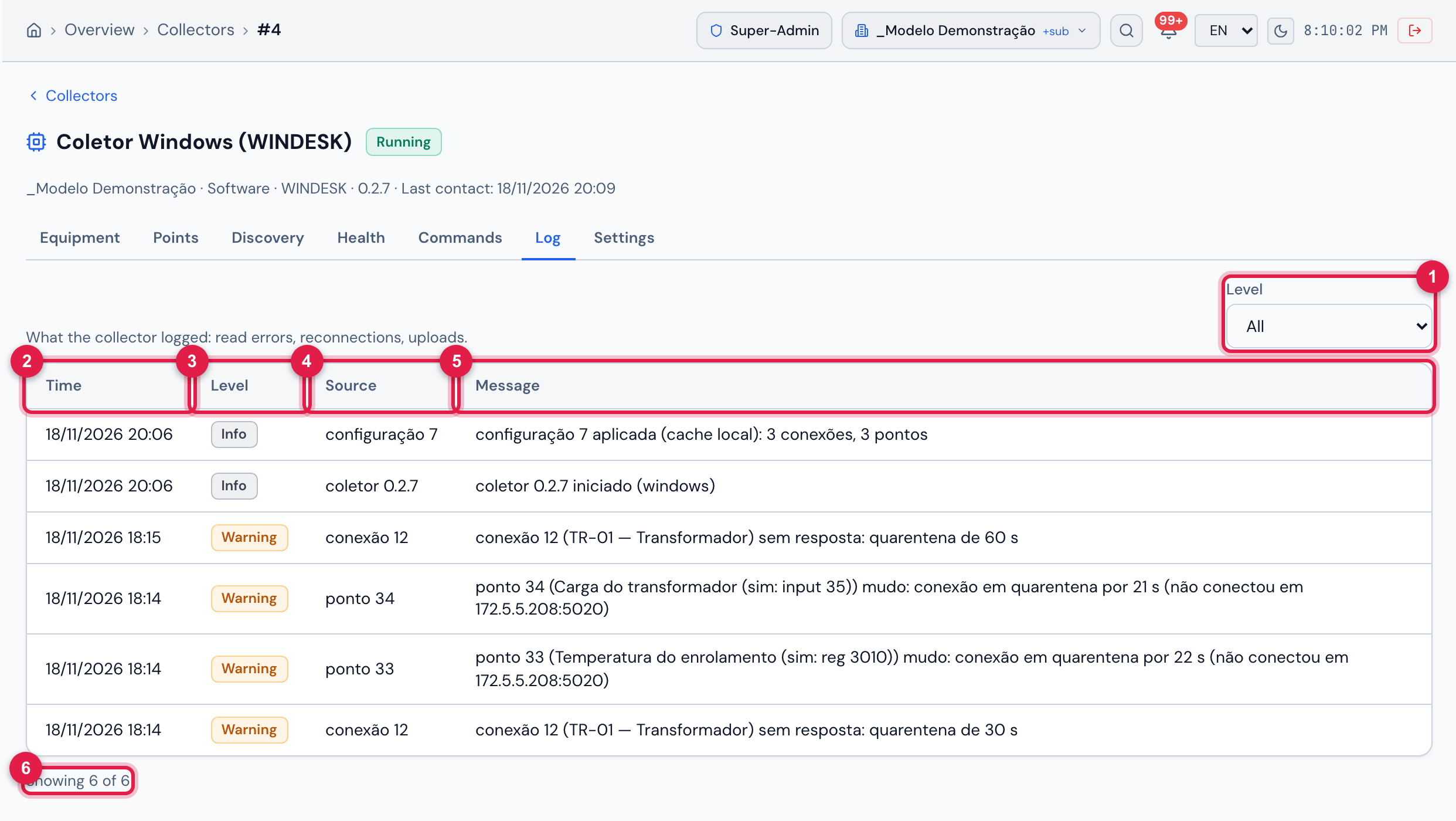
Figure 15. The Log tab of the collector.
- 1The Level filter: All, Info, Warning or Error.
- 2Time column.
- 3Level column, with the badge colour.
- 4Source column: the part of the collector (or the equipment) that generated the entry.
- 5Message column.
- 6Showing N of T — with more than 100 entries, the Load more button appears next to it.
The list goes from the newest entry to the oldest, 100 at a time; Load more brings the next ones. H2O keeps the log for 24 months.
Alerts in the bell
Section titled “Alerts in the bell”Two collector alerts go into the header bell (manual Getting started — web, chapter 9):
| Alert | When it appears | When it goes away | Leads to |
|---|---|---|---|
| Collector name has no contact | collector paired and active in the No contact status | the collector reports again | the Health tab of the collector |
| Asset name is not answering on collector name | collector running, with a linked and enabled asset that does not answer | the asset answers again, is disabled or unlinked | the Health tab of the collector |
Ticket when the collector loses contact
Section titled “Ticket when the collector loses contact”With the option Open a ticket after N minutes without contact checked in the record (chapter 3), H2O opens a ticket when the collector goes beyond that time without reporting. The screen sums up the rule: Without contact, the collector shows up in the alert bell. If you want, H2O also opens a ticket in the collector site. It is one ticket per outage; when the collector returns, a note is added to the ticket, which is not closed automatically.
| Of the ticket | How it is born |
|---|---|
| Title | [Collector] name has no contact |
| Site | the collector site |
| Description | the collector, the computer, the last contact, how long it has been without contact, how many assets are linked and the guidance: check whether the machine is on, whether the collector program is running and whether the site has internet |
| Type and priority | corrective, with high priority |
| Group and category | the Responsible group and the Ticket category chosen in the collector record |
| SLA, rules and notifications | it receives the default SLA of the site contract, goes through the ticket rules and triggers the new ticket notification, like a ticket opened by hand |
| Situation | What H2O does |
|---|---|
| the collector goes beyond the configured time without contact | opens one ticket |
| the collector returns | records a follow-up in the ticket: Collector name reported again on date**, after** time without contact. The ticket is not closed: whoever handles it decides |
| the collector goes down again with the ticket still open | does not open another one: it records a follow-up in the same ticket — Collector name lost contact again. |
| the collector goes down again after the ticket has been solved or closed | opens a new ticket |
On the Settings tab, the Ticket when contact is lost card shows the number of the ticket opened by this rule, in the line Ticket of the ongoing outage: no.
Ticket for an out-of-range reading
Section titled “Ticket for an out-of-range reading”The collector reading goes through the same range rule as the manual reading (manual Assets, chapter 6): outside the normal range it is an anomaly; outside the critical range it is a critical anomaly. The anomaly is marked in the measurement history. The ticket depends on three conditions, all at the same time:
| Condition | Where it is turned on |
|---|---|
| the measurement (or the asset) asks for a ticket | Open ticket on anomaly, in the metric — Metering tab of the asset record |
| the measurement has a range | Normal Min. / Normal Max. and Critical Min. / Critical Max. of the metric |
| the late reading rule of the collector allows it | Late readings card of the collector record (below) |
Since the automatic reading arrives every minute, H2O does not repeat the warning at every reading: it acts when the situation changes.
| What happened | What H2O does |
|---|---|
| the measurement went into anomaly | opens the corrective ticket [Anomaly] asset - metric, with the value, the expected range and the reading date. A critical anomaly is born with the highest priority |
| the anomaly stays the same | nothing: the open ticket already covers it |
| the anomaly changed type (from high to critical high, for example) | records a follow-up in the open ticket — New out-of-range reading — and, if it became critical, raises the priority |
| the measurement went back into range | records in the open ticket the follow-up The reading is back in range. The ticket is not closed by itself |
Readings with status Bad or No communication are stored in the history, but are not compared with the range and do not open a ticket.
The late readings policy
Section titled “The late readings policy”When the collector loses the internet, it keeps the readings and sends everything later. These readings enter the history with the time they were read, not the time they arrived: the chart is complete, with no gap. The Late readings rule of the collector (chapter 3) decides only one thing: whether an old, out-of-range reading still opens a ticket.
| Example | Store only, do not open a ticket | Open a ticket only if the reading is up to 30 minutes old | Always open a ticket, whatever the delay |
|---|---|---|---|
| out-of-range reading arrives 1 minute after being read | does not open | opens | opens |
| internet was down for 4 hours; the out-of-range reading is from the beginning of the outage | does not open | does not open (it is 4 hours old) | opens |
| internet was down for 4 hours; on return, the most recent reading is still out of range | does not open | opens (the most recent one is less than 30 minutes old) | opens |
Was this page helpful?
Thanks for the feedback!
Got it — we will improve this page.