
Sites — where to start
Manual — Environment · chapter 2 of 11
Everything in the module hangs off an environmental site: the headquarters or project that has its own license, CTF/APP and waste. Register it first — without a site, the new license, waste, shipment, source and equipment buttons stay disabled.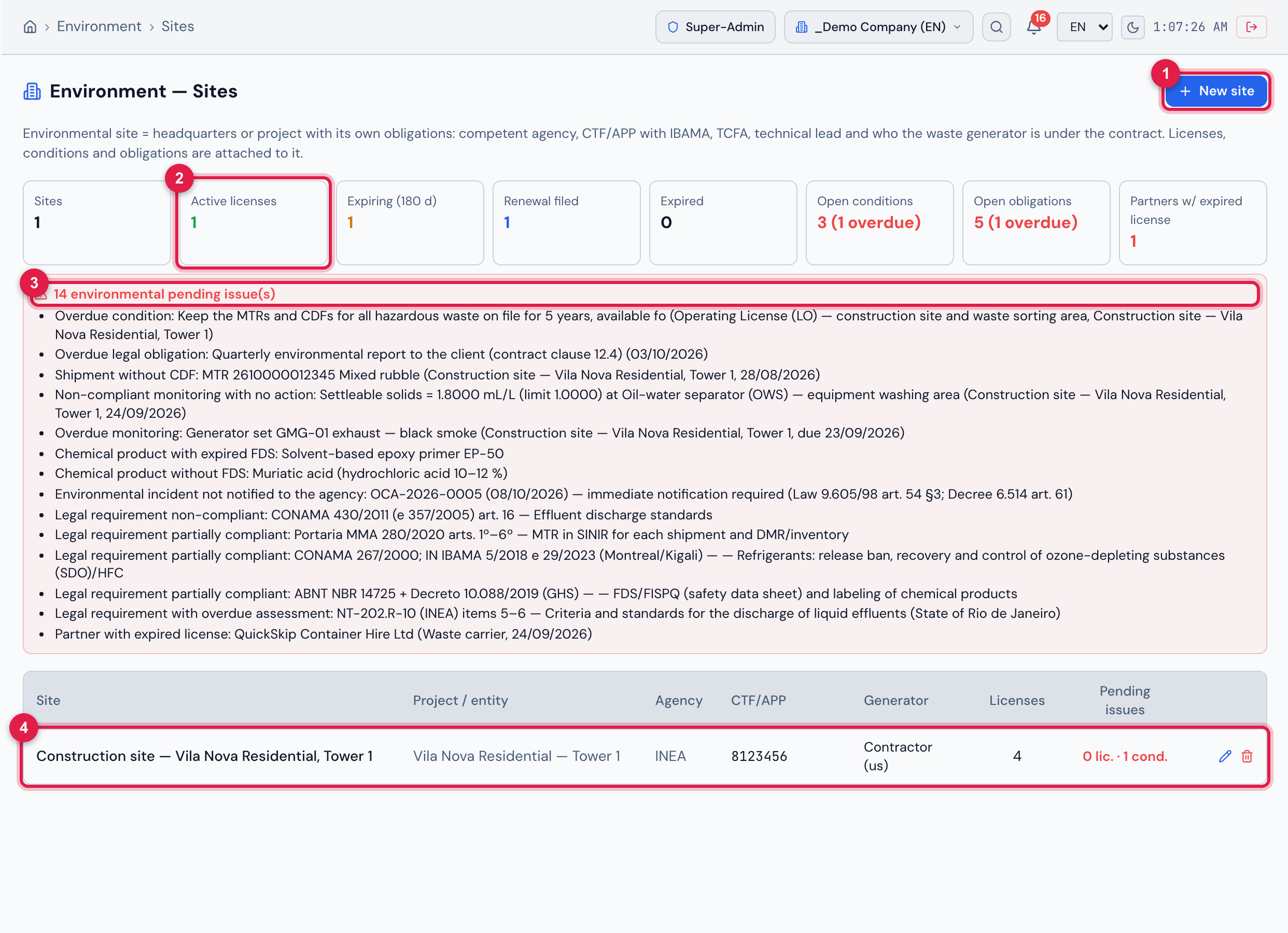
Figure 3. The Sites screen with the site “Construction site — Vila Nova Residential, Tower 1”: the indicators for the whole set (1 site, 1 active license, 1 expiring within 180 days, 1 renewal filed, 0 expired, 3 open conditions with 1 overdue, 5 open obligations with 1 overdue and 1 partner with an expired license), the red 14 environmental pending issue(s) bar opened with the list, and the table of sites with agency, CTF/APP, generator, number of licenses and pending issues (0 lic. · 1 cond.). Click a row to open the site record.
- 1New site — Name, Project (empty = headquarters/entity), CNPJ, Address, Competent environmental agency, CTF/APP (IBAMA), Size (TCFA), Potentially polluting activities, Waste generator at this site (Contractor (us), Client (client/agency) or Both), Environmental technical lead and Registration (CREA/CRBio/CRQ), Notes and Active.
- 2Module indicators (here, Active licenses); figures in red call for action.
- 3Pending-issues bar — click to open or close the list of what is overdue or non-compliant.
- 4Site row — click to open the record; the pencil edits and the bin deletes.
The pending-issues bar gathers what the system calculates across the whole module: expired license with no renewal filed, overdue condition and legal obligation, shipment without a CDF for more than 30 days, non-compliant monitoring with no linked work order (last 12 months), overdue monitoring, chemical product without an FDS or with an expired FDS, incident not notified to the agency, legal requirement non-compliant, partially compliant or with an overdue assessment, and partner with an expired license. The same indicators and the same bar appear at the top of the Licenses & permits screen.
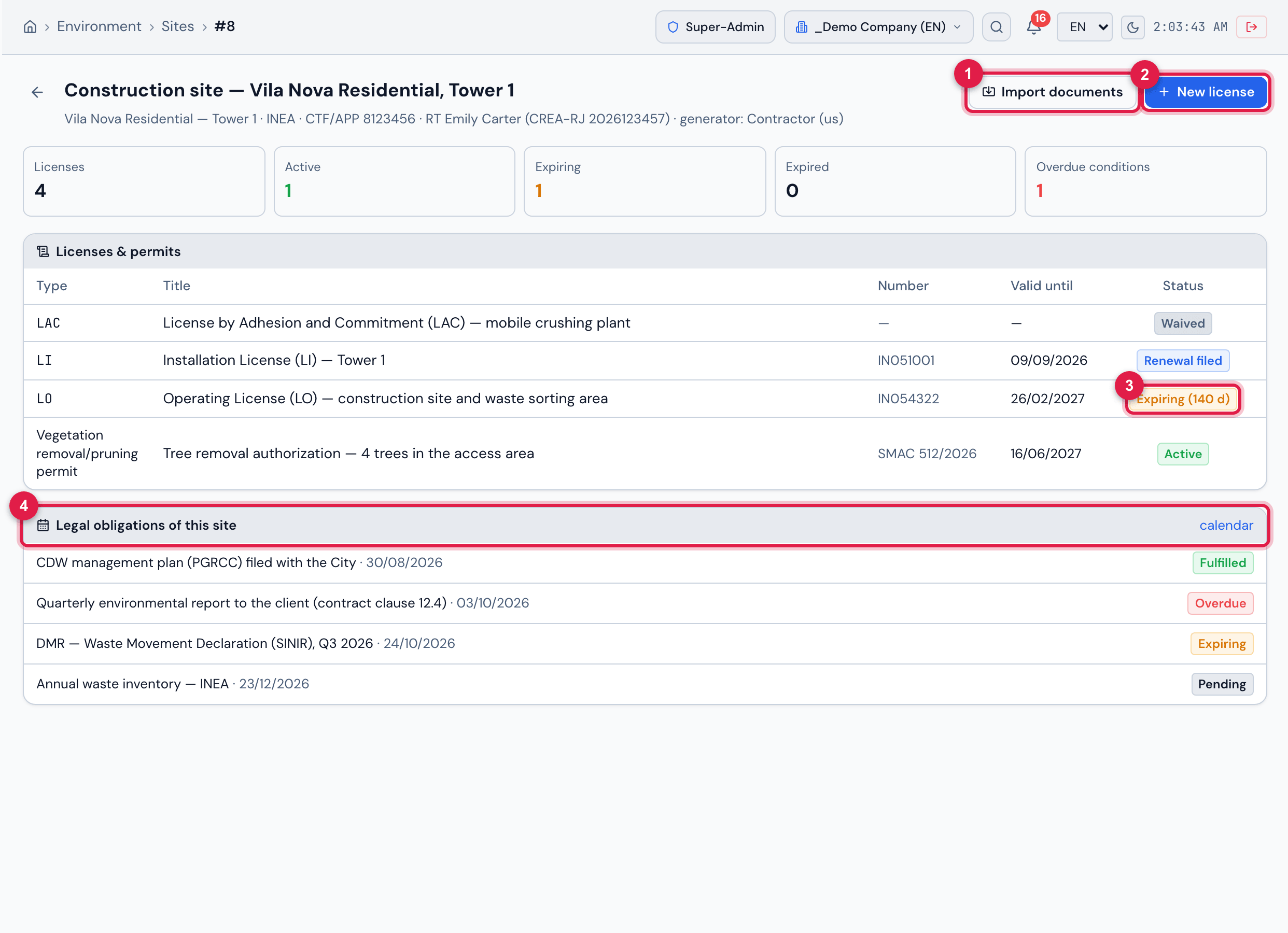
Figure 4. Record of the site “Construction site — Vila Nova Residential, Tower 1”: in the header, project, agency (INEA), CTF/APP, RT and generator; the Import documents and New license buttons; the site indicators (4 licenses, 1 active, 1 expiring, 0 expired, 1 overdue condition); the Licenses & permits list — LAC Waived, LI with Renewal filed, LO Expiring (140 d) and the tree removal authorization Active — and the Legal obligations of this site with the status of each one and the calendar link.
- 1Import documents — creates licenses from the documents of the Environmental License type.
- 2New license — comes with this site already selected.
- 3Calculated license status: Expiring (140 d).
- 4Legal obligations of this site — the calendar link opens the legal calendar.
Import documents creates licenses from the documents of the Environmental License type already registered in Documents for the site’s entity. The imported license comes in with the type “Other”, the document’s expiry date and the note “Imported from document #…”; adjust the type, the expiry date and the conditions. The original document is not changed, and importing again does not create duplicates.
Was this page helpful?
Thanks for the feedback!
Got it — we will improve this page.