
Building the plan with AI
Manual — Lubrication · chapter 5 of 12
The fastest way to start: you choose the equipment, describe it in one or two sentences, and the AI proposes the lubrication points — where to apply, which lubricant, how much, how and how often.- Open the AI plan tab (or click Suggest plan with AI).
- Choose the asset type and the asset.
- Describe the equipment: power, type of drive, whether it has a gearbox, the environment it operates in.
- Click Generate suggestion and wait 15 to 40 seconds.
- Review the list, untick what does not apply and click Create points.
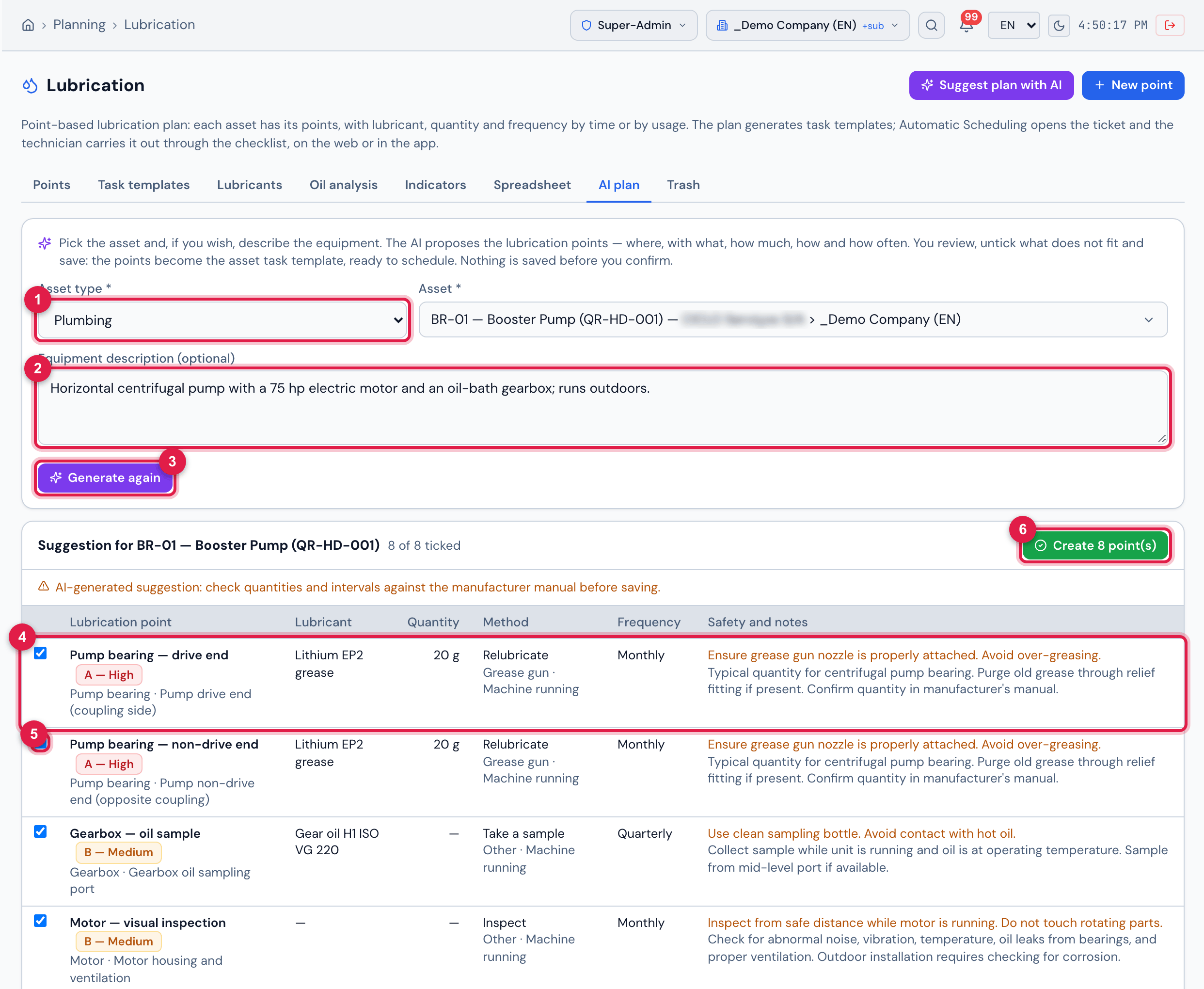
Figure 7. The AI suggestion for a pump.
- 1Asset type and, next to it, the asset that will receive the plan.
- 2The equipment description — optional, but it is what guides the suggestion.
- 3Generate suggestion (after the first time, Generate again). Nothing is saved when generating.
- 4Each row is a suggested point: name, criticality, lubricant, quantity, activity and method, frequency and the safety precautions.
- 5The checkbox: untick the point that does not fit.
- 6Create points saves the ticked points — and only then does the plan take effect.
What the AI takes into account
Section titled “What the AI takes into account”- The lubricant catalogue: when an item fits, the suggestion uses exactly that name. When none fits, it proposes a generic name based on the specification (never a brand), marked as new in catalogue — it is created together with the points.
- The points the asset already has: a point with the same name comes unticked, with the warning that ticking it updates the existing one.
- The asset’s meters: it only suggests a frequency by usage if the equipment has a cumulative meter.
Was this page helpful?
Thanks for the feedback!
Got it — we will improve this page.