
Flow 4 — Accidents and incidents
Manual — Occupational Safety · chapter 6 of 13
Every event — work accident, incident with no injury, near miss or occupational disease — goes into Occupational Safety › Accidents & incidents, gets a number (INC-YYYY-000N) and moves through three statuses: Registered → Under investigation → Completed. The record feeds the CAT (Work Accident Report, Brazil), the eSocial S-2210 event (accident/CAT), the frequency and severity rate indicators (FR / SR) on the dashboard and the contractor oversight (accidents without a CAT).| Status | What happens | Who does it |
|---|---|---|
| Registered | the facts, the people and the CAT are entered | whoever witnessed it / safety technician |
| Under investigation | method, immediate and root causes, conclusions, actions (work orders) | designated investigator |
| Completed | “Complete and sign”: the investigator signs with the registered signature; the record is frozen | the investigator (only they can sign) |
Recording the event
Section titled “Recording the event”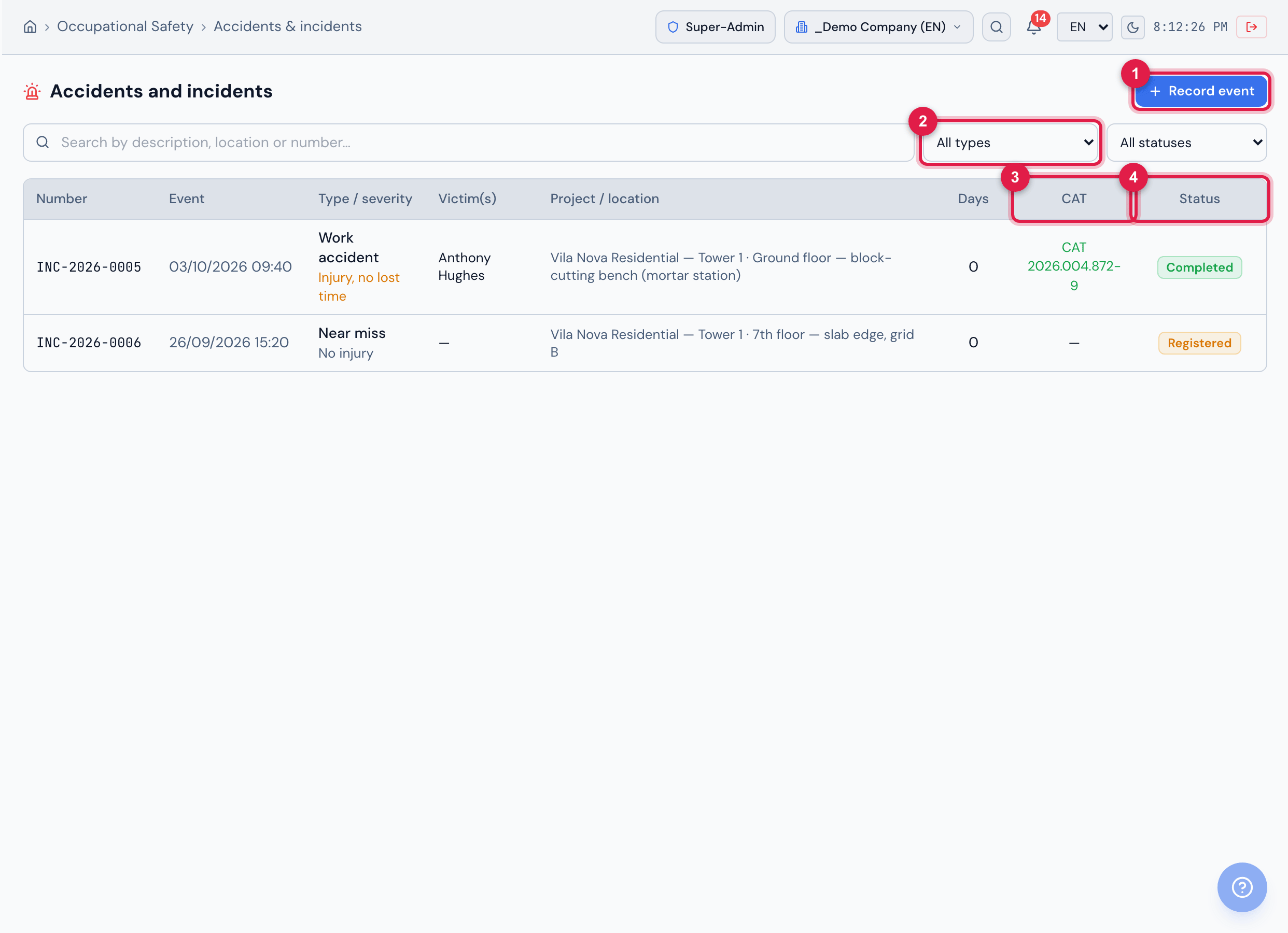
Figure 50. Event list: search by description, location or number; All types and All statuses filters; columns Number, Event, Type / severity, Victim(s), Project / location, Days (off work), CAT and Status. In the example, a completed work accident with a CAT and a near miss that is only registered.
- 1Record event.
- 2Filter by type (All types): Work accident, Incident (no injury), Near miss, Occupational disease.
- 3CAT column: number of the recorded CAT (CAT 2026.004.872-9) or “—” when there is none.
- 4Status column: Registered / Under investigation / Completed.
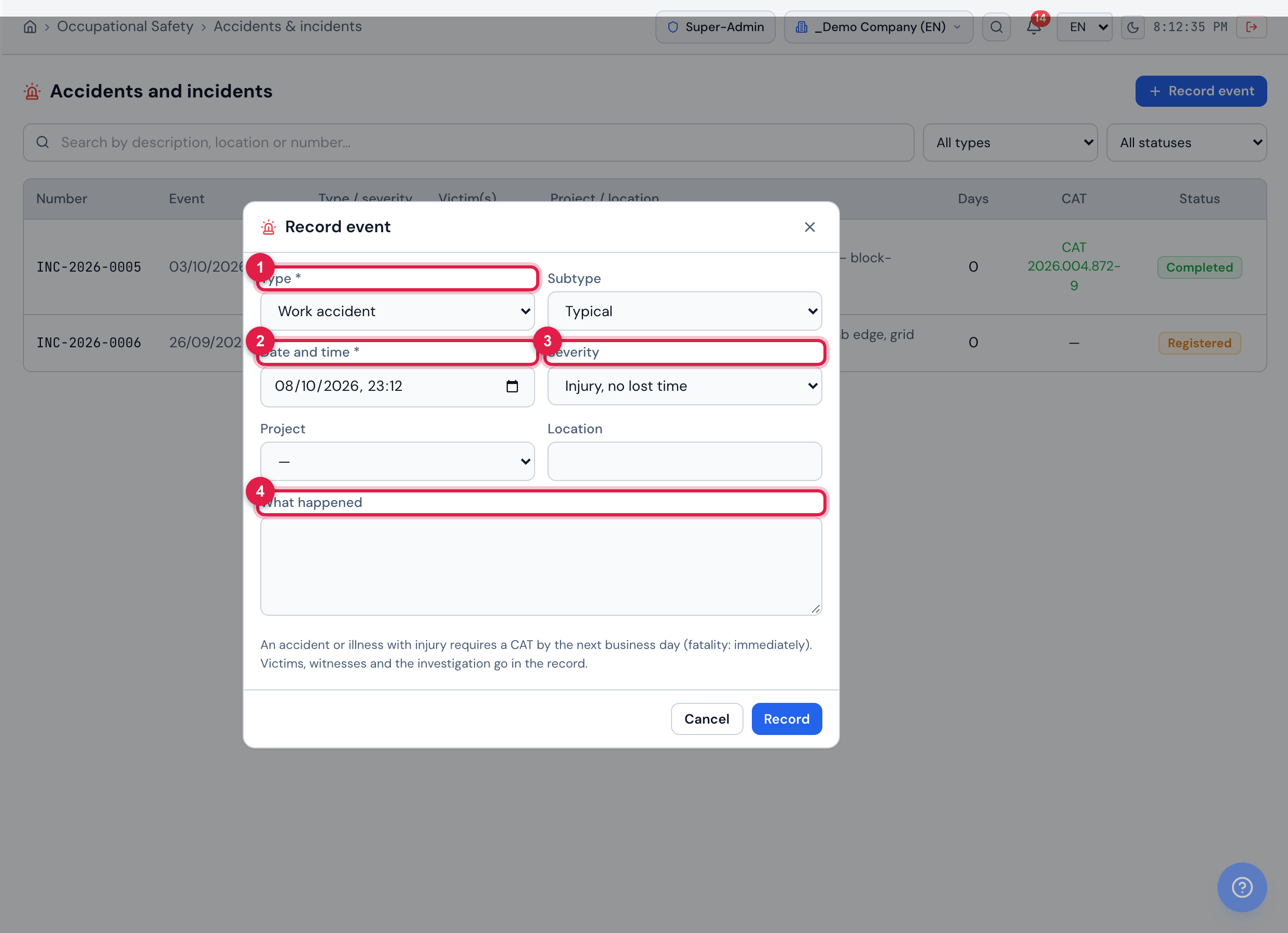
Figure 51. Record event modal: Type (Work accident) and Subtype (Typical; also Commuting and Occupational disease), Date and time, Severity, Project, Location and “What happened”. The footer reminds you of the CAT deadline; Record creates the record.
- 1Type (required); next to it, Subtype.
- 2Date and time (basis for the CAT deadline).
- 3Severity: No injury; Injury, no lost time; Lost-time; Fatality.
- 4What happened — account of the facts.
- Click Record event, choose the Type (and the subtype, for an accident), the date and time and the severity.
- Enter the Project and the Location and describe what happened in plain language (who, what, where, how).
- Click Record. The event opens as Registered, with the Event, People, Investigation, Actions, CAT / eSocial and Trail tabs.
People: victims, witnesses and others involved
Section titled “People: victims, witnesses and others involved”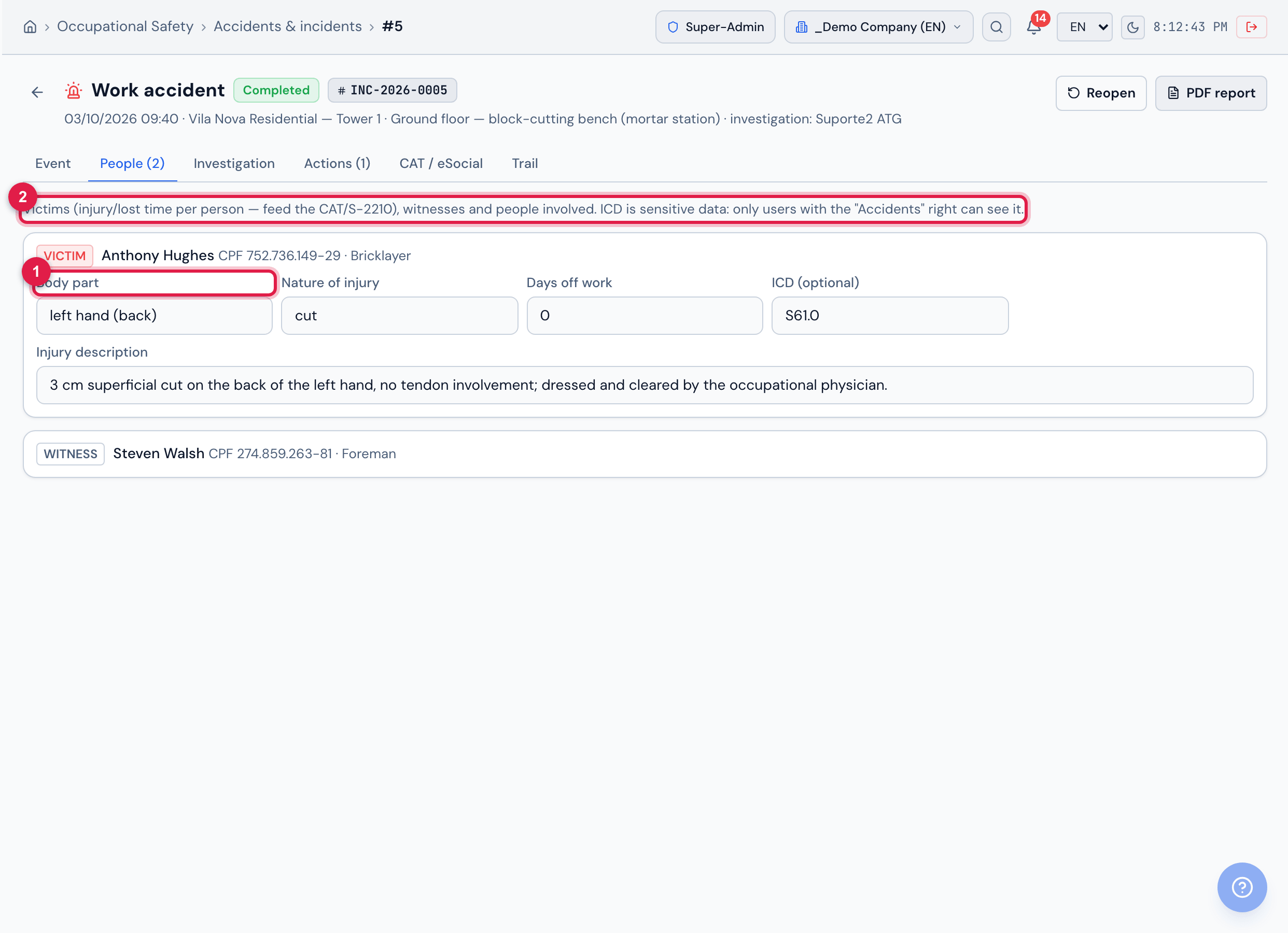
Figure 52. People (2) tab of event INC-2026-0005 (completed, read-only): the victim (Anthony Hughes, Bricklayer) with Body part, Nature of injury, Days off work, ICD (optional) and Injury description; below, the witness (Steven Walsh, Foreman).
- 1Victim’s injury data: Body part (left hand (back)); next to it, Nature of injury (cut), Days off work (0) and ICD (S61.0).
- 2Guidance text: victims (with injury/time off per person — they feed the CAT/S-2210), witnesses and others involved; the ICD is sensitive data, visible only with the “Accidents” right.
Investigate, act and complete
Section titled “Investigate, act and complete”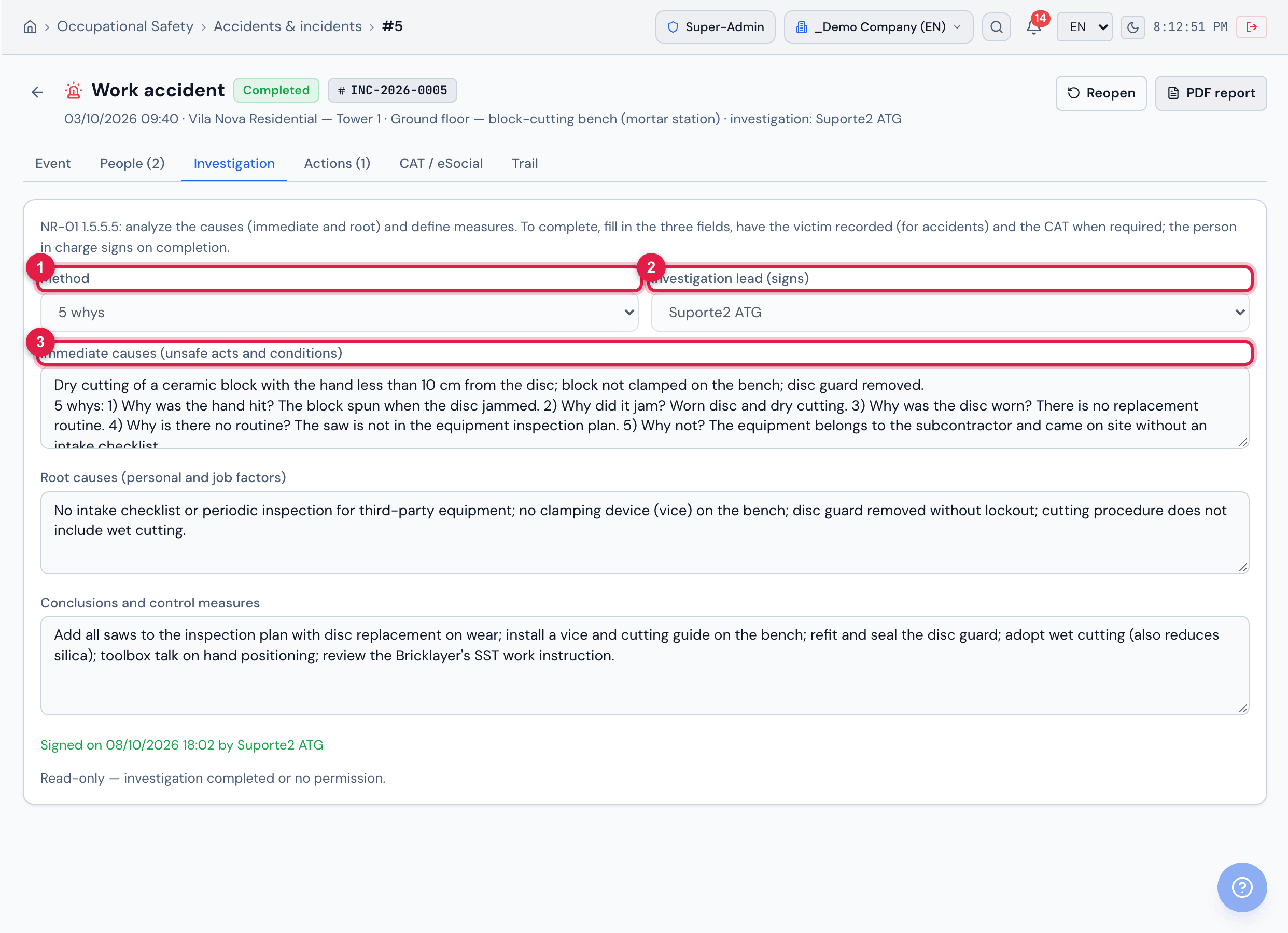
Figure 53. Investigation tab of an event already completed: Method (in the example, 5 whys; there are also Cause tree, Ishikawa (6M) and Other), Investigation lead (who signs), Immediate causes, Root causes and Conclusions and control measures. In the footer, “Signed on 08/10/2026 18:02 by Suporte2 ATG” and the read-only notice.
- 1Investigation Method.
- 2Investigation lead (signs) = whoever signs the conclusion.
- 3Immediate causes (unsafe acts and conditions); below, Root causes and Conclusions — all three are required to complete.
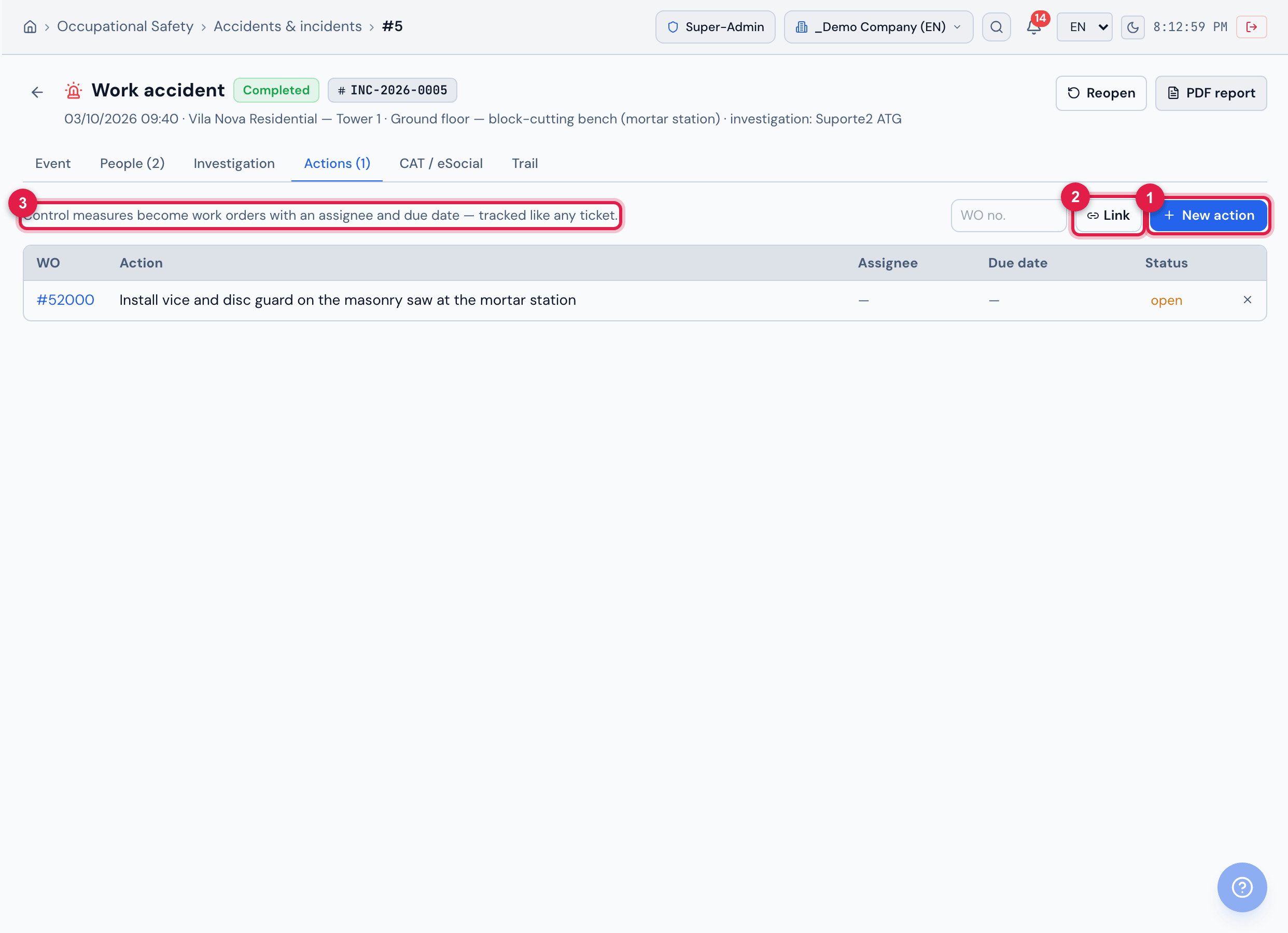
Figure 54. Actions (1) tab: the work orders (tickets) linked to the event — New action creates a work order with title, assignee and due date; Link connects an existing work order by its number. In the example, work order #52000 “Install vice and disc guard on the masonry saw at the mortar station” is open. The SST dashboard tracks these actions (total, resolved, overdue); a cancelled action shows as cancelled and stays out of that count.
- 1New action — creates the work order.
- 2Link an existing work order by number (WO no. field next to it).
- 3Guidance text: control measures become work orders with an assignee and due date, tracked like any ticket.
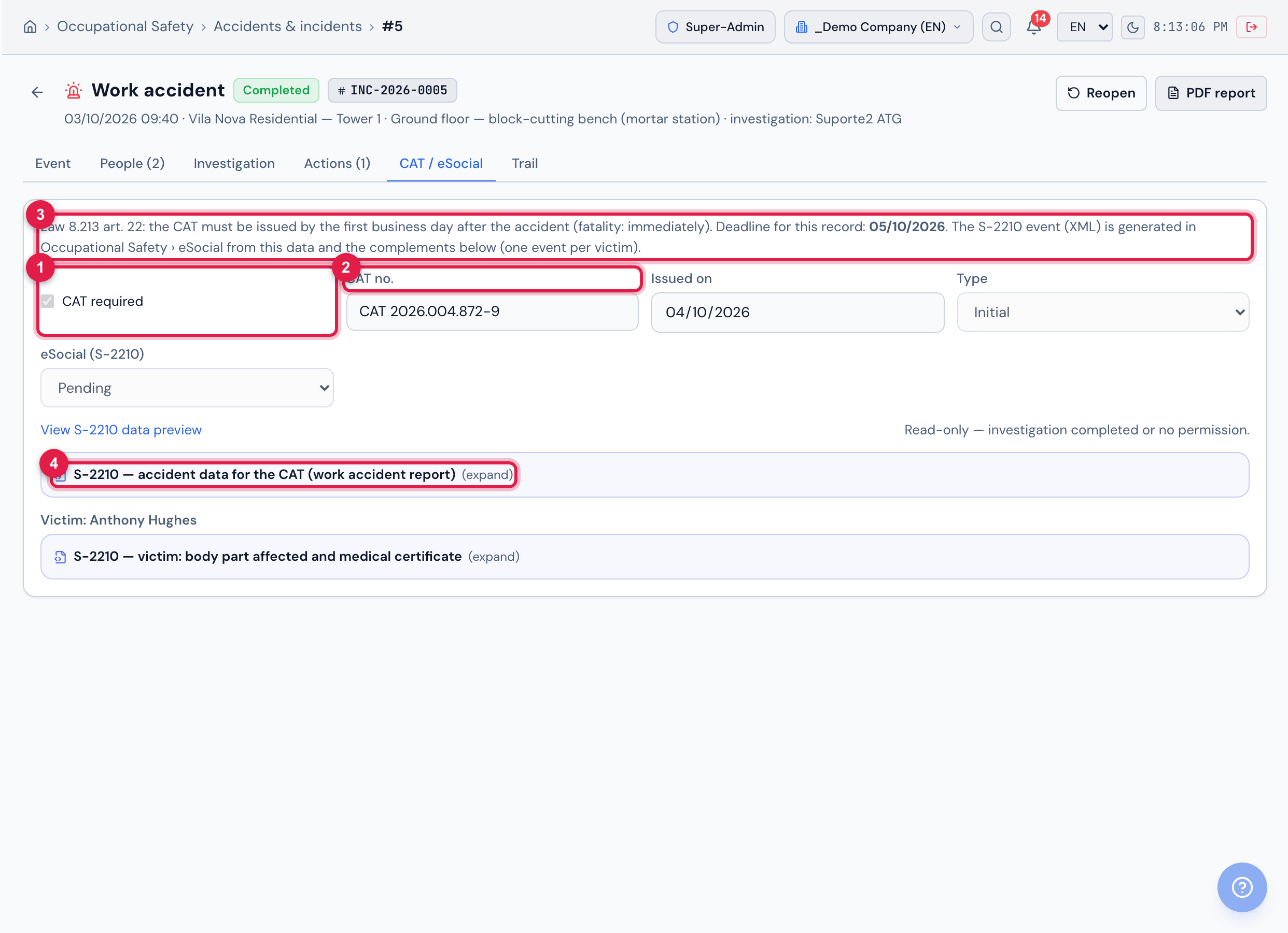
Figure 55. CAT / eSocial tab: CAT required, CAT no., Issued on, Type (Initial; also Reopening and Fatality notice), eSocial status (S-2210) and the View S-2210 data preview link; below, the complement blocks “S-2210 — accident data for the CAT (work accident report)” and, per victim, “S-2210 — victim: body part affected and medical certificate” (chapter 8).
- 1CAT required.
- 2CAT no. (CAT 2026.004.872-9); next to it, Issued on and Type.
- 3Guidance text with the legal deadline (Law 8.213 art. 22) and the deadline for this record (05/10/2026).
- 4S-2210 — accident data for the CAT block (eSocial complement of the event); below, the victim block.
- In the header, click Start investigation.
- On the Investigation tab, choose the method and the lead, and fill in immediate causes, root causes and conclusions.
- On the Actions tab, create the corrective actions (New action) — each becomes a work order with a due date that the dashboard tracks.
- On the CAT / eSocial tab, record the CAT (number, date, type) when required.
- Back in the header, Complete and sign: the investigator signs with the registered signature and the event moves to Completed. If something is missing, the system lists it (causes, conclusions, victim, CAT).
- Generate the PDF report for the file. Need to fix something? Reopen — the investigation signature is invalidated and must be redone.
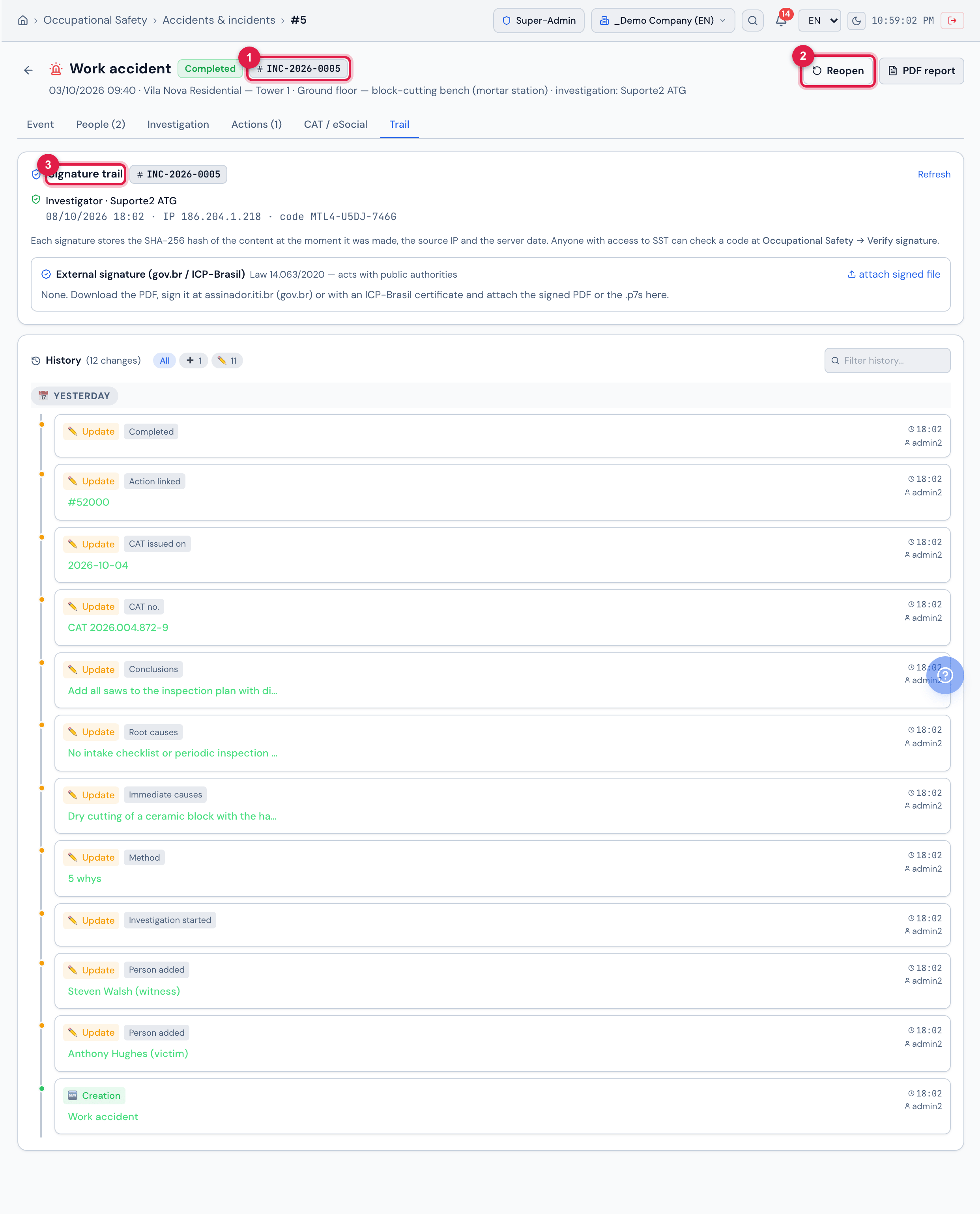
Figure 56. Completed event, Trail tab: header with the Completed status and the number, Reopen and PDF report buttons; the Signature trail shows the investigator’s signature (date, IP and verification code) and the External signature (gov.br / ICP-Brasil) block; below, the History with the 12 changes to the record.
- 1Number INC-2026-0005, next to the Completed status.
- 2Reopen (invalidates the signature).
- 3Signature trail: investigator Suporte2 ATG, 08/10/2026, with hash, IP and code.
Indicators and report
Section titled “Indicators and report”Events feed the SST dashboard cards Events, Lost-time, Lost days, FR / SR (frequency and severity rates) and Pending CAT; in Analytics, the SST — Accidents & incidents report; and in Contractor SST oversight, the “Accidents in the period (without CAT)” card. The APR field “Was there an incident?” (chapter 5) is only a flag on the APR — it does not create the event; record it here.
Was this page helpful?
Thanks for the feedback!
Got it — we will improve this page.