
Follow-up
Manual — Automatic Scheduling · chapter 7 of 8
Since the generated tickets are ordinary tickets, follow-up uses the screens the team already knows. What changes is the starting point: they are born Planned, with no technician assigned, with the date on the task.| Where | What to see |
|---|---|
| Operations › Tickets | filter by status Planned (rule Status is Planned) to see everything that is scheduled; the “plan - asset” title says what it is about. The Opened column is the generation date, not the visit date. |
| Operations › Kanban | the Planned column gathers the generated tickets; drag to Assigned when distributing the work (below). |
| Planning › Maintenance Calendar | shows the tickets by task date — the planned date —, together with the site’s other tickets. It is the team’s agenda. |
| Schedule page | the calendar of that schedule only, with the status of each ticket (chapter 5). |
| Asset page | the asset’s tickets, including the generated ones: the preventive history. |
| H2O app | the technician sees the ticket and the task with the checklist, and executes it (chapter 4). |
Distributing the work on the Kanban
Section titled “Distributing the work on the Kanban”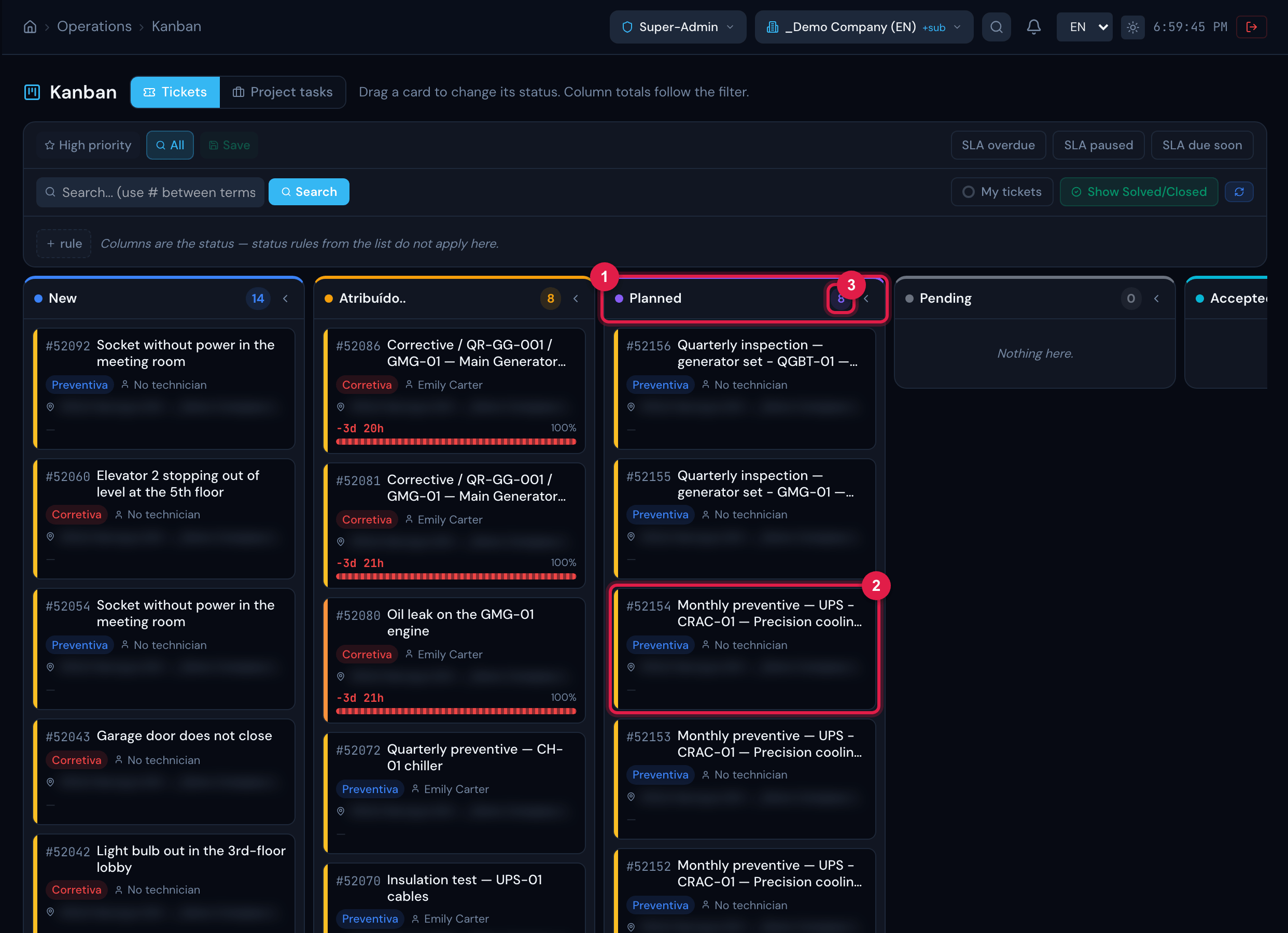
Figure 15. Operations › Kanban, Tickets tab: the Planned column with the tickets generated by the schedule (the most recent ones), together with the site’s other planned tickets.
- 1Planned column — the status the tickets are born with.
- 2A generated ticket — the “plan - asset” title.
- 3Column total — every Planned ticket of the site, not only the schedule’s; to isolate the schedule’s, use the search or the asset filter rule.
- Dragging the card to Assigned changes the status; the technician self-assigns on the ticket page or is assigned by the manager, as with any ticket.
- The planned date does not change when the status changes. To change the date, use the schedule calendar (chapter 5) — it also records the new date on the task.
Indicators and reports
Section titled “Indicators and reports”- The generated ticket is born with preventive modality: in the reliability indicators (MTBF/MTTR) and in the reports by modality it counts as preventive, not as corrective.
- The asset stays linked to the ticket and to the task: the task’s report and RAT find the asset, and the asset’s maintenance history receives the visit.
- To measure adherence to the schedule, compare on the schedule page what is still Planned with what has been Solved — the calendar shows each ticket’s status.
Was this page helpful?
Thanks for the feedback!
Got it — we will improve this page.