
Generated non-conformities
Manual — Task templates and checklists · chapter 8 of 10
A non-compliant answer (NC) flags a problem found in the field. In the checklist it turns red and asks for a photo. If the template has Generates Non-Conformity = Yes, the NCs of a ticket task become NCRs — Quality’s non-conformity reports — when the task is finished.| What is NC | Types |
|---|---|
| No, Not done, Unsatisfactory, Not OK, Non-compliant | the fixed-option types (chapter 4) |
| value outside the Min. Tol.: – Max. Tol.: range | Numeric |
| point Non-compliant | Measurement Point |
| severity Moderate or Severe | Thermography |
| criticality Critical or Regular | Electrical Panel Inspection |
| any NOK check | UPS Inspection |
| sheet with the Failed result (automatic or manual) | the four electrical test sheets |
Partial (Partially compliant, severity Minor, criticality Minimal) turns yellow and does not become an NCR. Image, Free text, Score, Information, Table / Grid and the choice types are never NC.
One NCR per item or one per task
Section titled “One NCR per item or one per task”| In the template | When the task is finished with NCs |
|---|---|
| Generates Non-Conformity = No | nothing is generated: the NCs stay only in the checklist and in the PDF |
| Generates Non-Conformity = Yes and Group NC = No | one NCR per non-compliant item, titled NC · Item N: <question> |
| Generates Non-Conformity = Yes and Group NC = Yes | one NCR for the task, with all the non-compliant items, titled NC · <template name> |
Use one per item when each problem will have its own owner and deadline; grouped when the same team handles everything at once (one electrical panel, one floor).
What the NCR contains
Section titled “What the NCR contains”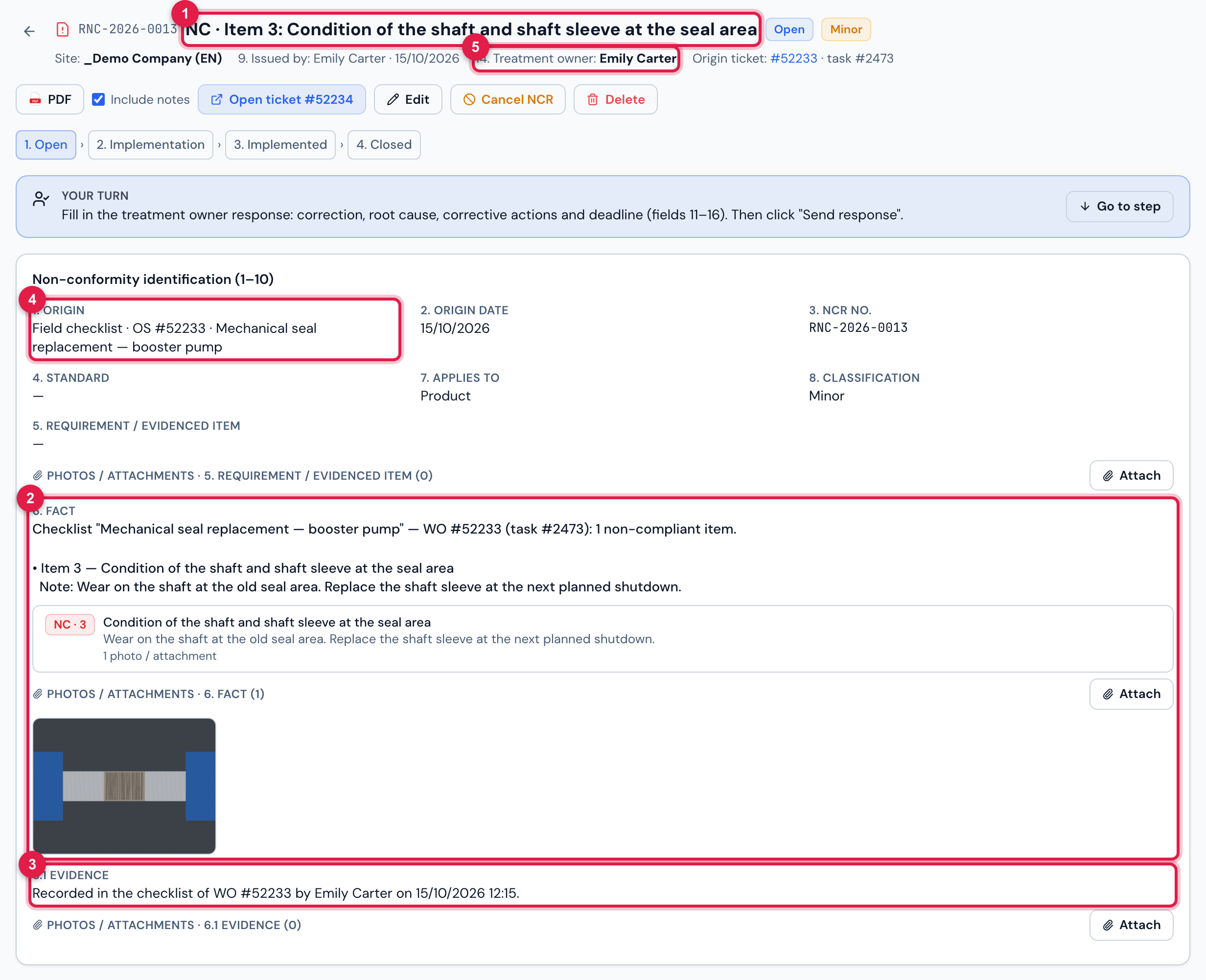
Figure 26. The NCR opened when finishing Mechanical seal replacement — booster pump (one NCR per item): NC · Item N: Condition of the shaft and shaft sleeve at the seal area, with the fact, the item photo, the evidence and the owner — the template’s technician.
- 1The title NC · Item N: ….
- 26. Fact: the checklist, the WO and the task, and each item with the question and the technician’s comment (Note:); the item photos become fact photos.
- 36.1 Evidence: Recorded in the checklist of WO #N by <technician> on <date>.
- 4The origin: the WO and the template.
- 5The owner — the template’s technician, or To delegate.
- Owner: the template’s Technician (chapter 3). Without a technician (or with an inactive one), the NCR is created To delegate, for Quality to choose who handles it.
- Classification: it starts as Minor; Quality adjusts it when delegating.
- The NCR gets its own ticket, a child of the source ticket, and the source ticket receives the note <code> opened from checklist “<template>” — item N non-compliant (plus awaiting assignment of the owner, when there is no technician).
- The N in Item N is the item number in the checklist — the same one the technician sees on the web and in the app (section titles do not count).
- The title, the fact, the evidence and the note on the ticket come in the language of whoever finishes the task, with the date in the company format. The question and the comments go as they were written.
- In an item with sections (Section Inspection) or rows, the non-compliant sections go into the same item, with the details of each one.
When the NCR appears
Section titled “When the NCR appears”- On the web: when the task is Finished. The screen does not say the NCR was opened: look in Quality › NCR or in the ticket note.
- In the app: on completion, the app shows the Non-compliances dialog with what will become an NCR — Complete and open NCR or Go back and review. The NCR is created when the completion reaches the server.
- Answers and photos that arrive from the app after the completion complete the existing NCR (while it is To delegate or Open) — without duplicating it.
- A deleted NCR counts as already generated: it is not created again for the same item.
Was this page helpful?
Thanks for the feedback!
Got it — we will improve this page.