
Task templates
Manual — Lubrication · chapter 6 of 12
When the points are saved, H2O creates the task templates automatically: one per asset and per frequency. The weekly points of a pump go into one template, the monthly ones into another. Each point becomes a checklist item, with what the technician needs to read on the spot: lubricant, quantity, method and safety.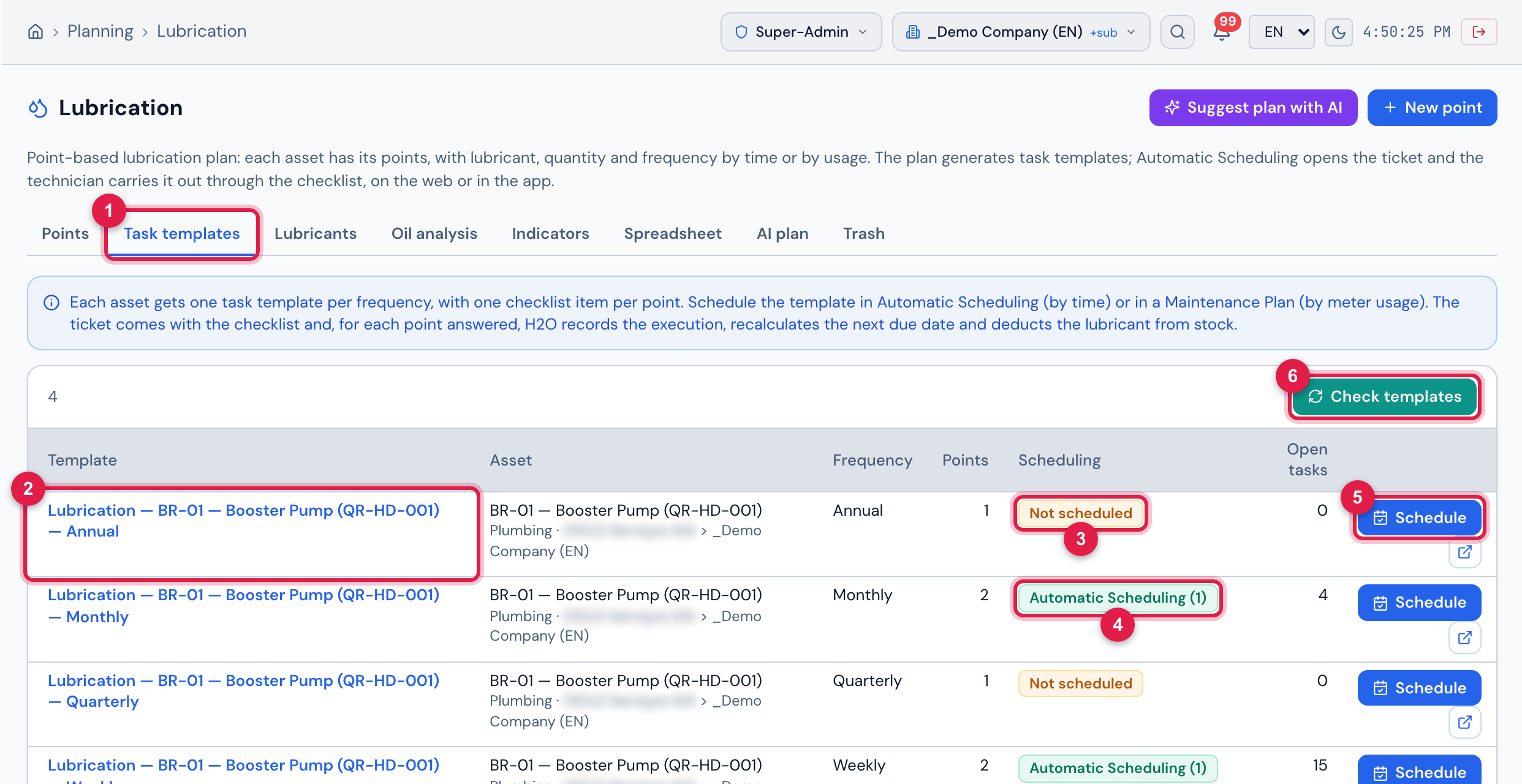
Figure 8. The Task templates tab.
- 1The Task templates tab.
- 2The generated template. The name carries the asset and the frequency; clicking it opens the template.
- 3Not scheduled — the template exists, but does not generate tickets yet.
- 4Automatic Scheduling (1) — the template is already in an active schedule. A template in a maintenance plan shows Maintenance Plan.
- 5Schedule — takes you to Automatic Scheduling with this template already chosen (chapter 7). For a template by meter usage, the button is Create plan.
- 6Check templates rebuilds the link between points and templates. It changes nothing if everything is already right.
- The Points column shows how many points the template covers; Open tasks, how many tasks are still to be done.
- Besides the points, every template ends with the item General condition of the lubricated points — it is where the technician records a leak, contamination, noise or abnormal temperature.
Was this page helpful?
Thanks for the feedback!
Got it — we will improve this page.