
The supplier page
Manual — Purchasing: orders, quotations and accounts payable · chapter 7 of 9
The supplier needs no user and no password. The link in the e-mail opens an H2O page with that quotation only. This chapter shows what they see — useful for guiding someone who is answering for the first time.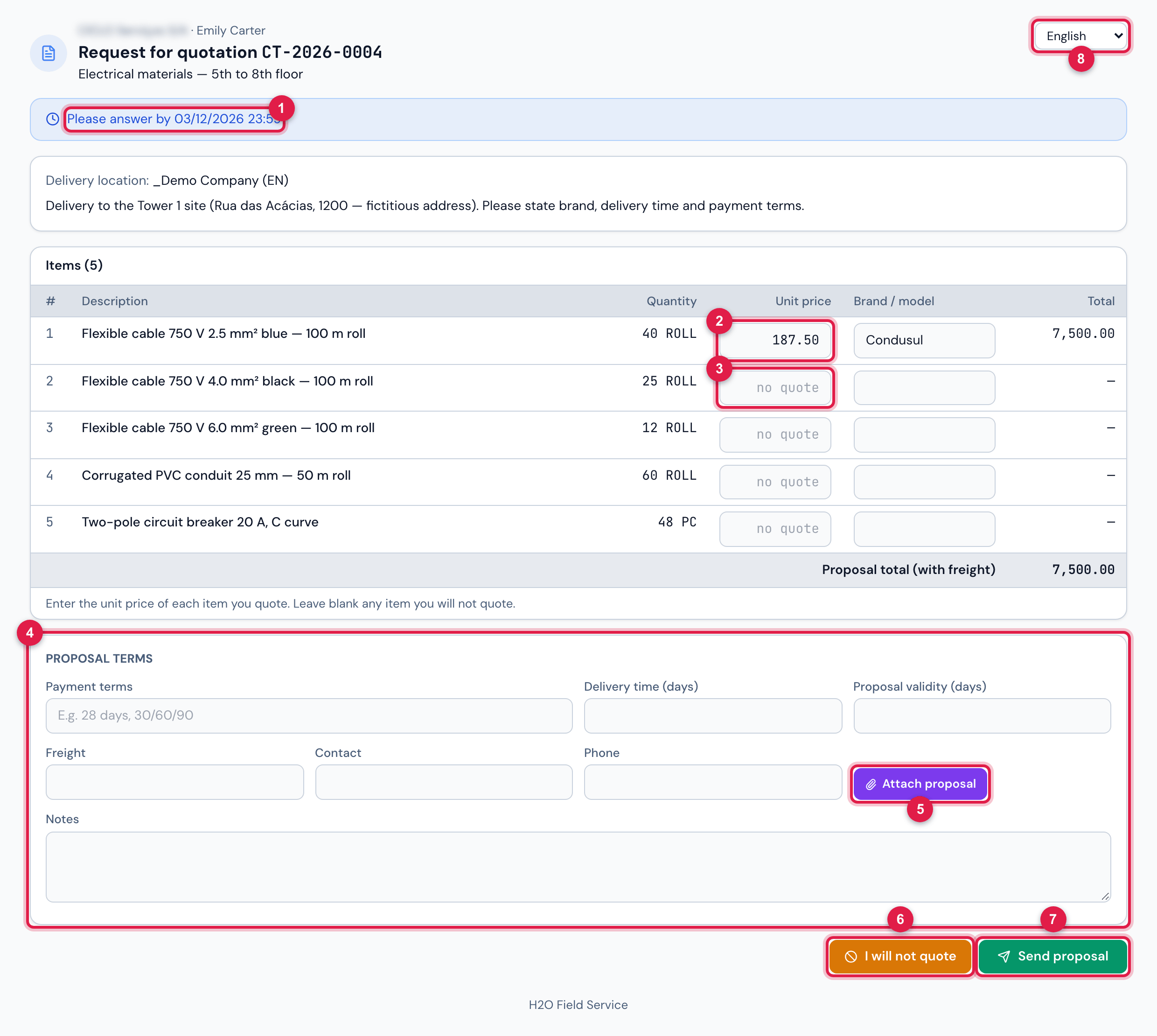
Figure 19. The answer page, as the supplier sees it.
- 1Please answer by — the quotation deadline.
- 2Unit price of the item.
- 3An item left blank (no quote) stays out of the proposal.
- 4Proposal terms: payment terms, delivery time, validity, freight, contact, phone and notes.
- 5Attach proposal — the supplier’s proposal file.
- 6I will not quote.
- 7Send proposal.
- 8The page language: Portuguese, English or Spanish.
- The supplier opens the link in the e-mail.
- They enter the Unit price of each item they quote and, if they wish, the Brand / model. The item total and the Proposal total (with freight) are calculated.
- They fill in the Proposal terms.
- If they wish, they click Attach proposal and choose the file.
- They click Send proposal. The page confirms: Proposal received.
- Someone invited by e-mail only also enters the Company name and the tax ID, under Your company.
- The supplier can correct and send again until the deadline: the last proposal is the one that counts.
- I will not quote tells the buyer that they declined.
- After the deadline, or with the quotation closed, the page shows This quotation is closed and no longer accepts answers. Only the buyer reopens it, with New deadline.
- The page shows the delivery location and the buyer’s instructions. The supplier does not see the other invitees or their proposals.
Was this page helpful?
Thanks for the feedback!
Got it — we will improve this page.