
The PMOC PDF and the inspection
Manual — PMOC · chapter 9 of 10
The PMOC PDF is the document handed to the health surveillance authority, to the contracting party or to the auditor: the whole plan and the record of the executions, with the photos, in a fixed sequence of seven sections. It is generated on the spot, from what is in H2O, by anyone who can read the PMOC — just the PMOC PDF button in the page header.| Section | What it brings | Where it comes from |
|---|---|---|
| 1. Building identification, Owner / building manager, Technical manager | the cover: PMOC, building, site, address, use, areas, occupancy, status and validity; the owner; the technical manager with council and registration, the ART number and the Document; the automatic schedule (horizon, items, tickets); the notes | Building tab (chapters 3 and 4) and the schedule (chapter 7) |
| 2. Air-conditioned rooms | room, floor, area, occupancy, air renewal and the equipment of each one | Rooms tab (chapter 5) |
| 3. HVAC equipment inventory | equipment and serial, type/model/manufacturer, capacity, refrigerant and charge, installation, room — the ones with no room in amber, with the count in the title | Equipment tab (chapter 5) |
| 4. Activity plan | code, activity, periodicity in days, applies to, task template and legal reference; the inactive ones marked (inactive) | Activities tab (chapter 6) |
| 5. Execution records | the summary (Total, Completed, Open, Overdue, With evidence) and, per ticket, activity and equipment, technician, due, executed, status and evidence — with the thumbnails of the checklist photos right below the row | Execution tab (chapter 8) |
| 6. Pending items and overdue preventive work | the tickets of the period still open, with OVERDUE · n day(s) late in red; or Nothing pending: every execution in the period is complete. | Execution tab |
| 7. Signatures | two lines: Technical manager — <name> and Building manager — <owner>, with “name, date and signature” | Building tab |
The cover and the plan
Section titled “The cover and the plan”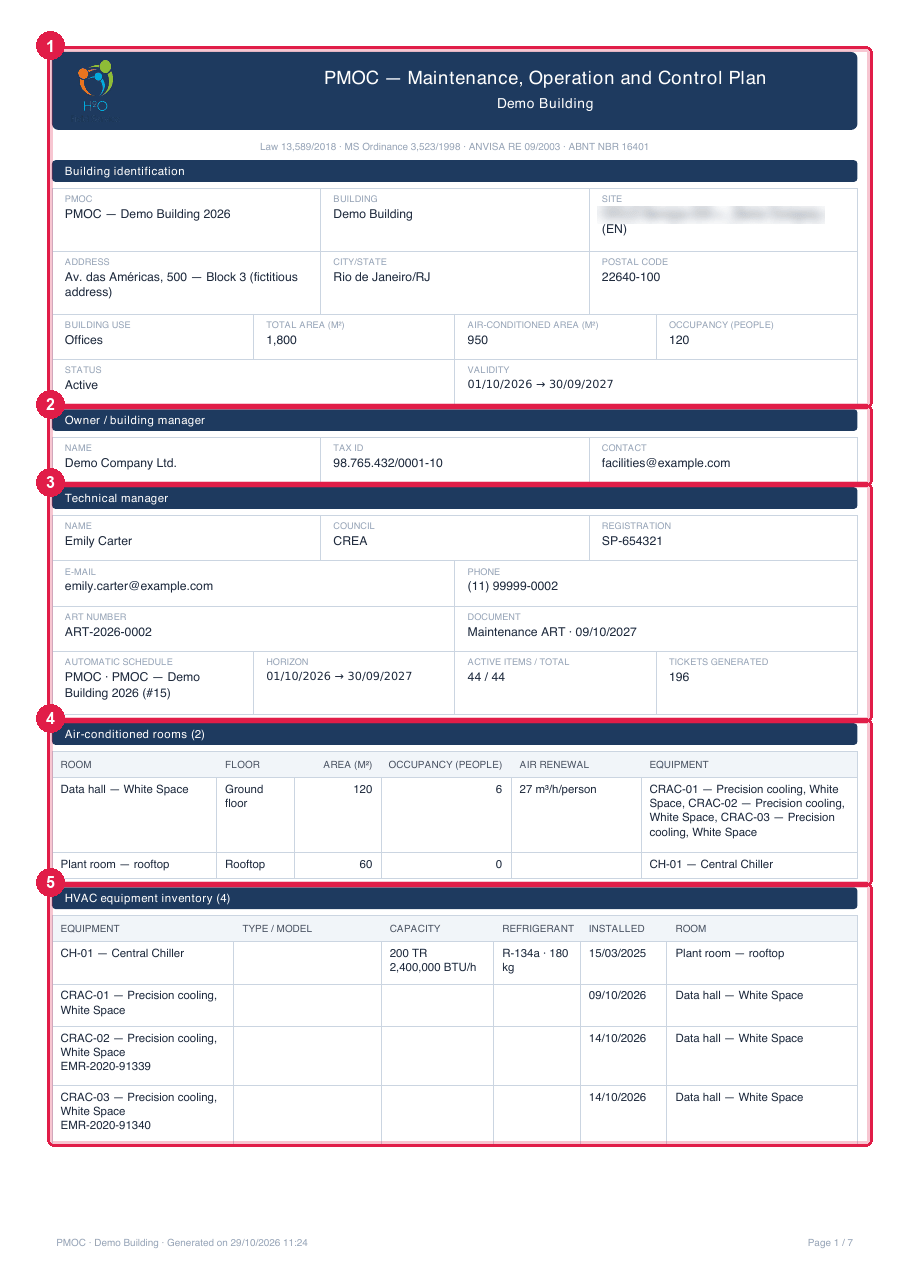
Figure 20. The first page of the PDF of the Demo Building: the identification, the owner, the technical manager and the ART, the rooms and the beginning of the inventory.
- 1The band with the company logo, PMOC — Maintenance, Operation and Control Plan, the building and the legal basis; below, Building identification with the status and the validity.
- 2Owner / building manager.
- 3Technical manager: name, council, registration, e-mail, phone, ART number and Document; on the last line, the Automatic schedule with horizon, items and tickets generated.
- 4Air-conditioned rooms (n) — the table of the rooms with the equipment of each one.
- 5HVAC equipment inventory (n · m no room) — equipment without a room is shown in amber, with ⚠ no room (none here).
The Activity plan section comes next, with the 15 (or your own) in the order of the tab. The footer of each page carries “PMOC · building · Generated on date and time” and Page n / N — the inspector knows when the document was issued and whether it is complete.
The executions, the pending items and the signatures
Section titled “The executions, the pending items and the signatures”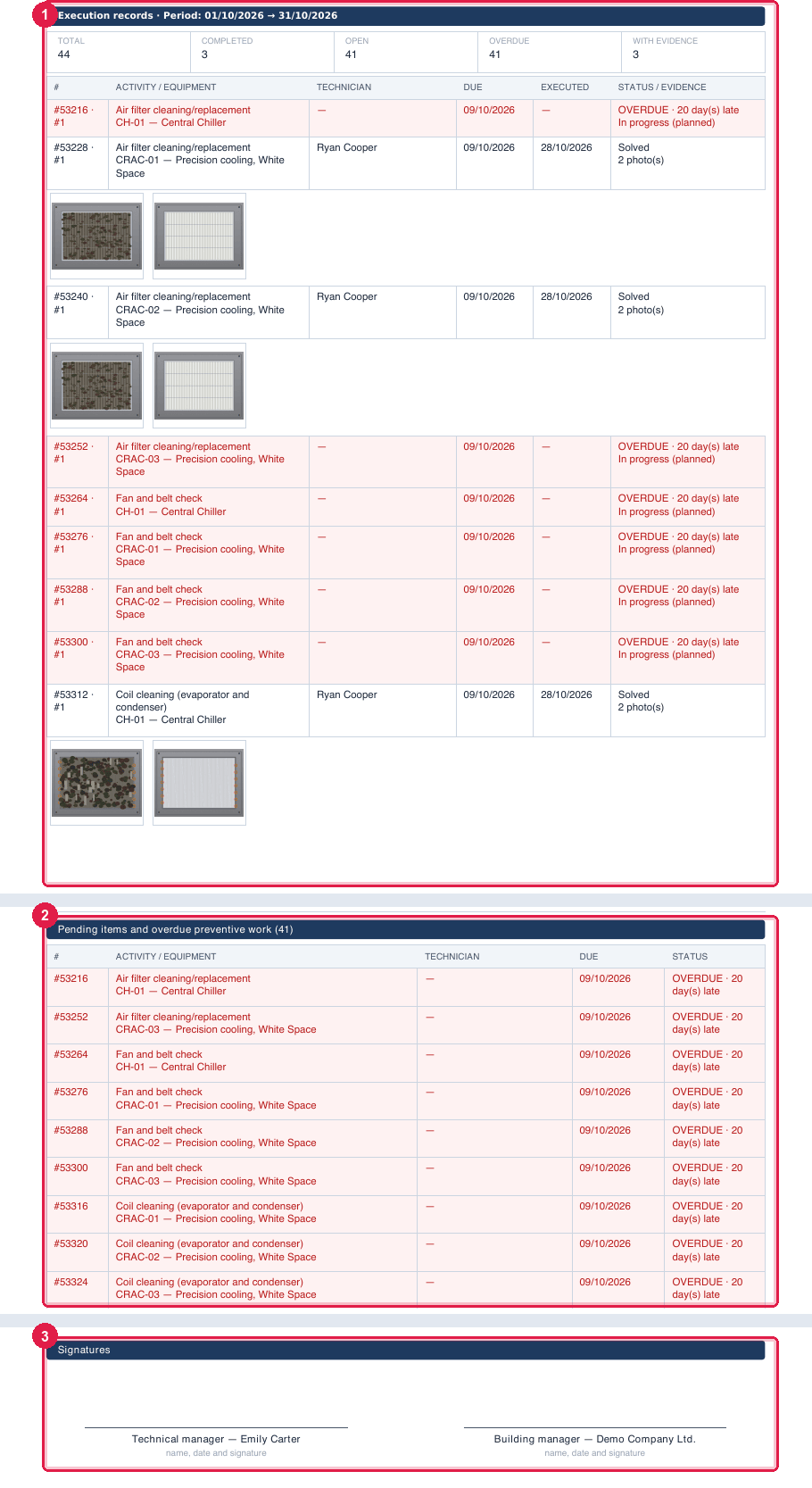
Figure 21. The final pages: Execution records with the thumbnails, Pending items and overdue preventive work and Signatures.
- 1Execution records · Period: … with the summary Total, Completed, Open, Overdue, With evidence and the table: # (the ticket and the sequence), Activity / Equipment, Technician, Due, Executed, Status / Evidence (“n photo(s)”, “n attachment(s)”). Right below the executed ticket, the thumbnails of the checklist photos (before and after the cleaning); an overdue row comes out in red on a pink background, with OVERDUE · n day(s) late.
- 2Pending items and overdue preventive work (n) — only what is open, for follow-up.
- 3Signatures: Technical manager — Emily Carter and Building manager — Demo Company Ltd., with “name, date and signature”.
Period and language
Section titled “Period and language”- The PMOC PDF button generates the document with all the executions of the PMOC (Period: whole period). The screen offers no date range for the PDF — the From / To filter of the Execution tab applies only to the screen. That is how it is today: for a specific period, the PDF address accepts the dates (
fromandto), and support can generate the range. - The PDF comes out in the screen language of whoever clicked: Portuguese, English or Spanish. The names of the 15 default activities are translated while they are still the original ones; renamed activities come out as they were written.
- The file is named PMOC-<Building>.pdf and opens in a browser tab; save it from there.
What to hand over and what to keep
Section titled “What to hand over and what to keep”| When | What to do |
|---|---|
| when activating the PMOC (start of the validity) | generate the PDF and sign it with the technical manager and the owner: it is the plan. File the signed PDF together with the ART — on the site page, Documents tab, as a common document, it is at hand. |
| every month (or at the pace the contract requires) | check the Execution tab and clear the overdue ones; the month’s PDF is the report to the contracting party. |
| at the inspection | generate the PDF on the spot: it brings the plan, the inventory, the executions with photos and the pending items up to that day. Present the ART (site document) and the signed PDF from the start of the validity. |
| when archiving the PMOC (end of the validity) | generate the final PDF and keep it: the archived PMOC remains accessible, but the PDF closes the period. |
Was this page helpful?
Thanks for the feedback!
Got it — we will improve this page.