
The asset: Commissioning tab and dossier
Manual — Commissioning · chapter 8 of 10
The matrix shows the project; the asset page shows the history of one piece of equipment — useful for the maintenance team that will take over the CRAC unit or the UPS, for the client audit and to answer “did this generator pass the IST?” without opening the project.The Commissioning tab of the asset
Section titled “The Commissioning tab of the asset”In Assets, open the asset: the Commissioning tab appears (before History) when it is in at least one ticket linked to a phase. Otherwise, the tab does not exist.
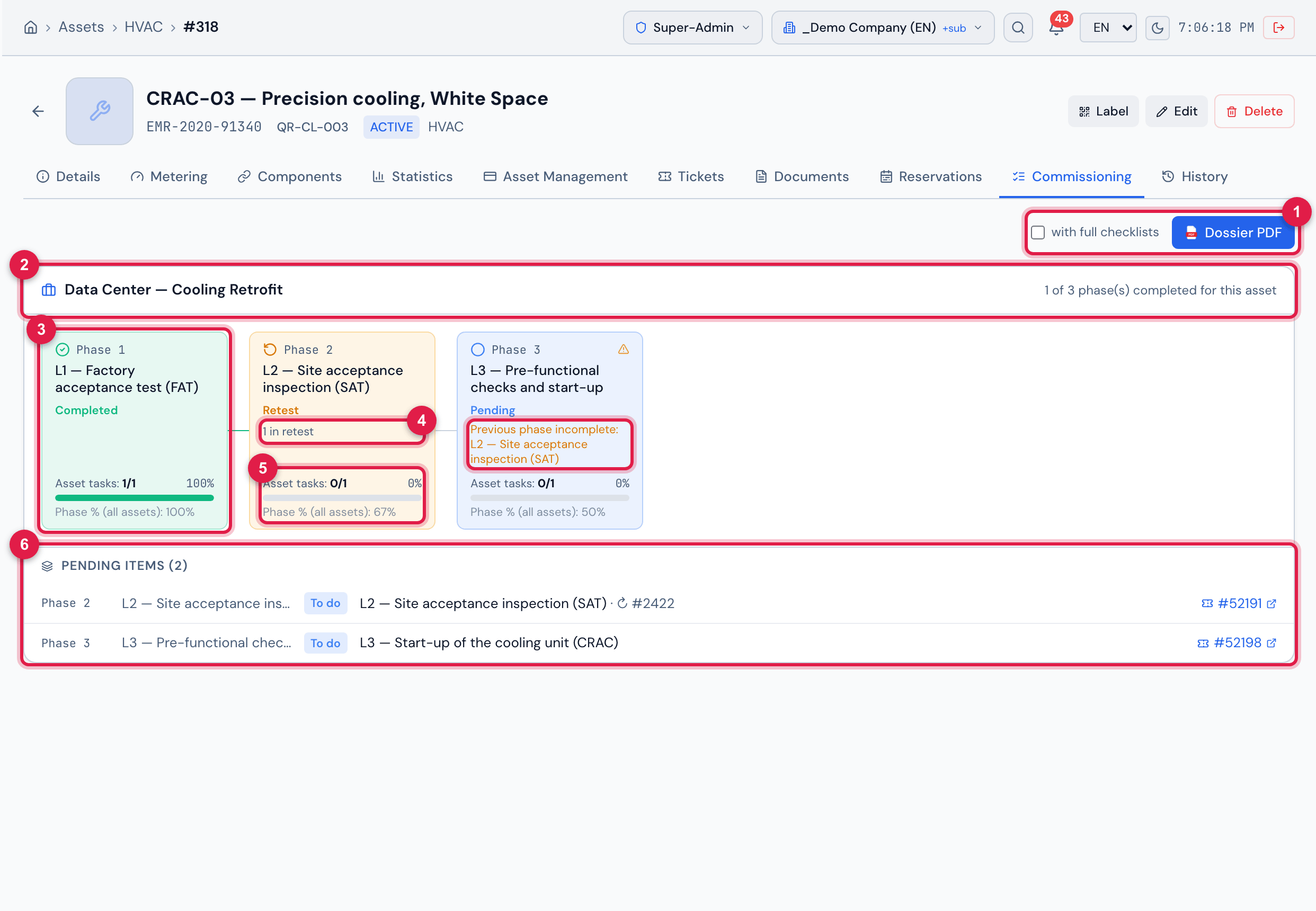
Figure 18. The Commissioning tab of CRAC-03 — Precision cooling, White Space: L1 completed, L2 in Retest after the transport damage, L3 pending with the Previous phase incomplete warning, and the pending items of the asset.
- 1with full checklists and Dossier PDF (below).
- 2The project (click to open it) and how many phases the asset has completed.
- 3One card per phase, in order: Phase N, name and status.
- 4N in retest (or N failed) and the Previous phase incomplete warning, when there is one.
- 5Asset tasks (approved/total), the asset % and the Phase % (all assets).
- 6Pending items (N) — each task still missing, with the reason and the ticket.
- The states are the same as in the matrix (chapter 6): Failed, Retest, Completed, In progress, Pending, No ticket.
- The pending items give the reason: To do, Failed or Retest; ↻ #N marks a retest task. Click the #ticket to open it.
- An asset in more than one project (for example, commissioned at implementation and again in a retrofit) shows one block per project.
- The tab only needs Read on the asset type.
The asset dossier PDF
Section titled “The asset dossier PDF”Dossier PDF generates the commissioning document of the asset, in the screen language. Check with full checklists to attach all the answered items of each test (by default it brings only the checklist summary and the non-conforming items).
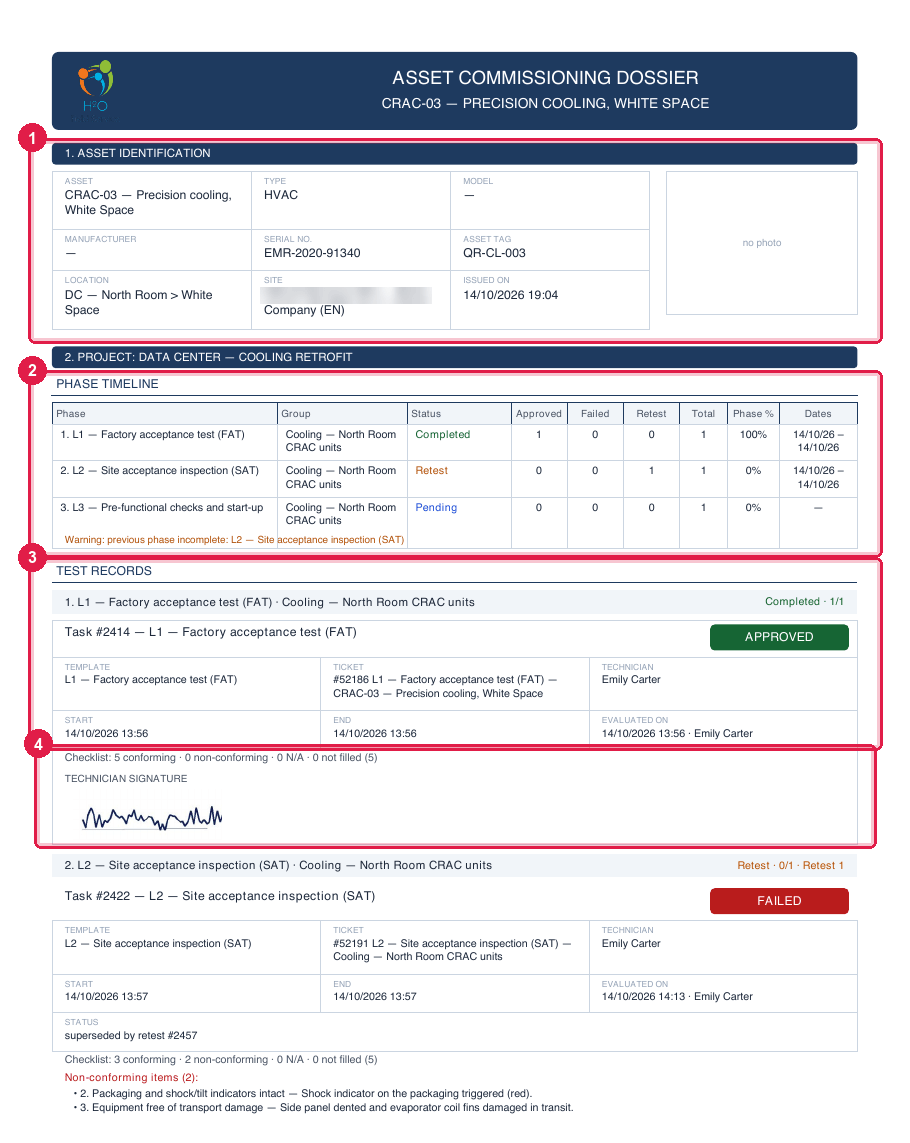
Figure 19. The first page of the ASSET COMMISSIONING DOSSIER of CRAC-03: the asset identification, the phase timeline and the first test record with the result stamp.
- 11. ASSET IDENTIFICATION — name, type, model, manufacturer, serial, asset tag, location, site and photo.
- 2PHASE TIMELINE — status, approved, failed, retest, total and dates per phase.
- 3TEST RECORDS — each task, with the APPROVED / FAILED / RETEST / TO DO stamp.
- 4Checklist summary (conforming, non-conforming, N/A, not filled) and the TECHNICIAN SIGNATURE; the test photos come here too, when there are any.
| Part of the dossier | What it brings |
|---|---|
| 1. ASSET IDENTIFICATION | the register data and the photo of the asset. |
| PROJECT › PHASE TIMELINE | per phase: group, status, approved / failed / retest / total, dates and phase %; the previous-phase-incomplete warning. |
| TEST RECORDS | each ticket task of the asset, phase by phase: template, ticket, technician, dates, result and when it was evaluated, checklist summary, non-conforming items, photo thumbnails and the technician signature. A failed task that had a retest appears as “superseded by retest”. |
| PENDING ITEMS | what is still missing: to do, failed, in retest. |
| GQE ITEMS AND NCRs | the GQE items and NCRs linked to the asset, with status, priority and responsible. |
Together with the commissioning section of the Gantt PDF (chapter 6), the dossier of each asset makes up the commissioning handover package.
Was this page helpful?
Thanks for the feedback!
Got it — we will improve this page.