
Access rights
Manual — Punch list (GQE) · chapter 2 of 11
Punch list items use the Punch list (GQE) row of the profile (People › Profiles › profile › Permissions tab, group Operations). Besides the usual boxes, the row has the extra box Validate (Quality).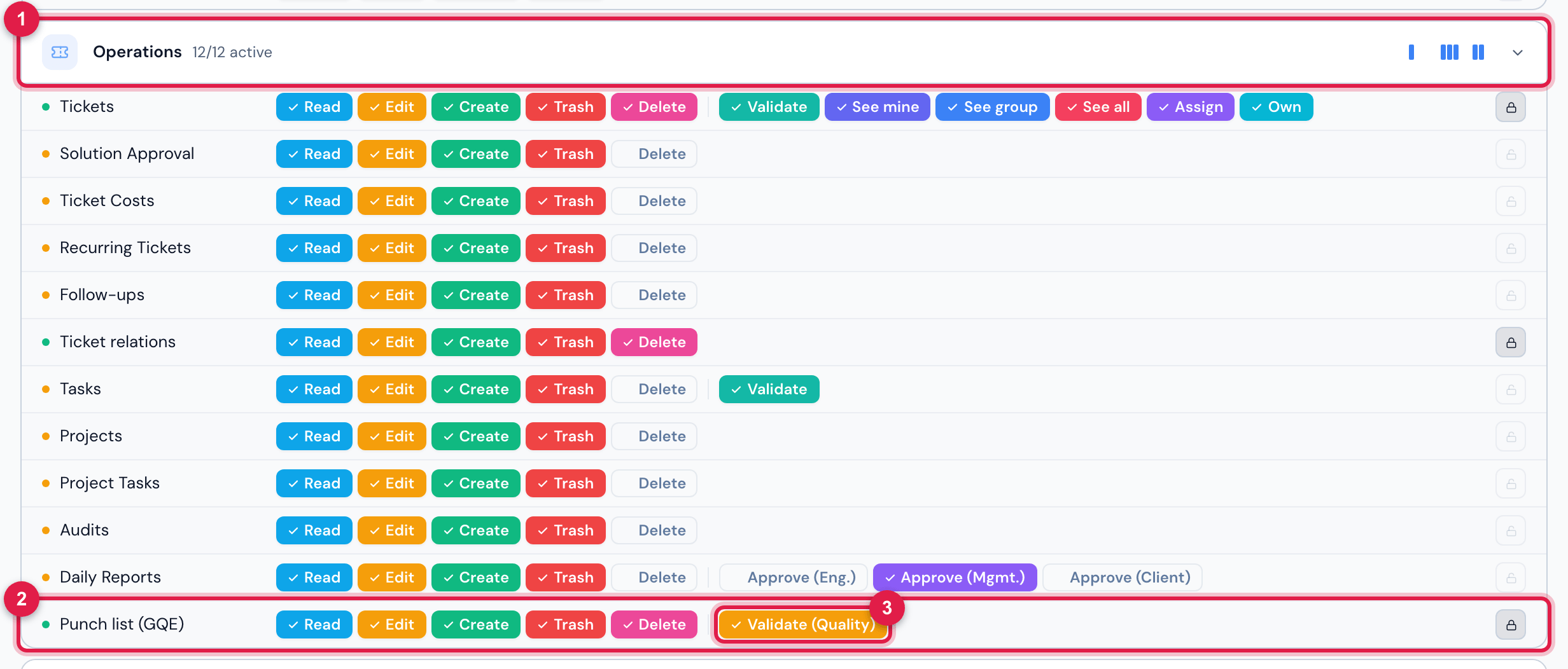
Figure 2. People › Profiles › Super-Admin › Permissions: the Punch list (GQE) row, in the Operations group, with the Validate (Quality) box.
- 1The Operations group.
- 2The Punch list (GQE) row — Read, Edit, Create, Trash and Delete.
- 3The extra box Validate (Quality).
| To… | You need, in the Punch list (GQE) row |
|---|---|
| see the menu, the projects, the list, the item pages, the PDF and the Spreadsheet | Read |
| New item | Create |
| Edit, Start fixing, Request validation, Block, Attach photos — on any item | Edit |
| Open work order and the Lists page (disciplines and origins) | Edit |
| Validate and complete, Reject, Won’t fix and Reopen | Validate (Quality) |
| Escalate to NCR | Edit here and Create in the NCR (Non-conformity) row |
| move an item to the trash (trash icon in the header of the item page), open the Trash and Restore | Trash |
| Delete permanently an item that is in the trash | Delete |
| delete a photo or an attachment added by mistake (trash icon on the photo) | Trash, while the item is still open |
The profile defaults
Section titled “The profile defaults”When the module was installed, each profile received punch list rights based on what it already had in Deviations (Occupational Safety) — whoever handles field deviations handles punch list items:
| The profile had in Deviations | It received in Punch list (GQE) |
|---|---|
| Trash (management profiles) | Read, Edit, Create, Trash and Validate (Quality) |
| Create (technicians) | Read, Edit and Create — they record and fix, they do not validate |
| only Read (client, requester, self-service) | nothing — the menu does not show; grant it by hand if the client should see or record items |
Was this page helpful?
Thanks for the feedback!
Got it — we will improve this page.