
Failure, retest, GQE and NCR
Manual — Commissioning · chapter 7 of 10
A failure does not get lost in a task: H2O immediately opens what is needed to fix it and test again, and keeps the link between the failure, the fix and the new test.- The technician completes the task with the result Failed — on the web or in the app (chapters 5 and 9) — and the task is left completed and failed.
- H2O opens a GQE item on the project job, with the asset, the phase, the non-conforming checklist items and the test photos.
- H2O creates a retest task on the same ticket: Retest — <task name>, to do, same template and same technician.
- The team fixes the problem and handles the GQE item until Completed.
- The technician runs the retest. When it is approved, the failure is cleared: the matrix cell turns green again once the rest of the phase is approved.
- If the defect is a formal non-conformity — from the manufacturer, from a supplier —, the GQE item is escalated to NCR.
The retest task
Section titled “The retest task”- It is created on the same ticket as the failed task, with the same template (the checklist starts blank), the same technician and group, and the same asset. The new-task notification of the ticket is sent, as for a task created by hand.
- With the Create material requests on the work order switch on in the template, the planned materials become material requests on the ticket again, now linked to the retest task.
- It shows ↻ #N (retest of task N) on the ticket page and the Retest badge in the app.
- While the retest is not approved, the cell stays in Retest. The failed task leaves the count: the retest is what counts. If the retest also fails, the retest of the retest is created — and so on; the last one always counts.
- The failed task stays on the ticket, with its checklist and photos: it is the evidence of the failure (it appears in the dossier as “superseded by retest”).
The GQE item
Section titled “The GQE item”The item appears in Operations › Punch list (GQE), on the project job. It follows the normal flow of GQE items — Triage / Under review → In progress → Under validation (requires a closing photo) → Completed —, and shows in the Links box where it came from. When it is created, the item notifies the responsible person (the ticket technician) by the bell and by e-mail, through the GQE rules in System › Notifications. Validation follows the rule of every GQE item: whoever moved the item to Under validation cannot validate or reject it — another person from quality does that.
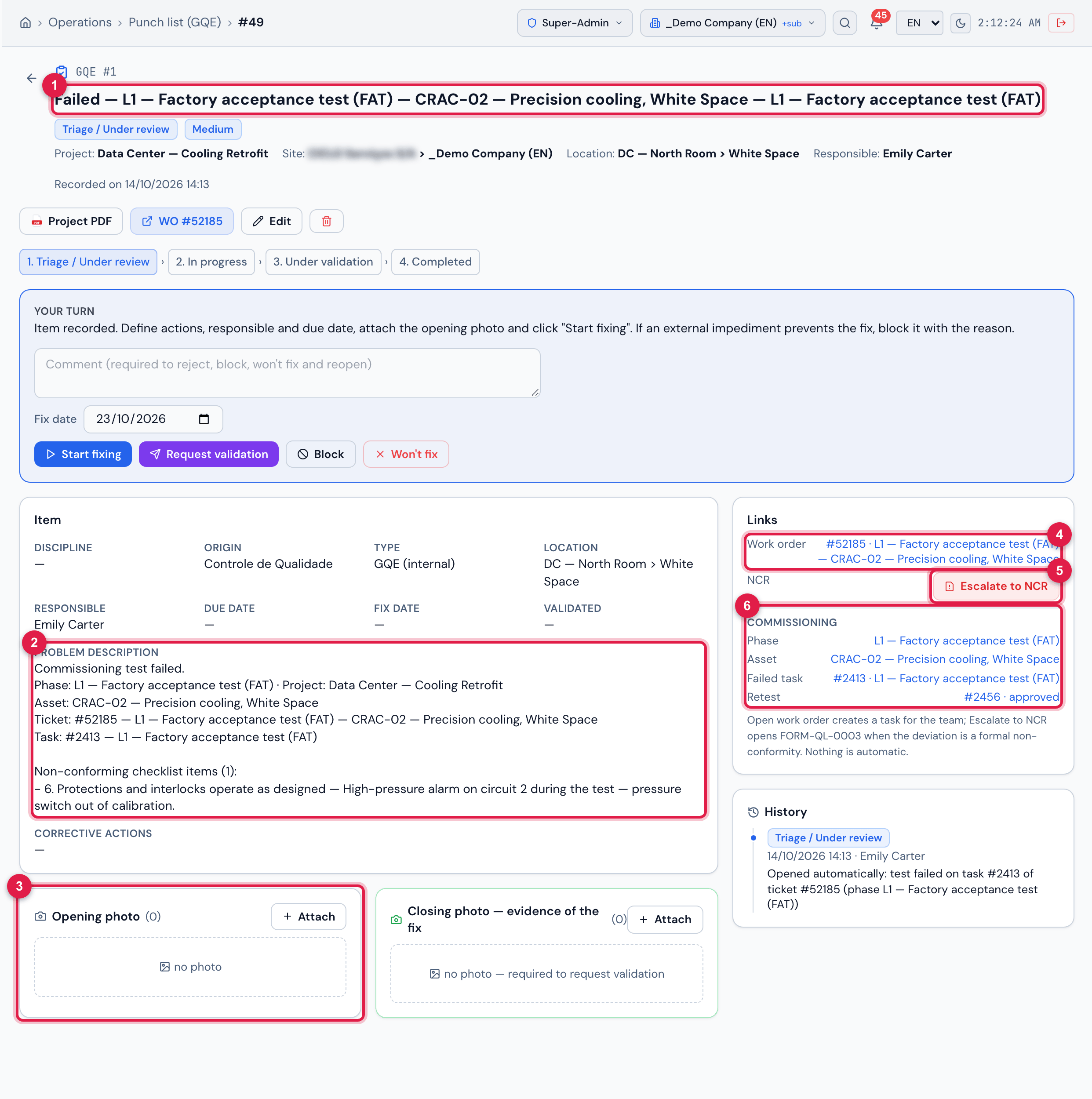
Figure 16. The GQE item opened by the failure of the factory test of CRAC-02 (high-pressure alarm on circuit 2): title “Failed — L1 — Factory acceptance test (FAT) — CRAC-02 — Precision cooling, White Space — L1 — Factory acceptance test (FAT)” (phase, asset and task), the non-conforming item in the description, the photo panel and the Commissioning block in the links, with the retest already approved.
- 1The title built by H2O: Failed — phase — asset — task.
- 2The description: phase, project, asset, ticket, task and the non-conforming checklist items.
- 3Opening photo — receives the photos of the test checklist automatically (this test had none).
- 4Work order — the test ticket.
- 5Escalate to NCR.
- 6Commissioning block: Phase (opens the matrix), Asset, Failed task and Retest with its status.
| GQE item field | Comes from |
|---|---|
| Job | the project of the phase. |
| Title | Failed — <phase> — <asset> — <task>. |
| Description | “Commissioning test failed.”, phase and project, asset, ticket, task and the Non-conforming checklist items with their comments. |
| Origin | Controle de Qualidade, when that origin exists in the GQE origin list (the name comes from the environment catalog). |
| Priority | the ticket priority: Critical (Very high or Critical), High, Medium or Low. |
| Responsible | the ticket technician. |
| Location | the asset location. |
| Status | Triage / Under review. |
| Photos | the checklist photos of the failed task (they are not copied: they point to the same files). |
Escalate to NCR
Section titled “Escalate to NCR”When the defect needs formal handling — a manufacturing defect, equipment delivered out of specification, a recurring failure —, Escalate to NCR on the GQE item opens FORM-QL-0003 already filled in and a treatment ticket. It needs Edit in Punch list (GQE) and Create in NCR.
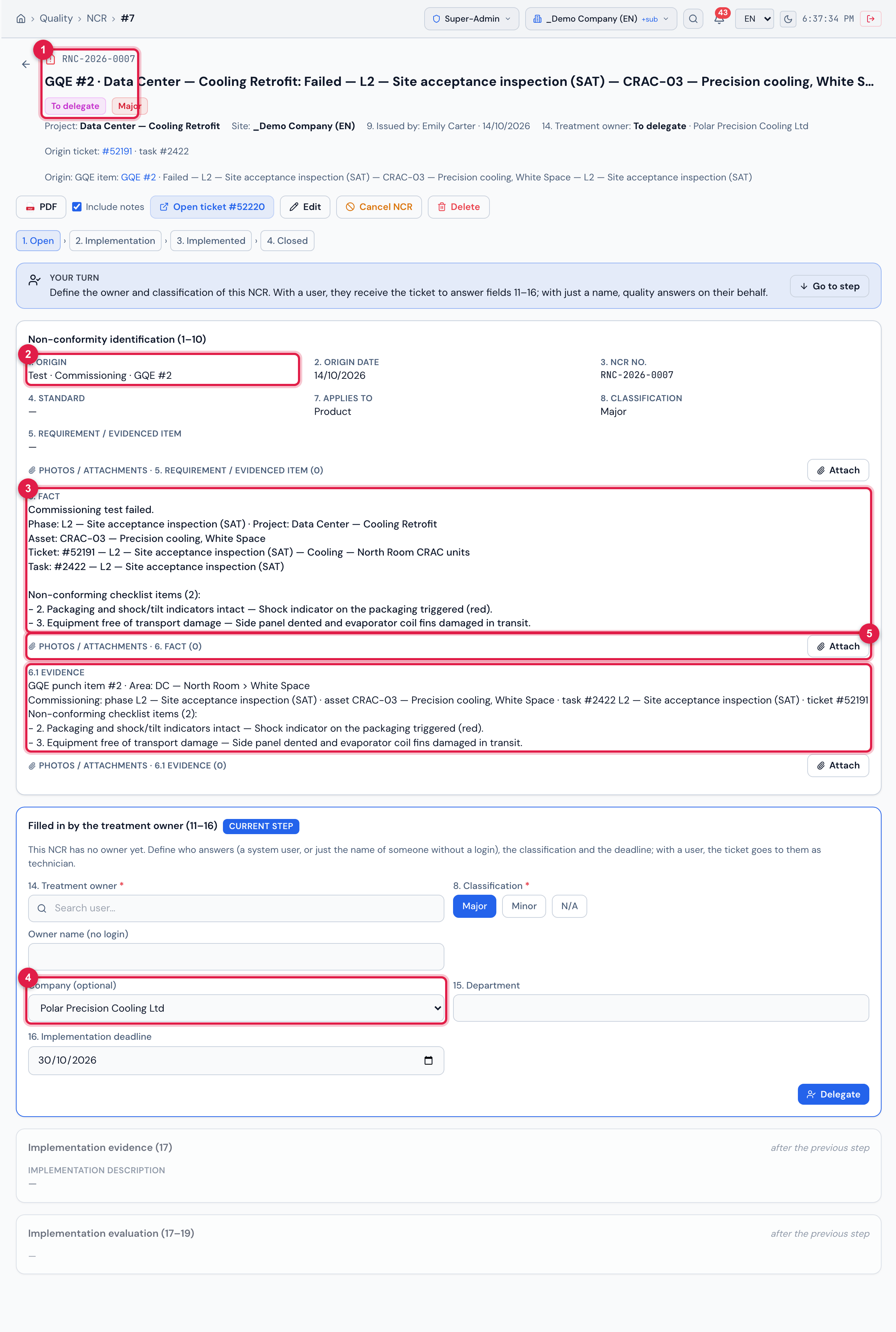
Figure 17. The NCR opened from the GQE item of the transport damage of CRAC-03 at receiving (L2): origin Test, the origin report number “Commissioning · GQE #N”, the fact and the evidence coming from the GQE item, the supplier company of the asset and the To delegate state. The classification Major was set when this example was created; through the Escalate to NCR button it comes as Minor (table below).
- 1The code RNC-YYYY-NNNN and the To delegate state.
- 21. Origin — Test, and the origin report number.
- 36. Fact and 6.1 Evidence — with the phase, the asset, the task and the non-conforming items.
- 4Company (optional) — the supplier of the asset.
- 5Photos / attachments of the fact — the photos of the GQE item go here (this one had none).
| NCR field | Comes from |
|---|---|
| Title | “GQE #N · <project>: <title of the GQE item>”. |
| 1. Origin | Test; origin report number “Commissioning · GQE #N”. |
| 6. Fact / 6.1 Evidence | the description of the GQE item; the evidence with phase, asset, task, ticket and non-conforming items. |
| 7. Applies to / 8. Classification | Product / Minor (adjust later if needed). |
| Company (optional) | the supplier of the asset (Asset Management tab of the asset), when there is one. |
| Treatment owner | none: the NCR is created To delegate so that quality decides who answers. |
| Treatment ticket | created as a child of the test ticket. |
- The GQE item now shows the NCR code in Links; the history records “Escalated to NCR …”.
- A GQE item escalates only once: This item was already escalated (RNC-…).
- The tip below Links sums it up: Escalate to NCR opens FORM-QL-0003 when the deviation is a formal non-conformity — nothing is escalated automatically.
- The treatment of the NCR (owner response, actions, implementation, evaluation) follows the normal NCR flow in Quality › NCR.
Was this page helpful?
Thanks for the feedback!
Got it — we will improve this page.