
Work order and Escalate to NCR
Manual — Punch list (GQE) · chapter 7 of 11
The Links box of the item page connects the item to two other H2O records. Both are only created by button — nothing is escalated automatically:| Button | Creates | Use it when | Right |
|---|---|---|---|
| Open work order | a ticket for the team to handle the fix | the fix is a job to be scheduled, with a technician, time and notes | Edit |
| Escalate to NCR | an NCR (FORM-QL-0003) already filled in and its treatment ticket | the deviation is a formal non-conformity — from a supplier, from a manufacturer, a recurring one — and needs root cause analysis and corrective action | Edit and Create in NCR |
Open work order
Section titled “Open work order”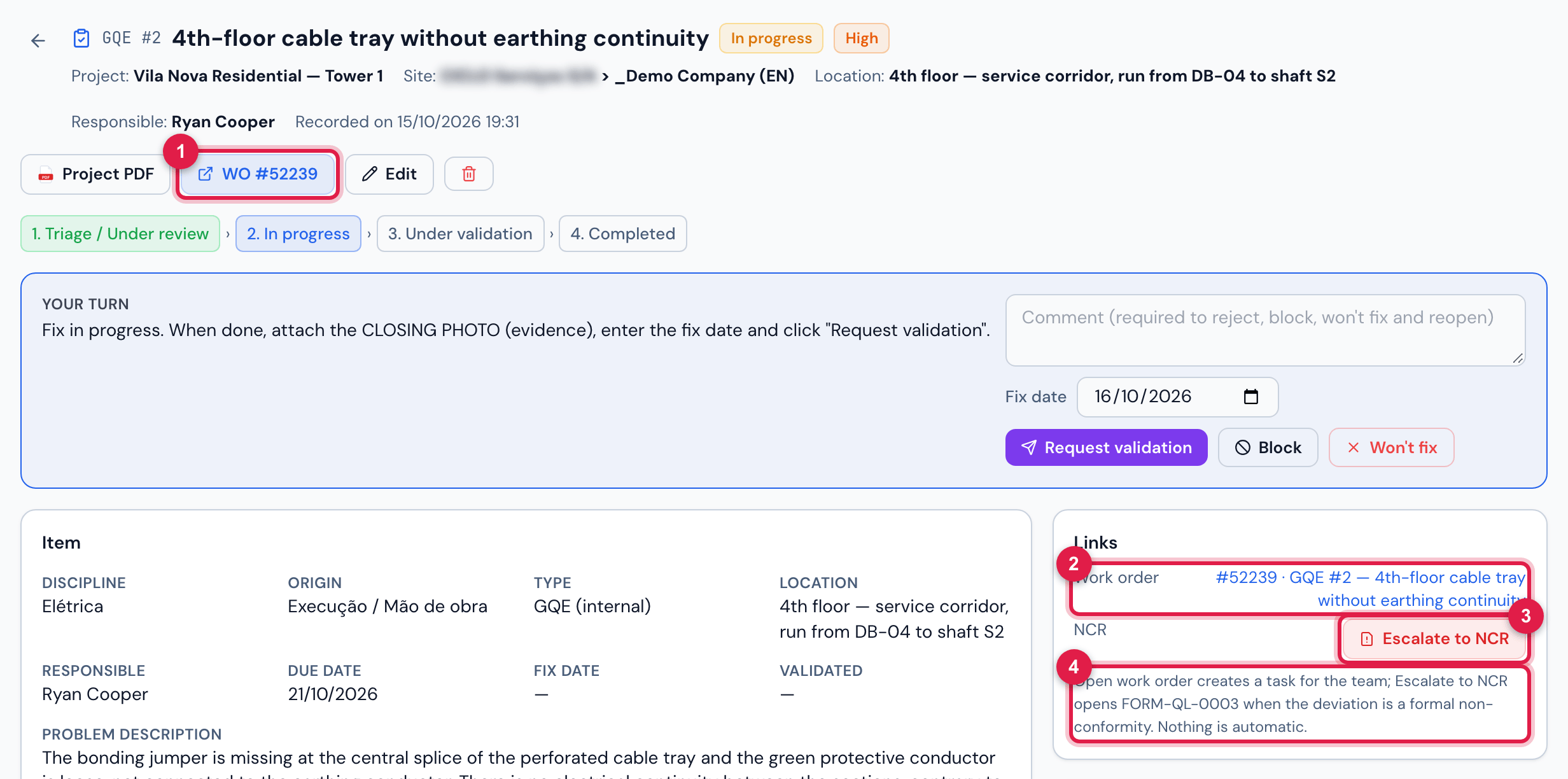
Figure 12. GQE #2 “4th-floor cable tray without earthing continuity”, with the work order open: the work order number in the header and in the Links box.
- 1WO #n in the header — opens the ticket.
- 2Work order in Links, with the number and the name.
- 3Escalate to NCR.
- 4The tip: Open work order creates a task for the team; Escalate to NCR opens FORM-QL-0003 — nothing is automatic.
- Open work order asks Open a work order for this item (technician = responsible)? and creates the ticket GQE #n — <title>, with the description, the actions and the location of the item, written in the language of the person who opens it.
- The technician of the work order is the item’s responsible (the work order is created Assigned); with no responsible, it is created New. The priority follows the item: Critical → Very high, High → High, Medium → Medium, Low → Low.
- The work order goes to the apps right away: the technician finds it in the app’s ticket list, like any ticket assigned to them.
- The work order is created with no category and no location, and does not go through the company’s automatic ticket rules (nor the new-ticket notices): complete the ticket if your routine uses them. The responsible receives the item notice — WO #m opened for GQE punch item #n — in the bell and by e-mail (chapter 6).
- An item has only one work order. The button disappears when the item is Completed or Won’t fix.
- If the work order is cancelled (Cancel ticket button on the ticket page), the item stays linked to it: the Links box keeps showing the work order and the Open work order button does not come back. Another work order cannot be opened for the same item — the server refuses with This punch item already has a work order. Keep this in mind before cancelling the work order of an item that is still open.
- The work order and the item are independent: solving the work order does not complete the item. Completion is still up to Quality, with the closing photo.
- The work order number appears in the PDF, in the Links block of the item (as WO).
Escalate to NCR
Section titled “Escalate to NCR”Escalating asks for confirmation — Escalate this item to an NCR? Opens the pre-filled FORM-QL-0003 (fact, evidence, photos, asset supplier) and a treatment ticket. — and shows the code of the NCR created (RNC-YYYY-NNNN created).
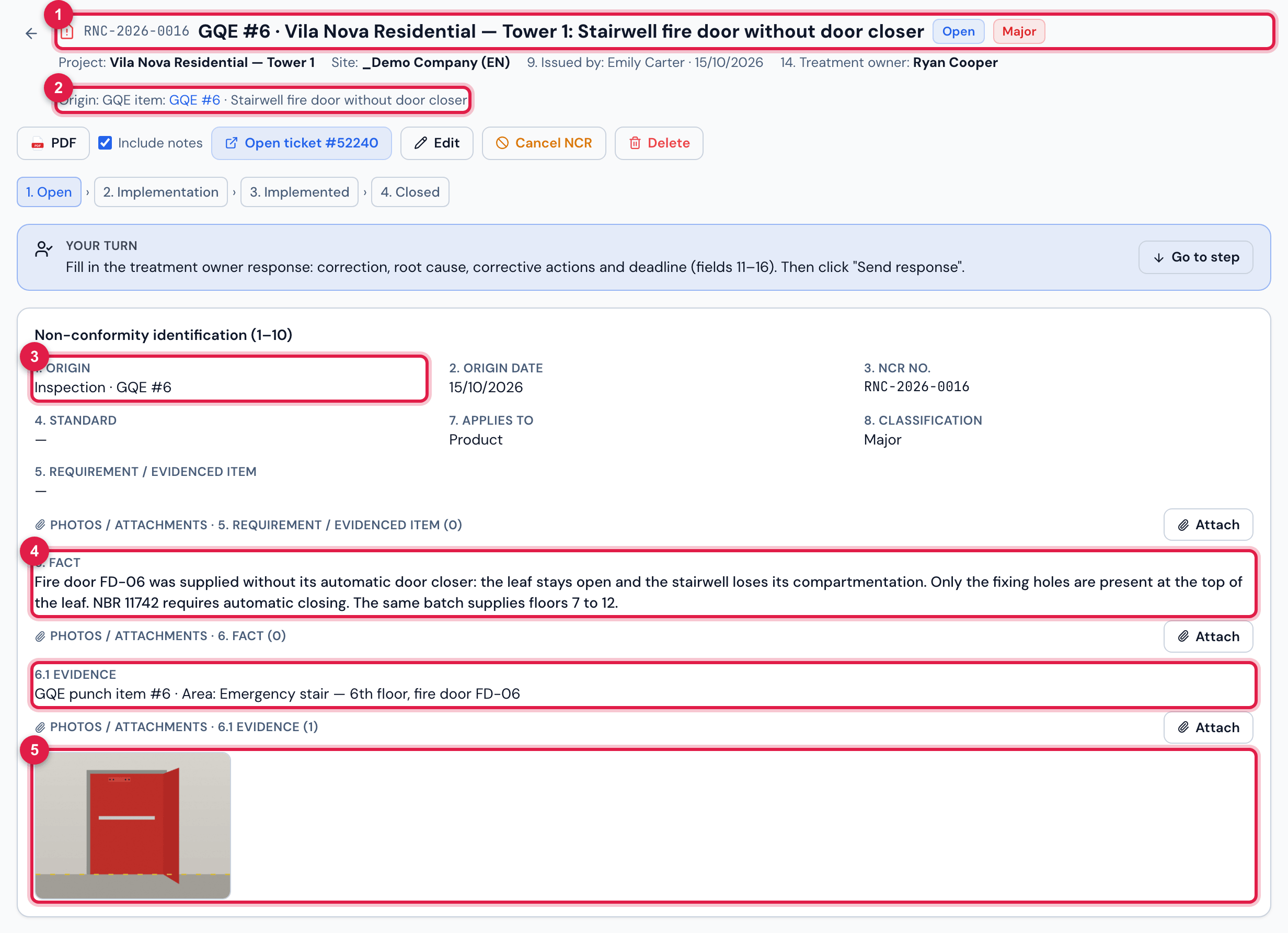
Figure 13. RNC-2026-0016, opened from GQE #6 “Stairwell fire door without door closer” (Critical priority → Major classification): title, origin, fact and evidence coming from the item, and the way back to it.
- 1The code RNC-YYYY-NNNN, the title GQE #n · <project>: <title> and the state.
- 2Origin: GQE item GQE #n — goes back to the item page.
- 31. Origin: Inspection and the origin report number GQE #n.
- 46. Fact and 6.1 Evidence, coming from the item.
- 5The photos of the item, attached to the NCR.
| NCR field | Comes from the item |
|---|---|
| Title | GQE #n · <project>: <title of the item> |
| 1. Origin | Inspection; origin report number GQE #n; date = the date the item was recorded |
| 6. Fact | the Problem description (or the title, if the description is empty) |
| 6.1 Evidence | GQE punch item #n · Area: … |
| 7. Applies to / 8. Classification | Product / Major when the priority is Critical or High, Minor otherwise — adjust later if needed |
| Treatment owner | the item’s Responsible — the NCR is created in the Open state. With no responsible, it is created To delegate. |
| Deadline | the item’s Due date |
| Photos | the opening and closing photos (the same files, not copies) |
| Treatment ticket | a new ticket; when the item has a work order, it is created as its child |
- The item now shows the NCR code in Links and in the header, and the history records Escalated to NCR RNC-…. The item status does not change: the fix on site is still handled here, and the formal treatment (owner response, actions, evaluation) follows in the NCR, in Quality › NCR.
- An item escalates only once: This item was already escalated (RNC-…).
- An escalated item cannot be deleted. A photo deleted from the item after the escalation stays in the NCR.
- Escalating is available in any status — even after completion, when the deviation recurs and Quality wants to open the formal treatment.
Was this page helpful?
Thanks for the feedback!
Got it — we will improve this page.