
The asset list
Manual — Assets · chapter 2 of 12
Clicking a type in the Assets menu opens the list of assets of that type in the selected site. The search looks in the Name, the Serial, the Tag / Asset # and the Notes. Click the heading of ID, Name or Updated to sort; the columns icon shows or hides columns (Manufacturer, for example, is hidden by default) and the download icon (Export) generates Excel or PDF of the current page or of everything the filter found. Click a row to open the record; the New button (Create right of the type) opens the registration.| Column | What it shows |
|---|---|
| ID and the photo | The asset number and the photo thumbnail (or an icon, if there is none). |
| Name | The name and, below it, the serial and the tag / asset #. |
| Status | The registration status (In use, Inactive, Under maintenance…; the list of statuses belongs to your company). The color comes from the name: red for inactive, deactivated or written off; amber for maintenance or repair; green for active, in operation or in use; gray for the others. |
| Location | Where the asset is within the site. |
| Tickets | Two badges: the blue one counts the preventive tickets and the red one (or amber, if none is open) the corrective and other modalities. The number is the count of closed tickets; the “+N” next to it, the open ones. Hover to see “Preventive: X closed, Y open”. |
| Updated | The date of the last change to the registration. |
The first three additional fields of the type also exist as columns, hidden: turn them on with the columns icon.
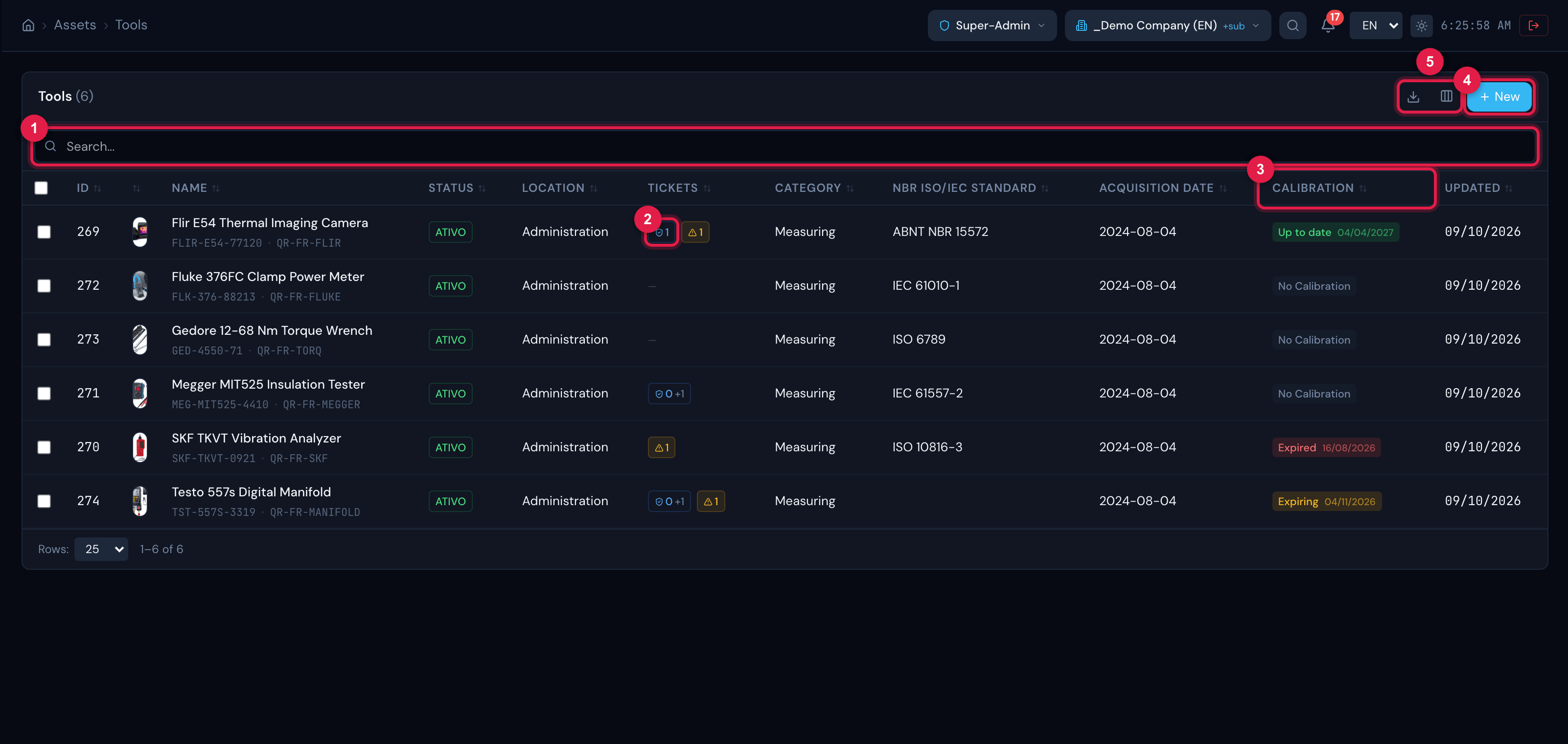
Figure 3. List of Tools: besides the common columns, the Calibration column shows the status of the latest calibration and the date of the next one.
- 1Search (name, serial, tag or notes).
- 2Badges of the Tickets column: preventive (blue) and corrective and others (amber, with ⚠); the number after the + is the open tickets.
- 3Calibration column: Expired, Expiring or Up to date, with the next date.
- 4New button.
- 5Columns and Export icons.
The PPE/CPE list
Section titled “The PPE/CPE list”In PPE/CPE the list gets, at the top, the usage status filters All, 🟢 Available, 🔵 In use, 🔧 Maintenance and ⛔ Discarded, and four columns:
- CA — status of the Certificate of Approval by the CA Expiry: Valid, Expiring (expires within 60 days), Expired, CA no date (has a number, no expiry) or No CA.
- Usage status — Available, In use, Maintenance or Discarded.
- Lifespan — OK, Expiring soon (2 months or less left) or Expired, counted from the Manufacturing date plus the Lifespan (months); without the lifespan, the column shows “—”. A new asset is created with the Manufacturing date equal to the registration date: enter the real date on the record, under Edit (chapter 3).
- Assigned to — who has the PPE.
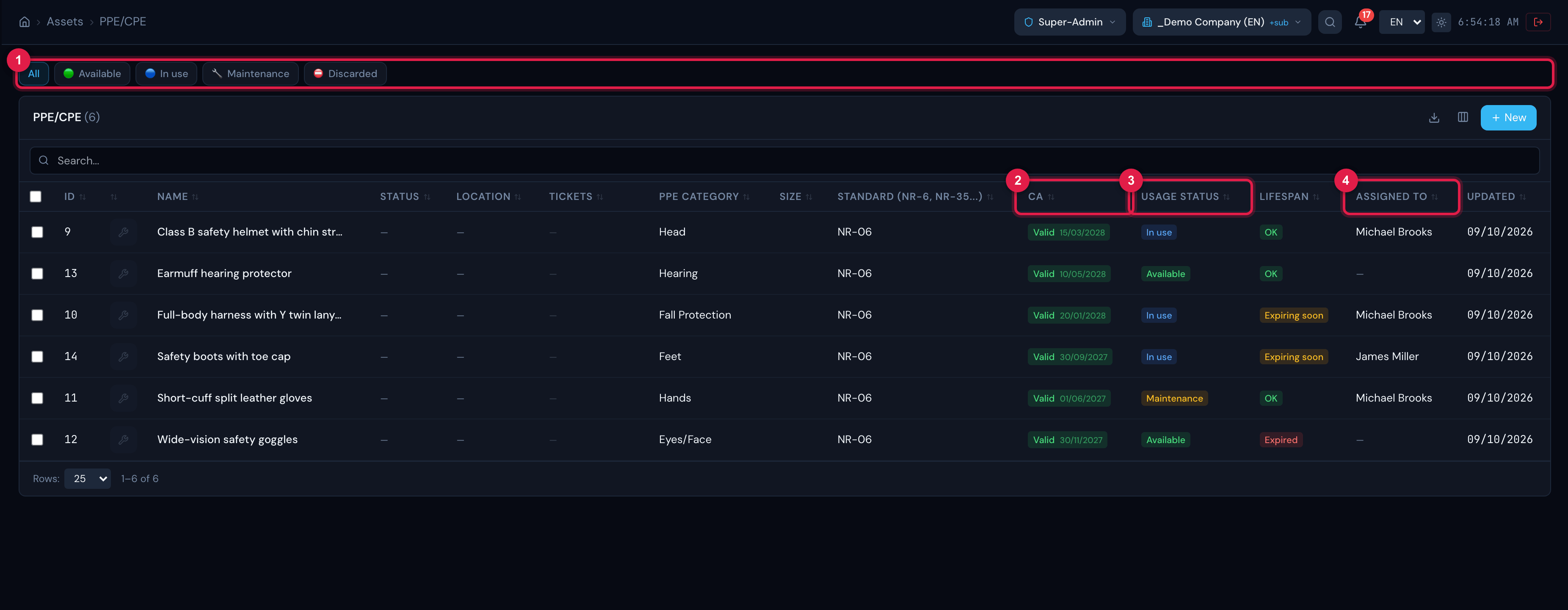
Figure 4. List of PPE/CPE with the usage status filters and the CA, Usage status, Lifespan and Assigned to columns.
- 1Usage status filters (All, Available, In use, Maintenance, Discarded).
- 2CA column with the certificate expiry.
- 3Usage status column.
- 4Assigned to column.
Selecting assets for labels
Section titled “Selecting assets for labels”The first column of the list has checkboxes. When you tick one or more assets, a bar appears at the bottom with the count, the Generate labels button and the X that clears the selection. When the filter has more assets than the page shows, the bar offers Select the N in this filter — at most 200 per batch; above that H2O selects the first 200 and asks you to refine the filter. The label batch is in chapter 10.
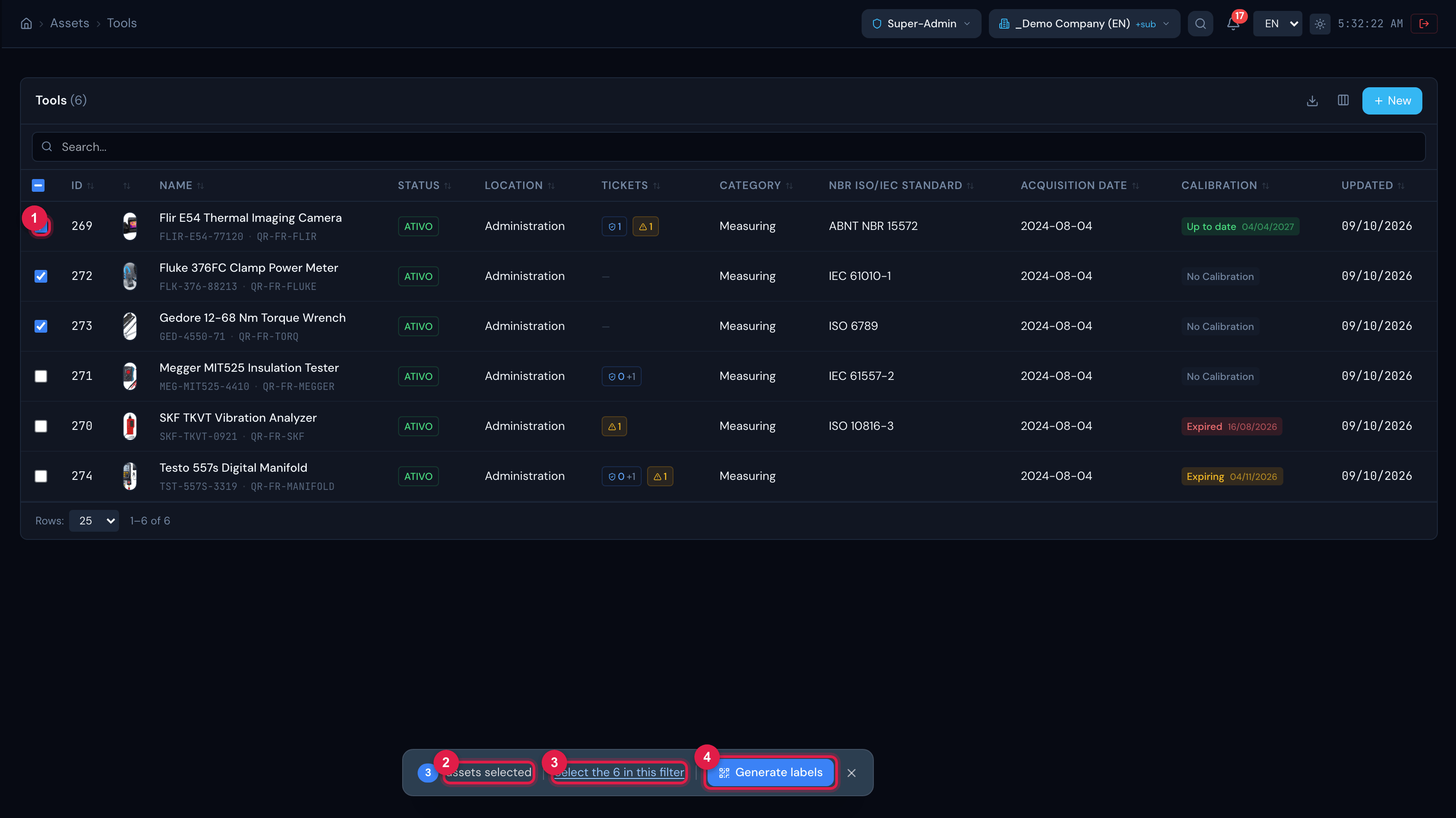
Figure 5. Assets ticked in the list and the selection bar: count, Select the N in this filter and Generate labels.
- 1Checkbox (the one in the header ticks the whole page).
- 2Number selected.
- 3Select the N in this filter (up to 200).
- 4Generate labels.
Was this page helpful?
Thanks for the feedback!
Got it — we will improve this page.