
Registering a user
Manual — Users, groups and profiles · chapter 3 of 12
In People › Users, click New User (the Create level on Users is needed). The form has five parts; fields marked * are required.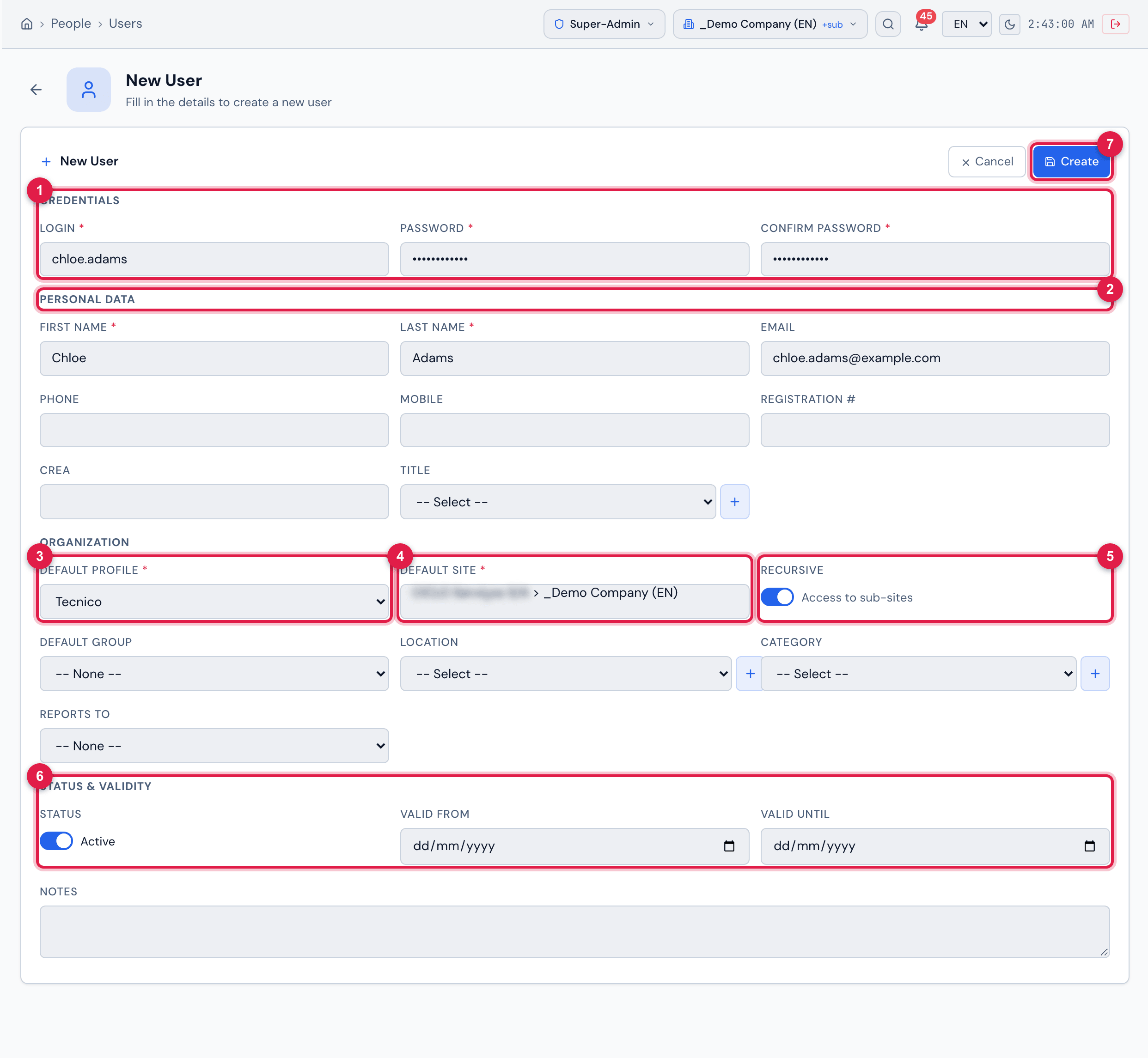
Figure 4. The New User form filled in (not created yet): Credentials, Personal Data, Organization with Default Profile, Default Site and Recursive, Status & Validity and, at the top, Cancel and Create.
- 1Credentials: Login, Password and Confirm Password.
- 2Personal Data: first name, last name, contacts, registration number, CREA and title.
- 3Default Profile — the profile of the first assignment.
- 4Default Site — the site of the first assignment.
- 5Recursive — on (Access to sub-sites), the assignment also applies to the sites below.
- 6Status & Validity — active or not and, if you wish, the period during which the account is valid.
- 7Create.
The fields
Section titled “The fields”| Part | Fields | Rules |
|---|---|---|
| Credentials | Login *, Password *, Confirm Password * | the login cannot repeat another user’s — not even that of a user in the trash. Password of 6 to 128 characters. |
| Personal Data | First Name *, Last Name *, Email, Phone, Mobile, Registration #, CREA, Title | the email cannot be in use by another user. The Title is the person’s job title (with an hourly rate for the labor cost); the + registers a new title right there. |
| Organization | Default Profile *, Default Site *, Recursive, Default Group, Location, Category, Reports to | Default Group, Location and Reports to list what exists on the chosen Default Site. Location and Category have a + for quick registration. |
| Status & Validity | Status, Valid from, Valid until | the user is created Active. The dates are optional (chapter 8). |
| Notes | free text | — |
Click Create. H2O saves the user and opens the user record (chapter 4).
What registration already creates
Section titled “What registration already creates”- The first assignment: Default Profile + Default Site + Recursive. The other assignments are added later, in the Profiles tab (chapter 5).
- Membership of the Default Group, if you chose one: the person is already a member of it.
- The two-factor authentication period starts at the person’s first sign-in: they have 7 days to set up the authenticator app, unless exempt (chapters 6 and 7).
Was this page helpful?
Thanks for the feedback!
Got it — we will improve this page.