
Fill in an FMEA
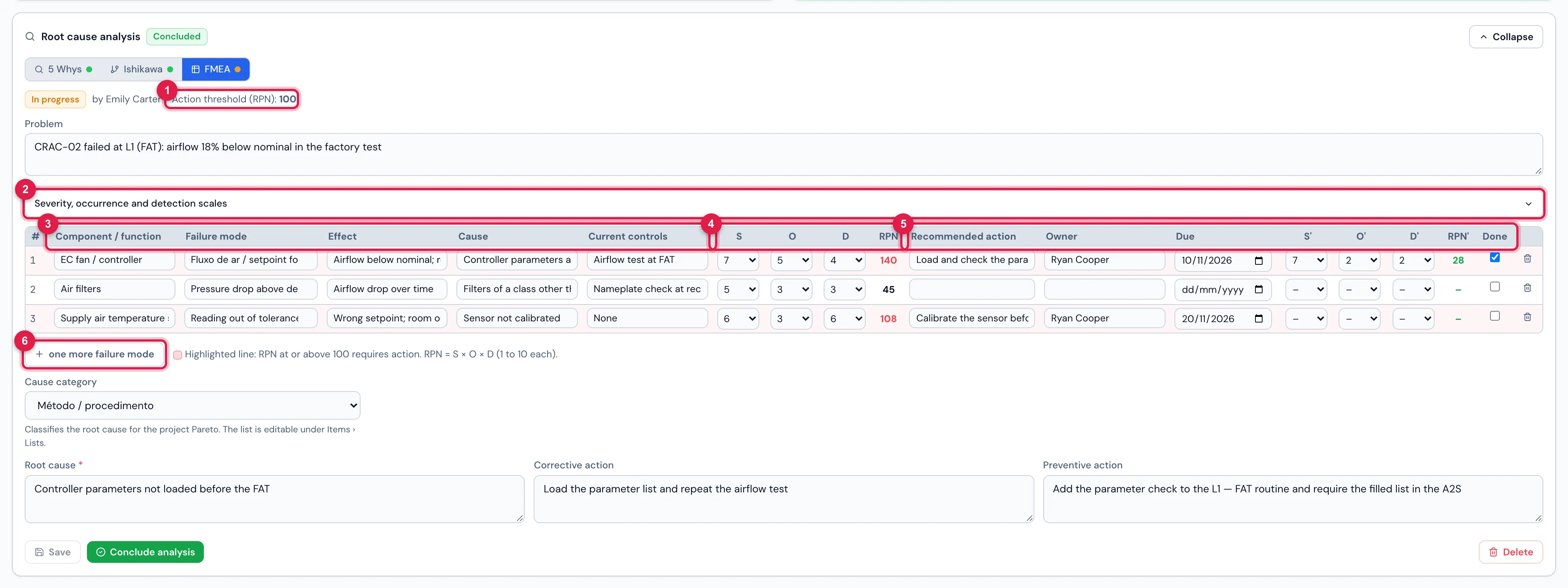
The FMEA is one of the three methods of the Root cause analysis block on the item page (and on the NCR detail). Each line is a failure mode with Severity, Occurrence and Detection from 1 to 10; the RPN = S × O × D says what to treat first.
You need: to be able to edit the item (the Edit right or being the responsible, with the item open). On the NCR, to answer or edit the NCR.
- Open the item, the Root cause analysis block, click FMEA and Start analysis. Rewrite the Problem as an observable fact.
- Click Severity, occurrence and detection scales and keep the panel open: it is the criterion of each score.
- Fill in one line per failure mode: Component / function, Failure mode (the catalog suggests while typing; free text accepted), Effect, Cause and Current controls. Use one more failure mode for the next one.
- Give the scores S (from the effect), O (from the cause) and D (from the controls). The RPN appears on its own; a line with an RPN at or above the Action threshold (RPN) turns red.
- For the red lines, write the Recommended action, the Owner and the Due date.
- Pick the Cause category, write the Root cause, the Corrective action and the Preventive action; Save and Conclude analysis.
- After the action: Reopen, give S′ O′ D′ (the RPN′ is computed), mark Done and Conclude analysis again.
See also: FMEA in practice in the manual — the three scales criterion by criterion, a scored example, the threshold, the re-evaluation and the meeting script.
Was this page helpful?
Thanks for the feedback!
Got it — we will improve this page.