
Invoice documents
Manual — NF-e and material receiving · chapter 6 of 11
The Documents tab keeps the receiving papers, in three columns: NF-e Photos (the DANFE), Order Photos (the purchase order or the supply order) and Quality Certificates (test reports, test, calibration or conformity certificates). All three go into the inspection PDF, each in its own section.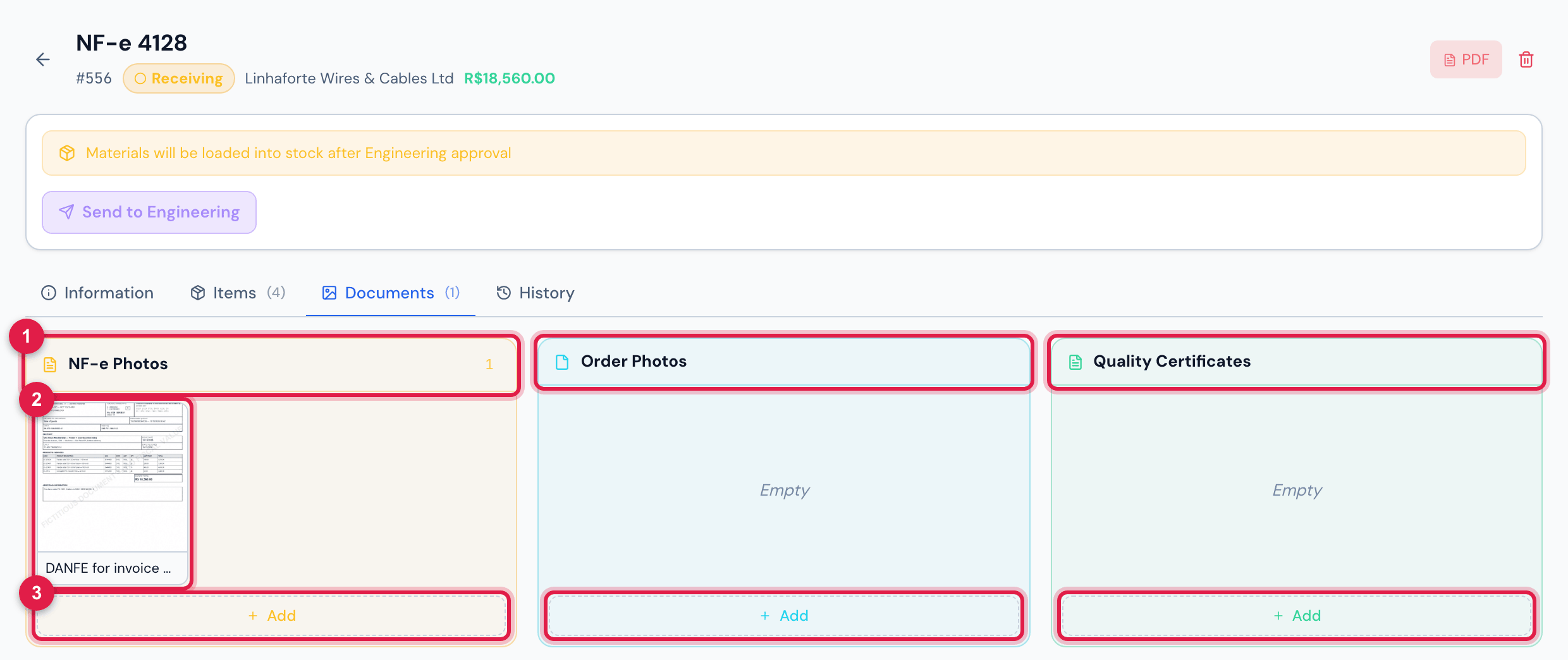
Figure 9. The Documents tab of invoice 4128, Receiving: the DANFE attached and the Add of each column.
- 1NF-e Photos, Order Photos and Quality Certificates — the number beside the name counts the column’s documents (it shows only when there is at least one).
- 2A document: click to enlarge the image or open the PDF (the PDF shows its first page as a thumbnail).
- 3Add — one file at a time, image or PDF.
Attaching and removing
Section titled “Attaching and removing”- Add, at the foot of each column, opens the file picker: an image (JPEG, PNG, WEBP, GIF) or a PDF. Document added appears.
- To remove a wrong document, hover over it and click the X: the question is Delete this document?, and then Document removed.
- A column with nothing shows Empty. The tab counts the documents, and the invoice list shows the same number in the Docs column.
- From the app, the documents can be scanned: the scanner straightens the sheet and crops the edges, and each page becomes an image on this tab (chapter 10).
| Action | Right | Until |
|---|---|---|
| Add | Edit | Awaiting Engineering |
| remove (X) | Trash | Awaiting Engineering |
| view and open | Read | always |
Was this page helpful?
Thanks for the feedback!
Got it — we will improve this page.