
PMOC: concepts and legal basis
Manual — PMOC · chapter 1 of 10
The PMOC — Maintenance, Operation and Control Plan (Plano de Manutenção, Operação e Controle) — is the document that Brazilian law requires of every building of public and collective use with air conditioning: who the technical manager is, which rooms are air-conditioned, which equipment serves each room, which maintenance activities are carried out and how often, and the proof that they were done. It is what the health surveillance authority asks for at an inspection and what the building manager, the facilities manager or the contracting party demands from the maintenance company.In H2O, the PMOC is a module of its own (Operations › PMOC) that ties together what the company already has in the system — the site, the HVAC assets, the site’s ART document (technical responsibility record), the task templates, Automatic Scheduling and the tickets with checklist and photos — and generates the PDF document with the seven sections an inspector expects.
What the law requires
Section titled “What the law requires”| Regulation | What it asks for | Where H2O answers it |
|---|---|---|
| Brazilian Law 13,589/2018 | every building of public and collective use with artificially air-conditioned rooms must have a PMOC for its air-conditioning systems, to eliminate or reduce health risks to the occupants | one PMOC per building, with the building, the owner, the technical manager and the validity (chapters 3 and 4) |
| MS Ordinance 3,523/1998 (Annex I) | the technical regulation of the Law: a qualified technical manager, the plan of maintenance activities with the periodicity of each one (filters, trays, coils, fans, ducts…) and the record of the executions | the 15 default activities with the periodicity of the Ordinance (chapter 6), the schedule (chapter 7) and the record of the executions with evidence (chapter 8) |
| ANVISA RE 09/2003 | reference standards of indoor air quality in air-conditioned rooms of public and collective use — outdoor air per person, temperature, humidity, CO₂, airborne particles and fungi — and the periodic assessment | the Air renewal of each room (chapter 5) and activities A10 and A11 (chapter 6) |
| ABNT NBR 16401 | the Brazilian standard for the design and performance of air-conditioning installations (comfort and indoor air quality parameters) | reference quoted in the PDF header; the activities and periodicities can be adjusted by the company (chapter 6) |
How H2O answers it
Section titled “How H2O answers it”| Part of the PMOC | Where it comes from in H2O | Chapter |
|---|---|---|
| Building | the site of the PMOC: one active PMOC per site, with name, use, address, areas and occupancy | 3 |
| Technical manager and ART | free text (or pulled from an H2O user) and the site’s legal document of the ART type, with the ART number | 4 |
| Air-conditioned rooms | registered in the PMOC, with floor, area, occupancy, air renewal and the equipment serving them | 5 |
| Equipment | the assets of the HVAC family of the site (and of the sites below it), with TR/BTU capacity, refrigerant and charge | 5 |
| Activities and periodicity | the 15 of Ordinance 3,523/98 + RE 09/2003, created in one click, or your own; each one with a task template | 6 |
| Schedule | an Automatic Scheduling schedule of the site, “PMOC · PMOC name”, with one item per equipment × activity, which generates the preventive tickets on the calendar | 7 |
| Record of the executions | the tickets of the schedule: technician, due and executed dates, status, checklist photos and attachments | 8 |
| The document | PMOC PDF — seven sections, with photo thumbnails and the signature fields | 9 |
The concepts
Section titled “The concepts”| Concept | What it means |
|---|---|
| PMOC | the plan of one building. It has a site (the building), a status — Draft, Active or Archived — and a validity (start and end). |
| Building site | the H2O site that represents the building (manual Companies and hierarchy, chapter 1). Only people who see that site see the PMOC. The equipment comes from it and from the sites below it. |
| One active per site | each site has at most one Active PMOC. Activating another one archives the previous one and closes its schedule (chapter 7). |
| Room | an air-conditioned space of the building (an office, a floor, a data center…), with the equipment serving it. It belongs to the PMOC — it is not the asset’s Location. |
| Equipment | an asset of the HVAC family. All the ones of the site enter the inventory, with or without a room. |
| Activity | a maintenance task of the plan: code (A01…), name, periodicity in days, which equipment it applies to, the task template and the legal reference. |
| Task template | the checklist the technician answers at each execution (manual Task templates). The effective periodicity in the schedule is the template’s. |
| Schedule | the Automatic Scheduling schedule generated by the PMOC (manual Automatic Scheduling): one item per equipment × activity; the preventive tickets come from it. |
| Execution | a preventive ticket of the schedule, with a Due date, an Executed date, technician, status and evidence (checklist photos and attachments). Still open after the due date, it is overdue. |
Who does what
Section titled “Who does what”| Role | What they do in the PMOC |
|---|---|
| facilities manager / building manager / contracting party | creates the PMOC, registers the building and the owner, follows the Execution tab and keeps the PMOC PDF |
| technical manager (engineer) | answers for the plan: checks the rooms and the inventory, defines the activities and periodicities, attaches the ART, activates the PMOC and signs the document |
| HVAC technician | executes the preventive tickets in the app, answers the checklist and takes the photos (before/after in the cleanings) |
| whoever answers to the inspector | hands over the PMOC PDF of the requested period, with the executions, the pending items and the signatures |
Access rights
Section titled “Access rights”The PMOC has no right of its own in the profile. It uses two rights that already exist (People › Profiles › profile › Permissions):
| To… | You need |
|---|---|
| see the menu, the list, the page, the tabs and the PMOC PDF | Read on the Tickets row (group Operations) or Read on the Maintenance plans row (group Planning) |
| New PMOC | Create on the Maintenance plans row |
| Save the building, the technical manager, the ART and the validity; rooms; activities; Create default activities; Activate PMOC; Archive; Generate schedule | Edit on the Maintenance plans row |
| Delete the PMOC | Trash on the Maintenance plans row |
Where to find it
Section titled “Where to find it”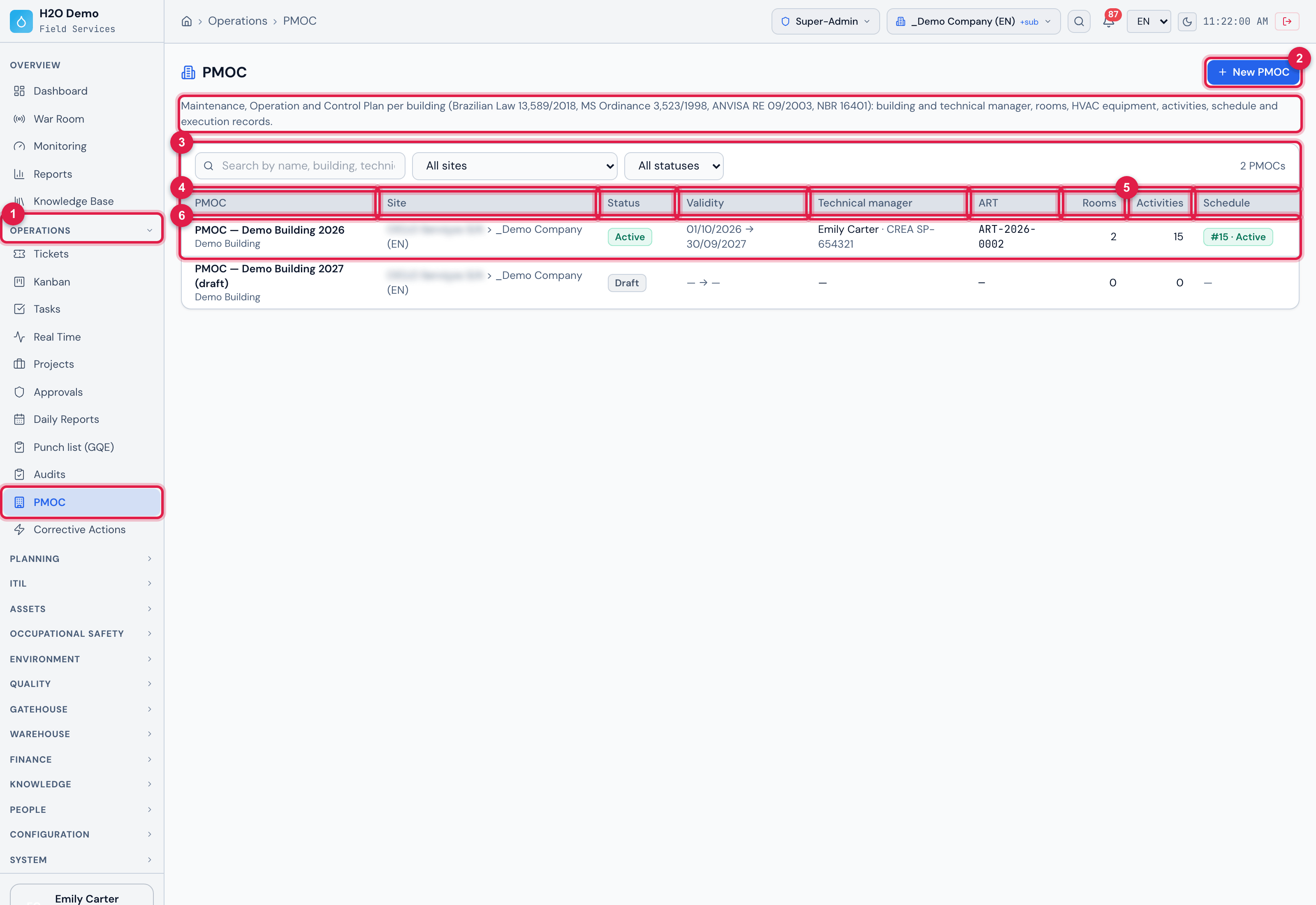
Figure 1. Operations › PMOC: the list of the PMOCs of the sites you see — here the active PMOC of the Demo Building and the 2027 draft.
- 1The Operations › PMOC menu and, below the title, the introduction text with the legal basis.
- 2New PMOC (only with Create in Maintenance plans).
- 3The search Search by name, building, technical manager or ART…, the filters All sites and All statuses (Active, Draft, Archived) and the counter {n} PMOCs.
- 4The columns PMOC (with the building below), Site, Status, Validity, Technical manager (name, council and registration) and ART (the number, or the document name).
- 5The columns Rooms, Activities and Schedule — the schedule number and its status (Active, Paused, Finished, Cancelled).
- 6The row: click anywhere to open the page. Active ones come first, then drafts, then archived ones.
| Where | What you do there | Chapter |
|---|---|---|
| Operations › PMOC | the list, the search, the filters and New PMOC | 1 and 3 |
| PMOC page (click a row) › Building tab | building, owner, technical manager, ART, validity and calendar | 3 and 4 |
| Rooms and Equipment tabs | the air-conditioned rooms and the inventory | 5 |
| Activities tab | the activities of the plan and the task templates | 6 |
| Schedule tab and the Activate PMOC / Archive / Delete buttons | generate and follow the schedule; the PMOC life cycle | 7 |
| Execution tab | the preventive tickets of the period, with evidence | 8 |
| PMOC PDF button | the document | 9 |
| People › Profiles › profile › Permissions | the rights (Tickets and Maintenance plans rows) | 1 |
Was this page helpful?
Thanks for the feedback!
Got it — we will improve this page.