
Following up: matrix, warning and PDF
Manual — Commissioning · chapter 6 of 10
The Commissioning tab of the project is the commissioning dashboard: at a glance, which assets were approved in which phases, what is in progress, what failed and what does not even have a ticket yet.The assets × phases matrix
Section titled “The assets × phases matrix”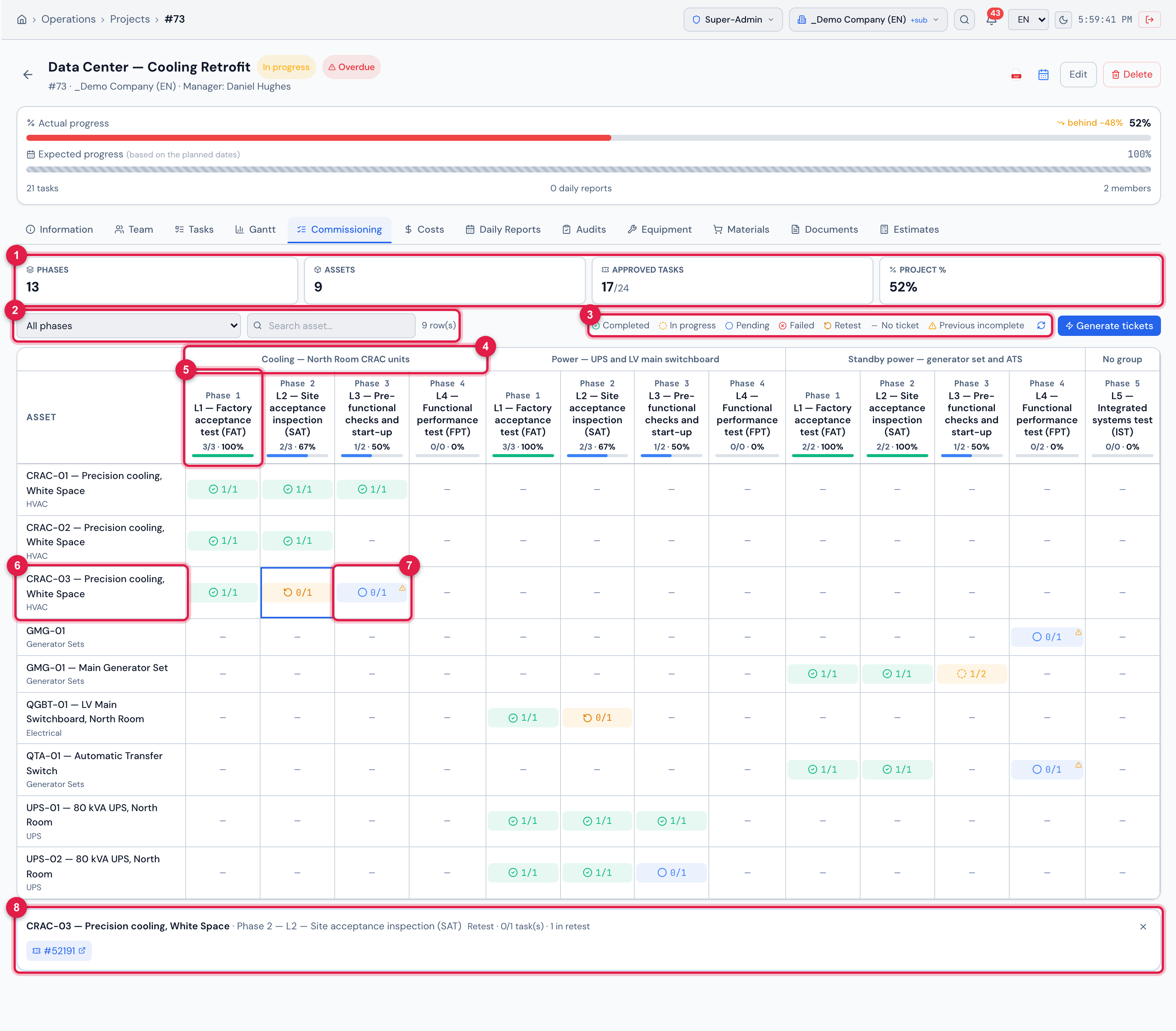
Figure 14. The matrix of Data Center — Cooling Retrofit: L1 completed in every asset that has it (CRAC-02’s after an approved retest), CRAC-03 in Retest in L2 and with the previous-phase-incomplete warning in L3, pending cells, the L4 of the standby power already with its ticket (chapter 4) and the other L4 phases and L5 still without tickets. Below, the tickets of the chosen cell.
- 1Cards: Phases, Assets, Approved tasks (approved / total) and Project %.
- 2All phases and Search asset… — filter the matrix; next to them, how many rows.
- 3The legend of the states and of Previous incomplete; Reload.
- 4The system (parent task) above its phases.
- 5The phase column: Phase N, the name, approved/total and the phase %.
- 6The asset and, below it, its type in the screen language — click the name to open its page.
- 7The cell: the status and approved/total of this asset in this phase. The triangle in the corner = previous phase incomplete.
- 8The tickets of the chosen cell — click to open.
| Cell status | When |
|---|---|
| Failed (✘ red) | there is a failed task without a retest task. In practice it almost never appears: the failure creates the retest at the same moment, the failed task leaves the count (the retest is what counts) and the cell goes straight to Retest. It only turns red if the retest does not exist — for example, if the retest task was deleted. |
| Retest (↻ amber) | there is a retest task not approved yet (the normal case after a failure) or a task marked as Retest. |
| Completed (✔ green) | all the tasks of this asset in this phase are approved. |
| In progress (◐ amber) | part approved, part not. |
| Pending (○ blue) | there is a ticket, no task approved yet. |
| No ticket (—) | the asset has no ticket in this phase. Click to generate one (chapter 4). |
- The status follows the order of the table: a cell with an open failure shows as Failed or Retest even if the other tasks are approved — never as completed. When the retest passes, the failure is cleared and the cell follows the other tasks.
- The rows are the assets already in some ticket of the phases. An asset of the site that has not entered any ticket yet has no row: it appears in the Generate tickets panel.
- After the retest is created, the failure is still recorded: in the Failed badge of the task in the ticket (chapter 5), in the GQE item (chapter 7), in the asset dossier as “superseded by retest” (chapter 8) and, in the app, under Superseded by retest (chapter 9).
- Tasks without an asset go into a (no asset) row at the end.
- A cancelled ticket (Cancel ticket button, with a reason) leaves commissioning, like a deleted ticket: its tasks no longer count in the phase %, in the matrix cell, in the pending items of the Gantt PDF and in the Commissioning tab of the asset, on the web and in the app. The phase can reach 100% without it. And, since the asset is no longer in the phase, Generate tickets offers it again for that phase.
- The matrix has no row limit and the first column stays fixed when scrolling sideways. The % in the header is that of the whole phase — all the assets and also the tasks without an asset.
- Clicking a cell with a ticket opens the list of tickets below (#number); clicking again closes it.
The previous-phase-incomplete warning
Section titled “The previous-phase-incomplete warning”When an asset has a ticket in a phase and is not fully approved in an earlier phase of the same system, the cell gets an amber triangle and the tooltip says which phases are missing: Previous incomplete: L2 — Site acceptance inspection (SAT). The same warning appears in the Generate tickets panel, in the Commissioning tab of the asset and in the dossier.
- “Previous” is by the Order of the level (chapter 2) and only between phases with the same parent task. Phases of different systems do not warn each other.
- An earlier phase in which the asset has no ticket at all also counts as incomplete. If your process skips L1 for certain equipment, do not create L1 in that system, or accept the warning.
In the Gantt PDF
Section titled “In the Gantt PDF”The Gantt PDF of the project (Generate Gantt PDF icon on the project page, or Gantt PDF in the list — the Projects manual, chapter 4) gets the Commissioning — assets × phases section whenever the project has a phase. It brings three blocks:
| Block | What it brings |
|---|---|
| Commissioning — assets × phases matrix | the same matrix as on screen, with the type of each asset and the status of each cell. Many assets break into pages (the header repeats); many phases become column bands (“columns 1 of 2”). |
| Commissioning — summary by phase | per phase: group, tickets, approved/total tasks, % and status. |
| Commissioning — open items | phase → asset → ticket and task not approved yet (to do, failed or in retest). Each phase title starts with the system — Cooling — North Room CRAC units › PHASE 2 — L2 — Site acceptance test (SAT) —, because phases of different systems have the same name. |
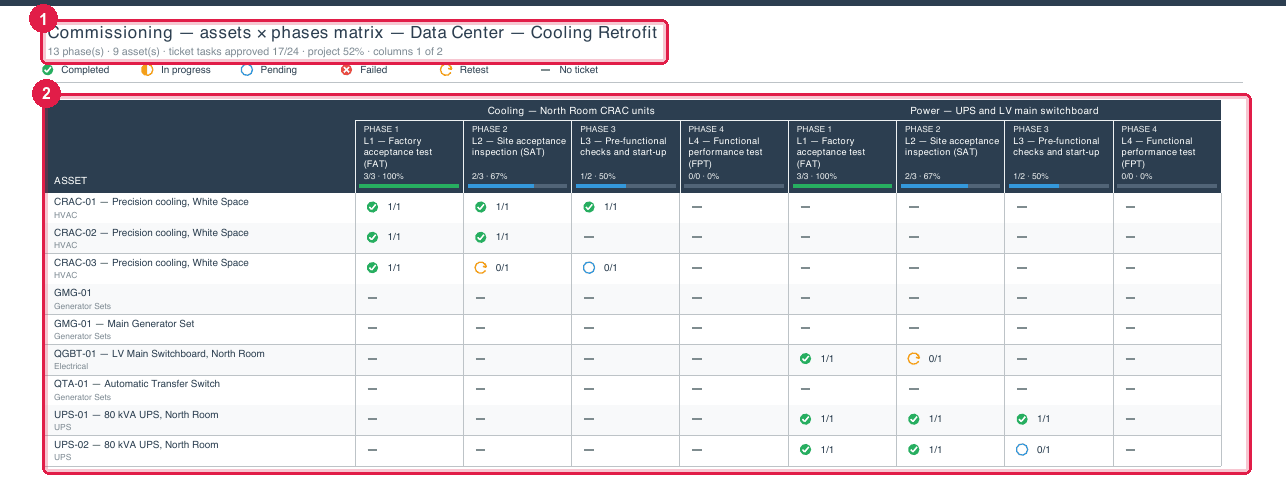
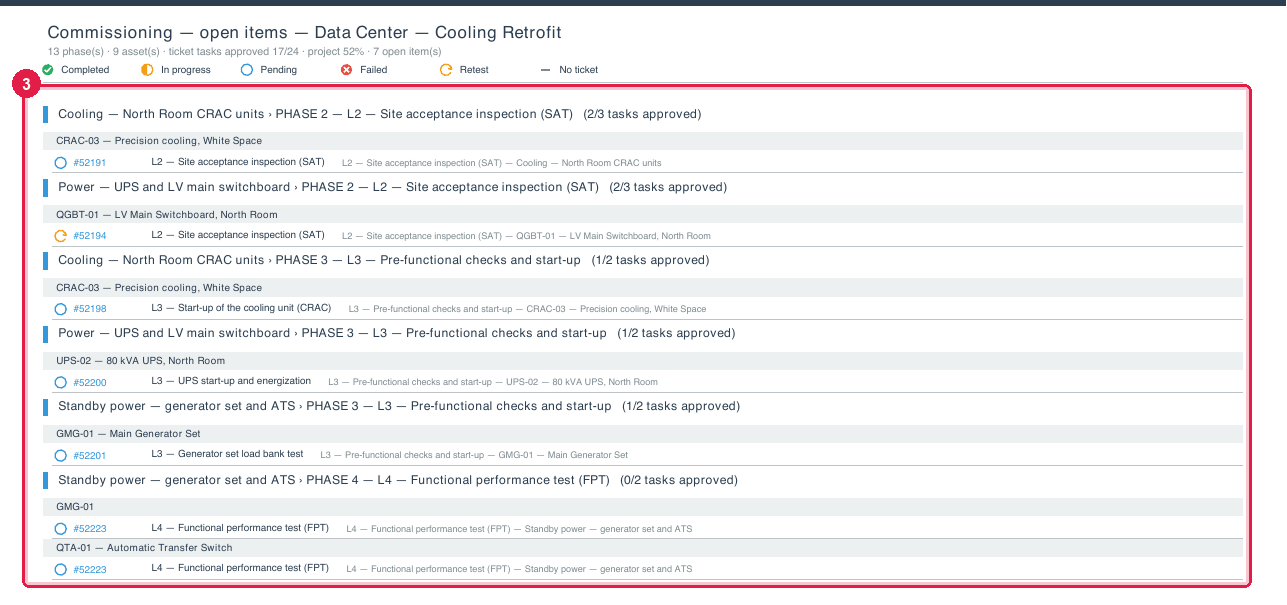
Figure 15. Two pages of the commissioning section of the Gantt PDF of Data Center — Cooling Retrofit: the assets × phases matrix and the list of open items.
- 1The section title and the summary (phases, assets, tasks, project %).
- 2The matrix, with the status of each asset in each phase.
- 3The open items, by system and phase and by asset, with the ticket.
It is the document for the weekly commissioning meeting: what is approved, what is missing and what failed, without anyone having to log into the system.
Was this page helpful?
Thanks for the feedback!
Got it — we will improve this page.