
Prerequisites: assets, ART and calendar
Manual — PMOC · chapter 2 of 10
The PMOC does not register equipment, documents or calendars: it reads what the site already has. Before creating the PMOC, check four things at the building site.| What | Where it is registered | What the PMOC uses it for |
|---|---|---|
| the HVAC assets of the building | Assets › HVAC (manual Assets, chapter 3) | the inventory (Equipment tab), the equipment of each room and the schedule items |
| the site’s ART document | site page › Documents tab (manual Companies and hierarchy, chapter 6) | the Site legal document (ART type) selector of the Building tab |
| a calendar of working days | Locations and calendars (manual Locations and calendars, chapter 8) | placing the preventive tickets on working days |
| the task templates of the activities | the PMOC itself creates them — PMOC · A01 · … — when an activity is saved without a template (chapter 6) | the checklist of each ticket and the effective periodicity |
The HVAC assets
Section titled “The HVAC assets”Only the assets of the HVAC family whose site is the PMOC site or a site below it enter the PMOC. A chiller registered at the parent company does not appear in the PMOC of a branch; a split unit registered at a sub-site of the building does. If the building has equipment at another site, move it or create the PMOC at the right site.
The inventory and the PDF show, for each piece of equipment, whatever is filled in on the asset page: type, model and manufacturer, Capacity (TR) and Capacity (BTU/h), Refrigerant and Refrigerant charge (kg), the Installation date, the serial number and the location. None of this is required to generate the PMOC — but it is what the inspector reads.
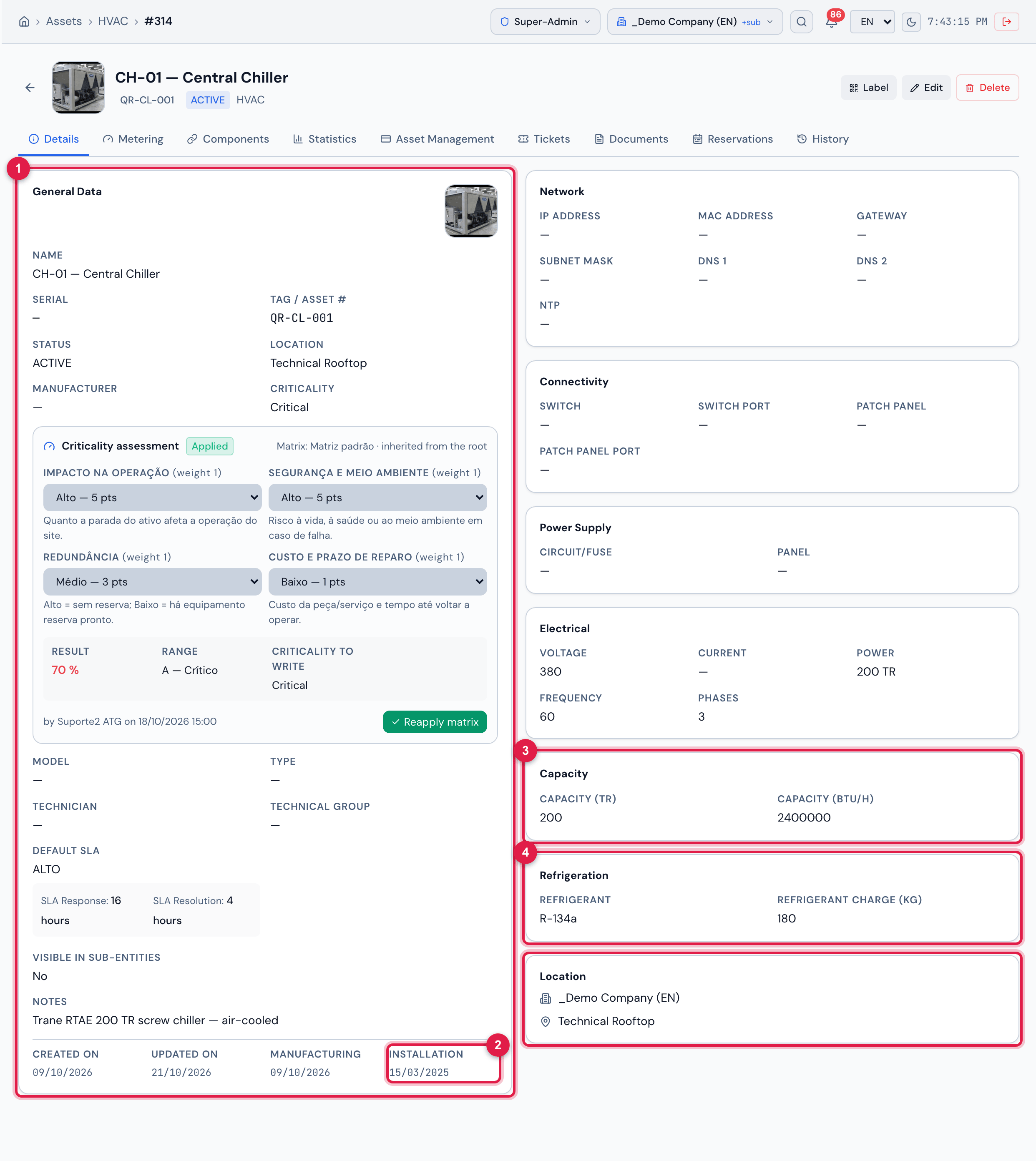
Figure 2. The page of the chiller CH-01 — Central Chiller (Assets › HVAC), Details tab: the fields the PMOC takes to the inventory.
- 1The General Data card: the name, type, model, manufacturer, site and location of the asset — the site decides which PMOC it enters.
- 2The Installation date.
- 3The Capacity section: Capacity (TR) and Capacity (BTU/h) — in the PMOC it appears as “200 TR · 2,400,000 BTU/h”.
- 4The Refrigeration section: Refrigerant and Refrigerant charge (kg) — in the PMOC, “R-134a · 180 kg”.
The site’s ART document
Section titled “The site’s ART document”The ART (Anotação de Responsabilidade Técnica, the technical responsibility record) is a legal document of the site: attach the ART PDF on the site page, Documents tab, with the Type ART / TRT. In that selector the PMOC lists the documents of that type of the site itself and those of the sites above marked as Visible in sub-sites (recursive) — these appear with the inherited mark.
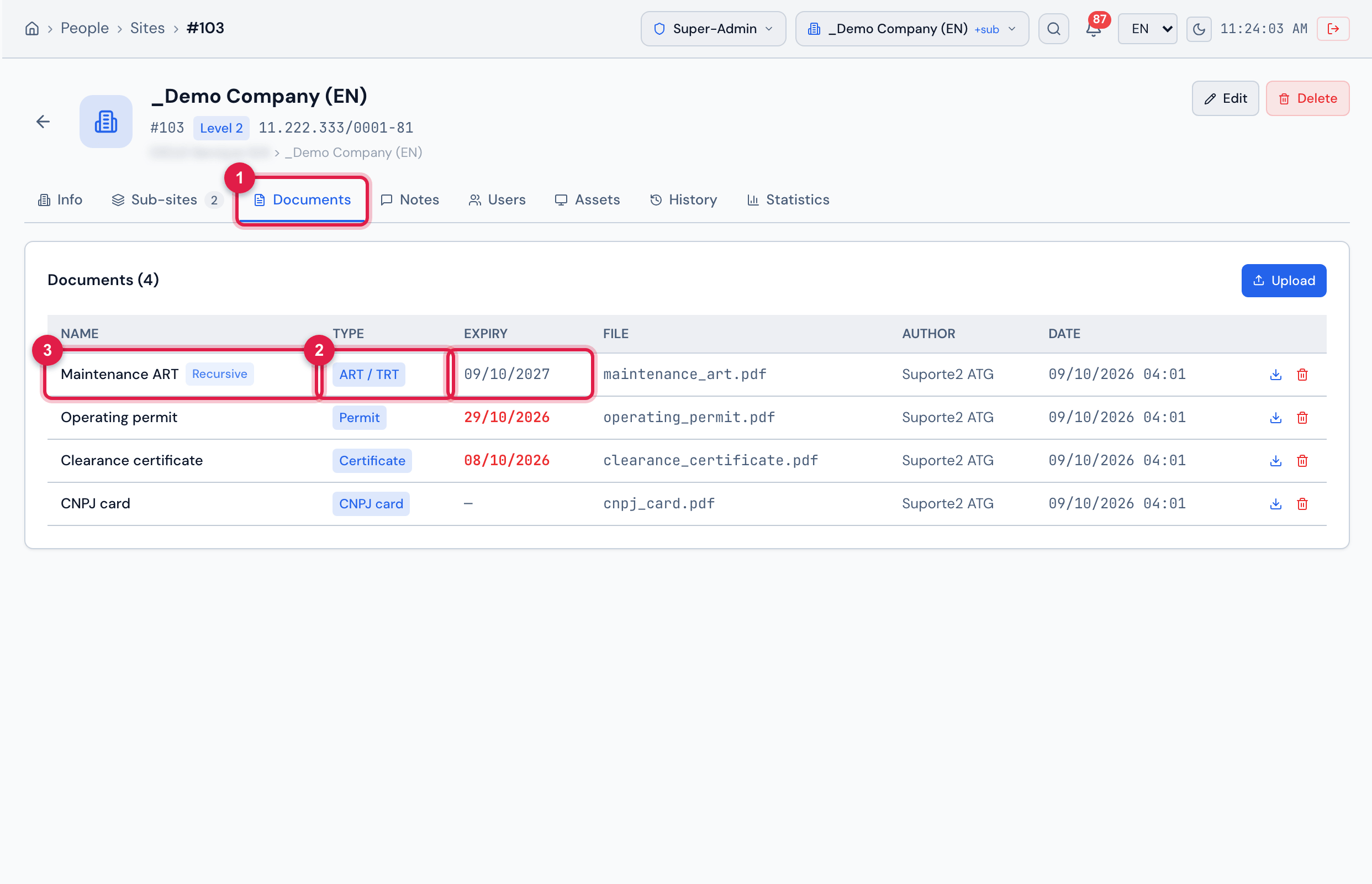
Figure 3. The page of the site _Demo Company (EN), Documents tab: the document Maintenance ART, of the ART / TRT type.
- 1The Documents tab of the site page.
- 2The document of the ART / TRT type — this is the type the PMOC looks for.
- 3The Name of the document and the Expiry — both appear in the PMOC selector and in the PDF.
A document uploaded at a site above with Visible in sub-sites (recursive) checked appears in the PMOCs of the sites below with the inherited mark — useful when the ART covers several buildings of the same company.
The calendar
Section titled “The calendar”The PMOC schedule places the tickets on the working days of a calendar. The order of choice: the Schedule calendar set on the Building tab; otherwise, the first calendar of the site or of the sites above; otherwise, the first calendar registered in the company. Without any calendar, the generation stops with the warning No calendar registered: the schedule needs a calendar (Planning › Automatic Scheduling). Nothing was generated.
How to register one and what the calendar does with holidays and weekends: manual Automatic Scheduling, chapter 2.
The task templates
Section titled “The task templates”Each PMOC activity needs a task template — it is what becomes the ticket checklist and what dictates the periodicity in the schedule. You do not need to create them beforehand: when an activity is saved without a template, H2O creates a template named PMOC · <code> · <name> with the activity periodicity, and Create default activities does that for the 15 at once (chapter 6). If the company already has its own HVAC templates, choose them in the activity’s Task template field.
What a template is, checklist items, required photo and periodicity: manual Task templates, chapter 3.
Was this page helpful?
Thanks for the feedback!
Got it — we will improve this page.