
CIPA — committee, election, minutes and harassment
Manual — Occupational Safety · chapter 7 of 13
The Occupational Safety › CIPA page manages the CIPA — Internal Accident and Harassment Prevention Committee (NR-05, the Brazilian regulatory standard on the committee) by project or establishment: sizing, election process, members and term, job stability, meetings with signed minutes, the requirements of Law 14.457/2022 (the Brazilian law on harassment prevention) and the documents. When the project does not reach the minimum headcount, register a Designated representative instead of the committee (“Designated representative” type).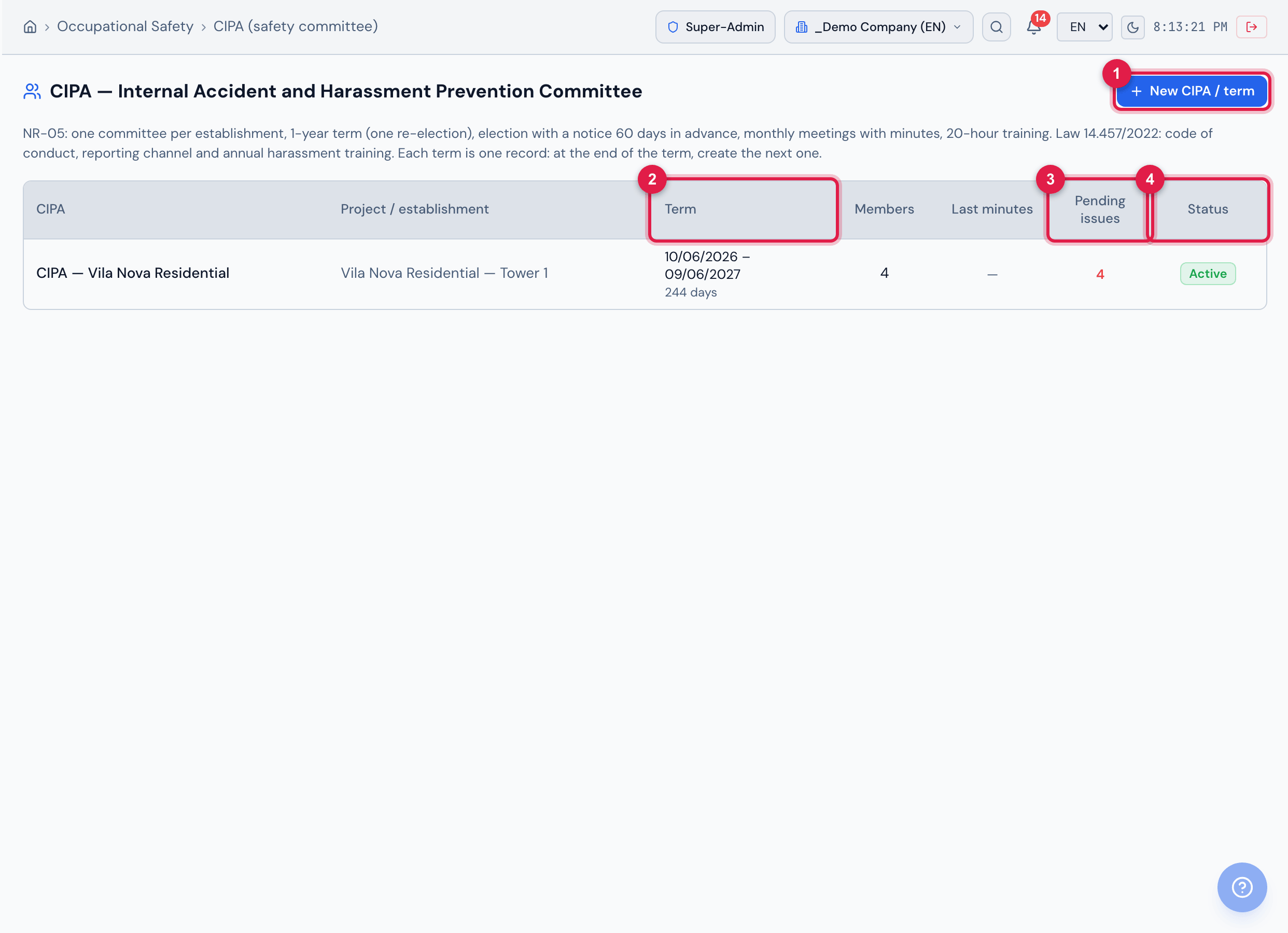
Figure 57. List of CIPAs, with the summary of NR-05 and Law 14.457 at the top: columns CIPA, Project / establishment, Term (dates and days left), Members, Last minutes, Pending issues and Status (Being formed, Active, Ended). In the example, “CIPA — Vila Nova Residential”: 4 members, no minutes, 4 pending issues, Active.
- 1New CIPA / term.
- 2Term: 10/06/2026 – 09/06/2027, 244 days left (turns amber at 60 days).
- 3Pending issues calculated by the compliance check (4, in red).
- 4Status (Active).
- Click New CIPA / term: name (e.g., “CIPA — Residencial Vila Nova”), type (CIPA or Designated representative), project, term start (if left empty, the end is calculated as +1 year − 1 day). Save.
- On the Details and election tab, enter the sizing (Table I): how many full members and alternates on each side — H2O does not encode the NR table; you enter the Table I number for the risk level and the project headcount. Record the dates of the election process (election notice, registration, voting, voters/votes cast, inauguration) and the meeting calendar.
- On the Members tab, add the members of both sides (Employer, designated / Employees, elected), with position, votes, 20-hour training and, for the elected members, the job stability (up to 1 year after the end of the term).
- Every month, on the Meetings / minutes tab, record the regular meeting and sign the minutes as President and as Secretary.
- On the Harassment tab, record the code of conduct, the reporting channel and the last training (every 12 months).
- In Documents, attach the election minutes, inauguration minutes, annual calendar, risk map, training certificates and code of conduct.
Details, election and compliance
Section titled “Details, election and compliance”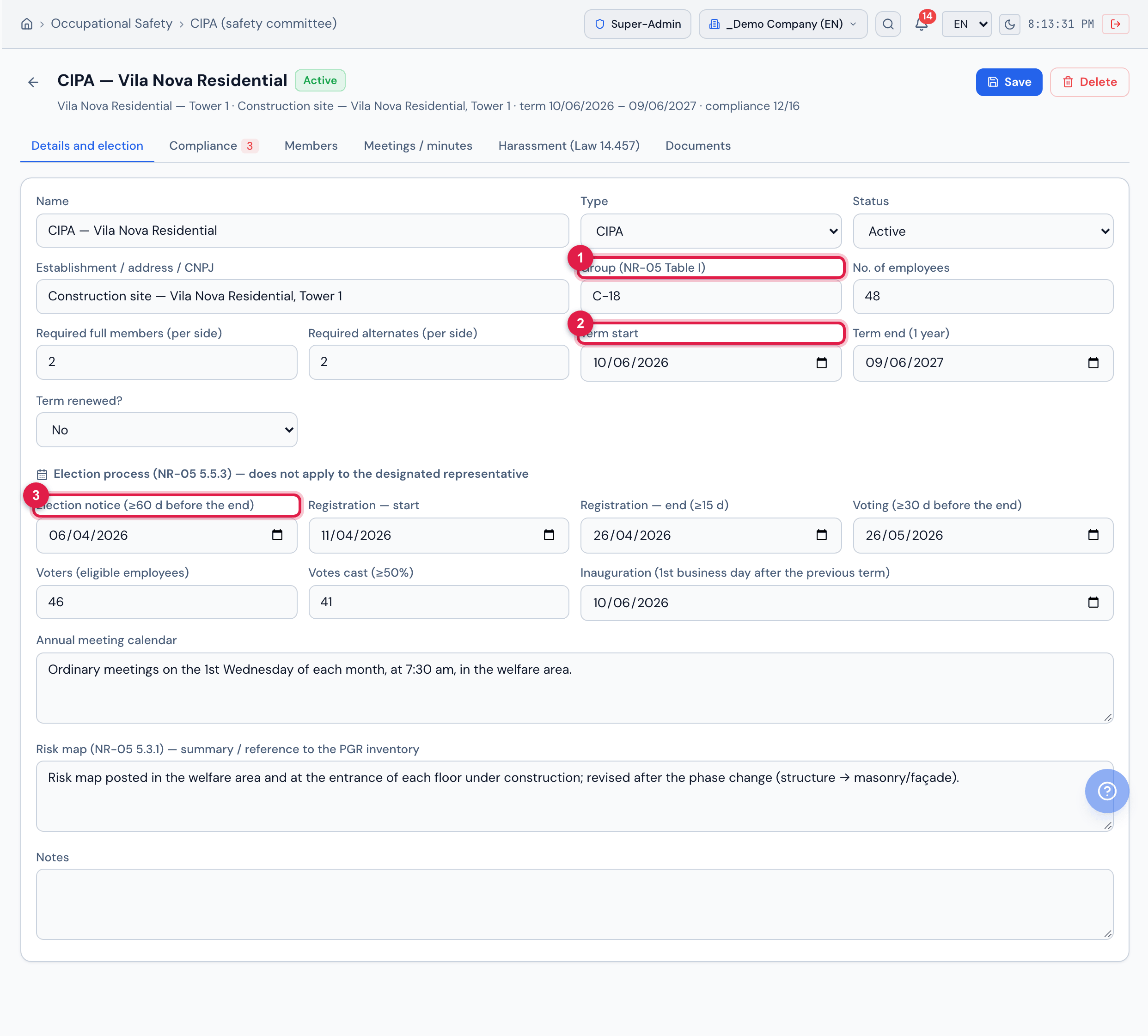
Figure 58. Details and election tab: Name, Type (CIPA), Status, Establishment / address / CNPJ, Group (NR-05 Table I), No. of employees, Required full members and alternates per side, Term start and end, “Term renewed?”; below, the Election process (NR-05 5.5.3), the Annual meeting calendar, the Risk map and Notes. The header shows “compliance 12/16”.
- 1Group (NR-05 Table I) (C-18) — together with the No. of employees, it sets the full members/alternates required per side (2 + 2).
- 2Term start (10/06/2026); next to it, Term end (1 year).
- 3Election process: Election notice (≥60 d before the end); then Registration, Voting, Voters and Votes cast, Inauguration.
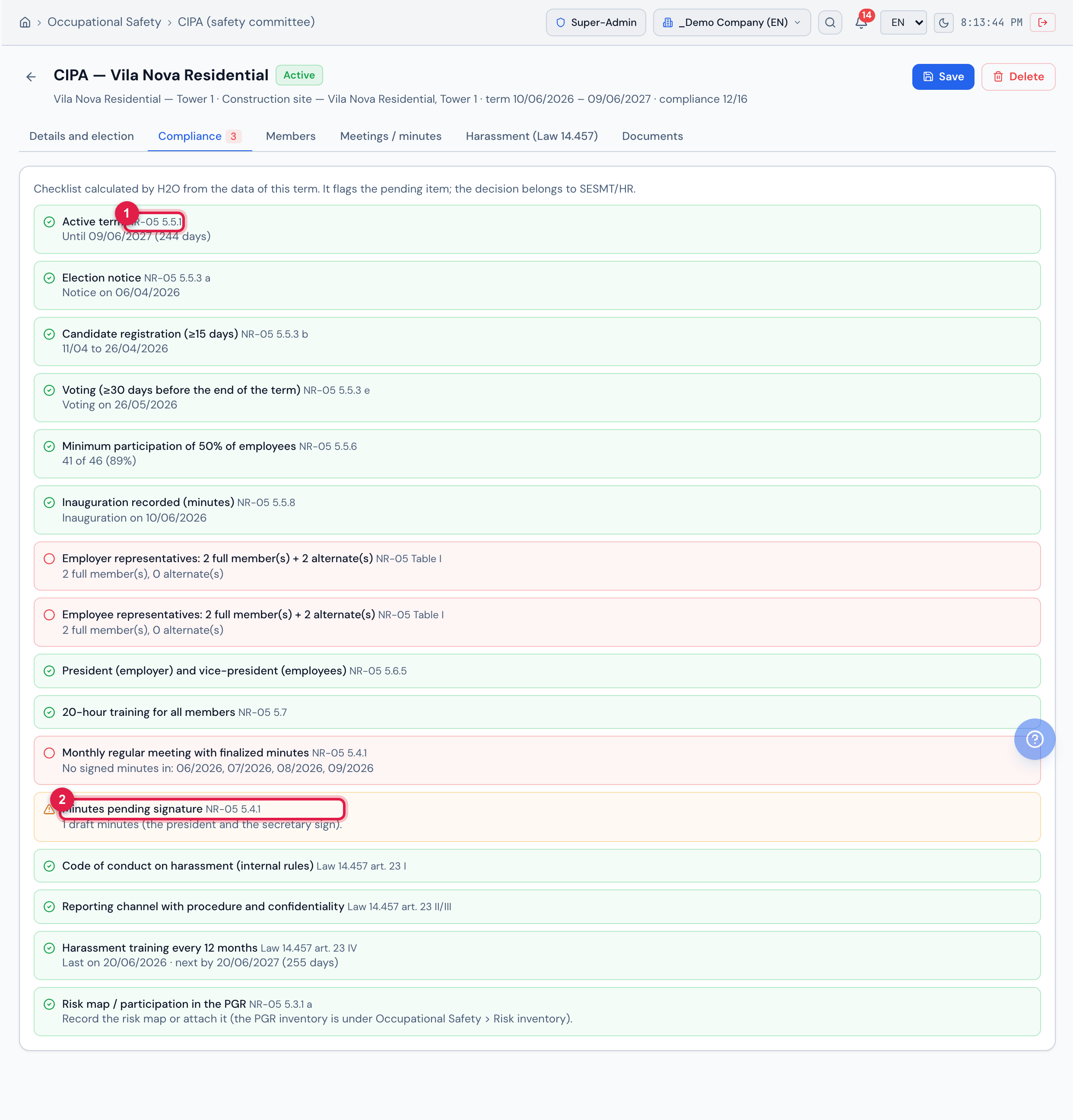
Figure 59. Compliance (3) tab: checklist calculated by H2O from the term data — each item with its legal basis (NR-05 / Law 14.457) and status: green ok, red pending (no alternates in the committee, months without signed minutes), amber attention (minutes in draft).
- 1Legal basis of each item (here NR-05 5.5.1, on the Active term item — until 09/06/2027).
- 2Item needing attention: Minutes pending signature (NR-05 5.4.1) — 1 set of minutes in draft waiting for the president and the secretary.
Members
Section titled “Members”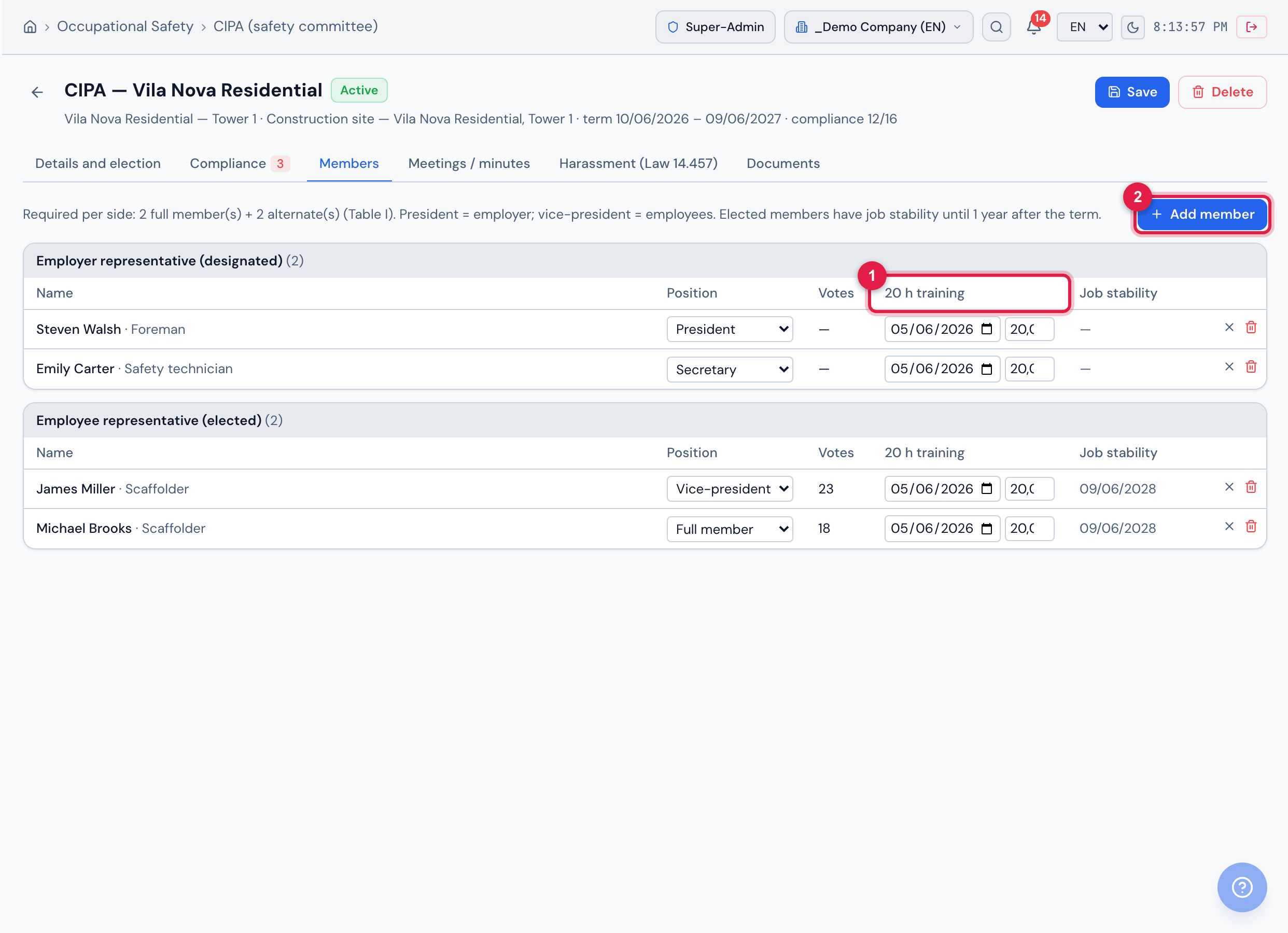
Figure 60. Members tab: two panels — Employer representative (designated) and Employee representative (elected) — with Name and job role, Position (President, Secretary, Vice-president, Full member; also Alternate), Votes, 20 h training (date and hours) and Job stability (09/06/2028 for the elected members). At the end of each row, the departure (×) and delete icons.
- 120 h training column — date and hours of each member’s course (NR-05 5.7).
- 2Add member.
Meetings and signed minutes
Section titled “Meetings and signed minutes”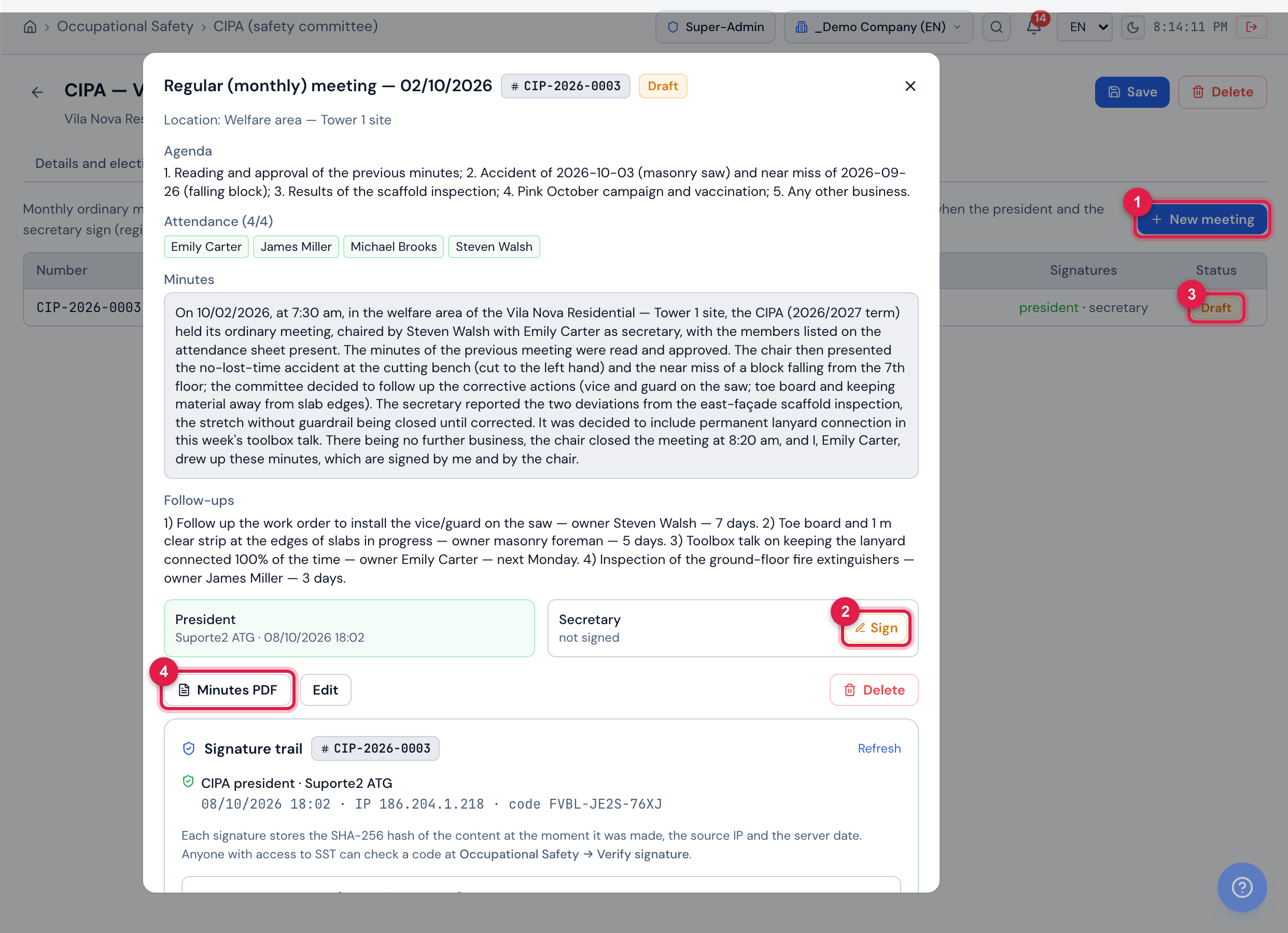
Figure 61. Modal of meeting CIP-2026-0003 (Regular (monthly), 02/10/2026, Draft status): location, agenda, attendance (4/4), minutes text, follow-ups and the two signature panels — the President has already signed; the Secretary has not yet (Sign button). Below, Minutes PDF, Edit, Delete and the Signature trail. With both signatures, the minutes become Finalized; after that, Reopen minutes appears (it asks for a reason and invalidates the signatures).
- 1New meeting (on the Meetings / minutes tab, in the background): date, type (Regular (monthly) / Extraordinary), location, agenda, minutes, follow-ups.
- 2Sign as Secretary — each role signs with its own user and registered signature; the President (Suporte2 ATG) has already signed.
- 3Meeting status in the list: Draft → Finalized.
- 4Minutes PDF; right below, the signature trail with date, IP and code.
Harassment (Law 14.457) and documents
Section titled “Harassment (Law 14.457) and documents”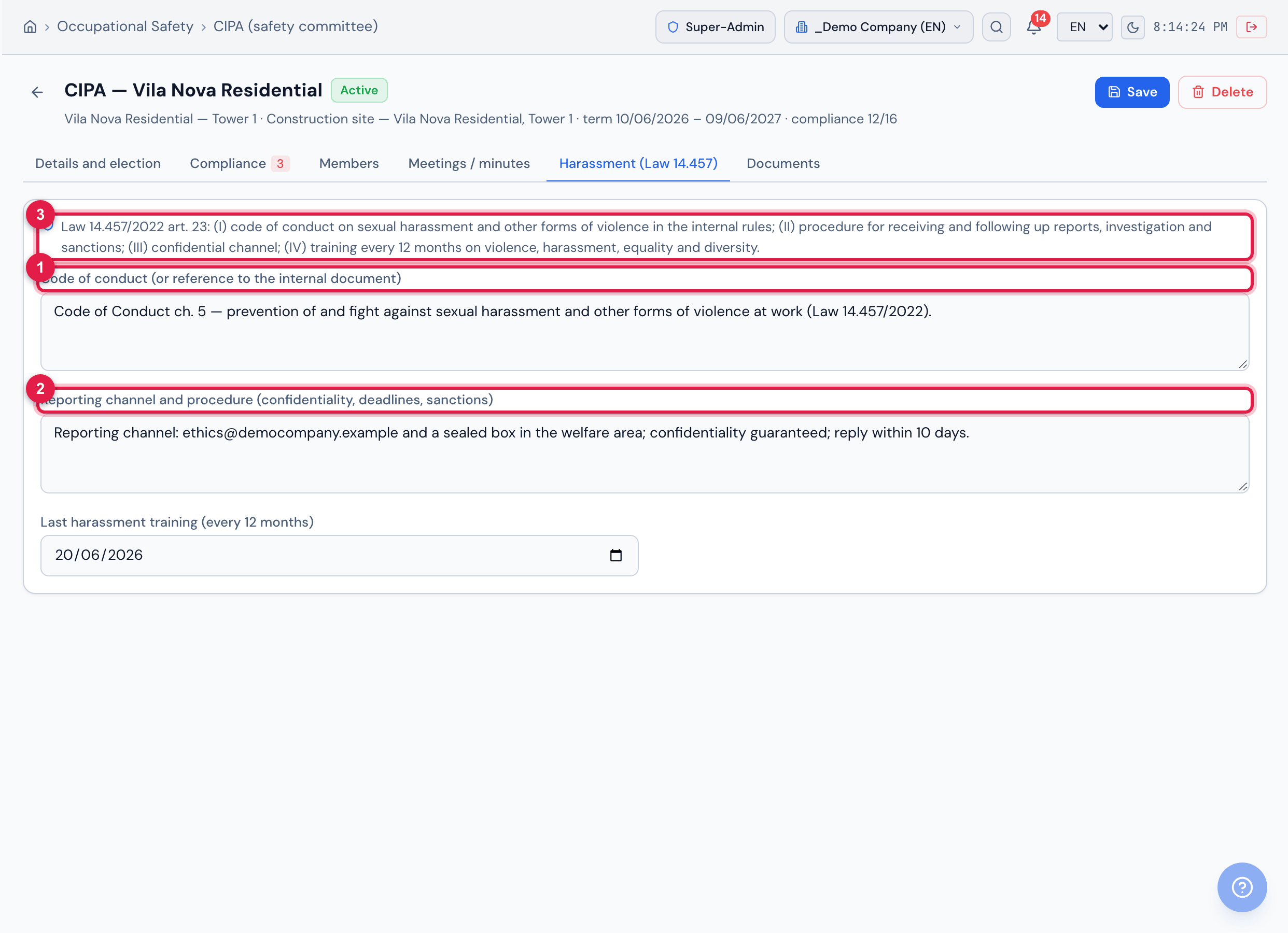
Figure 62. Harassment (Law 14.457) tab: the summary of art. 23 at the top, Code of conduct (or reference to the internal document), Reporting channel and procedure (confidentiality, deadlines, sanctions) and Last harassment training (every 12 months).
- 1Code of conduct — text or reference to the company Code of Conduct.
- 2Reporting channel and procedure — e-mail, ballot box, confidentiality and response time.
- 3Summary of art. 23 of Law 14.457/2022 (items I to IV) — what management needs to prove.
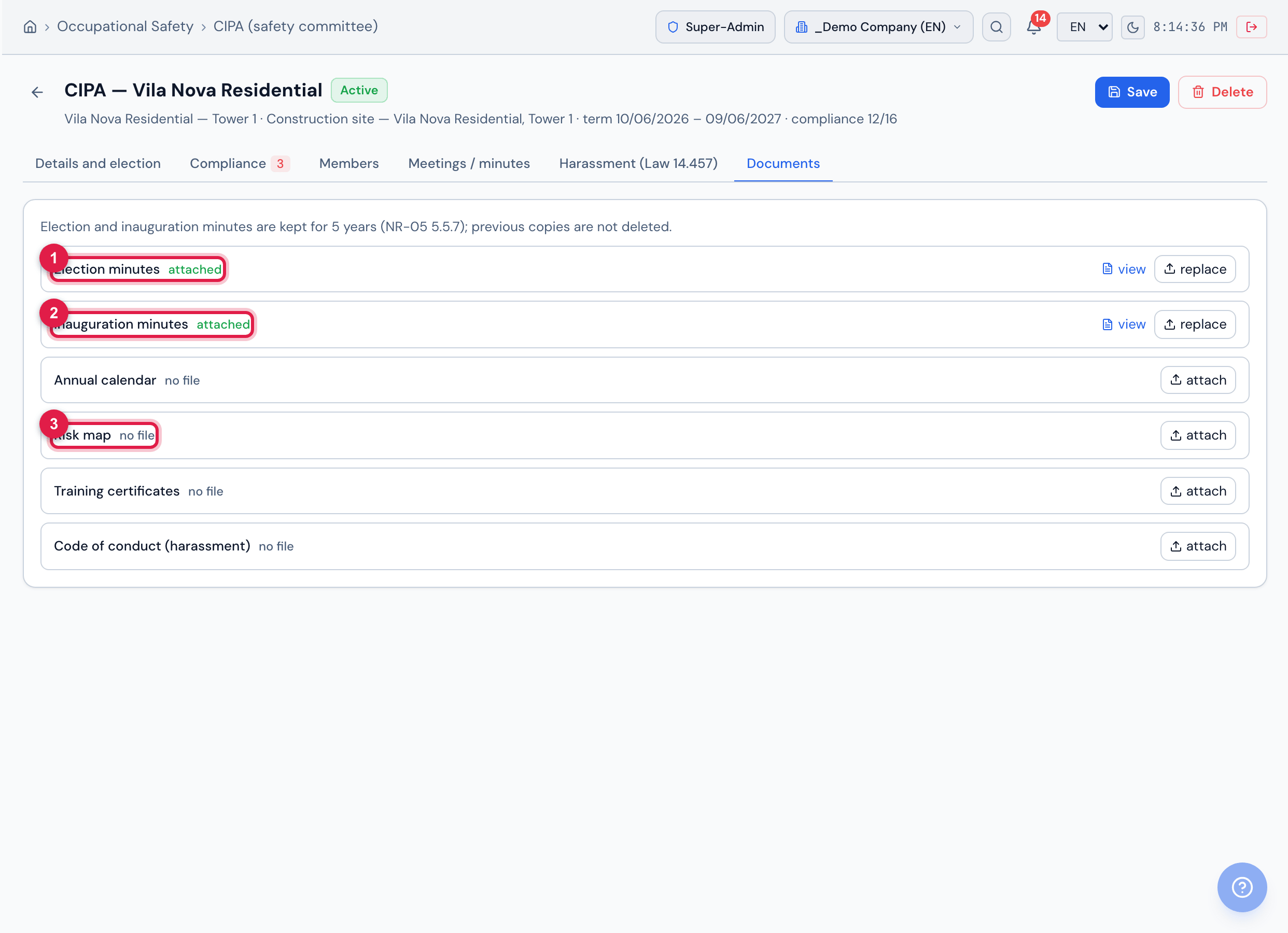
Figure 63. Documents tab: election minutes, inauguration minutes, annual calendar, risk map, training certificates and code of conduct — attach, replace or view each one.
- 1Election minutes (attached — view / replace).
- 2Inauguration minutes (attached).
- 3Risk map (no file — attach).
The term alerts (60/30/7/0 days) and the harassment training alerts (30/7/0) are e-mailed to users who have the CIPA right with Edit. The SST dashboard shows Active CIPA, term ending/expired, “No minutes last month” and “Harassment training due”.
Was this page helpful?
Thanks for the feedback!
Got it — we will improve this page.