
Disciplines and origins
Manual — Punch list (GQE) · chapter 10 of 11
Discipline and Origin are lists your company maintains. They are on the Lists page, a button at the top of the punch list screen (needs Edit). Both lists apply to all companies and sites of your H2O.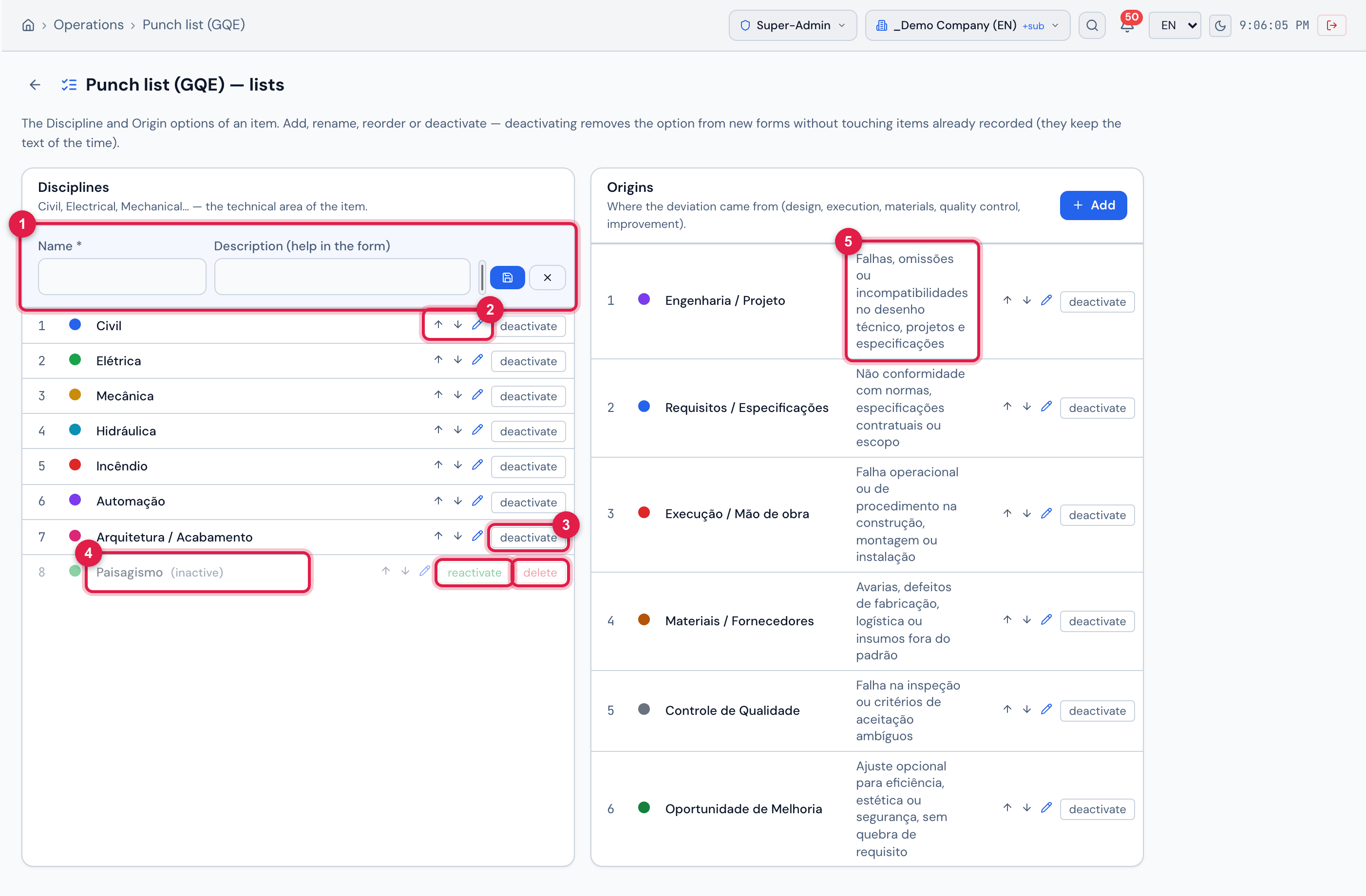
Figure 20. The Punch list (GQE) — lists page: Disciplines on the left, Origins on the right.
- 1Add — Name, Description (help in the form) and the color.
- 2The move up / move down arrows change the order in the forms; the pencil renames.
- 3deactivate removes the option from new forms; reactivate brings it back.
- 4An inactive entry, greyed out in the list, with delete.
- 5The description of the origin — it is what appears below the Origin field when recording.
| List | Comes with (names as registered at the factory, in Portuguese) |
|---|---|
| Disciplines | Civil, Elétrica, Mecânica, Hidráulica, Incêndio, Automação, Arquitetura / Acabamento (civil, electrical, mechanical, plumbing, fire, automation, architecture / finishes) |
| Origins | Engenharia / Projeto (flaws, omissions or clashes in the drawings and specifications) · Requisitos / Especificações (standards, contract, scope) · Execução / Mão de obra (operational or procedural failure) · Materiais / Fornecedores (damage, manufacturing defects, off-standard supplies) · Controle de Qualidade (inspection failure or ambiguous criterion) · Oportunidade de Melhoria (optional adjustment, no requirement broken) |
- The item keeps the text of the discipline and the origin of the time: renaming or deactivating an entry does not change items already recorded.
- delete only shows on a deactivated entry, and only works if no item ever used that name — otherwise: Item in use on punch items — deactivate it instead of deleting.
- Two entries with the same name in the same list are not accepted: An item with this name already exists.
- The names are not translated: they appear as they were registered, in any screen language, in the form, the filters, the item page, the PDF and the spreadsheet.
Was this page helpful?
Thanks for the feedback!
Got it — we will improve this page.