
Task templates: concepts
Manual — Task templates and checklists · chapter 1 of 10
A task template is the script of a job: the checklist someone answers in the field — what to check, what to measure and within which range, where to take photos —, plus what goes with the task (description, duration, technician, periodicity). You build the template once; from it come the tasks of the tickets, the preventive maintenance of Automatic Scheduling, the commissioning tests, the audits, the equipment checklists and the APR, PT and safety inspections.In the system, the template is called Template: the menu is Knowledge › Templates and the list is called Task Templates. In this manual, “task template” and “template” mean the same thing.
Where it is
Section titled “Where it is”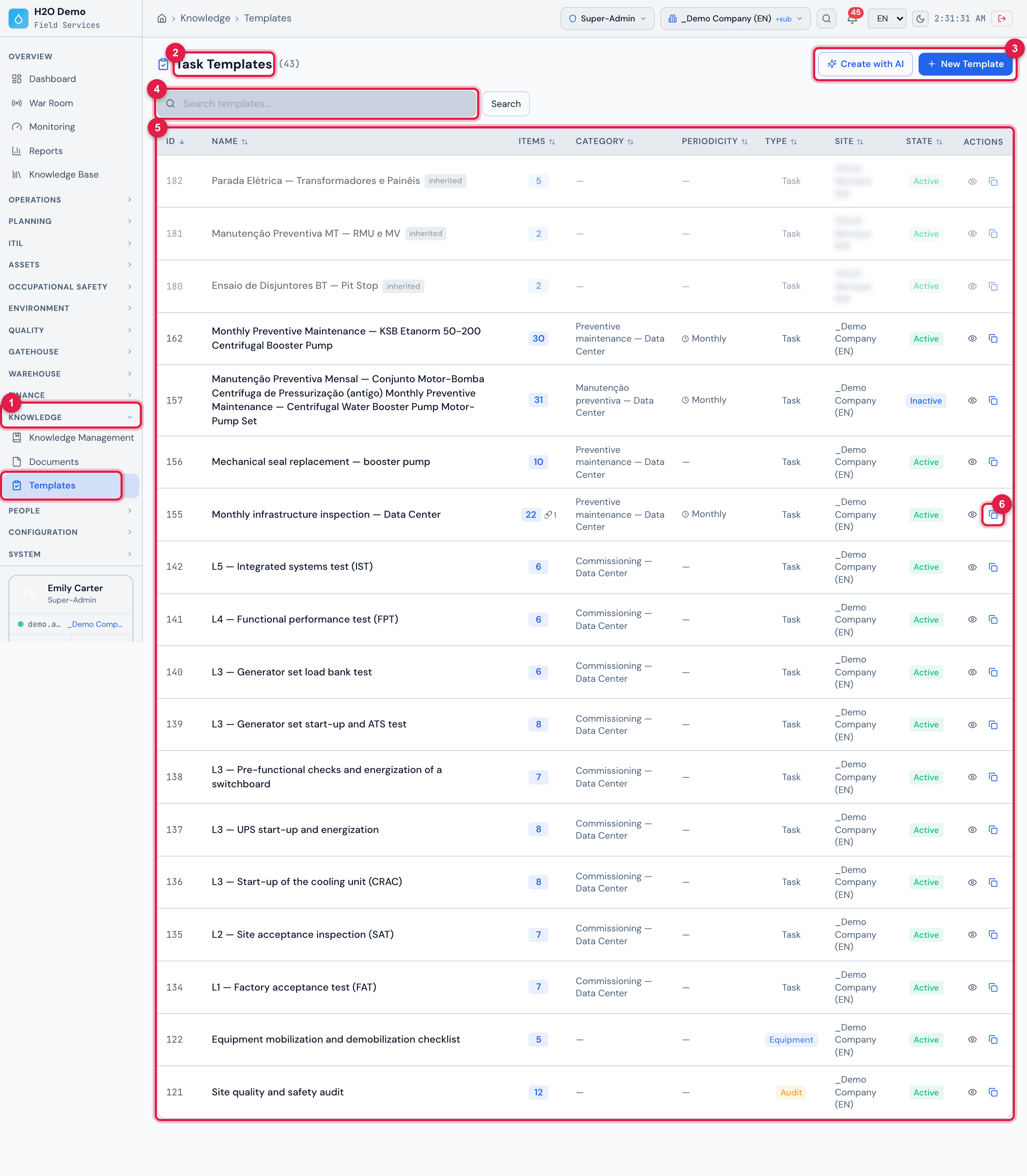
Figure 1. Knowledge › Templates, sorted by ID (newest first): at the top, the three electrical test templates that come with H2O, inherited from the root site (chapter 6); then the templates of the demo company — the one generated by the AI Assistant (and the previous one, Inactive), the seal replacement, the monthly inspection, the commissioning tests, the equipment checklist and the job audit.
- 1The Knowledge › Templates menu.
- 2Task Templates and the total.
- 3Create with AI and New Template.
- 4The Search templates… search.
- 5The list: name, items, category, periodicity, type, site and state.
- 6Clone — copies the template with all its items.
| Where | What you do there | Chapter |
|---|---|---|
| Knowledge › Templates | the template list, the search, Clone, New Template and Create with AI | 2, 3 and 5 |
| template record (click a row) | the header (Edit), the items, the Preview, the Materials, the History and the PDF preview | 3, 4 and 9 |
| ticket task, audit, project equipment, APR, PT, inspection, Automatic Scheduling, Commissioning, Patrols, Maintenance Plans, PMOC | choose the template (PMOC also creates the templates of its activities) | 6 |
| task record (web) and ticket › Checklists (app) | answer the checklist and finish | 7 |
| Quality › NCR | the non-conformities generated by the checklist | 8 |
| People › Profiles › profile › Permissions, group Knowledge | the rights | 1 |
The parts of a template
Section titled “The parts of a template”| Part | What it is | Chapter |
|---|---|---|
| header | name, description, site, report type, category, duration, technician, periodicity and the non-conformity rules | 3 |
| items | the checklist questions, each of one of the 23 types — from Yes / No / NA to Thermography and the electrical test sheets —, with required photo, tolerance range, options and translation | 4 |
| sections | items of the Grouping type, which split the checklist into blocks with a title | 4 |
| materials | the list of what to take to do the job; with Create material requests on the work order on, each material becomes a material request on the ticket when the task is created from the template | 4 |
| history | who changed what, and when | 9 |
The report types
Section titled “The report types”The Template type says where the template is used — and, therefore, which document and which PDF it produces (chapter 6):
| Template type | In the list | Becomes… |
|---|---|---|
| Task | Task | the checklist of a ticket task — corrective, preventive, commissioning test, patrol, FVS |
| Audit | Audit | a project audit |
| Equipment | Equipment | the mobilization, daily use or demobilization checklist of a project equipment |
| APR | APR | a Preliminary Risk Analysis (APR) |
| PT (Work Permit) | PT | a Work Permit |
| Safety inspection | Inspection | a safety inspection |
Who does what
Section titled “Who does what”| Role | What they do | Where |
|---|---|---|
| whoever builds the checklists (engineering, quality, maintenance, safety) | creates and maintains the templates: items, ranges, photos, periodicity, non-conformity; uses the AI assistant | web |
| planning / management | chooses the template in the tasks, in Automatic Scheduling, in the commissioning routines and in the patrols | web |
| whoever works in the field (technician, inspector, auditor) | answers the checklist, takes photos, comments, signs and finishes | web and app |
| quality | handles the NCRs generated by the non-compliant items | web |
Access rights
Section titled “Access rights”The template uses the Task Templates row of the profile (People › Profiles › profile › Permissions tab, group Knowledge).

Figure 2. People › Profiles › Super-Admin › Permissions, group Knowledge: the Task Templates row.
- 1The Knowledge group.
- 2The Task Templates row — Read, Edit, Create, Trash and Delete.
| To… | You need, in the Task Templates row |
|---|---|
| see Knowledge › Templates, open the record, the Preview, the Materials, the History and the PDF preview | Read |
| choose a template in a task, audit, APR, PT or inspection | Read (besides the right of the document itself) |
| New Template, Create with AI, Clone, create a category, New Item, Add Material | Create |
| Edit the header, edit and drag items, Link asset, change a material quantity | Edit |
| delete an item, remove a material | Trash |
Web and app
Section titled “Web and app”| I want to… | Web | App |
|---|---|---|
| create, edit, clone templates; AI assistant | yes | no |
| choose the template of a new task | yes | yes (only Task templates) |
| change the template of a task | yes (deletes the answers, with a warning) | no |
| answer the checklist | yes | yes, also offline |
| scan the label QR to add a panel, a UPS or an electrical test sheet | no | yes |
| see the item translation | yes, in italics | yes, in italics |
| task PDF | yes | yes (Report (PDF)) |
Was this page helpful?
Thanks for the feedback!
Got it — we will improve this page.