
Global Search
Manual — Getting started — web · chapter 7 of 13
Global Search looks for a term in several modules at once. Open it with the magnifier in the header.- Click the magnifier. The Global Search page opens, with the cursor in the Search all modules… field.
- Type at least 2 characters. The search runs by itself as soon as you stop typing; Esc clears the field.
- The results come in groups — Tickets, Assets, Tasks, Knowledge Base, Materials, Documents, Changes and Problems —, each with its total beside it. Click a result to open the record.
| Group | Where the term is searched |
|---|---|
| Tickets | ticket title and description; typing just the number finds the ticket with that number |
| Tasks | task text and the title of its ticket |
| Assets | name, serial number, asset tag and notes |
| Knowledge Base | article title and answer |
| Documents | name and file name |
| Materials | name and reference |
| Changes and Problems | title and description |
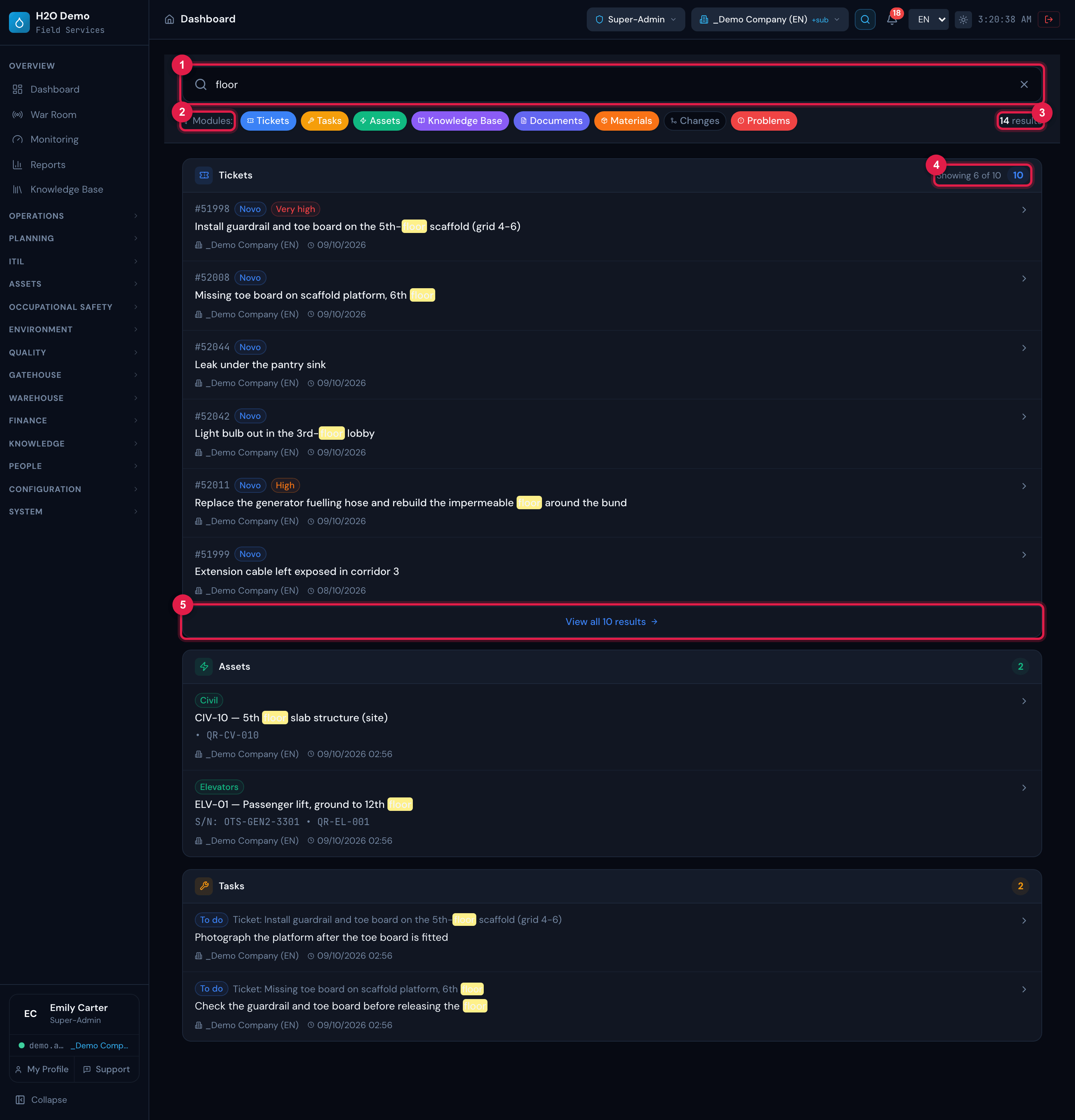
Figure 19. Global Search with the term floor: the search field, the Modules: line with the colored filters (Changes turned off, in gray), the total (14 results) and the groups Tickets (Showing 6 of 10), Assets and Tasks, with the term highlighted.
- 1Search all modules… field.
- 2Modules: — click a module to take it out of the search or put it back.
- 3Total of results.
- 4A group: up to 6 records, Showing 6 of N and the total.
- 5View all N results.
Filtering by module
Section titled “Filtering by module”On the Modules: line, each colored module is in the search; click to take it out (it turns gray) and click again to put it back. At least one module always stays on. The search runs again by itself at each change.
What the search respects
Section titled “What the search respects”- The site selected in the header (with or without the sub-sites, according to the Site + sub-sites switch). Did not find something that exists? Check the active site.
- In Tickets, also what your profile can see: tickets outside your reach do not appear.
- Each group shows up to 6 records, the most recently modified. View all N results opens the module list with the term already in the search field (for the Tasks group, the Tasks list). In the Tickets and Tasks lists, the filter rules the list has kept still apply: if the total does not match, check them.
- Each group — Tasks, Assets, Knowledge Base, Documents, Materials, Changes and Problems — only appears, as a group and on the Modules: line, to users with the right to read that module in the active profile (the same right that shows the item in the menu). In Assets, only the asset types the profile can read are included.
Was this page helpful?
Thanks for the feedback!
Got it — we will improve this page.