
Technical manager, ART and validity
Manual — PMOC · chapter 4 of 10
The lower part of the Building tab is what an inspector checks first: who is technically responsible for the plan, the ART that covers that work and the validity period of the PMOC.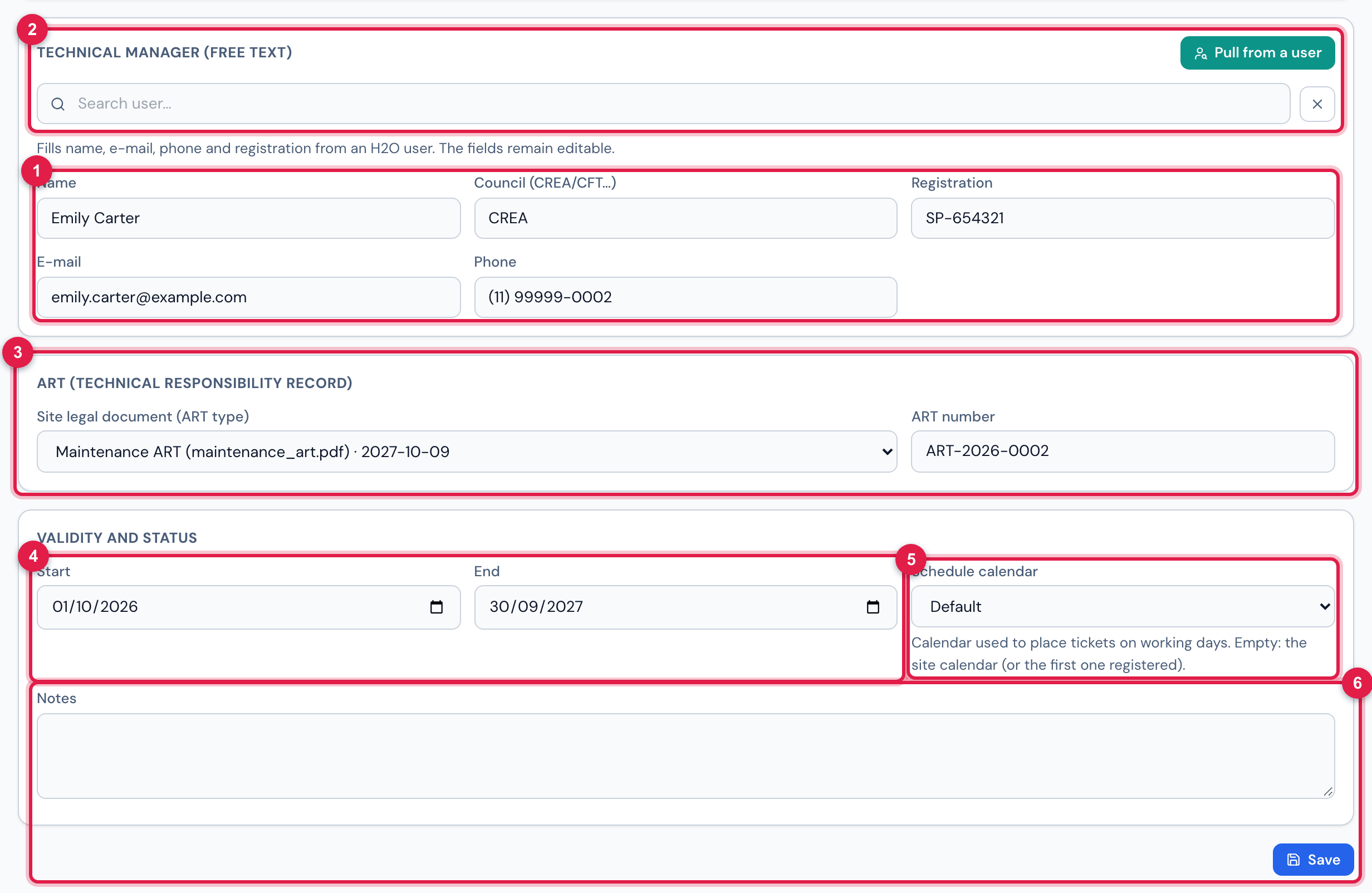
Figure 7. The Building tab scrolled down: Technical manager (free text) with the Pull from a user search open, ART (technical responsibility record), Validity and status and Save.
- 1Technical manager (free text): Name, Council (CREA/CFT…), Registration, E-mail and Phone — typed by hand or pulled from a user; they remain editable.
- 2Pull from a user opens the Search user… search: choose the engineer and the fields are filled in.
- 3ART (technical responsibility record): the Site legal document (ART type) selector — document name, expiry and inherited when it comes from a site above — and the ART number.
- 4Validity and status: Start and End.
- 5Schedule calendar — empty: the site’s, or the first one registered.
- 6Notes and the Save button.
The technical manager
Section titled “The technical manager”The technical manager is free text: the PMOC records name, council, registration, e-mail and phone as they are written, because that is how they go to the PDF and to the signature line. The technical manager does not need to be an H2O user — an external engineer hired only for the ART goes in here just the same.
If the technical manager is an H2O user, Pull from a user saves the typing:
- Click Pull from a user and type part of the name in Search user… (only active users of the sites you see).
- Choose the user. H2O fills in Name (first and last name from the user record), E-mail (the default e-mail), Phone (mobile; otherwise the landline) and Registration.
- Check the Council: it comes as CREA when the registration came from the user’s CREA field; if it came from the employee ID, it stays empty — write the right council (CREA, CFT…).
- Click Save — the pulled data is only recorded when the tab is saved.
Pull from a user also records which user was pulled, but what counts on the screen and in the PDF is the text of the fields. Did the engineer change? Pull again or rewrite.
The ART
Section titled “The ART”The ART has two parts: the document (the ART PDF attached to the site — chapter 2) and the ART number (text, e.g. “ART-2026-0002”). The PMOC PDF prints both: the number and the document name with the expiry.
- The Site legal document (ART type) selector lists the ART-type documents of the PMOC site and those of the sites above marked as recursive (inherited). Each option shows the name, the file (when different from the name) and the expiry.
- — none — leaves the PMOC without a document; the number can be entered anyway.
- If the document linked to the PMOC is later deleted from the site, the selector still shows it by name, but the PDF starts printing Document —.
Validity, calendar and notes
Section titled “Validity, calendar and notes”| Field | What it does |
|---|---|
| Start | start of the validity. It is also the start of the schedule generated (chapter 7); empty, the schedule starts today. |
| End | end of the validity and end of the schedule. Empty, the schedule runs until 12 months after the start, and the generation warns. |
| Schedule calendar | the calendar of working days on which the preventive tickets are placed. Empty: H2O uses the site’s (or the sites above); with none, the company’s first calendar. |
| Notes | free text; printed in the PDF right below the identification (e.g. contract conditions, excluded scope, changes of technical manager). |
Was this page helpful?
Thanks for the feedback!
Got it — we will improve this page.