CMMS for Industrial Maintenance

Industrial maintenance from plan to proof, with MTBF and MTTR per asset

Built for the plant's maintenance planning team and for companies that maintain equipment for many clients under contract and SLA. The plan opens the work order ahead of time, based on whichever comes due first: date, hour meter or reading. The technician works in the app even without signal, and the MTBF, MTTR and availability of each asset come straight from the work orders.

  • Developed by a consulting firm in maintenance planning and control (PCM), commissioning, RCM and ISO 55000 methods
  • App for Android, iPhone/iPad and Windows, with offline field work
  • RAT (field service report) and checklist PDFs with signature, generated on the phone
H2O · Dashboard
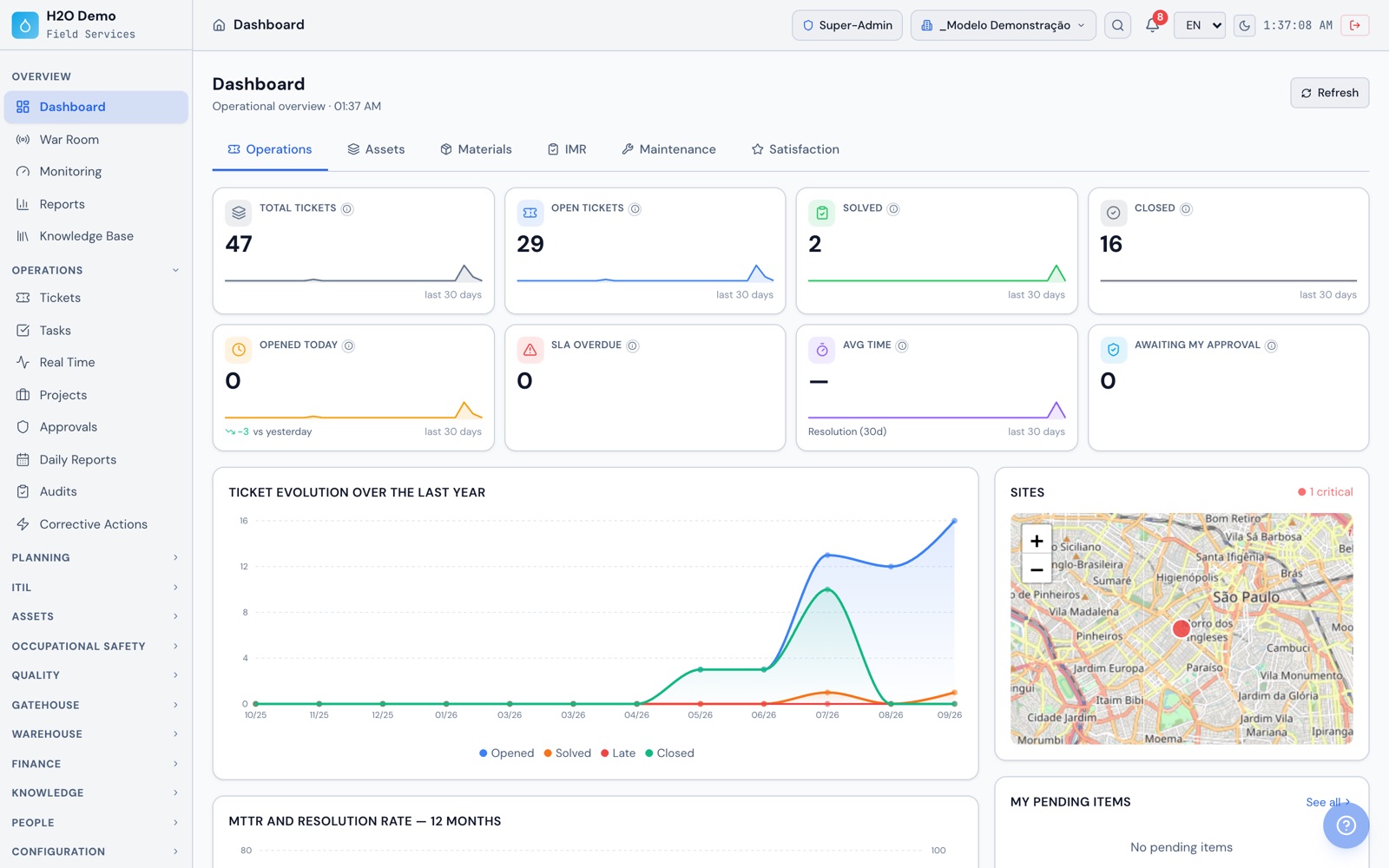
H2O web Dashboard on the Operations tab, with total tickets, opened today, overdue SLA and a map of the sites
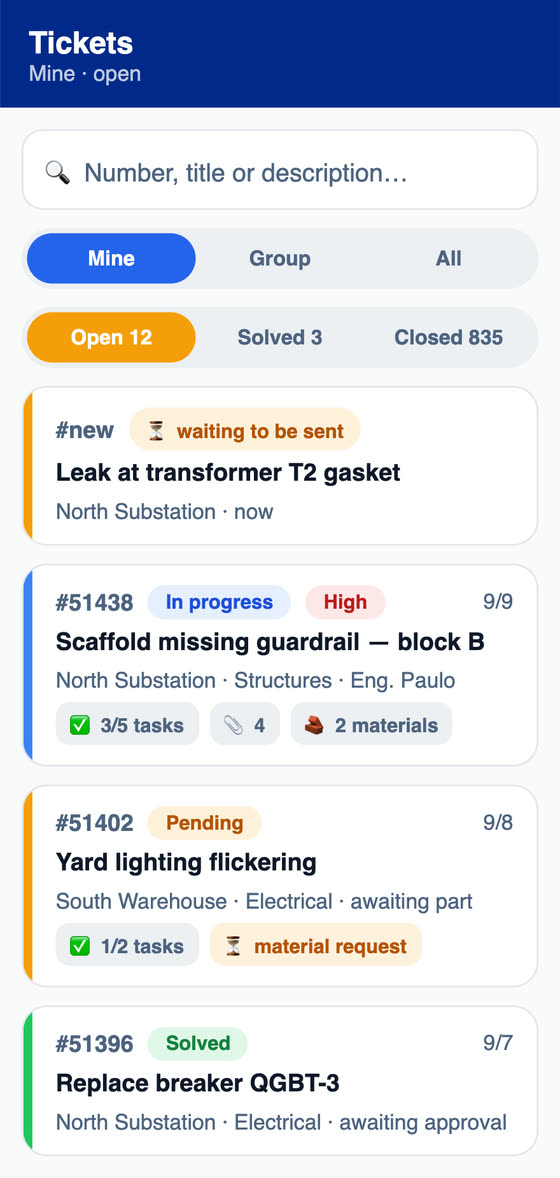
List of open tickets in the H2O app, with the status, priority, tasks and material requests of each one
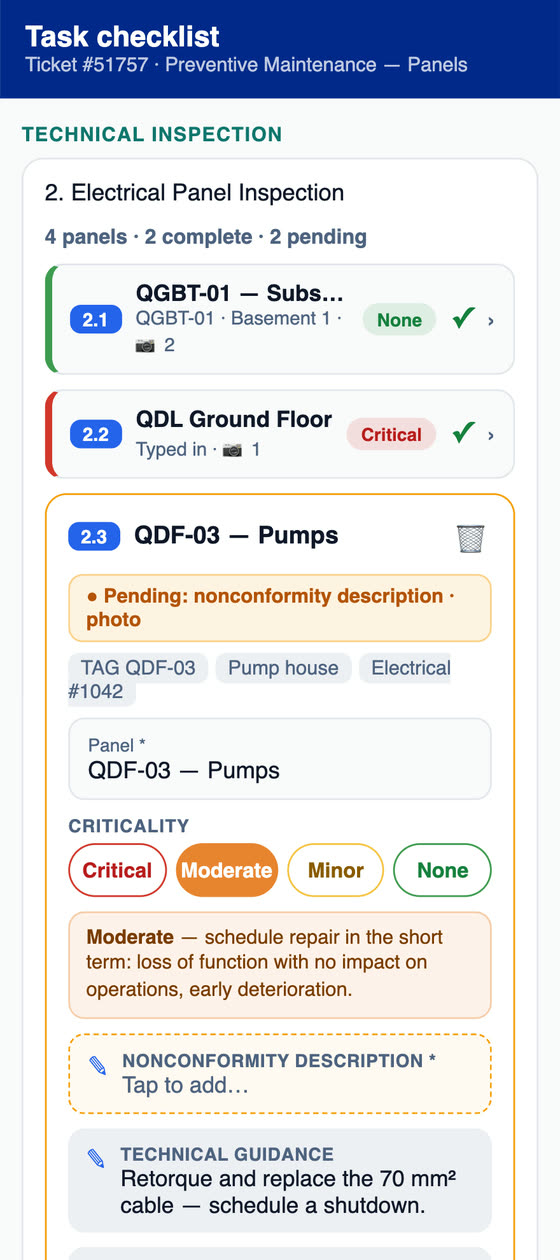
Preventive maintenance checklist for electrical panels in the H2O app, with criticality per panel
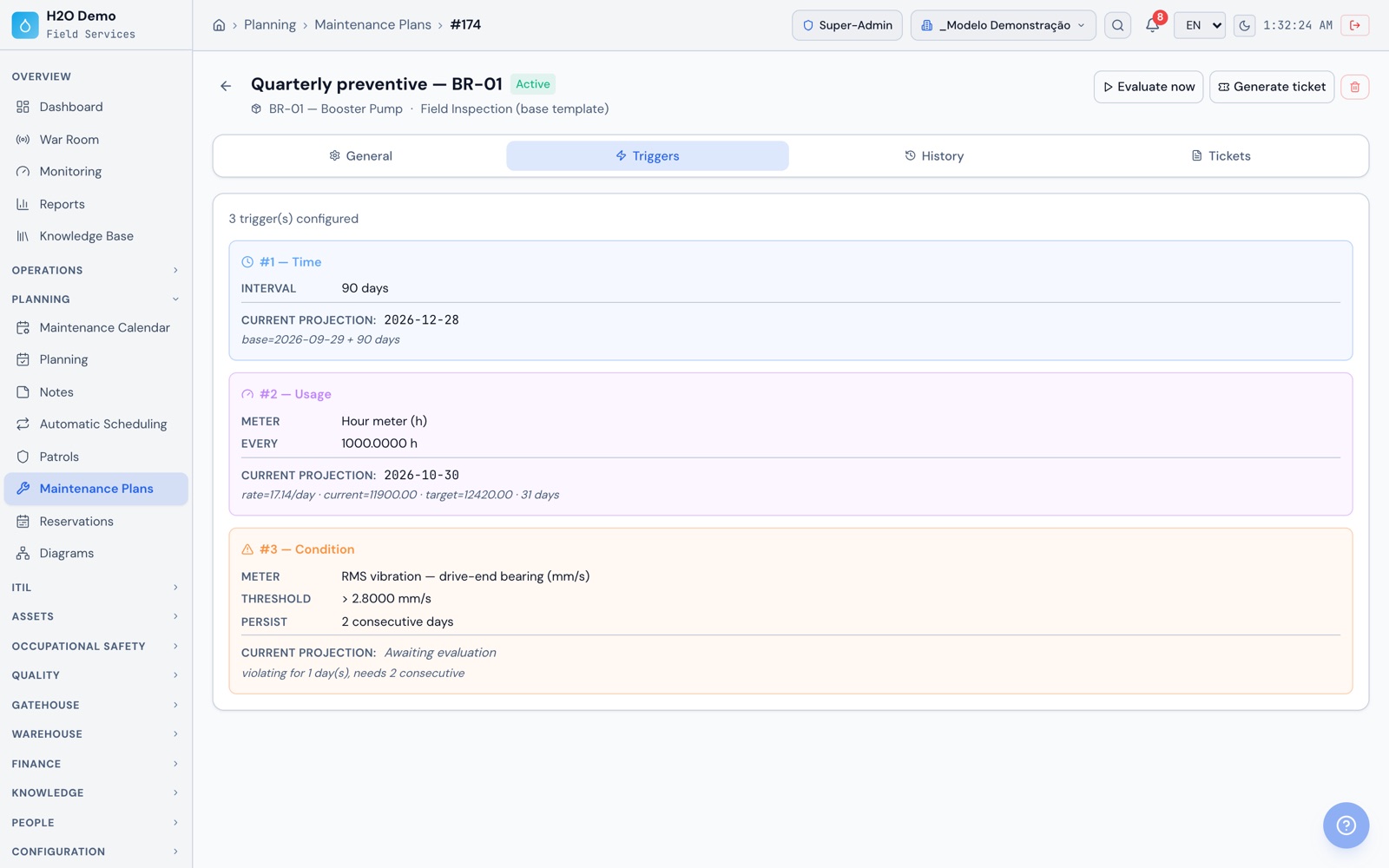
BR-01 preventive due Oct 30the hour meter comes due before the plan date
BR-01 · vibration above 2.8 mm/sthe plan needs 2 days in a row to open a work order
Maintenance engineering

Built by people who work in maintenance planning, commissioning and reliability

H2O is developed by ATG Soluções para Engenharia, a consulting and technology company with experience in maintenance planning and control (PCM), commissioning, RCM and ISO 55000 methods. The system was born inside mission-critical data centers, created by people who spent more than 10 years on those projects across Latin America, and it was used as the maintenance management tool in Uptime Institute® Operational Sustainability audit processes. Today it serves maintenance companies, engineering firms, facilities providers and large service buyers. At the plant, that method becomes a routine in the system, with the plan, the execution and the history of each asset linked together.

  • PCM: a plan per asset with triggers by date, hour meter or reading, an annual schedule with the planned hours per month, and each technician's week in planning
  • RCM: components with service life by time or by usage, measurements with an expected range and a critical range, and symptom, impact and cause recorded on the work order
  • ISO 55000: a record for each asset with property data, warranty, documents, components, work order history, MTBF, MTTR and availability
  • Commissioning: checklists with measurements against tolerance, required photos per item, signature and PDF, which later serve the preventive maintenance

Our goal is to build, together with our clients, an ecosystem of accurate indicators for highly relevant and predictable decisions.

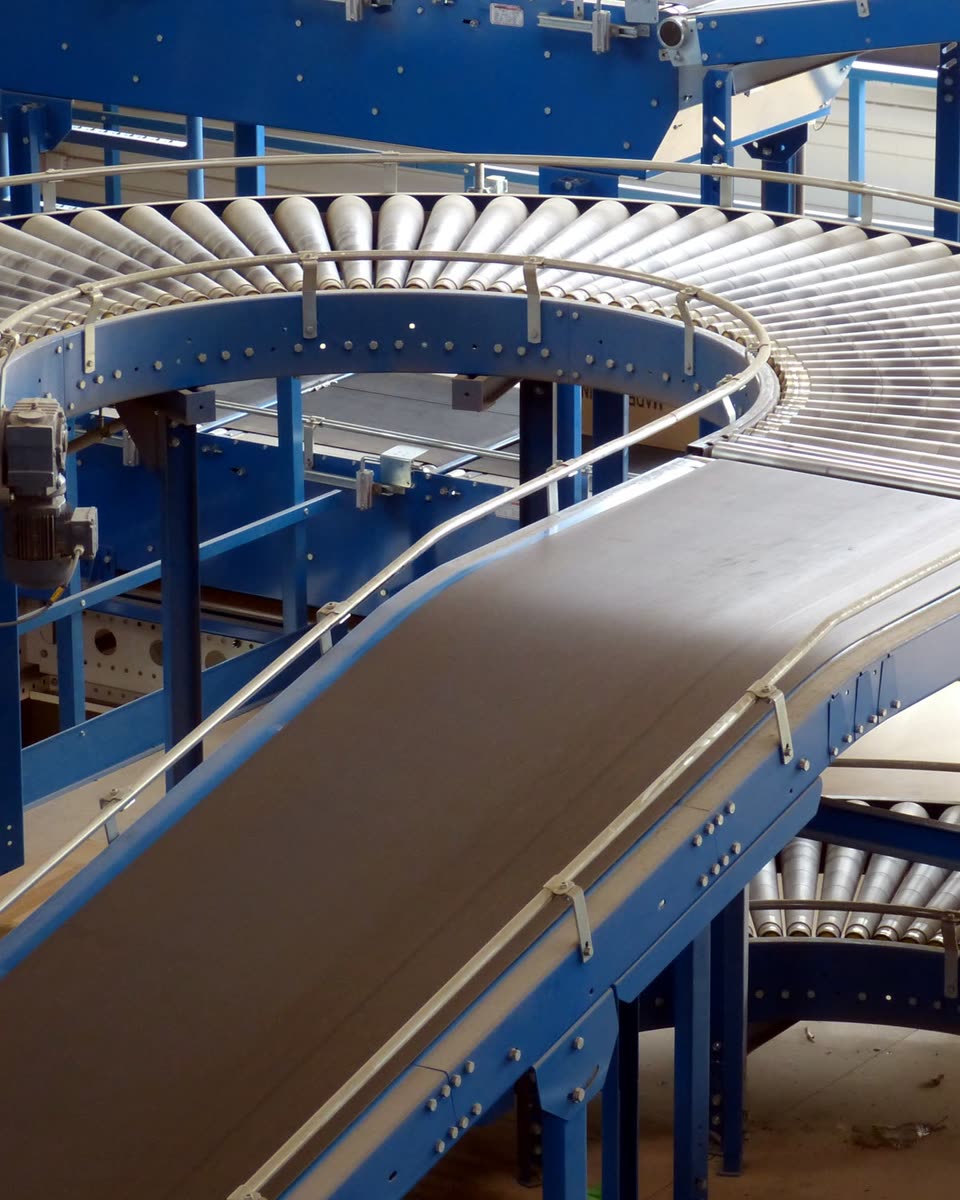
Roller conveyor with a curved section and a gear motor
Conveyor line
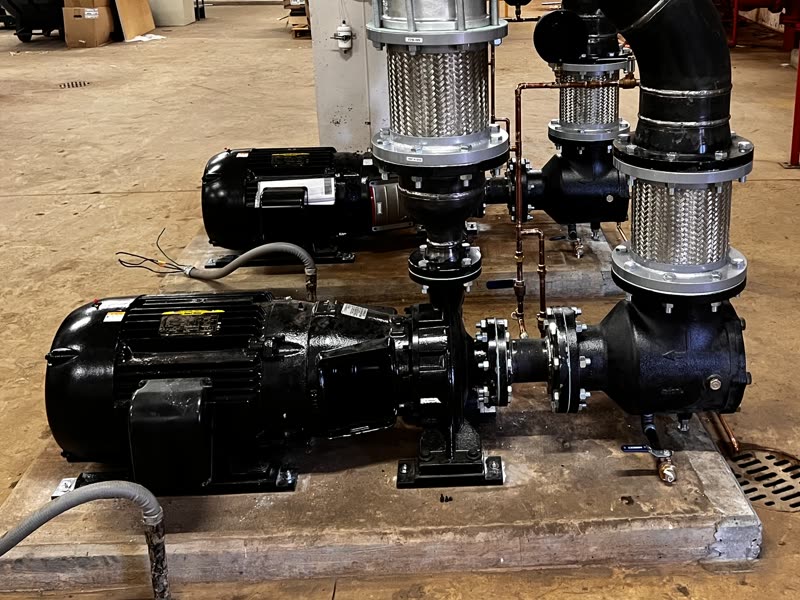
Two centrifugal pumps with electric motors on a concrete base
Centrifugal pumps
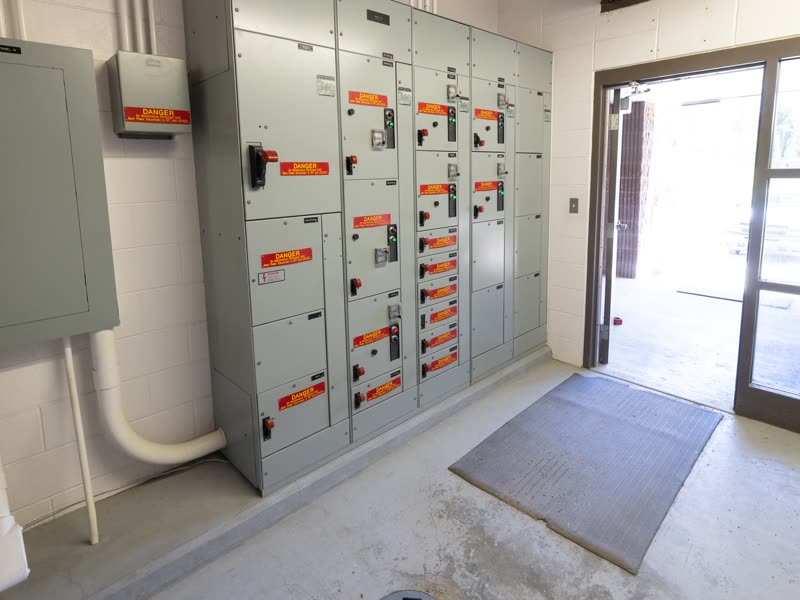
Electrical room with a motor control center panel and starter drawers
Motor control center
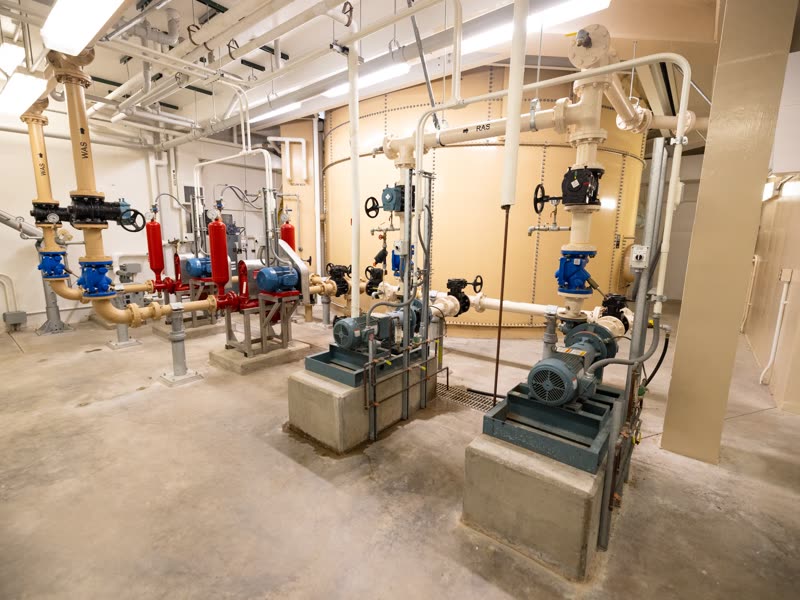
Pump house with piping, valves and motor-pump sets
Pump house
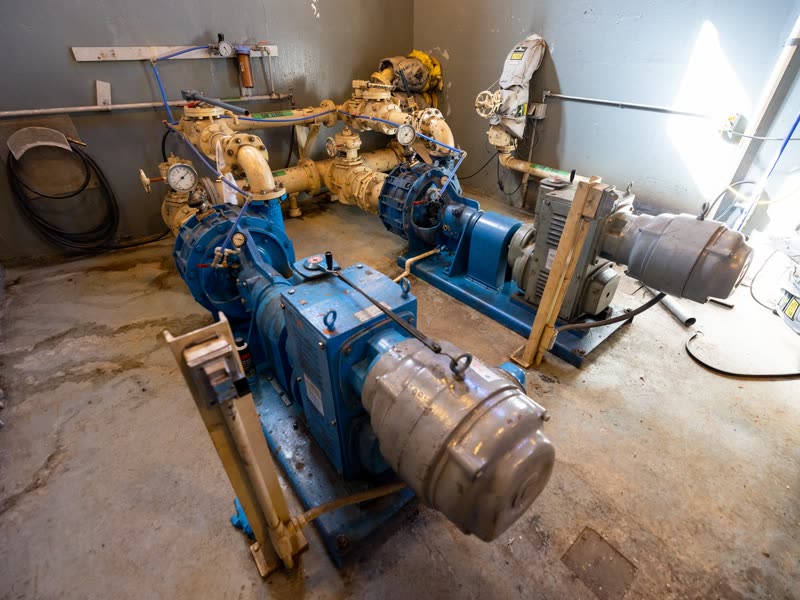
Motor-pump sets with couplings and pressure gauges in a mechanical room
Motors and couplings

Uptime Institute® and Tier® are registered trademarks of Uptime Institute LLC. ATG has no partnership with Uptime Institute. Illustrative photos of industrial equipment, unrelated to ATG clients (Wikimedia Commons, public domain and CC0).

Who uses it

Who uses H2O in industrial maintenance

Maintenance planner (PCM)

Creates the plans per asset, builds the annual schedule with the planned hours per month and lays out each technician's week in planning.

Maintenance supervisor

Tracks open work orders, overdue SLA and workload per technician on the dashboard, sees out-of-range assets in Monitoring and answers approval requests.

Mechanic, electrician and field technician

Gets the work order in the app, times each task, fills in the checklist with photos and measurements, logs component replacements and collects the signature, with or without signal.

Maintenance engineering

Sets the metrics and ranges for each asset, tracks MTBF, MTTR and availability, and records recurring failures with symptom, impact and cause.

Maintenance manager

Brings the executive report in PDF or PowerPoint, the reliability report and the cost per client, site and technician to the results meeting.

Contract manager

Sets up each client's contract with SLA and penalty by priority, tracks the IMR (the contract's performance scorecard) and closes the monthly measurement with score, deduction and approved amount.

Warehouse keeper

Receives the NF-e (Brazilian electronic invoice) by its access key, watches parts below minimum stock and hands out the material requested by the work order, with a record of where it went.

Production operator and requester

Opens a ticket from the asset's QR code or the portal, follows its progress, accepts or rejects the solution and answers the satisfaction survey.

Before and after

From spreadsheet to maintenance plan in the system

What usually lives in spreadsheets, on paper or in WhatsApp in plant or contract maintenance, and where it lives in H2O.

TodayThe annual maintenance plan lives in a spreadsheet that only one person knows how to update.
With H2OThe plan lives in the system, per asset, with trigger, checklist, technician and group. The annual schedule generates the year's work orders and the calendar shows what is coming up.
TodayThe preventive comes due and nobody notices until it turns into a corrective.
With H2OThe plan opens the work order with the lead time you set, based on whichever comes due first: days, hour meter hours or an out-of-limit reading, and it notifies the team by email.
TodayThe compressor's hour meter is written in a notebook and the hours-based replacement runs past due.
With H2OThe hour meter reading comes in through the app, a patrol or the web, and the plan projects the next preventive date from the average usage of the latest readings.
TodayMotor vibration creeps up slowly and only gets attention when the bearing seizes.
With H2OEach reading is compared with the asset's expected range and critical range. When it is out of range, it is highlighted on the chart and in Monitoring, and it can open a work order.
TodayMTBF and MTTR are built in Excel, a different way every month.
With H2OThe indicators come from each asset's work orders, always with the same formula, and show up on the asset record and in the reliability report.
TodayThe technician has no signal in the machine room and fills everything in later, from memory.
With H2OThe app works offline. Checklist, photos, measurements and signature stay on the device and upload on their own when the network comes back.
TodayWaiting for a part blows the SLA and turns into a contract penalty.
With H2OPut the work order in a status that pauses the SLA, such as 'Awaiting part', and the resolution clock stops. The paused time is given back in business hours, using the SLA calendar.
TodayThe client disputes the service and the monthly measurement turns into an argument about deductions.
With H2OThe RAT includes captioned photos, materials, the solution and the signatures of the technician and the client. The IMR is calculated from the work orders, with the contract's weights, targets and deduction bands.
Maintenance plan

How the plan keeps the plant's preventive maintenance on schedule

The cycle H2O repeats for each active plan, from setup to the next preventive. Setup happens on the web and execution in the app.

  1. 1

    Asset and checklist

    The plan starts from an asset, such as the BR-01 booster pump or an air compressor, and a checklist template with the items, tolerance ranges and required photos. For a batch of assets of the same type, such as the motors on a line, the same plan can be created in one go.

  2. 2

    Triggers

    Every N days, every X hour meter hours, or when a reading such as vibration or bearing temperature crosses the limit, with the option to require a minimum number of consecutive days out of range. A plan can have all three, and whichever comes due first wins.

  3. 3

    Readings and daily evaluation

    Hour meter and metric readings come in through the app, a patrol, the web or the API. Once a day, H2O recalculates the next date for each active plan and, for usage triggers, projects the date from the average usage of the latest readings.

  4. 4

    Work order ahead of time

    Within the lead time you set, 7 days by default, the plan opens the work order with the checklist, technician and group, applies the automation rules and notifies the team by email. The plan opens one work order at a time and, by default, applies to assets in operation.

  5. 5

    Field execution

    The technician gets the work order in the app and runs the checklist next to the machine, even without signal, with readings, photos, component replacement, signature and the PDF generated on the device.

  6. 6

    Close-out and restart

    When the work order is resolved or closed, the plan records the execution date and restarts the count. For usage triggers, the last hour meter reading becomes the new baseline. The plan history keeps every evaluation, every work order generated and every restart.

Preventive maintenance in the field

From the asset tag to the signed PDF, all done at the machine

Four screens from the H2O app, with sample data. The work order generated by the plan is carried out at the machine, even in areas with no signal, and goes back complete to the asset history.

  1. Every asset with its own QR tag
    1Identify

    Every asset with its own QR tag

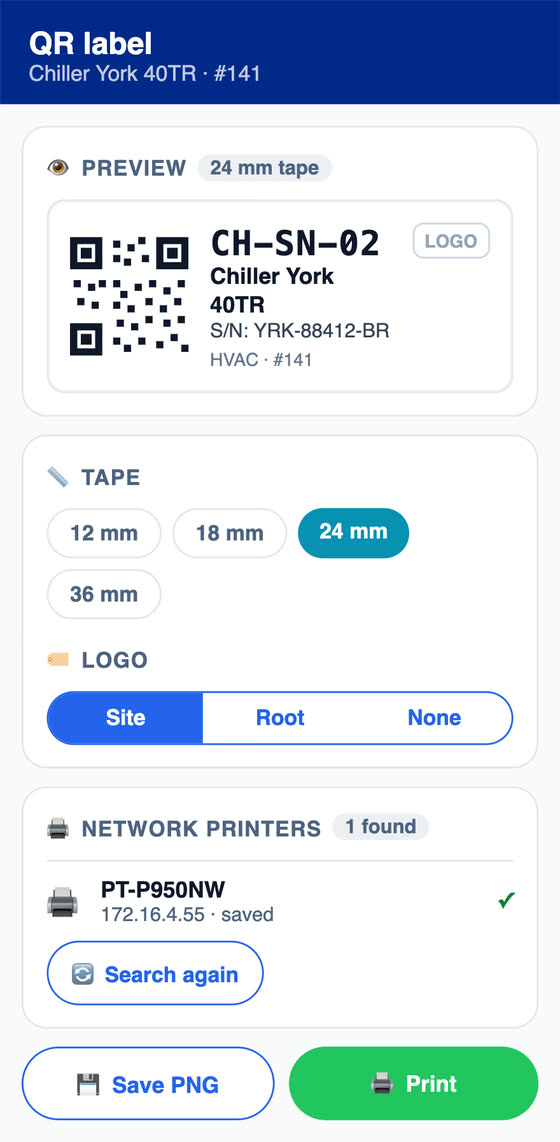
    The technician registers the asset in the field and prints the QR tag on a Brother label printer from the app, or the planner prints it from the web in 4 sizes. Anyone on site scans the tag and opens a ticket already linked to the asset, with its technician, group and SLA.

  2. The plan's work order in the technician's list
    2Receive

    The plan's work order in the technician's list

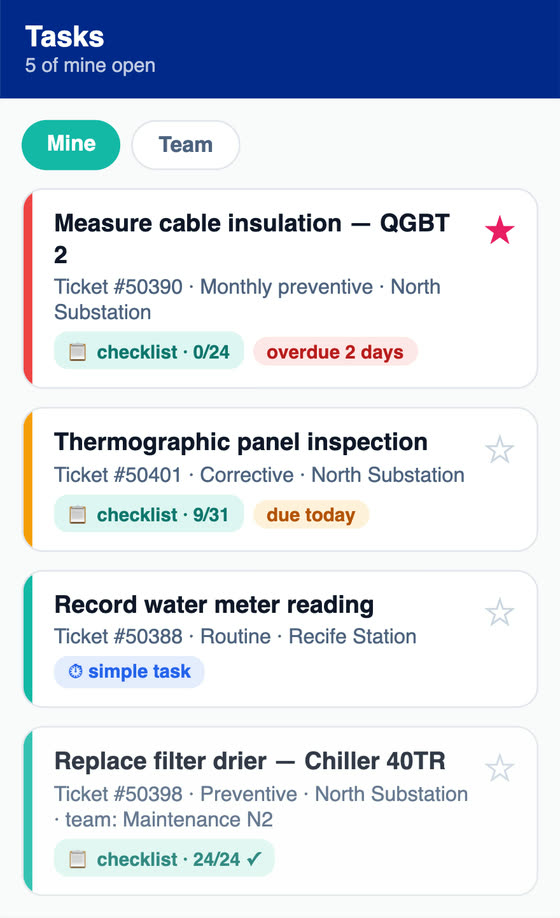
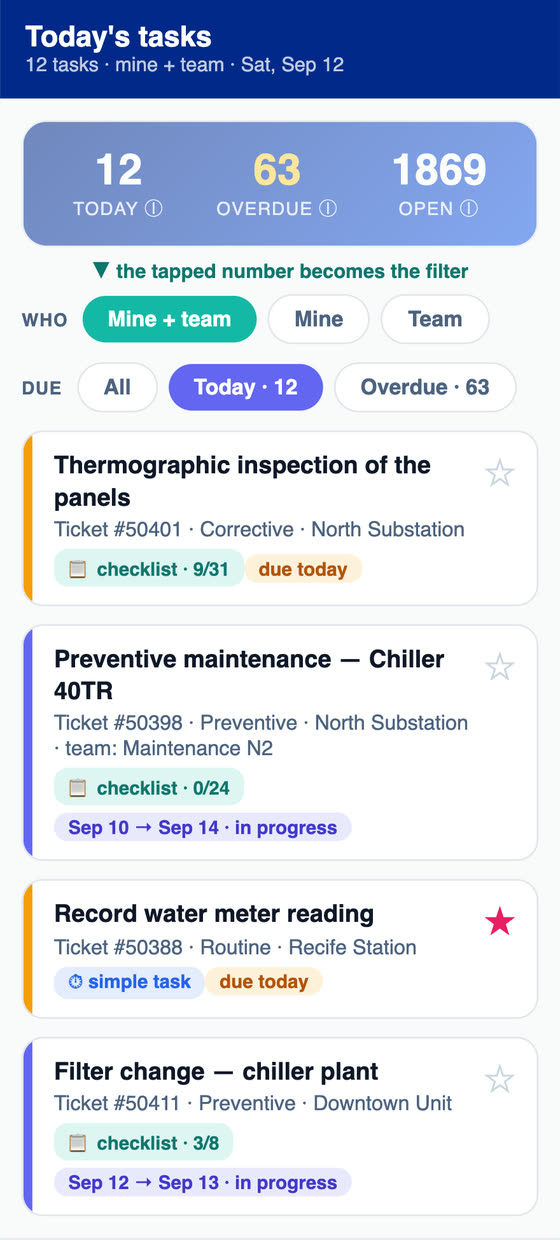
    The preventive shows up in the technician's and the team's tasks, with checklist progress and the due date. Each task shows whether it is due today or already late.

  3. Thermography of the panels, one by one
    3Execute

    Thermography of the panels, one by one

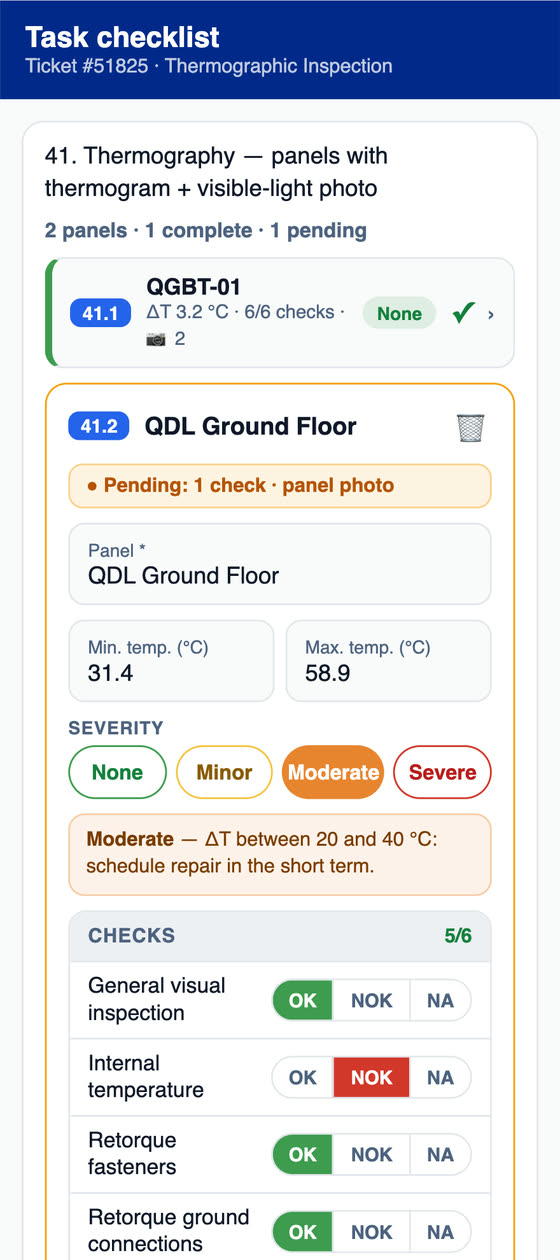
    The technician enters the minimum and maximum temperatures of each panel, marks the severity and answers the checks as OK, NOK or NA. Anything missing, such as the panel photo, shows as pending.

  4. Signature, PDF and the plan restarts
    4Close

    Signature, PDF and the plan restarts

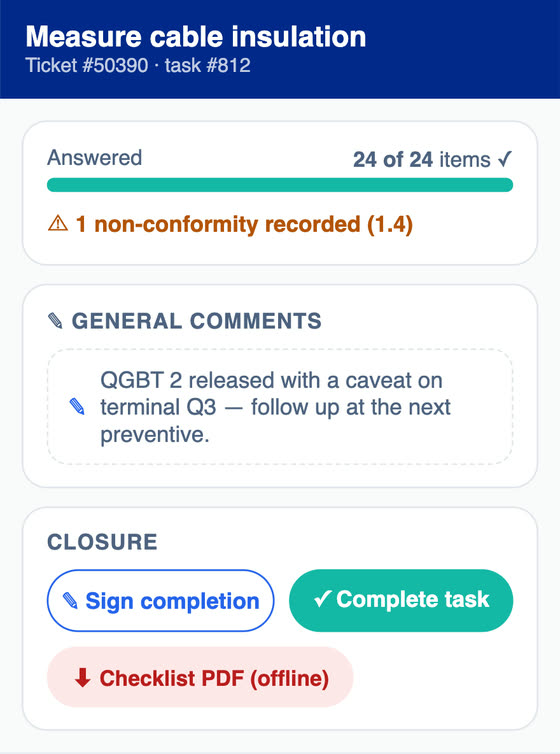
    The technician signs off and generates the checklist PDF right there, offline. The nonconformity is recorded and, when the template is set up for it, becomes an NCR linked to the work order. Once closed, the work order restarts the plan's count.

By area of work

From the plan to the asset history, with costs and contract

What the technician uses on the phone, and what planning, supervision, engineering and contract management follow on the web. The web screens come from the demo environment.

Work orders

Every job becomes a work order with a deadline, an owner and a history

Tickets come in from the web, the app, the asset's QR code or the requester portal. The work order brings together tasks with logged hours, checklists, photos, approvals, materials, costs, the linked asset and a timeline of everything that happened. On correctives, the work order keeps the failure's symptom, impact and cause, which appear on the RAT.

  • Response and resolution deadlines chosen at opening, by rule, by the asset or by the contract's SLA table
  • Statuses you mark to pause the SLA, such as 'Awaiting part', freeze the resolution clock
  • Rules set category, priority, modality, SLA and technician or group at opening
  • A technician, group or outside supplier as the assignee of the same work order
  • Solution accepted or rejected by the requester, and a satisfaction survey after closing
  • RAT sent by email from the web to several recipients, one at a time or in batch
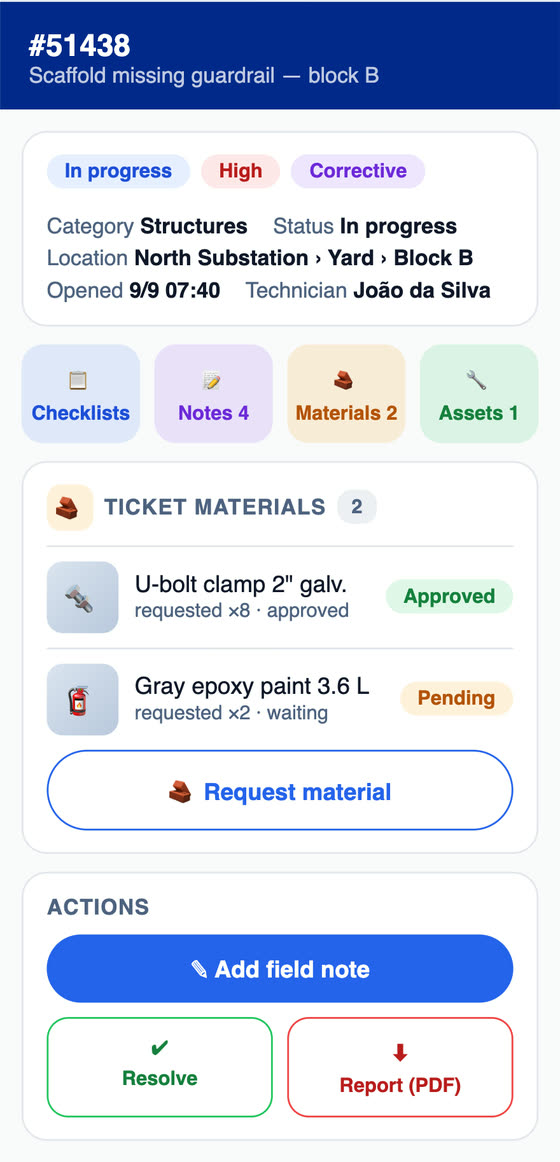
On the phoneIn the app, the work order panel with status, priority, modality, location, technician, requested materials and the RAT PDF button.
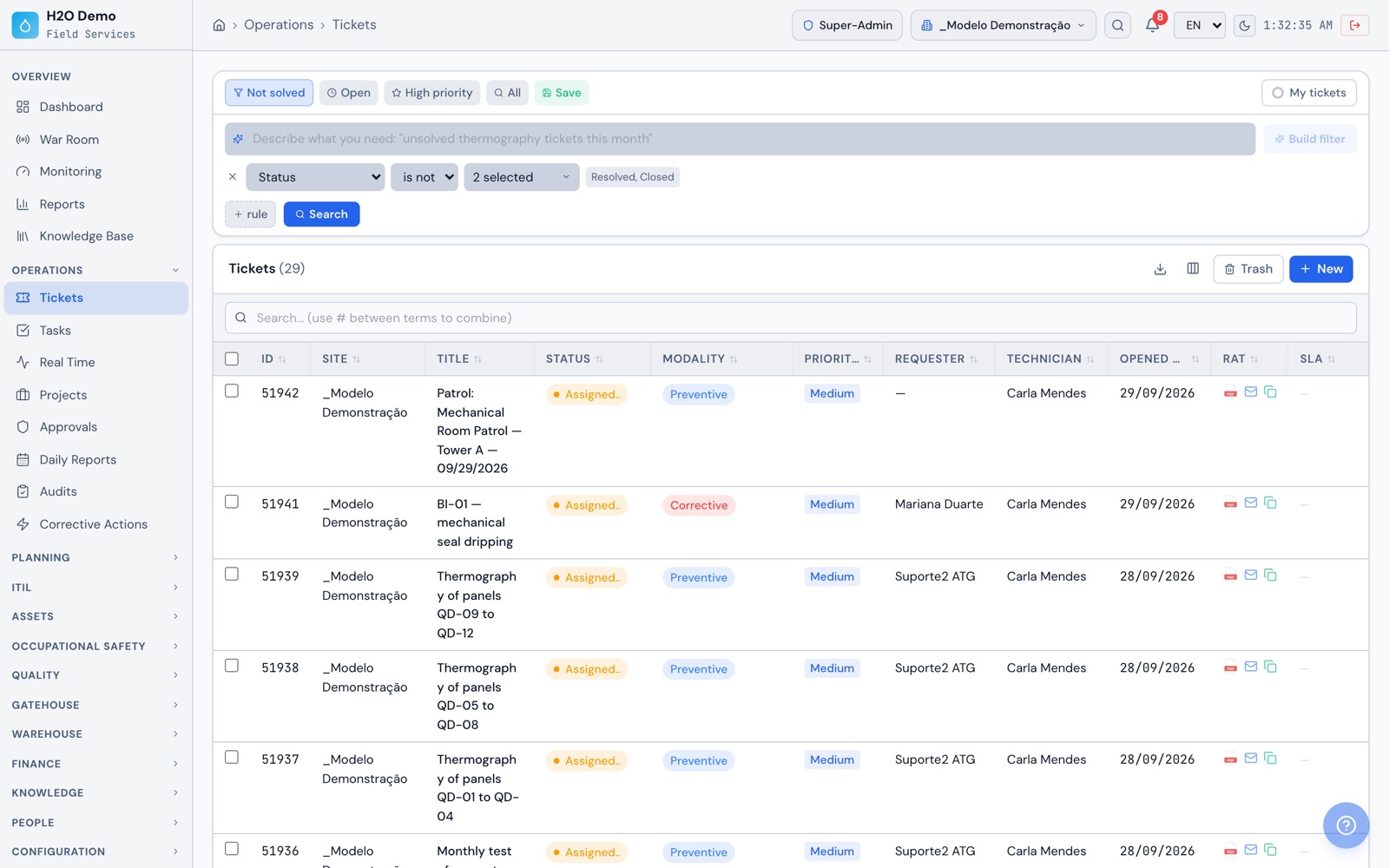
At the officeOn the web, the work order list with site, status, modality, priority, requester, technician, opening date and the RAT and SLA columns.
Operations › Tickets
H2O web: the work order list with site, status, modality, priority, requester, technician, opening date and the RAT and SLA columns.
H2O app: the work order panel with status, priority, modality, location, technician, requested materials and the RAT PDF button.
Maintenance plan

A plan per asset that opens the work order before it comes due

Each plan links an asset to a checklist template and to one or more triggers: time-based, usage-based and condition-based. Whichever comes due first wins. The plan opens the work order with the lead time you set, already with checklist, technician and group, notifies the team by email and restarts the count when the work order is resolved or closed.

  • Usage by hour meter or counter, with the due date calculated from the average usage of the latest readings
  • Condition by a reading above, below or outside a range, with the option to require N consecutive days
  • The same plan created in one go for a batch of assets of the same type
  • One work order per plan at a time, by default only for assets in operation
  • Dashboard with active plans, plans due in 7 days, overdue plans and plans executed this month
  • Plan history with every evaluation, every work order generated and every restart
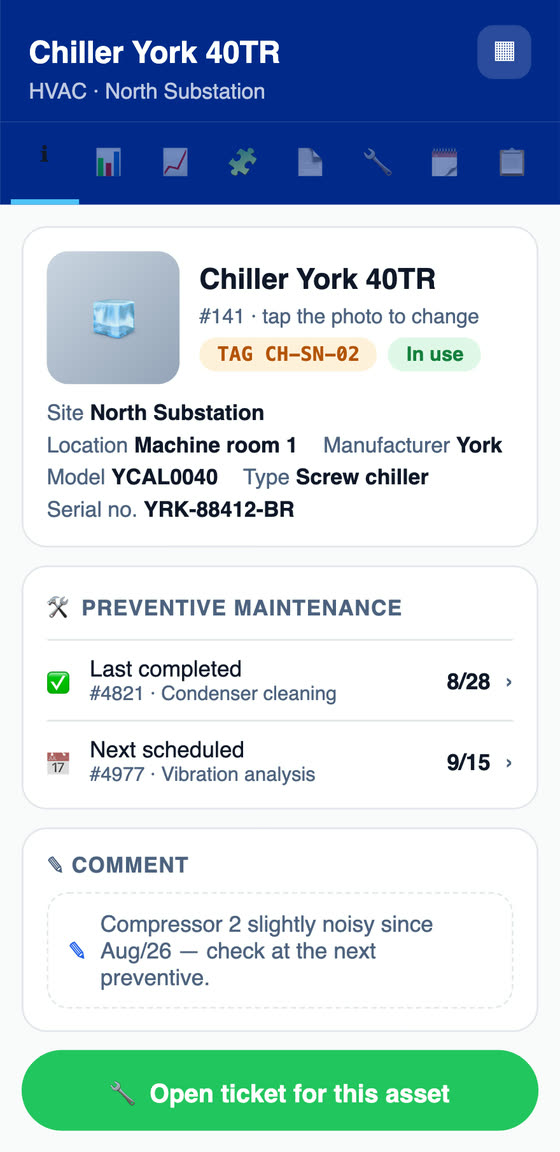
On the phoneIn the app, the asset record with the last completed preventive, the next scheduled one and the button to open a ticket for it.
At the officeOn the web, the BR-01 pump plan with three triggers (every 90 days, every 1,000 hour meter hours and vibration above 2.8 mm/s for 2 days in a row), the next date projected by time and by hour meter, and how many days the vibration has been out of range.
Planning › Maintenance Plans › BR-01
H2O web: the BR-01 pump plan with three triggers (every 90 days, every 1,000 hour meter hours and vibration above 2.8 mm/s for 2 days in a row), the next date projected by time and by hour meter, and how many days the vibration has been out of range.
H2O app: the asset record with the last completed preventive, the next scheduled one and the button to open a ticket for it.
Scheduling and calendar

Annual schedule, calendar and each technician's week

In Automatic Scheduling, build the year's schedule by linking a set of assets to a checklist template, using the template's frequency, from daily to yearly or every N days. H2O generates all the work orders for the period at once, moves dates that fall on holidays or non-working days to the nearest business day, and shows the planned hours per month so you can size the team.

  • Rescheduling from a given date, or one work order moved together with the ones after it
  • Monthly or weekly calendar with work orders by status, priority and group
  • Each plan's next preventive shows on the calendar before the work order exists
  • Weekly planning for each technician with work order tasks, changes and projects, plus planning notes
  • Monthly calendar exported to PDF
On the phoneIn the app, today's and overdue tasks, mine or the team's, with the checklist progress of each preventive.
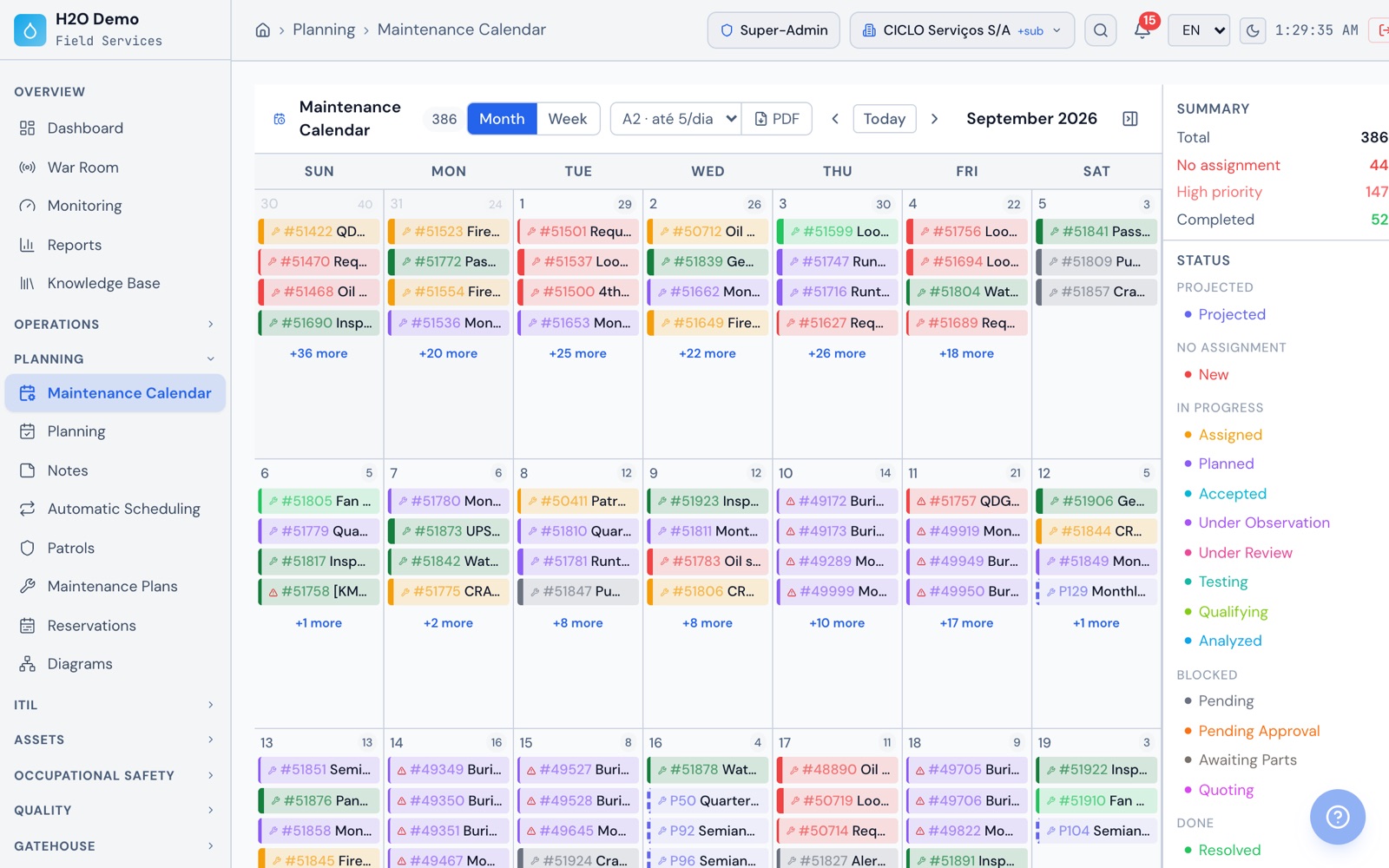
At the officeOn the web, the month's calendar with each day's work orders colored by status, each plan's next preventive, the month summary and the status legend.
Planning › Maintenance Calendar
H2O web: the month's calendar with each day's work orders colored by status, each plan's next preventive, the month summary and the status legend.
H2O app: today's and overdue tasks, mine or the team's, with the checklist progress of each preventive.
Condition-based maintenance

Measurements with an expected range and a critical range on each asset

Set up on each asset the metrics your engineering team tracks, such as vibration, bearing temperature, current, pressure and hour meter. Each metric has a unit, an expected range, a critical range and a reading frequency. Readings come in through the app, a patrol, the web or the API and are classified on arrival as normal, high, low or critical.

  • Automatic corrective work order when a reading goes out of range, with Very high priority if it is critical
  • The same readings feed the plans' usage and condition triggers
  • Daily, weekly or monthly inspection patrols, where each item points to an asset and receives its reading
  • Monitoring dashboard with Normal, Attention, Critical, Late and No data
  • Ready-made metric packages to apply to an asset in one step, and a photo attached to the reading
  • SCADA or IoT gateway sends readings through the REST API, identifying the asset by its external reference
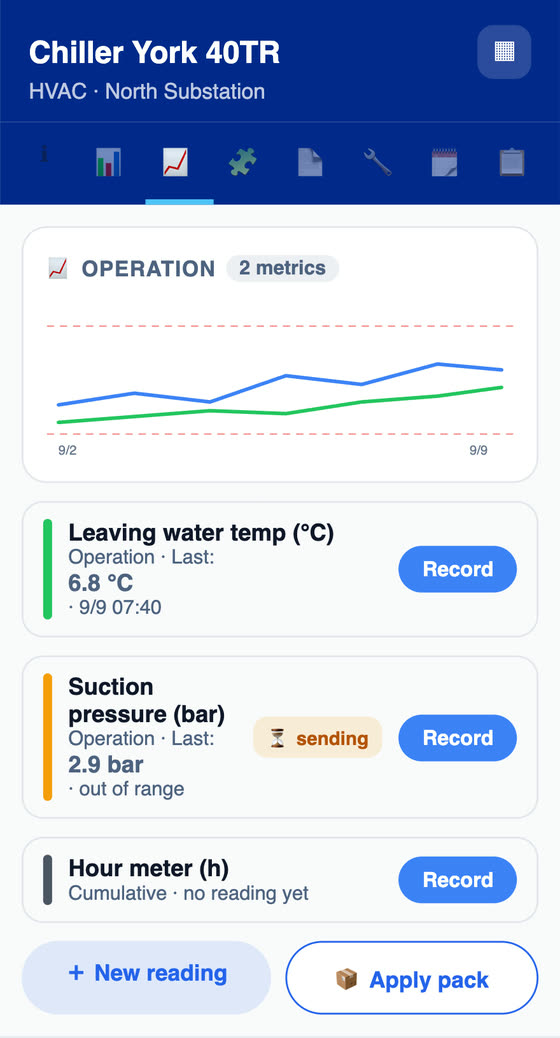
On the phoneIn the app, the asset's measurements with the chart and limit lines, the out-of-range reading and the hour meter.
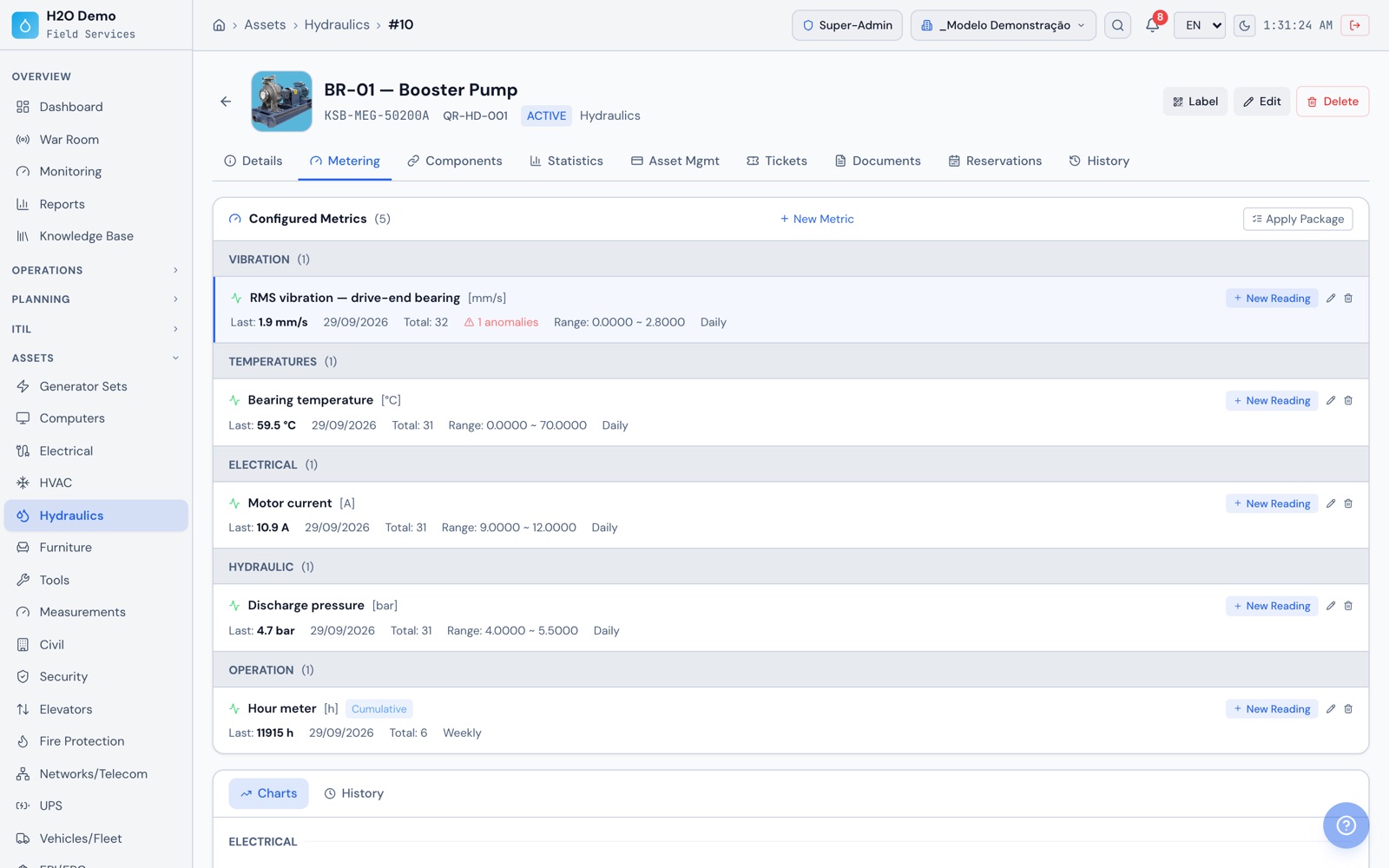
At the officeOn the web, the BR-01 pump metrics grouped into vibration, temperatures, electrical, hydraulic and operation, with the range of each measurement, the hour meter's accumulated usage and the anomaly recorded on vibration.
Assets › Hydraulics › BR-01
H2O web: the BR-01 pump metrics grouped into vibration, temperatures, electrical, hydraulic and operation, with the range of each measurement, the hour meter's accumulated usage and the anomaly recorded on vibration.
H2O app: the asset's measurements with the chart and limit lines, the out-of-range reading and the hour meter.
Assets and components

Assets with a record, a QR code and components with a replacement forecast

Register assets in 16 families with their own fields, such as Electrical, Hydraulics, HVAC, Power Generators and Tooling. Each record keeps location, manufacturer, model, serial number, photos, documents, property data, warranty and work order history. Bearings, mechanical seals, belts and filters go in as components, with service life by time, by usage or whichever comes first.

  • Status of each component (on time, due soon or overdue) on the record, the RAT, the checklist and the technical report
  • Replacement log with reason, linked work order and hour meter reading, which restarts the count
  • Email to the people you choose when the replacement enters the warning window
  • QR tag in 4 sizes from the web, or printed on a Brother label printer from the Android app
  • Dependency diagram between assets, with impact analysis before an intervention
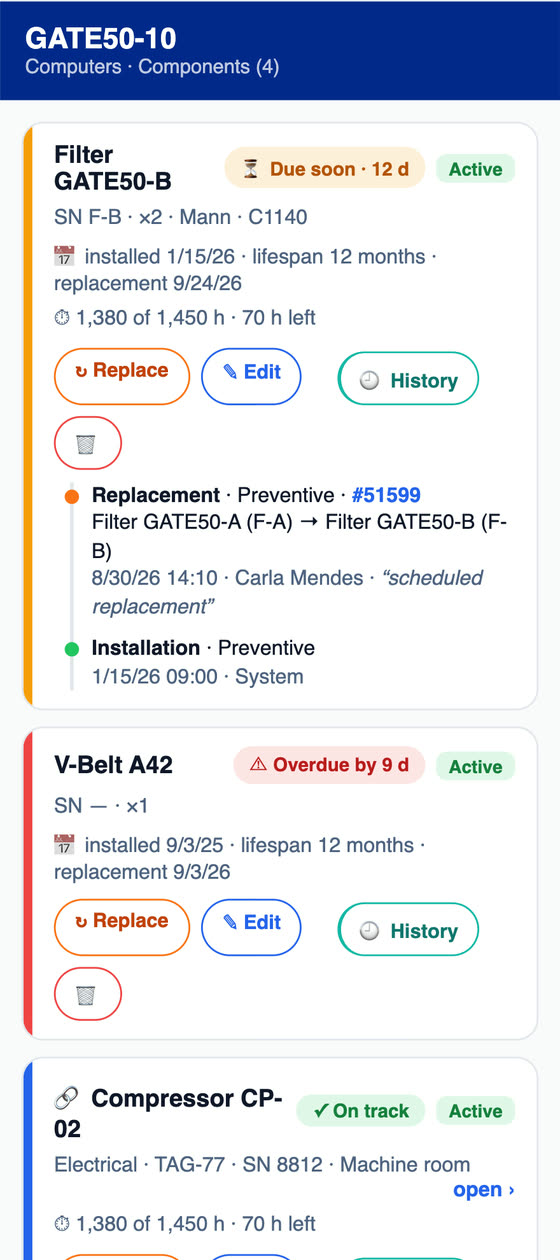
On the phoneIn the app, the asset's components with service life, hours of use, next replacement date, the status of each one and the replacement history.
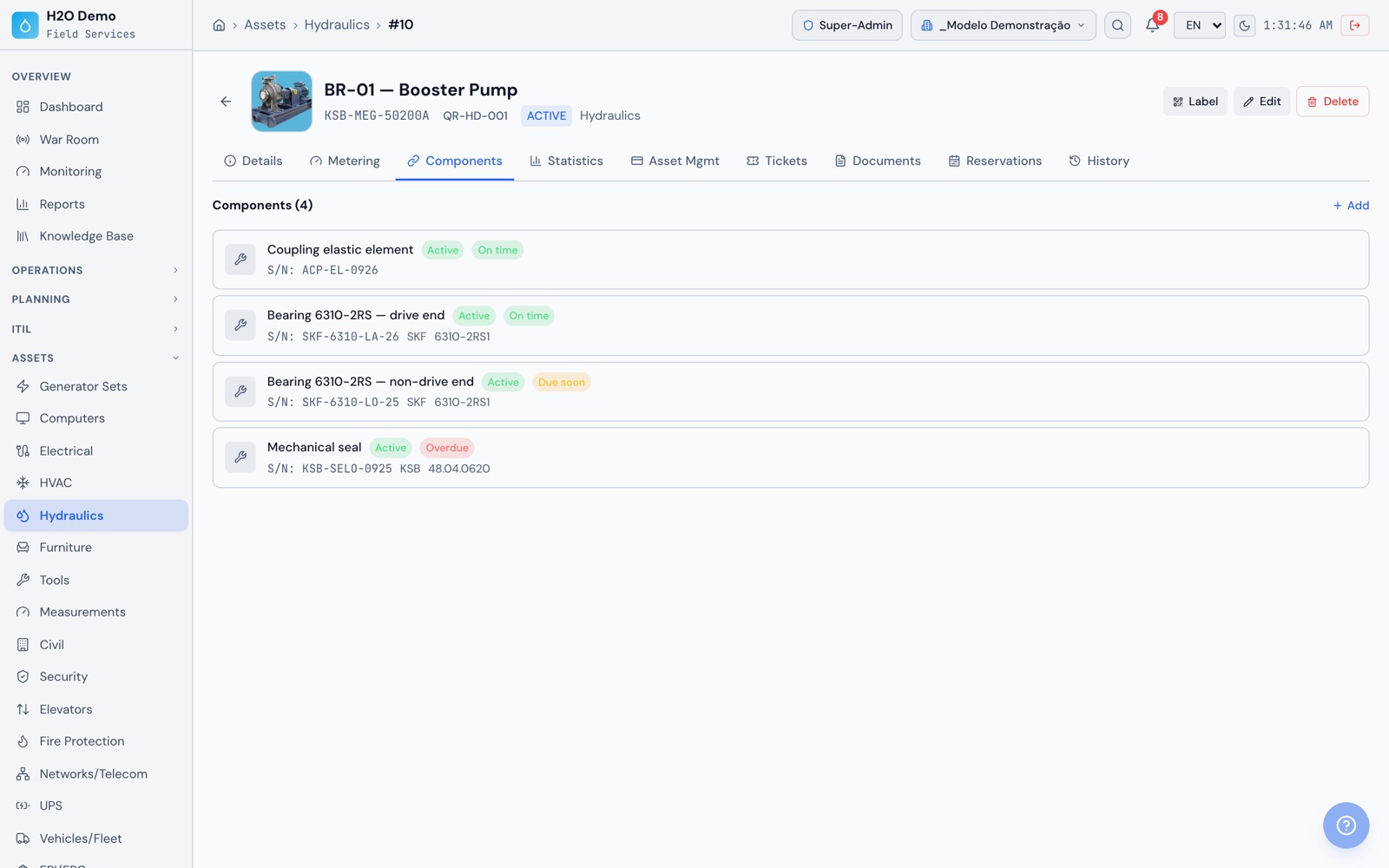
At the officeOn the web, the BR-01 pump components, with coupling, bearings and mechanical seal, and the status of each one: on time, due soon or overdue.
Assets › Hydraulics › BR-01
H2O web: the BR-01 pump components, with coupling, bearings and mechanical seal, and the status of each one: on time, due soon or overdue.
H2O app: the asset's components with service life, hours of use, next replacement date, the status of each one and the replacement history.
Reliability

MTBF, MTTR and availability for each asset, calculated from the work orders

The asset record shows MTBF, MTTR, MTTF, availability, downtime hours and the timeline of preventives and correctives. The reliability report brings all assets together for the chosen period, sorted by criticality, and each asset's PDF is ready for the results meeting.

  • Preventive and corrective separated by the work order's modality, which a rule can set at opening, including on plan work orders
  • Repair time measured from opening to resolution of each corrective work order
  • Month-by-month MTTR and preventive compliance by family on the dashboard
  • "Only with history" filter to analyze just the assets with work orders in the period
  • PDF per asset with photo, statistics, timeline and components
  • Executive report in PDF and PowerPoint, and reports exported to CSV, XLSX and PDF
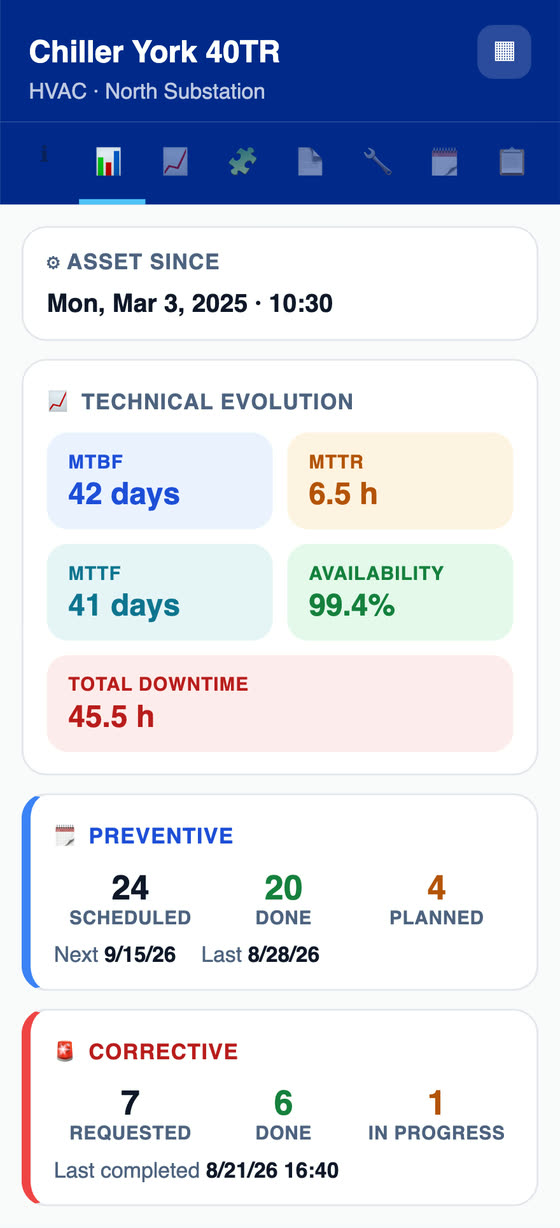
On the phoneIn the app, the asset's MTBF, MTTR, MTTF, availability and unavailability, with preventives and correctives counted from the work orders.
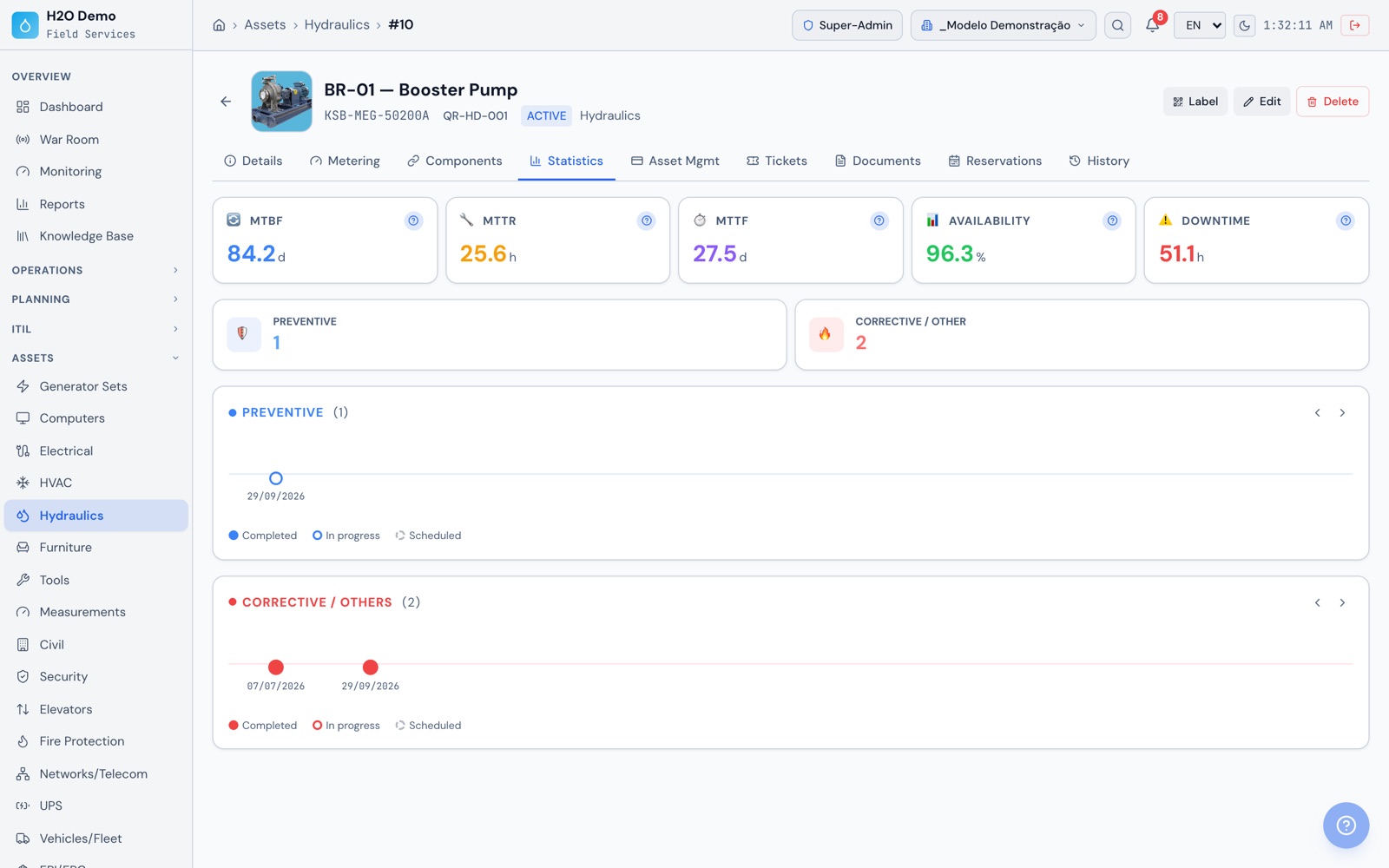
At the officeOn the web, the BR-01 pump statistics with MTBF, MTTR, MTTF, availability and downtime, and the timeline of correctives.
Assets › Hydraulics › BR-01 › Statistics
H2O web: the BR-01 pump statistics with MTBF, MTTR, MTTF, availability and downtime, and the timeline of correctives.
H2O app: the asset's MTBF, MTTR, MTTF, availability and unavailability, with preventives and correctives counted from the work orders.
Technician app

The technician closes the work order with no signal and the client signs on screen

In the app, the technician gets work orders, times each task, fills in checklists and patrols with photos and measurements, checks the asset history, logs component replacements and requests material. Everything works offline and uploads on its own when the network comes back. The RAT is generated on the phone itself, with the client's signature.

  • Checklist completed with every item answered and the technician's signature
  • Photo from the camera, the gallery or as a document, with markup on the image
  • A nonconforming item can generate an NCR and a corrective action as a child ticket of the work order
  • RAT PDF generated on the phone, even offline, in Portuguese, English or Spanish
  • Technician's location on the War Room and a bell with alerts for their tickets
  • App for Android, iPhone, iPad and Windows, on Google Play, the App Store and the Microsoft Store
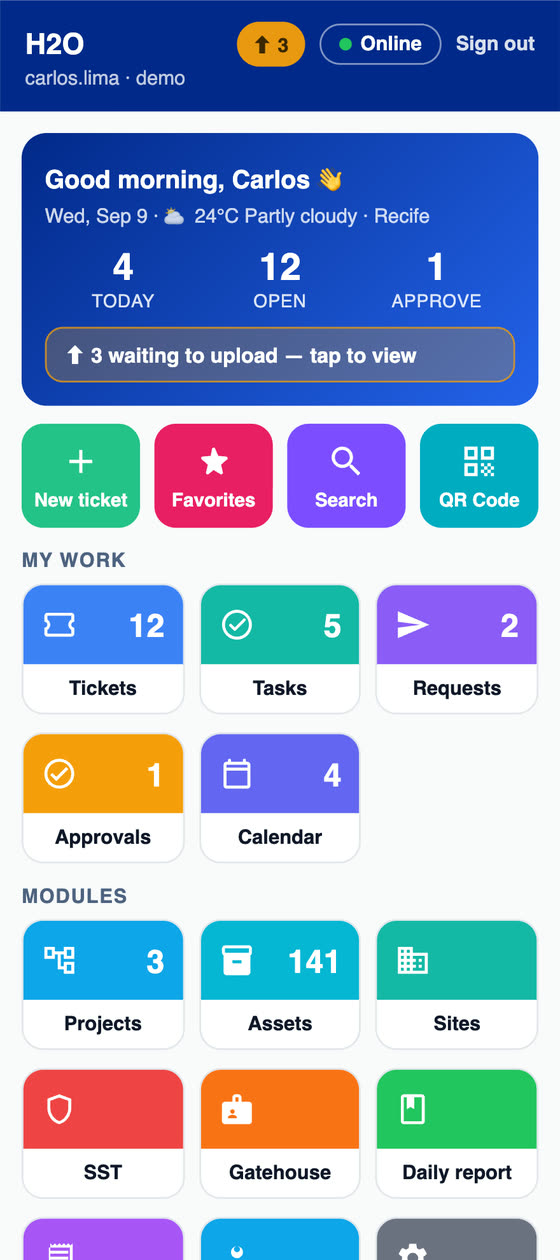
On the phoneIn the app, the technician's day with today's tasks, open tickets, pending approvals and items waiting to upload when there is no network.
At the officeOn the web, the RAT PDF with asset, tasks, captioned photos, materials, solution and the signatures of the technician and the client with the site map.
H2O app: the technician's day with today's tasks, open tickets, pending approvals and items waiting to upload when there is no network.
Stock and costs

The part delivered to the work order goes straight into the job cost

Register spare parts with minimum stock and target stock. The technician requests material from the work order or the app, the request goes through approval and purchasing and, on delivery, the cost is added to the work order automatically at its stock entry value. Hours logged on tasks complete the cost of the job.

  • Parts below minimum highlighted in the list and on the dashboard
  • NF-e by access key, with a SERPRO (Brazilian federal data service) lookup, or by barcode in the app
  • Work order cost: technician hourly rate × time, fixed cost and material
  • Cost reports by client, site, location, requester and technician
  • Productivity per technician, with backlog and breakdown
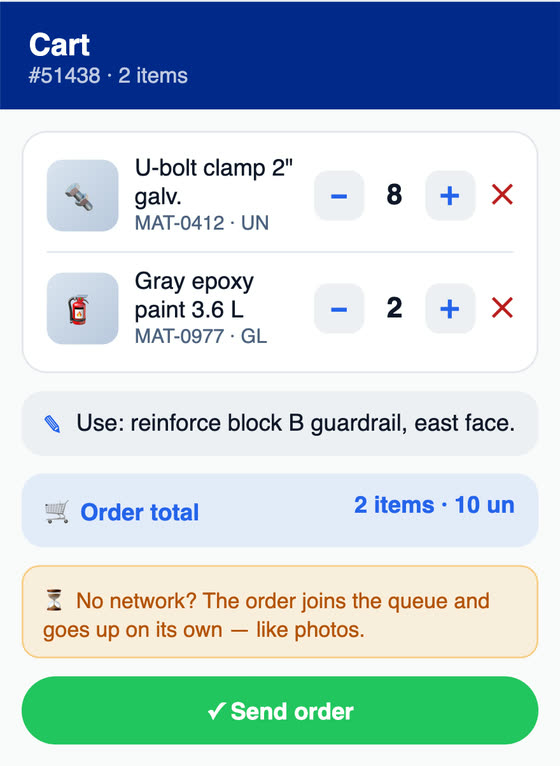
On the phoneIn the app, the material request linked to the work order, which goes into the queue and uploads when there is network.
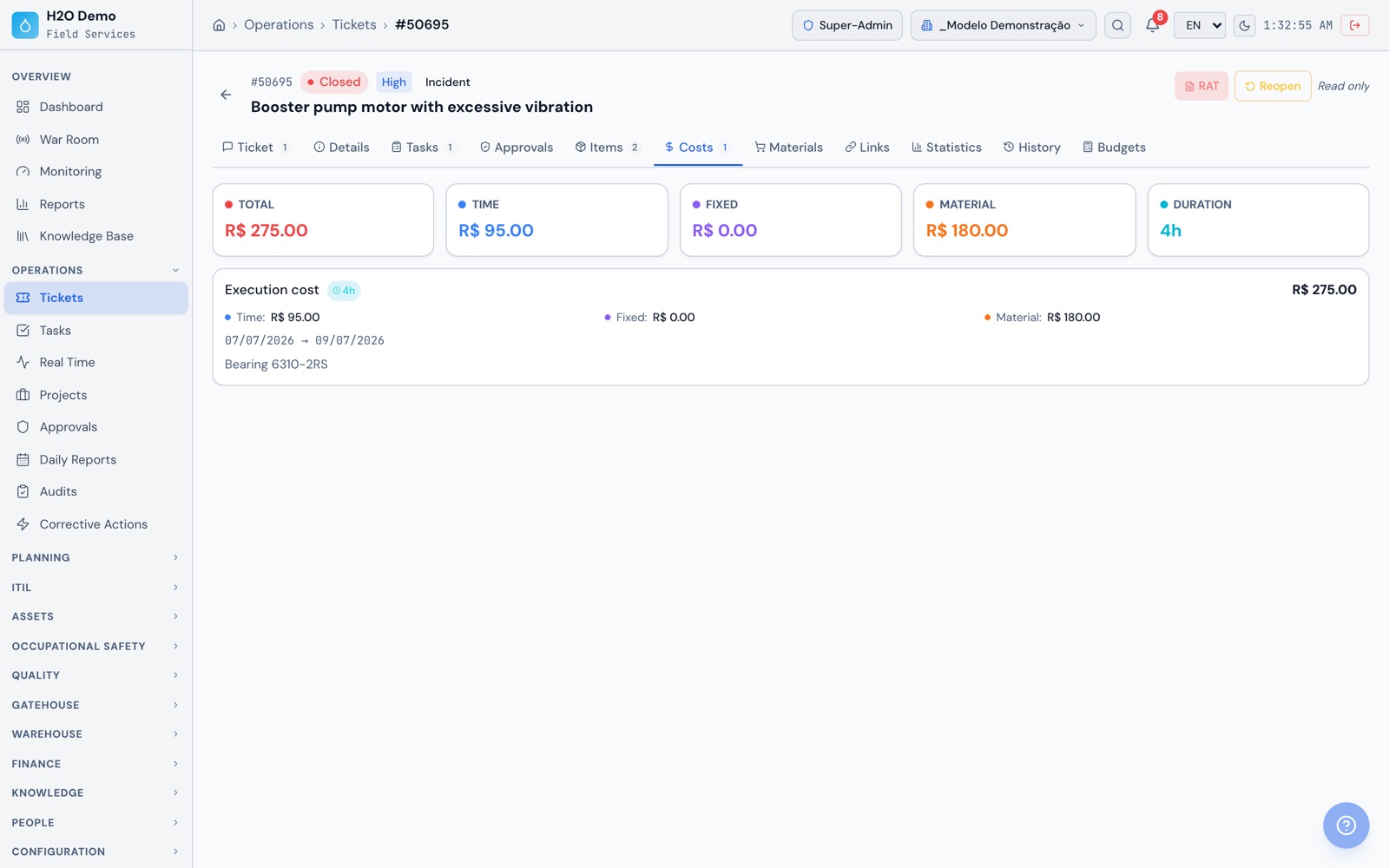
At the officeOn the web, the Costs tab of the booster pump work order with the time cost, the fixed cost and the 6310-2RS bearing entered as material.
Operations › Tickets › Costs
H2O web: the Costs tab of the booster pump work order with the time cost, the fixed cost and the 6310-2RS bearing entered as material.
H2O app: the material request linked to the work order, which goes into the queue and uploads when there is network.
Contracts and measurement

Contract SLA, IMR and deductions calculated from the work orders

For companies that maintain equipment for many clients, each client has its own contract, with validity period, covered sites, SLA by priority (response hours, resolution hours and % penalty), addendums and staff board. The automatic IMR indicators come from the work orders themselves, and the monthly measurement shows the score, the deduction and the approved amount.

  • IMR with weights, targets and deduction bands, built from reusable templates
  • Automatic indicators for SLA compliance, preventives performed, MTTR, repeat failures, satisfaction and checklists
  • Measurement with close-out, approval, reopening and invoicing, exported to Excel and PDF
  • Clients and sites in a tree, and each user sees only what their profile allows
  • Requester portal and satisfaction survey, whose score feeds the IMR
  • Email alert when the contract is about to expire
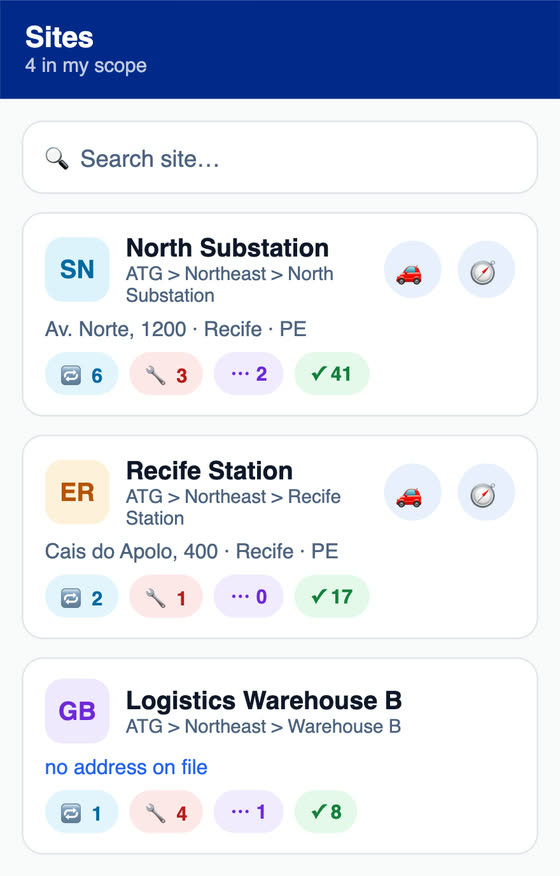
On the phoneIn the app, the sites within the user's scope, organized by client and region, with the preventives, correctives and closed items of each one.
At the officeOn the web, the contract's monthly measurement with team, costs, measured items, IMR score, deduction and approved amount.
H2O app: the sites within the user's scope, organized by client and region, with the preventives, correctives and closed items of each one.
Why H2O

Also in H2O for industrial maintenance

Technical reports

Reports for lightning protection systems (SPDA, NBR 5419), thermography (NBR 15572 and NBR 16292) and generator sets (NBR ISO 8528), plus technical reports for electrical panels (NBR 5410 and NR-10, Brazil's electrical safety standard) and UPS units (NBR 15014), filled in from field data and with diagrams. NBR codes are ABNT's Brazilian technical standards.

Calibrated instruments

Thermal camera, vibration analyzer, megohmmeter and torque wrench with calibration history, attached certificate, 'expired' or 'expiring in 30 days' status and a link to the work order. The RAT lists the tools used on the job.

Recurring failures and changes

Log a repeating failure as a Problem, with symptom, impact and cause, and a planned Change, each with follow-ups, owners and tasks that go into the team's planning.

Dependency diagram

Link assets with Feeds, Protects, Monitors and Depends, see each one's current readings and tickets, and check the impact analysis before shutting down a machine.

PT, APR and PPE

Work Permit (PT) with revalidation, close-out and signatures, APR (job hazard analysis) with an attendance list, trainings and PPE records in PDF, in the same system as the work orders and also in the app.

Contractors on the work order

The motor, compressor or HVAC supplier is recorded as the work order's assignee, alongside technicians and groups, and can be linked to the client's contract.

Estimate and proposal

Corrective estimate linked to the work order and a proposal sent by link, which the client approves with an on-screen signature. The approved proposal becomes a contract.

Approvals

Approval requests with attached documents, for an estimate or an equipment shutdown, answered on the web or in the app.

AI to build checklists

Describe the equipment, the manufacturer and the frequency, and the assistant suggests a preventive checklist in Portuguese, with an English version, for you to review before using it.

Knowledge Base

Procedures and solutions with draft, approval and publishing, also visible in the requester portal.

Reports and War Room

Executive report and contract management report in PDF and PowerPoint, SLA, cost and productivity reports, and the War Room with sites on the map and the location of technicians.

Import and API

Assets, tickets, users, locations and contacts come in from a CSV or Excel spreadsheet. The authenticated REST API and signed webhooks let you integrate your ERP and other systems.

Get the app

The same H2O at the plant, in the shop and in the office

Technicians on the phone, even in areas with no signal. Planning, supervision and management on Windows or in the browser. The same data and the same offline queue.

Android
Phones and tablets · Google Play
Open on Google Play
iPhone and iPad
iOS · App Store
Open on the App Store
Windows
Desktop and kiosk · Microsoft Store
Install from Microsoft Store
Free trial

Try H2O right now

Enter your name and email and get instant access to a demo environment with sample data, on the web and in the app. The data is reset every 72 hours.

Create your exclusive demo environment in seconds.

This will be your site name in H2O. You can use a fictional name.

No commitment · 7-day access · Your data will not be shared

Frequently asked questions

What people usually ask before starting

How does the preventive maintenance plan work by time, usage or condition?

Each plan links an asset to a checklist template and to one or more triggers: time (every N days), usage (every X hours on the hour meter or another counter, with the due date calculated from the average usage of the latest readings) and condition (when a metric reading, such as vibration or bearing temperature, crosses the limit, with the option to require a minimum number of consecutive days out of range). Whichever comes due first wins. Once a day H2O recalculates the next date and, within the lead time you set, opens the work order with checklist, technician and group and notifies the team by email. When the work order is resolved or closed, the plan records the execution and restarts the count. Usage and condition triggers use a metric set up on the asset, such as the hour meter, and its readings.

What is the difference between a maintenance plan and the annual schedule?

The plan follows one asset and opens one work order at a time, when the trigger that comes due first gets close. It works well for a compressor by hour meter or a motor by vibration. The schedule generates all the work orders for a period at once for a set of assets, using the checklist template's frequency, from daily to yearly or every N days, with dates moved to the nearest business day and planned hours per month. It fits the lubrication route and the annual schedule presented to management or to the client. Both appear on the Maintenance Calendar, and each plan's next preventive shows there before the work order exists.

How does H2O calculate MTBF, MTTR and availability?

Per asset, from the work orders linked to it and the modality of each one. MTBF is the average interval between openings of corrective work orders, and MTTR is the average time between their opening and resolution. Availability subtracts the downtime from correctives from the time since the asset was registered. The same tab shows MTTF and downtime hours, with the timeline of preventives and correctives. For the numbers to come out right, each work order needs to be linked to the asset and have the right modality, preventive or corrective. An automation rule can set the modality at opening, including on work orders generated by plans. The reliability report brings these indicators together for all assets by period, in PDF.

How does H2O support predictive and condition-based maintenance?

Predictive techniques, such as vibration analysis and thermography, produce measurements. In H2O, each asset gets the metrics you track, such as vibration in mm/s, bearing temperature, current and pressure, with an expected range, a critical range and a frequency. Readings come in through the app, a patrol, the web or the REST API, when sent by a SCADA system or IoT gateway, and are classified on arrival. An out-of-range reading can open a corrective work order automatically, with Very high priority if it is critical, and the plan's condition trigger opens the preventive when the deviation repeats for the number of days you set. Thermographic inspection has its own checklist in the app and a PDF report. The ranges and intervention criteria are set by your engineering team.

How do I track replacement of bearings, belts, seals and filters?

Each part goes in as a component of the asset, with an installation date and service life by time, by usage (hours or another unit) or whichever comes first. The asset shows whether the component is on time, due soon or overdue and keeps the history of each replacement, with reason, linked work order and hour meter reading. The replacement restarts the count, the component status appears on the RAT, the checklist and the technical report, and H2O emails the people you choose when the replacement enters the warning window.

Does the app work in industrial areas with no signal?

Yes. With the work orders already on the device, the technician handles the job, fills in checklists and patrols, takes photos, enters measurements, logs component replacements, requests material, collects the client's signature and generates the RAT, all offline. The data uploads on its own when the network comes back. Login and the first sync use the network. The app is on Google Play (Android), the App Store (iPhone and iPad) and the Microsoft Store (Windows). Plans, scheduling, contracts and dashboards are set up on the web, and automatic notices to the team and the client go out by email.

Does it work for a company that provides maintenance to many clients?

Yes. Clients, sites and units sit in a tree, and each user sees only the clients in their profile. Each contract has a validity period, covered sites, SLA by priority with % penalty, IMR and a monthly measurement with score, deduction and approved amount, exported to Excel and PDF. The client follows tickets through the requester portal and answers the satisfaction survey, which feeds the IMR. The Invoice button records the invoice in the contract's execution, and the contract management report comes out in PDF and PowerPoint for the client meeting.

How is the SLA counted?

Response and resolution deadlines come from the choice made at opening, a rule, the asset or the SLA table of the contract that covers the site, and they are counted from opening. Statuses marked to pause the SLA, such as 'Awaiting part', freeze the resolution clock, and the paused time is given back in business hours from the SLA calendar. Overdue items show on the dashboard, the list, the War Room and the app, and the SLA reports include a summary, trends and a detailed breakdown in business hours.

How do I control spare parts and the cost of each work order?

Each part has a minimum stock and a target stock, and parts below minimum are highlighted in the list and on the dashboard. The technician requests material from the work order or the app, the request goes through approval and purchasing and, on delivery, the cost is added to the work order automatically at its stock entry value. The NF-e comes in by access key, with a SERPRO lookup, or by barcode in the app. The work order cost adds up technician hourly rate times logged time, fixed cost and material, and the reports show cost by client, site, location, requester and technician.

Does H2O help apply RCM and ISO 55000 asset management?

ATG is a consulting and technology company with experience in maintenance planning and control (PCM), commissioning, RCM and ISO 55000 methods, and H2O keeps the records those methods use: each asset's record with property data, warranty and documents, components with service life, plans by time, usage and condition, work order history with symptom, impact and cause, recurring failures logged as a Problem, and the MTBF, MTTR and availability of each asset. The analysis and the method's decisions stay with your engineering team, and ATG offers implementation consulting. Using H2O does not guarantee certification.

Is H2O an Uptime Institute partner?

No. ATG has no partnership with Uptime Institute, and H2O is not certified or endorsed by it. H2O was born inside mission-critical data centers and was used as the maintenance management tool in Uptime Institute® Operational Sustainability audit processes. What it keeps are the records the operation uses to demonstrate its maintenance program: the plan, the work orders executed with checklist, photos and signature, and the history of each asset. Using H2O does not guarantee certification or any audit outcome.

Can I import my asset base?

Yes. Assets, tickets, users, locations and contacts come in from a CSV or Excel spreadsheet, with preview and validation before saving. Plans, materials and suppliers are set up on the system's screens, and the same plan can be created in one go for several assets of the same type. To connect H2O to your ERP or other systems, there is an authenticated REST API and signed webhooks, and the integration is delivered as a custom project.

Can I run the PMOC in H2O?

Yes, with the preventive maintenance tools: one plan per HVAC unit or an annual schedule for the whole set, checklists with photos and measurements, and the PDF of each execution. The PMOC (Brazil's mandatory HVAC maintenance, operation and control plan) is built with the same features as any other preventive plan.

Put your plant's maintenance plan in H2O

Create your demo environment in seconds, with sample data on the web and in the app, set up a preventive plan for an asset and watch the work order reach the technician's app. For a guided presentation built around your plant or your contracts, message the team on WhatsApp.