
Items from a commissioning failure
Manual — Punch list (GQE) · chapter 8 of 11
In commissioning, each test is a ticket task linked to a phase of the project. When the technician completes the task with the result Failed — on the web or in the app —, H2O by itself opens an item on the project and a retest task on the same ticket. On the web, the message is Failed: GQE item #n and retest task #m opened. The full process is in the manual Commissioning, chapter 7; here is what changes in the item.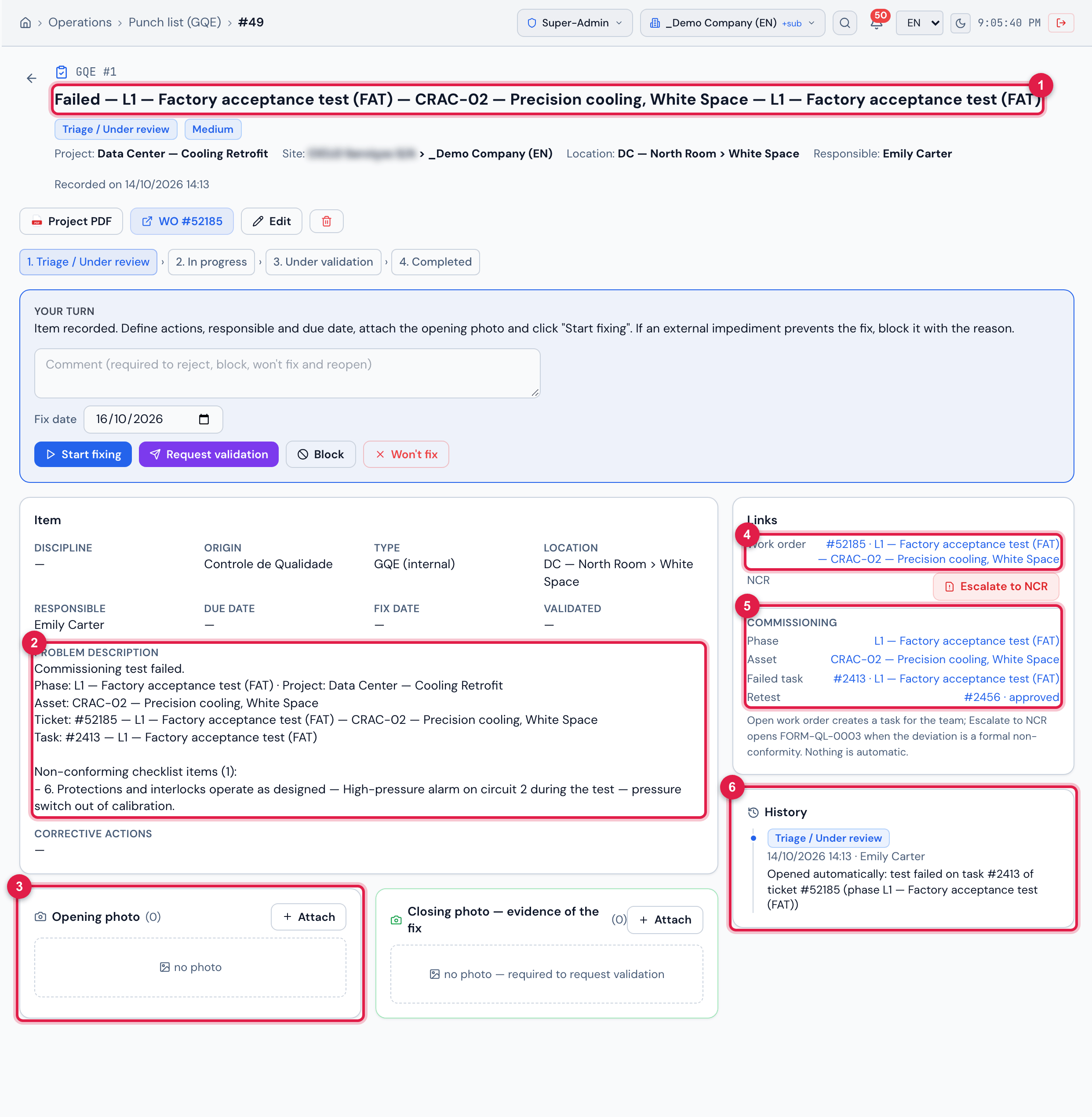
Figure 14. GQE #1, opened by the failure of the factory test of CRAC-02 on the project Data Center — Cooling Retrofit, with the retest already approved.
- 1The title built by H2O: Failed — <phase> — <asset> — <task>.
- 2The description: Commissioning test failed., phase, project, asset, ticket, task and the non-conforming checklist items.
- 3Opening photo — the photos of the test checklist (this test had none: the box shows no photo).
- 4Work order — the test ticket.
- 5The Commissioning block: Phase, Asset, Failed task and Retest, with its status.
- 6The history: Opened automatically: test failed on task #… of ticket #… (phase …).
| Item field | Comes from |
|---|---|
| Project | the project of the phase |
| Title | Failed — <phase> — <asset> — <task> |
| Problem description | the test summary and the Non-conforming checklist items, with their comments |
| Type / Origin | GQE (internal) / Controle de Qualidade, when that origin exists and is active on the Lists page |
| Priority | the ticket’s: Very high or Critical → Critical; High → High; Medium → Medium; the others → Low |
| Responsible | the ticket technician — who receives the responsible-assigned notice, unless they were the one who failed the test |
| Location | the location of the asset |
| Due date | empty — set it in Edit |
| Opening photo | the checklist photos of the failed task (the same files, not copies) |
| Status | Triage / Under review |
What is different about this item
Section titled “What is different about this item”- The Work order already comes filled in with the test ticket — that is why Open work order does not show.
- The Commissioning block in Links leads to the Phase (Commissioning tab of the project), the Asset, the Failed task and the Retest, with its status: to do, completed, approved or failed.
- The retest and the item are independent: approving the retest does not complete the item, and completing the item does not approve the retest. Handle the item until Completed, with the closing photo of the fix, like any other.
- One item per failed task: while its item is open, failing the same task again does not create another. A failed retest is another task — and opens its own item.
- The items of the asset appear in the asset’s Dossier PDF (manual Commissioning, chapter 8).
Escalate to NCR in commissioning
Section titled “Escalate to NCR in commissioning”The button is the same as in chapter 7, but the NCR comes out with the test rules:
| NCR field | Commissioning item |
|---|---|
| 1. Origin | Test; origin report number Commissioning · GQE #n |
| 6.1 Evidence | the item, the phase, the asset, the task, the ticket and the non-conforming checklist items |
| 8. Classification | Minor (adjust later if needed) |
| Company (optional) | the supplier of the asset (Asset Management tab of the asset), when there is one |
| Treatment owner | none — the NCR is created To delegate |
| Treatment ticket | a child of the test ticket |
Was this page helpful?
Thanks for the feedback!
Got it — we will improve this page.