
Environmental incidents, aspects and impacts, legal requirements and ISO 14001
Manual — Environment · chapter 7 of 11
The Incidents, aspects, legal requirements and ISO 14001 screen has four tabs and a site filter at the top.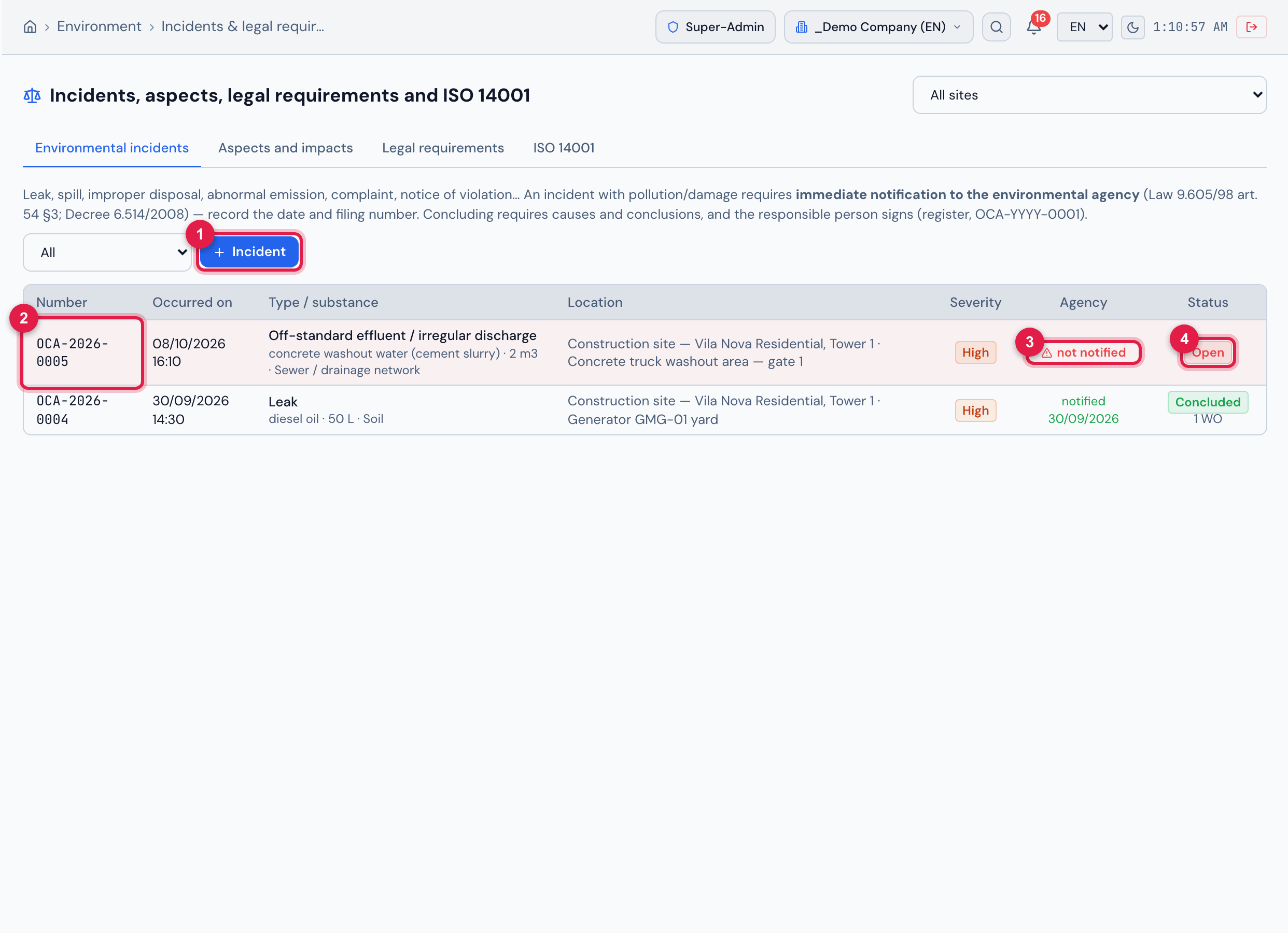
Figure 19. The Environmental incidents tab: OCA-2026-0005 (off-spec effluent at the concrete truck washout, High severity) Open and not notified to the agency, with a red background; and OCA-2026-0004 Concluded, notified to INEA, with 1 corrective work order. Each row shows number, date and time, type/substance, location, severity, notification to the agency and status; the filter next to the button shows one status at a time.
- 1+ Incident.
- 2The incident’s OCA number.
- 3not notified — notification to the agency is required and there is no date yet.
- 4Open status.
- Click + Incident and record type, severity, date and time, site, location, substance, volume, affected medium, description and the immediate actions/containment; attach a photo, lab report or official letter.
- In Notification required?, leave “automatic (high/critical)” — high or critical severity requires notification to the agency — or choose Yes/No. Once the agency has been notified, record the Agency, Notified on and the Filing number.
- Open the incident and use Edit / investigate to record the method, the immediate causes, the root causes and the conclusions/corrective actions (and the notice of violation, if any). When causes are saved, the status becomes Under investigation.
- Link the corrective work orders with link work order (work orders are never created automatically).
- Click Conclude and sign: the system checks the causes (immediate or root), the conclusions and the notification to the agency when it is required; if the notification was not recorded, it asks for a justification, which stays in the history. The registered signature of the person concluding goes into the trail (hash, IP and verifiable code).
While an incident that requires notification has no Notified on date, it stays red in the list, shows the warning “This incident requires notification to the environmental agency and none is recorded yet…” on its record, is a pending issue of the module and triggers an e-mail alert every day (Law 9.605/98 art. 54 §3; Decree 6.514/2008). Once concluded, it accepts no edits and no new work orders: use Reopen, enter the reason — the signature is invalidated — and edit.
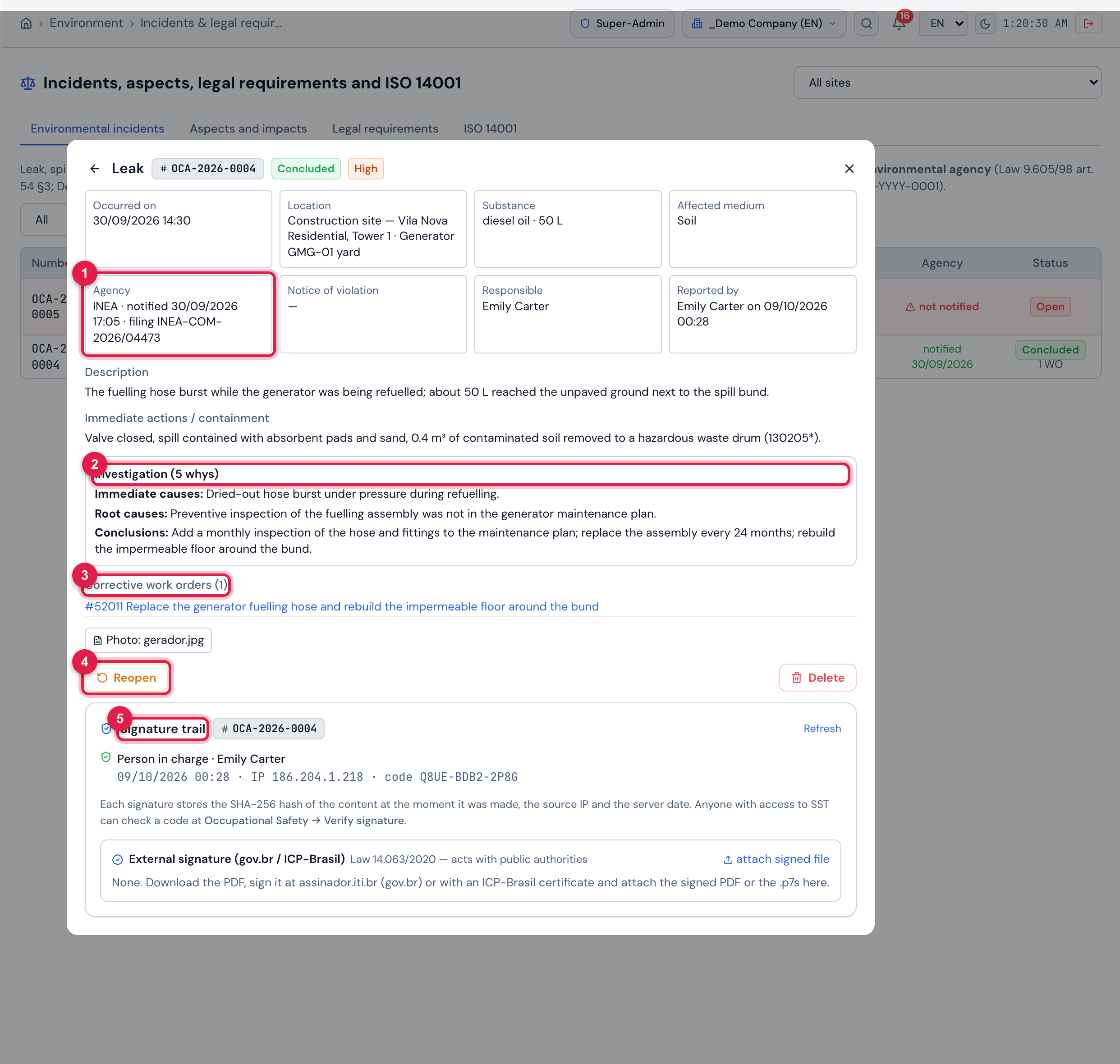
Figure 20. Record of the concluded incident OCA-2026-0004 — a 50 L diesel leak at the generator yard: the facts (occurred on, location, substance, affected medium), the notification to INEA with date and filing number, the notice of violation (none), the responsible person and who reported it, the description, the containment, the investigation (5 whys: immediate causes, root causes and conclusions), the linked corrective work order (#52011), the attachment (photo), the Reopen and Delete buttons and the Signature trail with Emily Carter’s signature (date, IP and code).
- 1Agency — notification to the agency: date and filing number.
- 2Investigation — method, causes and conclusions.
- 3Linked Corrective work orders.
- 4Reopen — asks for the reason and invalidates the signature.
- 5Signature trail.
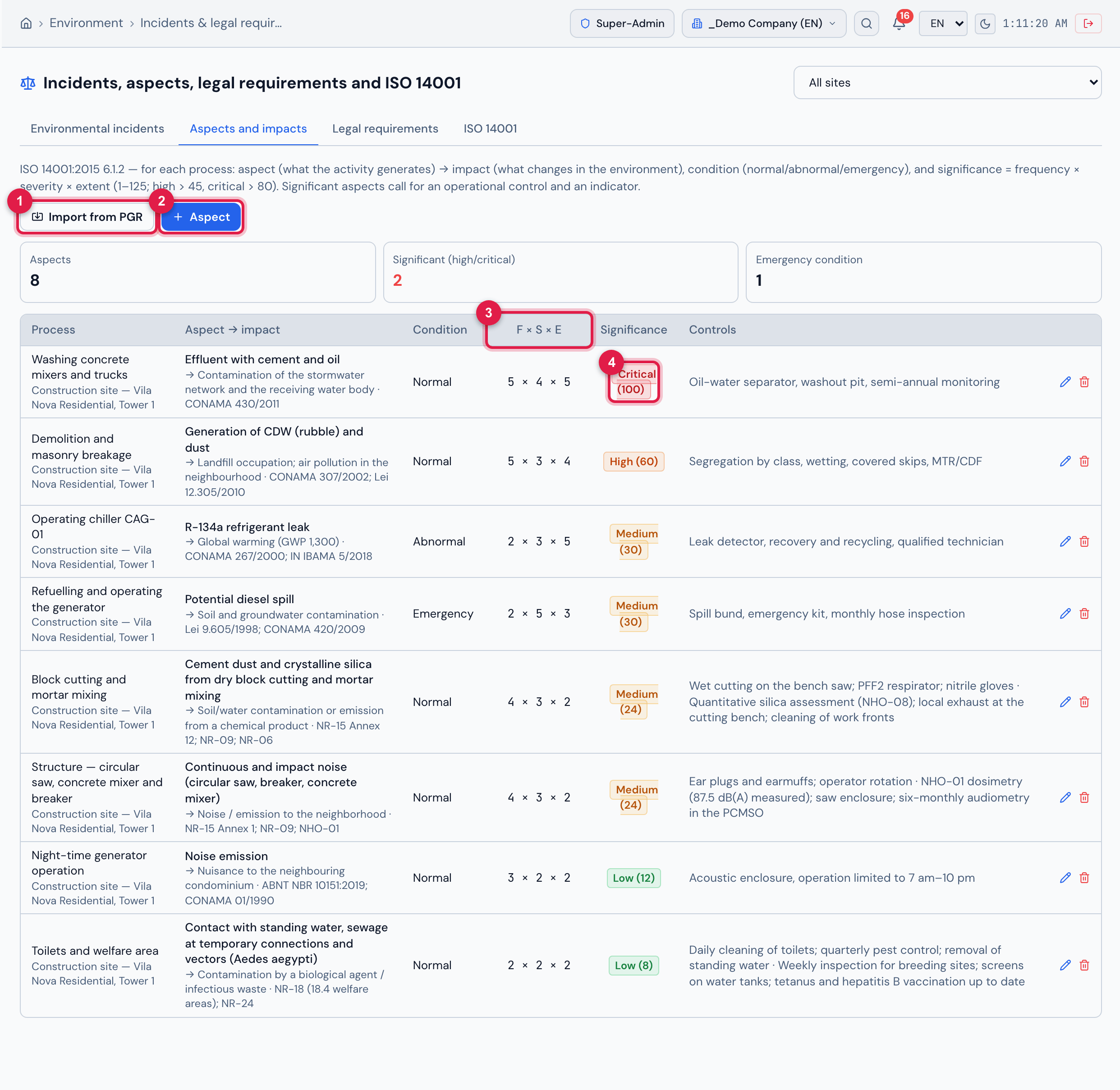
Figure 21. The Aspects and impacts tab (ISO 14001 6.1.2): the indicators (8 aspects, 2 significant, 1 in emergency condition) and, per process, the aspect → impact with the related requirement, the condition, F × S × E, the significance = frequency × severity × extent (low ≤ 15, medium ≤ 45, high ≤ 80, critical above 80) and the controls. The concrete mixer washing effluent is Critical (100); CDW and dust, High (60); the dust from block cutting, the noise from the structure machinery and the sanitary facilities came from the SST risk inventory through Import from PGR.
- 1Import from PGR.
- 2+ Aspect.
- 3F × S × E column.
- 4Significance Critical (100).
Register with + Aspect (site, process, aspect, impact, condition, temporality, frequency, severity, extent, controls, related requirements and status Active/Controlled/Closed — the significance appears as you fill it in). The Import from PGR button brings in, as aspects, the chemical, physical and biological risks still open in the SST risk inventory (with a site filtered, those of its project), with extent 2 for review; the same risk is not imported twice.
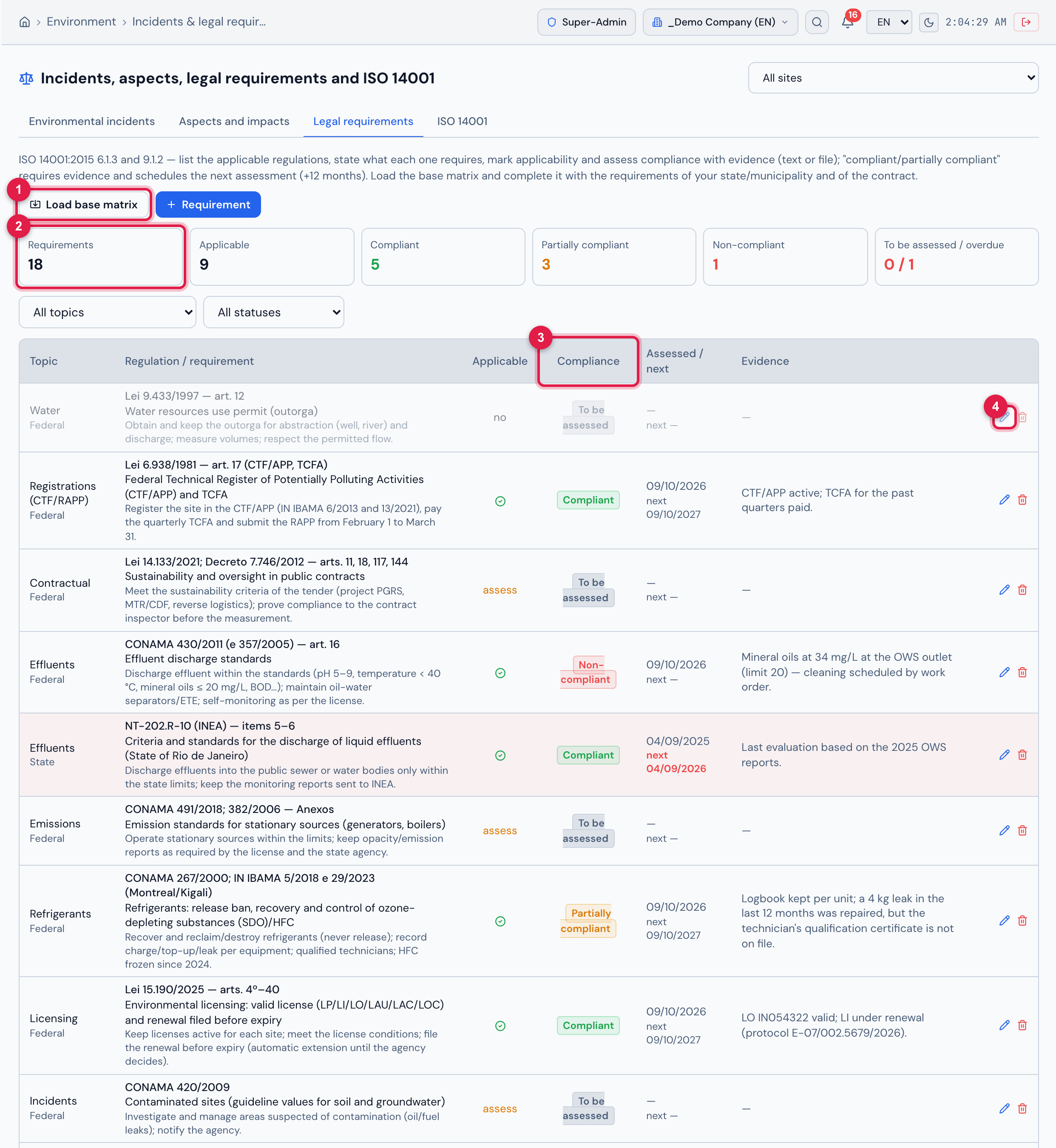
Figure 22. The Legal requirements tab (ISO 14001 6.1.3 / 9.1.2): the indicators (18 requirements, 9 applicable, 5 compliant, 3 partially compliant, 1 non-compliant, 0 to be assessed / 1 overdue), the topic and status filters and the matrix with topic and jurisdiction, regulation/article, requirement and obligation, applicability, compliance (Compliant, Partially compliant, Non-compliant, To be assessed), date of the assessment and of the next one, and the evidence. The state regulation NT-202.R-10 has an overdue assessment (red background, next date in red).
- 1Load base matrix.
- 2Indicators (here, Requirements).
- 3Compliance column.
- 4Assess pencil.
Load base matrix inserts 17 typical requirements — licensing (Law 15.190/2025), CTF/APP and TCFA, PGRS, MTR/DMR, CONAMA 307 (construction waste), reverse logistics, waste classification and storage (NBR 10004/11174/12235), effluents (CONAMA 430), emissions (CONAMA 491/382), noise, refrigerants, FDS, water use permit, environmental crimes and incident notification (Law 9.605/98), contaminated areas (CONAMA 420), Law 14.133/2021 and ISO 14001 — all as “to be assessed”; it does not duplicate what already exists. Complete it with + Requirement for the state, municipal and contract requirements.
To assess, click the pencil (Assess): set the Applicability and the Compliance and record the evidence (text or file). Compliant or Partially compliant requires evidence and schedules the next assessment in 12 months (unless you enter another date). An applicable requirement that is non-compliant, partially compliant or has an overdue assessment is a pending issue of the module; the e-mail alert goes out 30 days before and on the day of the next assessment.
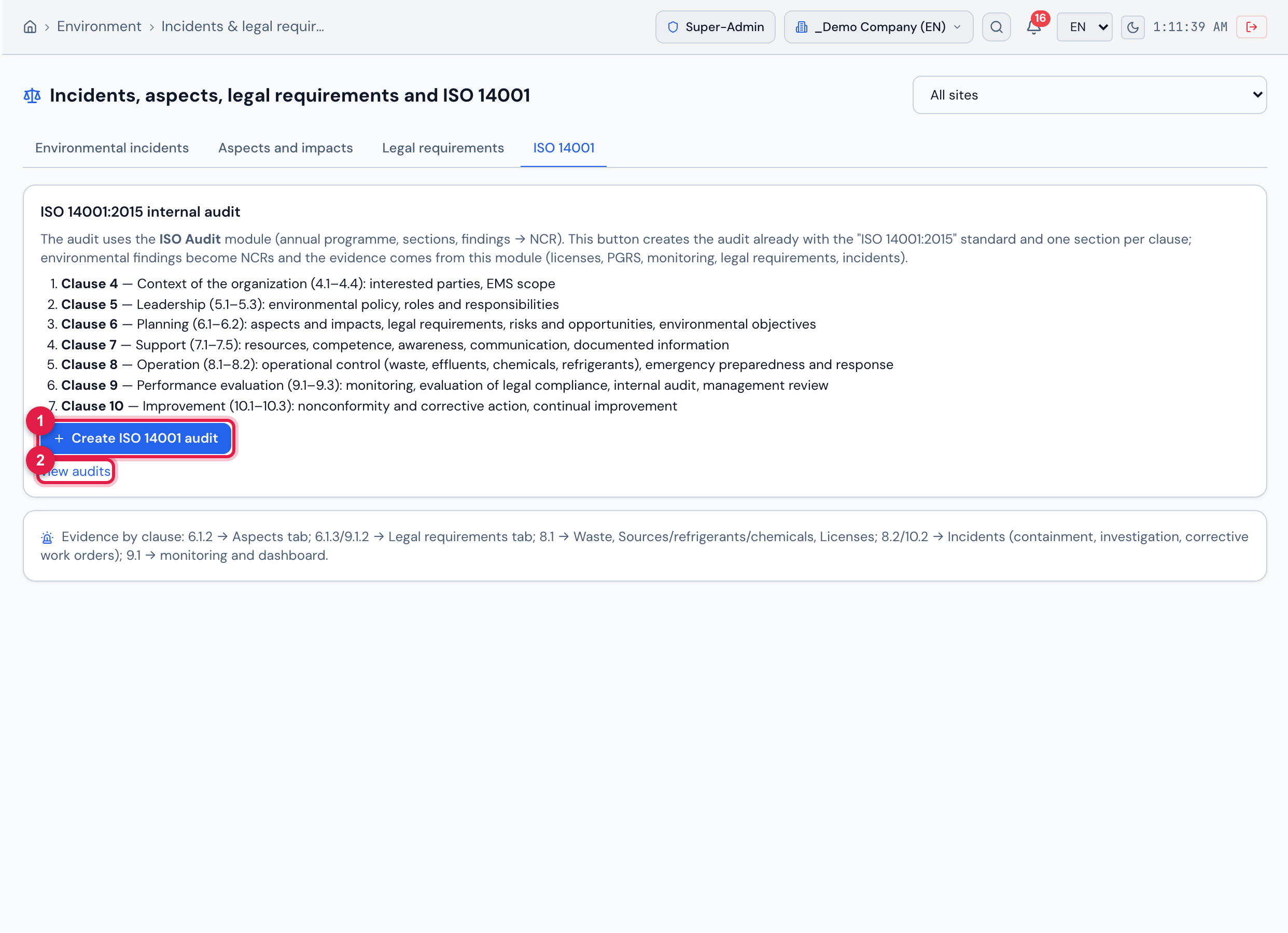
Figure 23. The ISO 14001 tab: the ISO 14001:2015 internal audit box with clauses 4 to 10; the Create ISO 14001 audit button creates, in the ISO Audit module, an internal audit with the standard “ISO 14001:2015” and one section per clause and opens it — with a site filtered, it already carries the site’s name and project. Findings become NCRs through the normal flow; the box below shows where the evidence for each clause is.
- 1Create ISO 14001 audit.
- 2view audits — opens the list of audits.
Was this page helpful?
Thanks for the feedback!
Got it — we will improve this page.