
Asset Management: value, warranty and depreciation
Manual — Assets · chapter 7 of 12
The Asset Management tab keeps the asset’s purchase data — value, order, invoice, fixed asset number, dates, warranty, supplier and proposal — and calculates the depreciation. It uses the profile’s Asset Register right (Finance group). Each asset has one asset management record.- In the Asset Management tab, click Create asset management record (it appears when the asset has none yet).
- Fill in the sections: Financial Information (Value (R$), Order #, Invoice, Delivery #, Fixed Asset #), Dates (Order date, Purchase date, Delivery date, Use date, Inventory date, Decommission), Warranty (Duration (months), Expiry, Warranty value (R$), Information) and Depreciation (Lifespan (months), Method, Coefficient).
- Choose the Supplier and the Proposal, if any, and write the Notes.
- Click Create. Afterwards, use Edit and Save to change it.
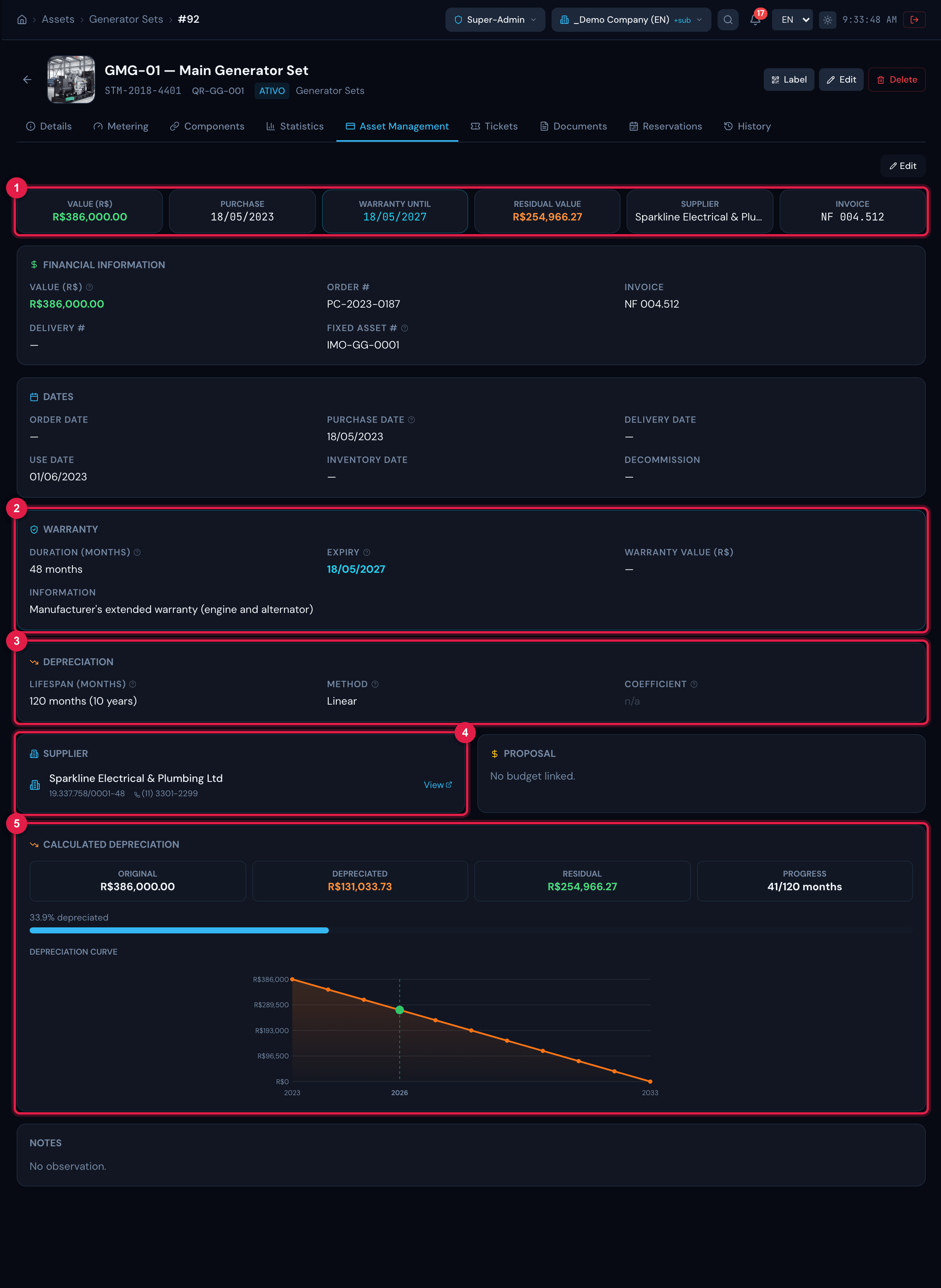
Figure 18. Asset Management tab filled in: the summary cards (Value, Purchase, Warranty until, Residual Value, Supplier, Invoice), the record sections and the Calculated depreciation block with the year-by-year chart.
- 1Summary cards: Value, Purchase, Warranty until, Residual Value, Supplier and Invoice.
- 2Warranty section: the Expiry is calculated (purchase + duration).
- 3Depreciation section: lifespan, method and coefficient.
- 4Supplier card with the View link to the supplier record.
- 5Calculated depreciation: original, depreciated, residual and progress.
| Rule | How it works |
|---|---|
| Warranty expiry | When editing, the screen fills in Expiry = Purchase date + Duration (months); you can adjust the date by hand. The warranty is valid until the last day: it is expired only from the next day on. |
| Depreciation | Calculated when there is a Value (R$) greater than zero and a Purchase date. Linear: the value drops by the same amount every month until it reaches zero at the end of the lifespan. Declining: depreciates more at the beginning — the annual rate (12 ÷ lifespan in months) is multiplied by the Coefficient and applied to each year’s balance. |
| Lifespan not entered | The calculation uses 60 months (5 years) and warns: “Lifespan not provided — using 60 months (5 years) as the tax default.” A new record already comes with 60 months and the Linear method. |
| No value or no purchase date | The block shows what is missing (“Fill in Value (R$), Purchase date and Lifespan (months) to enable the automatic depreciation calculation.”). |
Was this page helpful?
Thanks for the feedback!
Got it — we will improve this page.