
Execution and evidence
Manual — PMOC · chapter 8 of 10
On the technician’s side, the PMOC does not exist: what arrives is a preventive ticket with a task and a checklist, like any other — in the web ticket list or in the app. On the manager’s and the technical manager’s side, the Execution tab gathers those tickets by period and says what was done, what is overdue and what has evidence.The preventive ticket
Section titled “The preventive ticket”Each ticket generated by the schedule is named <template> - <equipment> — for example PMOC · A01 · Limpeza/troca de filtros de ar - CRAC-01 — Precision cooling, White Space — and is born with the preventive modality, the Planned status on the adjusted date and a task linked to the asset, with the template checklist (manual Automatic Scheduling, chapter 4).
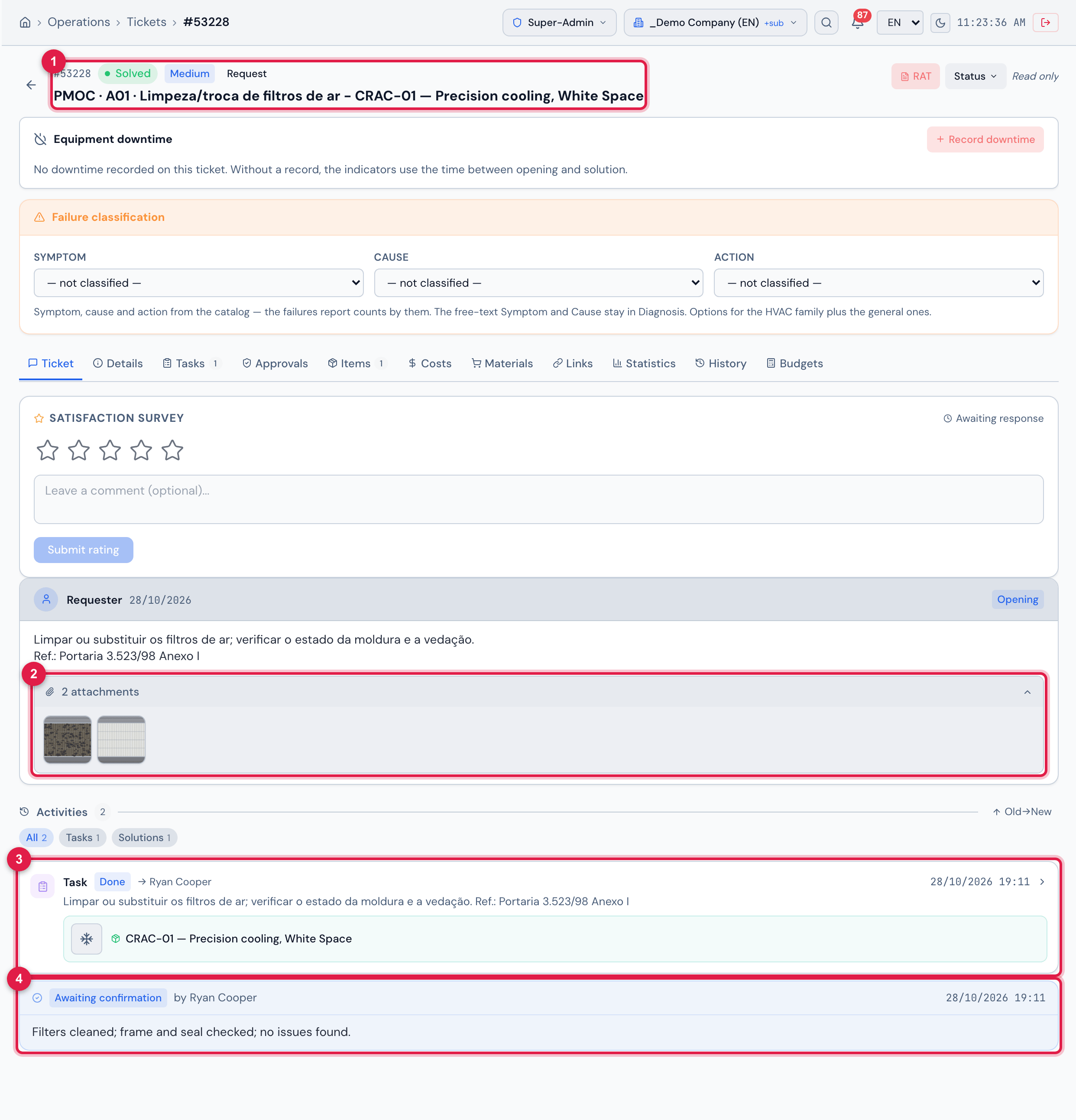
Figure 18. The ticket PMOC · A01 · Limpeza/troca de filtros de ar - CRAC-01, solved by the technician Ryan Cooper with the before and after photos.
- 1The title PMOC · A01 · … - CRAC-01 … and the Solved status.
- 2The checklist photos, in the ticket attachments — they are what becomes the thumbnails of the Execution tab and of the PDF.
- 3The ticket task, with the template PMOC · A01 · Limpeza/troca de filtros de ar and the asset.
- 4The solution recorded when the ticket was solved — shown as Awaiting confirmation until the requester accepts it (or the ticket closes by itself).
| Who | Does what | Where |
|---|---|---|
| the technician | opens the ticket, answers the checklist (with the required photos in the cleanings), finishes the task and solves the ticket | H2O app or web — manual Task templates, chapter 7 |
| the supervisor | assigns the technician, reschedules, follows up | ticket list, schedule calendar |
| the manager / technical manager | checks what was executed and chases the overdue | the PMOC’s Execution tab |
The Execution tab
Section titled “The Execution tab”The tab lists the tickets of the PMOC schedule in the period — by due date, not by execution date — with the totals at the top:
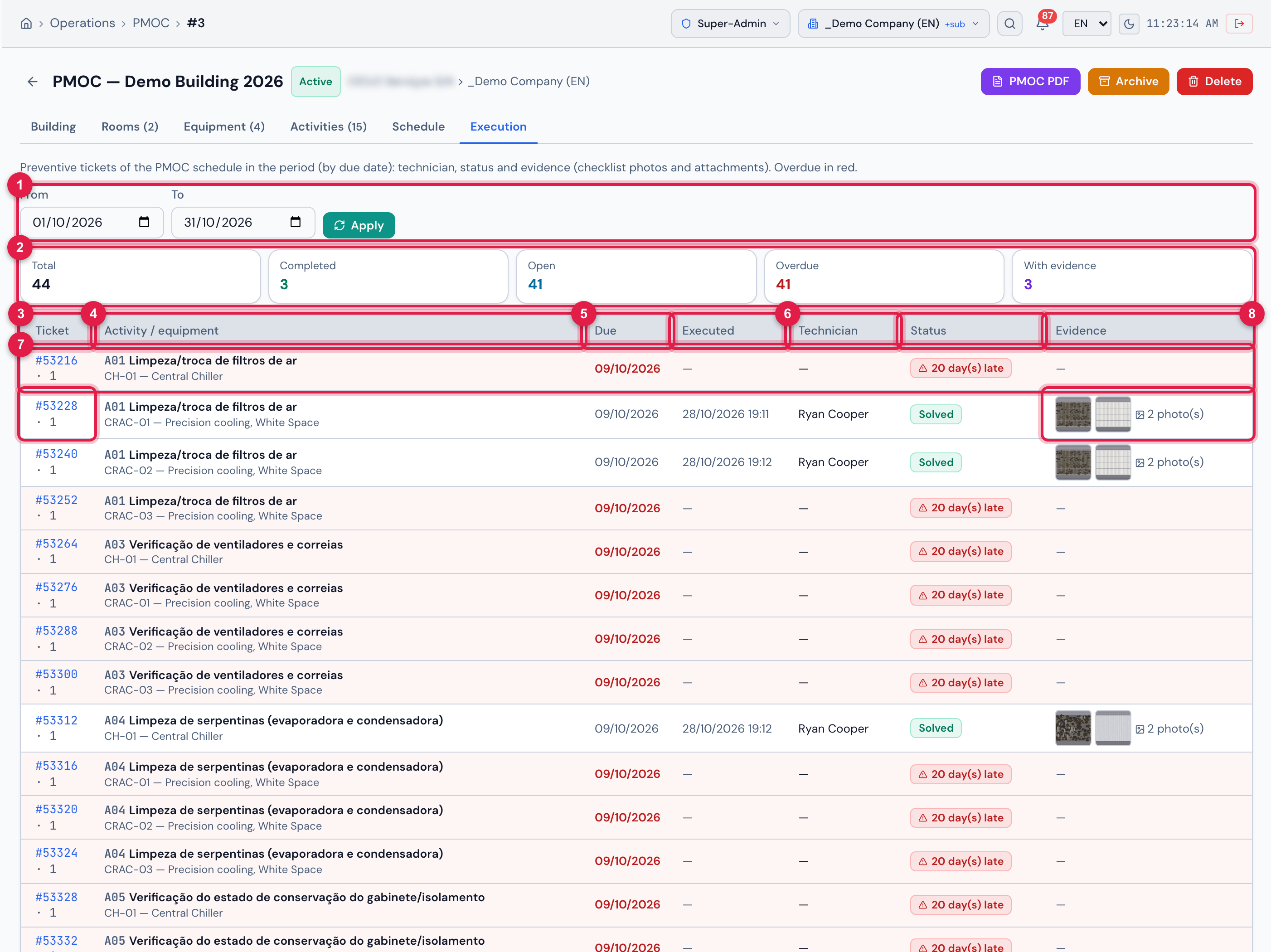
Figure 19. The Execution tab of the Demo Building, from 01/10/2026 to 31/10/2026: 44 preventive tickets, three of them solved with photos and the other 41 overdue.
- 1From / To and Apply — the period by due date; empty, all the executions of the PMOC.
- 2The cards Total, Completed, Open, Overdue and With evidence.
- 3The Ticket column: #number (link to the ticket) and, next to it, the sequence of the item in the schedule.
- 4Activity / equipment: the code and the name of the activity, with the equipment below.
- 5Due (in red when overdue) and Executed — the date and time of the solution (or of the closing).
- 6Technician and Status: New, In progress (assigned), In progress (planned), Pending, Solved or Closed — green when completed.
- 7An overdue row: light red background and the badge {n} day(s) late in place of the status.
- 8Evidence: the thumbnails of the checklist photos (click opens the photo), {n} photo(s) and {n} attachment(s).
| Counter | Counts |
|---|---|
| Total | the tickets of the schedule with a due date in the period |
| Completed | the Solved and Closed ones |
| Open | all the other statuses |
| Overdue | open with the due date before today |
| With evidence | with at least one checklist photo or one attachment |
- The Due date is the ticket’s adjusted date in the schedule (the planned one, moved to a working day or by someone’s hand on the calendar). Moving the ticket on the calendar changes the due date here too.
- Executed is the date of the ticket’s solution (or of the closing, if there was no solution). A ticket closed without a solution, by cancellation, appears as Closed with the closing date — check through the link.
- A cancelled (closed) ticket of the schedule counts as completed. To take a visit out of the PMOC without counting it, delete it through the ticket trash.
- The tickets of an archived PMOC remain on its Execution tab: it is the history of the validity period.
Was this page helpful?
Thanks for the feedback!
Got it — we will improve this page.