
Costs and Estimates
Manual — Projects · chapter 8 of 13
Two tabs deal with money, with different roles: Costs records what the project has spent (simple entries, with amount and period); Estimates links to the project the technical budgets (compositions, SINAPI, BDI) made in Finance › Estimates.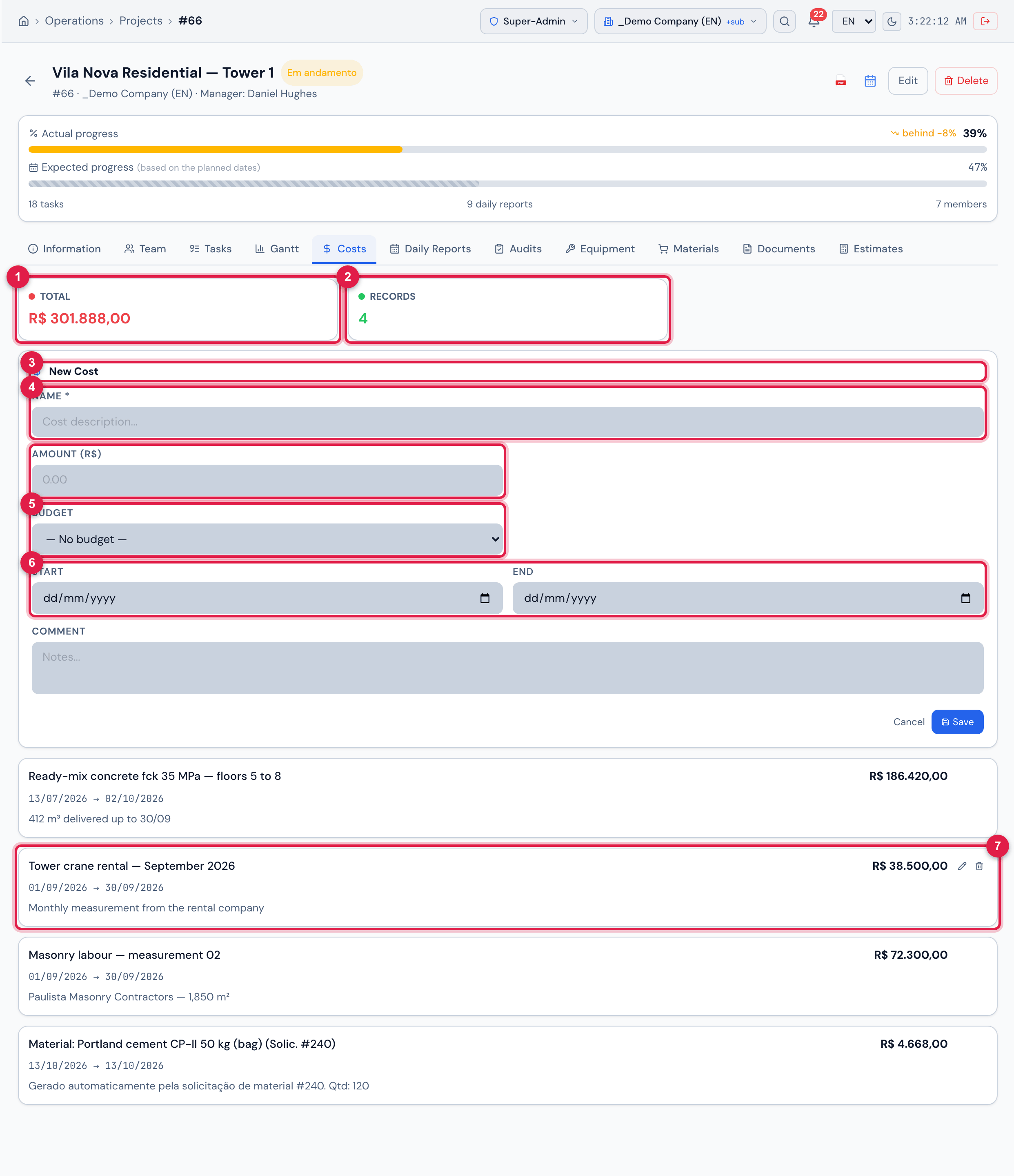
Figure 16. Costs tab of Vila Nova Residential — Tower 1: the Total (R$ 301.888,00) and Records (4) cards, the New Cost form open and the entries — tower crane rental, ready-mix concrete for floors 5 to 8, masonry labour and the automatic cost of the delivered cement (Material: Portland cement CP-II 50 kg (bag) (Solic. #240)).
- 1Total — the sum of the entries, in reais.
- 2Records — how many entries there are.
- 3New Cost — the button opens this form (already open here). It needs the Create right in Projects.
- 4Name (required) and Amount (R$).
- 5Budget — optional.
- 6Start and End — the period of the expense.
- 7An entry: amount, period and comment. The pencil edits and the trash can deletes (on mouse-over).
- Use one entry per expense or per measurement: “Scaffolding rental — October”, “Outsourced labour — electrical”, “Temporary generator rental”.
- The End cannot be earlier than the Start (End date must be after the start date).
- The Budget field associates the entry with a control budget already registered in the company; leave — No budget — if you do not use it.
- Entering a cost needs Create in Projects; correcting it, Edit; deleting it, Trash.
Estimates
Section titled “Estimates”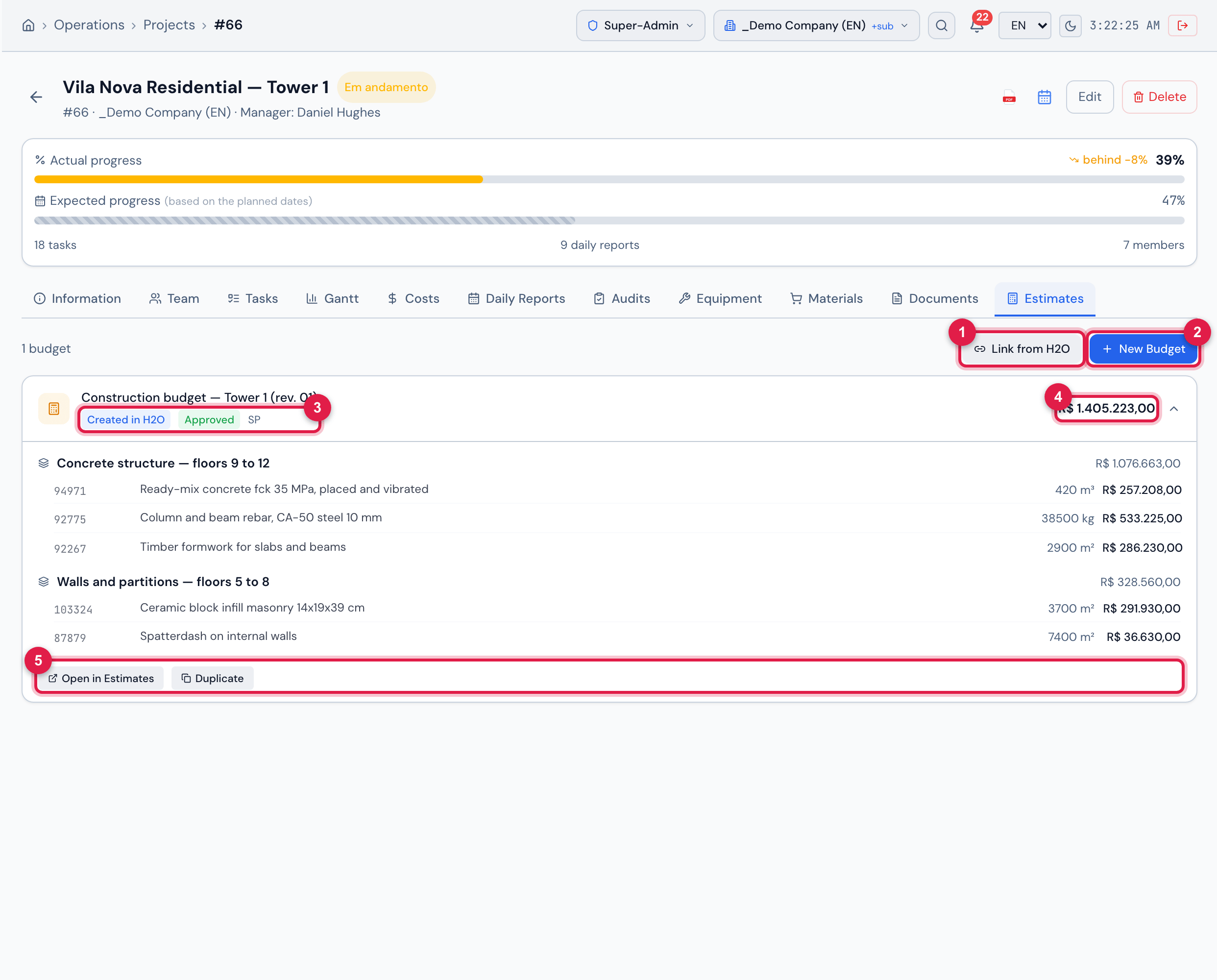
Figure 17. Estimates tab: the buttons to link or create and the budget Construction budget — Tower 1 (rev. 01) expanded — Created in H2O, Approved, with two groups (the concrete structure of floors 9 to 12 and the walls of floors 5 to 8) —, the total and the actions. With the OrçaFascio integration configured, Link from OrçaFascio also appears next to Link from H2O (not the case in the demo environment).
- 1Link from H2O — picks a budget already made in Finance › Estimates.
- 2New Budget — creates a technical budget already linked to the project.
- 3Origin badge (Created in H2O, Imported, Linked) and state badge.
- 4The budget total. When the budget has a BDI, the expanded part ends with the Subtotal, BDI and Total lines.
- 5The actions, which change with the budget state.
| State | What can be done |
|---|---|
| Draft | Edit, Submit for Approval, Duplicate, Delete. |
| Awaiting Approval | Approve or Reject (with Rejection reason and Confirm Rejection). |
| Rejected | the reason appears on the card; you can Edit and Submit for Approval again, or Delete. |
| Approved | Send to OrçaFascio (with the integration), Duplicate. |
| Sent / Synced | Resend to OrçaFascio, Log (the Sync History), View in OrçaFascio. |
- Open in Estimates takes you to the full budget screen (Finance › Estimates), in any state.
- Each button follows one level of the profile’s Estimates row, the same one the server requires: Create — New Budget, Link from H2O, Link from OrçaFascio, Edit and Duplicate; Trash — Delete; Delete (fifth column of the row) — Send to OrçaFascio and Resend; Submit — Submit for Approval; Approve — Approve and Reject (chapter 1). Having Edit in Tickets shows none of these buttons.
- Whoever submits a budget for approval cannot approve it: approval is left to someone else.
- Compositions, SINAPI prices, BDI and approval are covered in the estimates manual.
Was this page helpful?
Thanks for the feedback!
Got it — we will improve this page.