
Module overview
Manual — Environment · chapter 1 of 11
The Environment module organizes the environmental obligations of the company and of each project: the licenses and their conditions, the legal calendar (RAPP, TCFA, DMR, renewals), the licensed partners (carriers, receivers, laboratories), waste management (inventory, PGRS — Solid Waste Management Plan, shipments with MTR — Waste Transport Manifest — and CDF — Certificate of Final Disposal, DMR — Waste Movement Declaration), the sources with monitoring (effluents, emissions, noise, water, soil), the refrigerants, the chemical products with FDS (Safety Data Sheet), the environmental incidents, the aspects and impacts, the legal requirements matrix, the ISO 14001 audit and the ESG dashboard.The logic is the same throughout the module: H2O organizes, proves and reminds. It does not replace the SINIR portal (national waste information system), IBAMA’s RAPP or the state agency’s system — the official filing still happens there; H2O keeps the number, the file, the due date and the evidence. Nothing locks the rest of the system: environmental pending issues appear as warnings on the dashboards and in the contract inspector’s view, never as a block on a ticket or a measurement.
| Screen (Environment menu) | What it records | Main legal basis |
|---|---|---|
| Sites | The headquarters or project that has its own obligations: agency, CTF/APP, TCFA, RT, who the waste generator is. | Law 6.938/81 (CTF), Law 15.190/2025 |
| Licenses & permits | LP, LI, LO, LAU, LAC, LOC, LAE, water use permit (outorga), vegetation removal permit, CTF/APP, municipal permit, AVCB…, with expiry date, renewal and conditions. | Law 15.190/2025 |
| Legal calendar | Obligations with a due date: RAPP, TCFA, DMR, waste inventory, renewals, reports to the agency, periodic monitoring. | IN IBAMA 6/2013 and 13/2021; Portaria MMA 280/2020 |
| Environmental partners | Waste carriers, receivers/disposal facilities, laboratories and consultancies, with license and expiry date. | PNRS (Law 12.305/2010) |
| Waste (PGRS / MTR) | Inventory by code, signed PGRS, MTR → CDF shipments, dashboard and DMR. | PNRS; CONAMA 307; NBR 10004; Portaria MMA 280/2020 |
| Sources, refrigerants & chemicals | Effluent/emission/noise/water/soil points with results; refrigerants per equipment item; FDS and stock. | CONAMA 430, 491, 01/90; CONAMA 267; NBR 14725 |
| Incidents & legal requirements | Leaks and events, aspects and impacts, requirements matrix, ISO 14001 audit. | Law 9.605/98; Decree 6.514/2008; ISO 14001:2015 |
| ESG dashboard | Consumption, scope 1 and 2 emissions, waste, social and governance indicators; spreadsheet and PDF (GRI 300). | GHG Protocol; GRI 300/403 |
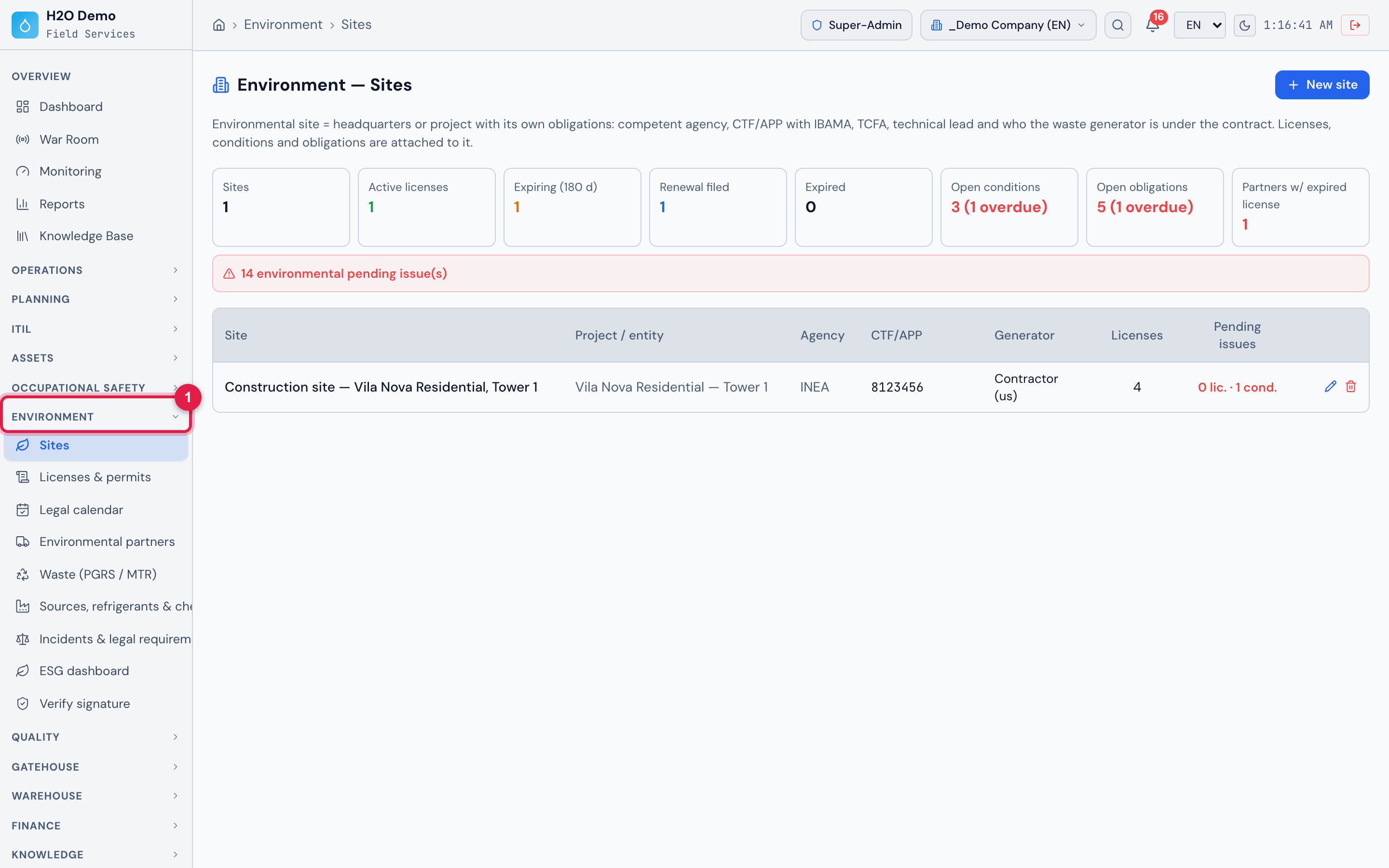
Figure 1. The Environment section in the menu, with the eight screens of the module — Sites, Licenses & permits, Legal calendar, Environmental partners, Waste (PGRS / MTR), Sources, refrigerants & chemicals, Incidents & legal requirements and ESG dashboard — and the Verify signature item, which checks a signature code. Users without the right for a screen do not see its item.
- 1Environment section of the side menu; click the title to open or close the list.
Access rights
Section titled “Access rights”Access is controlled by the profile rights (People › Profiles › Permissions tab, Environment group). There are two rights, with the same levels as the rest of H2O — Read, Edit, Create, Trash (soft delete) and Delete:
| Right (name in the profile) | Screens it unlocks |
|---|---|
| Environment (licenses, conditions, legal calendar, partners) | Sites, Licenses & permits, Legal calendar, Environmental partners, Sources, refrigerants & chemicals, Incidents & legal requirements and ESG dashboard — despite its name, it covers every screen of the module except Waste. |
| Waste (inventory, PGRS, MTR/CDF, DMR) | Waste (PGRS / MTR). The list of sites and partners used in the waste forms comes from the Environment right. |
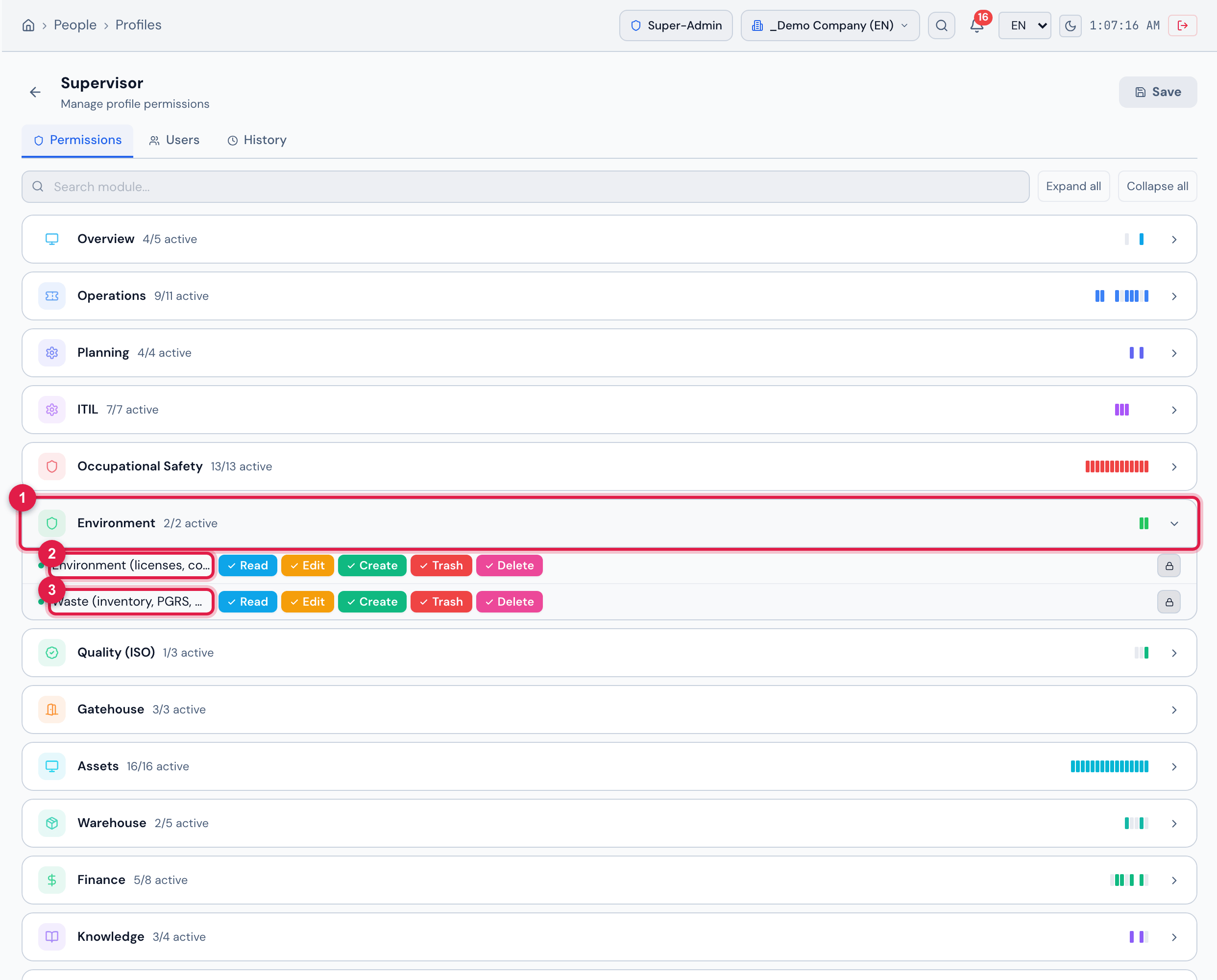
Figure 2. People › Profiles › Supervisor profile › Permissions tab, with the Environment group open (“2/2 active”): the two rights of the module, each with the levels Read, Edit, Create, Trash and Delete — all ticked in this profile. Click a level to switch it on or off and confirm with Save.
- 1Environment group — click to open or close it; it shows how many rights of the group are active.
- 2Environment (licenses, conditions, legal calendar, partners) right — every screen of the module except Waste.
- 3Waste (inventory, PGRS, MTR/CDF, DMR) right — the Waste (PGRS / MTR) screen.
| Level | What it allows in the module |
|---|---|
| Read | Open the screens, the attached files and the PDFs (PGRS, ESG), and export the DMR and the ESG spreadsheet. |
| Create | New records: site, license, obligation, Generate the year’s RAPP/TCFA, partner, Import documents, source, equipment, chemical product, incident, aspect, Import from PGR, requirement, Load base matrix, ESG entry and Create ISO 14001 audit; in Waste: inventory waste, own code, PGRS / revision and shipment. |
| Edit | Change records and the day-to-day actions: + Condition, fulfilling a condition and an obligation, Record result, Log operation (refrigerant), link work order, chemical stock, concluding and reopening an incident, assessing a requirement, Override factor; in Waste: Publish and sign (RT) the PGRS. |
| Trash | The delete buttons of the module (red trash can and Delete). Deletion is soft: the record leaves the lists but stays in the history. |
Was this page helpful?
Thanks for the feedback!
Got it — we will improve this page.