
The user record
Manual — Users, groups and profiles · chapter 4 of 12
Click a user in the list to open the record. At the top are the photo (click it to change — up to 2 MB), the name, the login, the status (Active / Inactive, and Expired when the validity has passed) and the default profile; on the right, the Edit, Deactivate, Password and Delete buttons.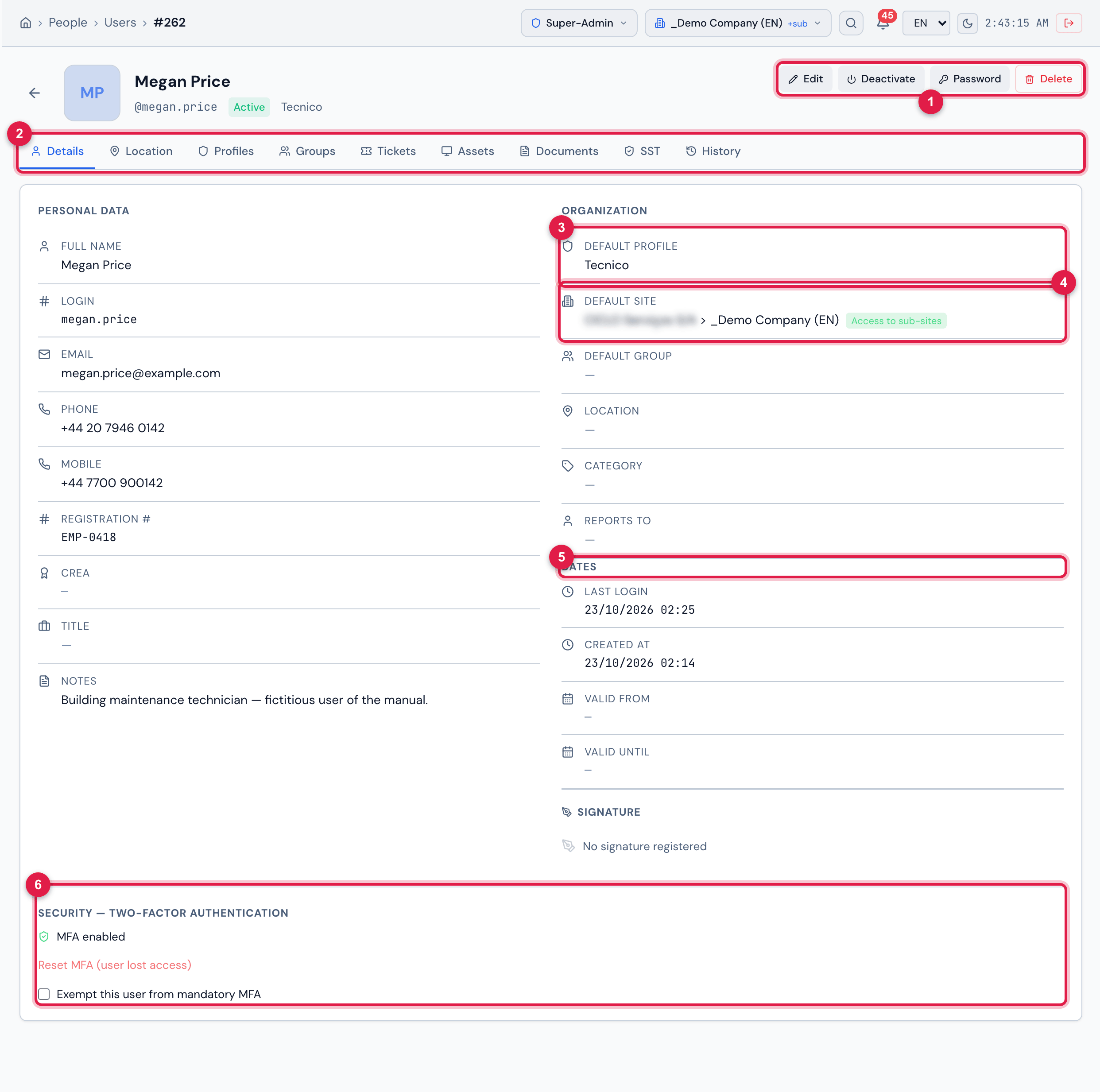
Figure 5. A user record, Details tab: Personal Data on the left; Organization, Dates and Signature on the right; at the end, the Security — Two-factor authentication block.
- 1Actions: Edit, Deactivate (or Activate), Password and Delete.
- 2The record tabs.
- 3Default Profile — the profile the person starts with when signing in.
- 4Default Site, with the Access to sub-sites badge (recursive assignment) or This site only.
- 5Dates: last login, creation and the validity period.
- 6Security — Two-factor authentication (chapter 6).
The tabs
Section titled “The tabs”| Tab | What it shows | Shown to whoever has |
|---|---|---|
| Details | the personal data, the organization, the dates, the signature registered by the person and the security. | Read on Users |
| Location | the last position sent by the H2O app, on a map (or No location registered). | Edit on Users, on the user’s site |
| Profiles | the profile + site + recursive assignments (chapter 5). | Read on Profiles |
| Groups | the groups the person belongs to (chapter 5). | Read on Groups |
| Tickets | panels: tickets opened by the person (Requester), assigned to them (Technician), of their groups, tasks, priority and the Last 6 Months. Only the tickets you can see are counted. | Read on Tickets |
| Assets | the assets linked to the person. | Read on Computers |
| Documents | files attached to the user; Upload sends one, the icon downloads. | Read on Documents (upload: Create) |
| SST | the Occupational Safety record linked to the user (SST manual). | Workers right (SST) |
| History | the changes to the record — the changed field, the old value and the new one — with date and author. | Read on Logs / Audit |
Editing the data
Section titled “Editing the data”Edit replaces the Details tab with the form (the same as for registration, without the password). Differences from registration:
- Login can be changed, in Personal Data. The new login cannot belong to another account, active or in the trash: H2O refuses it with the same messages as in the registration (chapter 12).
- Notification e-mails: besides the main email, the person can receive notices at other addresses. Type the address and click Add; the X removes an additional one (the main one cannot be removed here).
- Default Profile and Default Site only offer the assignments the user already has. To give access to a new site, first add the assignment in the Profiles tab.
- Recursive is shown read only (Edit in the Profiles tab): recursive belongs to each assignment.
- The password is changed with the Password button (chapter 6).
Click Save. If you changed the Status or the validity dates, the person’s open session is re-evaluated at once (chapter 8).
Read only
Section titled “Read only”The record opens read only — without Edit, Deactivate, Password and Delete, without the buttons of the Profiles and Groups tabs and without the Location tab — in two cases:
- your active profile does not have Edit on Users: the strip says Your profile does not have permission to edit users.;
- the header site is not the user’s default site (nor the Root): the strip says This user belongs to another site. Read-only mode. Switch the header site to the user’s site to edit.
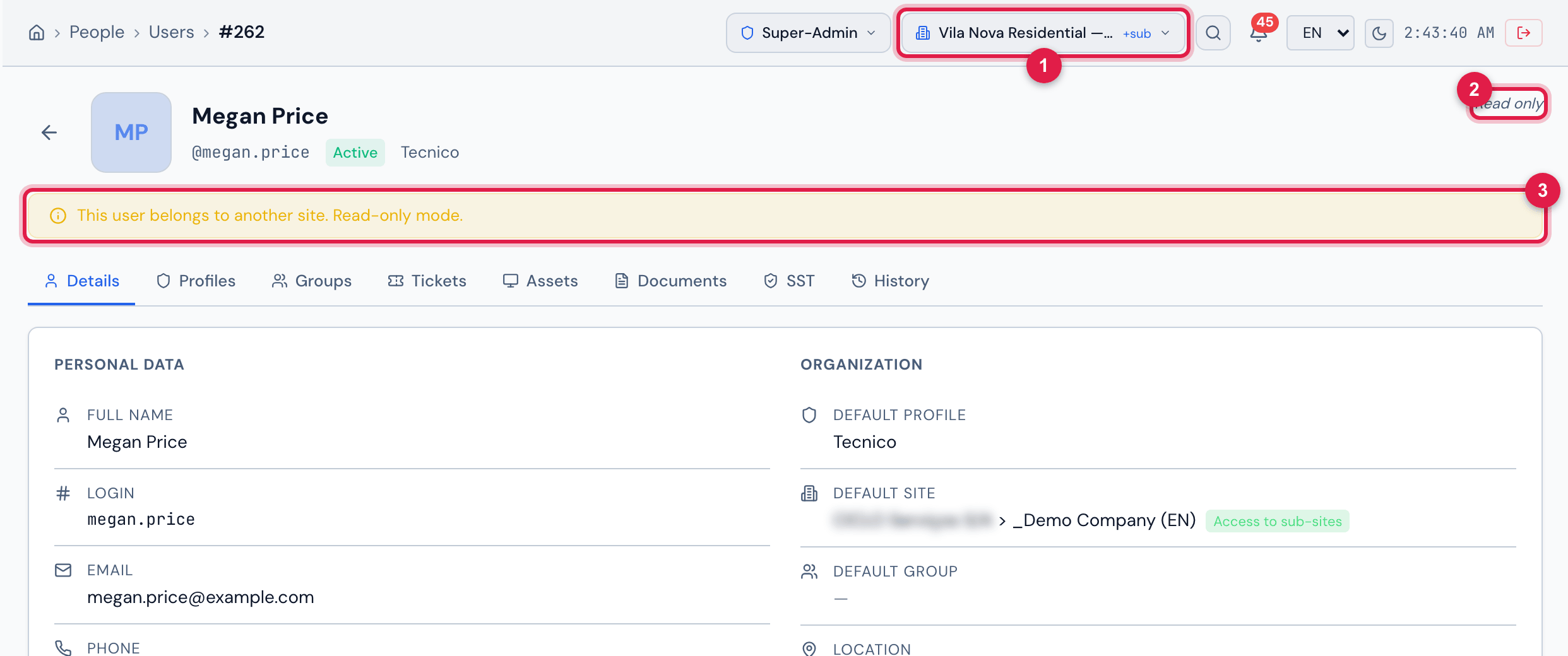
Figure 6. The same record with Vila Nova Residential — Tower 1 in the header: the user belongs to the company, so the record opens Read only, with the yellow strip and without the Location tab.
- 1The header site — different from the user’s default site.
- 2Read only instead of the buttons.
- 3The This user belongs to another site. Read-only mode. strip.
Was this page helpful?
Thanks for the feedback!
Got it — we will improve this page.