
Commissioning: concepts
Manual — Commissioning · chapter 1 of 10
Commissioning is the process that proves, with evidence, that each piece of equipment and each system was manufactured, delivered, installed, started up and tested as the design requires — before the installation goes into operation. In a data center this applies to cooling (CRAC/CRAH units, chillers), power (UPS units, generator sets, LV main switchboards, PDUs), fire protection and automation; in construction, to any building system that must be handed over tested.In H2O, commissioning is set up inside a project (the Projects manual) and executed with tickets: each test is a ticket task, with the test checklist, the tested asset, photos and signature. H2O puts the pieces together — phases, assets, tickets, results, failures and retests — and shows where each asset stands in each phase.
Levels L1 to L5
Section titled “Levels L1 to L5”The data center market usually splits commissioning into five levels, from the factory test to the integrated test of the whole site. H2O creates these five levels at once (chapter 2), with these names:
| Level | Name in H2O | What is checked |
|---|---|---|
| L1 | L1 — Factory acceptance test (FAT) | the equipment at the factory, before shipping: manufacturer tests, witnessed by the client when the contract requires it. |
| L2 | L2 — Site acceptance test (SAT) | the arrival on site: receiving inspection, transport damage, nameplate, accessories and documentation check. |
| L3 | L3 — Pre-functional / start-up | the finished installation: installation checklists, connections, torque, insulation, start-up assisted by the manufacturer. |
| L4 | L4 — Functional performance test (FPT) | each piece of equipment running in every expected condition: setpoints, alarms, interlocks, switchovers, performance. |
| L5 | L5 — Integrated systems test (IST) | the systems together, in real scenarios: utility power failure, generator start, transfer, loss of a CRAC unit, heat load with load banks. |
The names and the number of levels are yours: you can rename them, create others (for example, a “Training and handover” level) or use only three phases on a small job (chapter 2).
The terms
Section titled “The terms”| Term | What it is in H2O |
|---|---|
| Level or phase type | a project task type marked as Commissioning phase, with an Order (1 = first). It is the company catalog of levels (chapter 2). |
| Phase | a project task whose type is a level. Its % is not typed in: it comes from the tests executed in the tickets linked to it (chapter 3). |
| System or group | the parent task of the phases in the project tree — for example, “Cooling — North Room CRAC units” with phases L1 to L5 below it. It organizes the matrix and the previous-phase warning (chapter 3). |
| Routine | the rule “at this level, for this asset type, use this task template” — for example, L3 × HVAC → “L3 — Start-up of the cooling unit (CRAC)” (chapter 2). |
| Task template | the task template from Knowledge › Templates, with the test checklist. |
| Commissioning ticket | a ticket linked to a phase. It gets the Comissionamento modality when it is generated in a batch (chapter 4). Each of its tasks is the test of one asset. |
| Test result | Approved, Failed or Retest, recorded on the ticket task (chapter 5). |
| Matrix | the Commissioning tab of the project: assets in the rows, phases in the columns, the status of each pair in the cell (chapter 6). |
| GQE item | the record of a defect to be fixed (punch list). A failure opens one automatically (chapter 7). |
| NCR | the Non-Conformity Report (FORM-QL-0003), for when the defect becomes a formal non-conformity, usually with the supplier (chapter 7). |
| Asset dossier | the PDF with the whole commissioning history of an asset: phases, test records, photos, signatures, pending items, GQE items and NCRs (chapter 8). |
Where it lives
Section titled “Where it lives”Commissioning has no menu of its own: it shows up in the places where the work already happens.
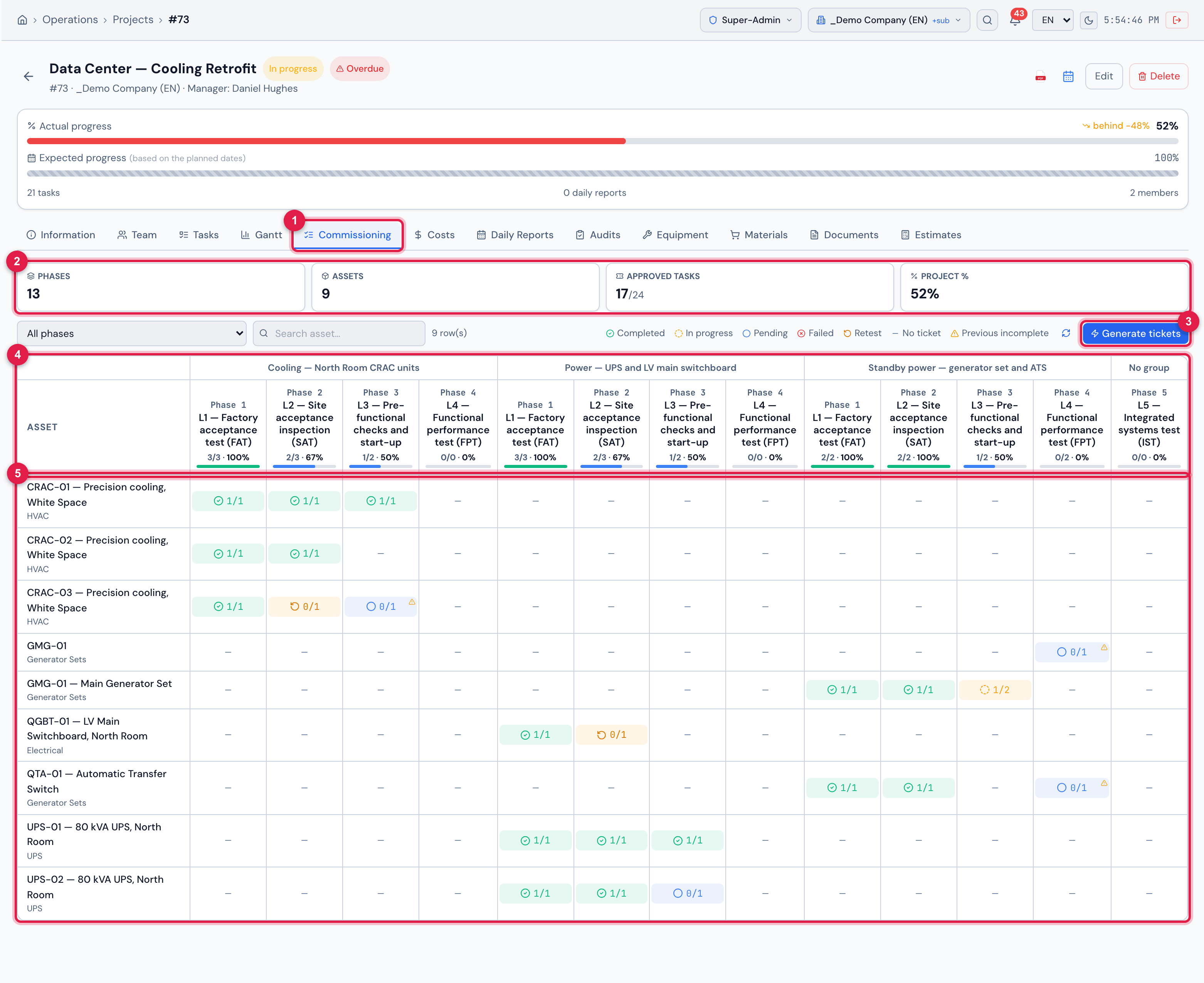
Figure 1. The Commissioning tab of the Data Center — Cooling Retrofit project: the phases in the columns — L1 to L4 under each system and L5, with no parent task, under No group —, the assets in the rows and the status of each asset in each phase.
- 1The Commissioning tab — only shown when the project has at least one phase.
- 2The summary: Phases, Assets, Approved tasks and Project %.
- 3Generate tickets — creates the test tickets in a batch (chapter 4).
- 4The phases, grouped by system, with the % of each one.
- 5The assets and the status of each one in each phase (chapter 6).
| Where | What you do there | Chapter |
|---|---|---|
| Configuration › Project task types | the levels (phases) and the Routines by level | 2 |
| Operations › Projects › project › Tasks tab | the phase tasks and the systems | 3 |
| Operations › Projects › project › Commissioning tab | the matrix and the Generate tickets button | 4 and 6 |
| ticket page › Tasks tab | the Test result of each task | 5 |
| Operations › Punch list (GQE) and Quality › NCR | the defects and Escalate to NCR | 7 |
| Assets › asset › Commissioning tab | the timeline of the asset and the Dossier PDF | 8 |
| H2O app | run the tests, give the result when completing, see the asset through the QR code | 9 |
Access rights
Section titled “Access rights”Commissioning uses the rights that already exist in the profile (People › Profiles › profile › Permissions tab). There is no “Commissioning” right.
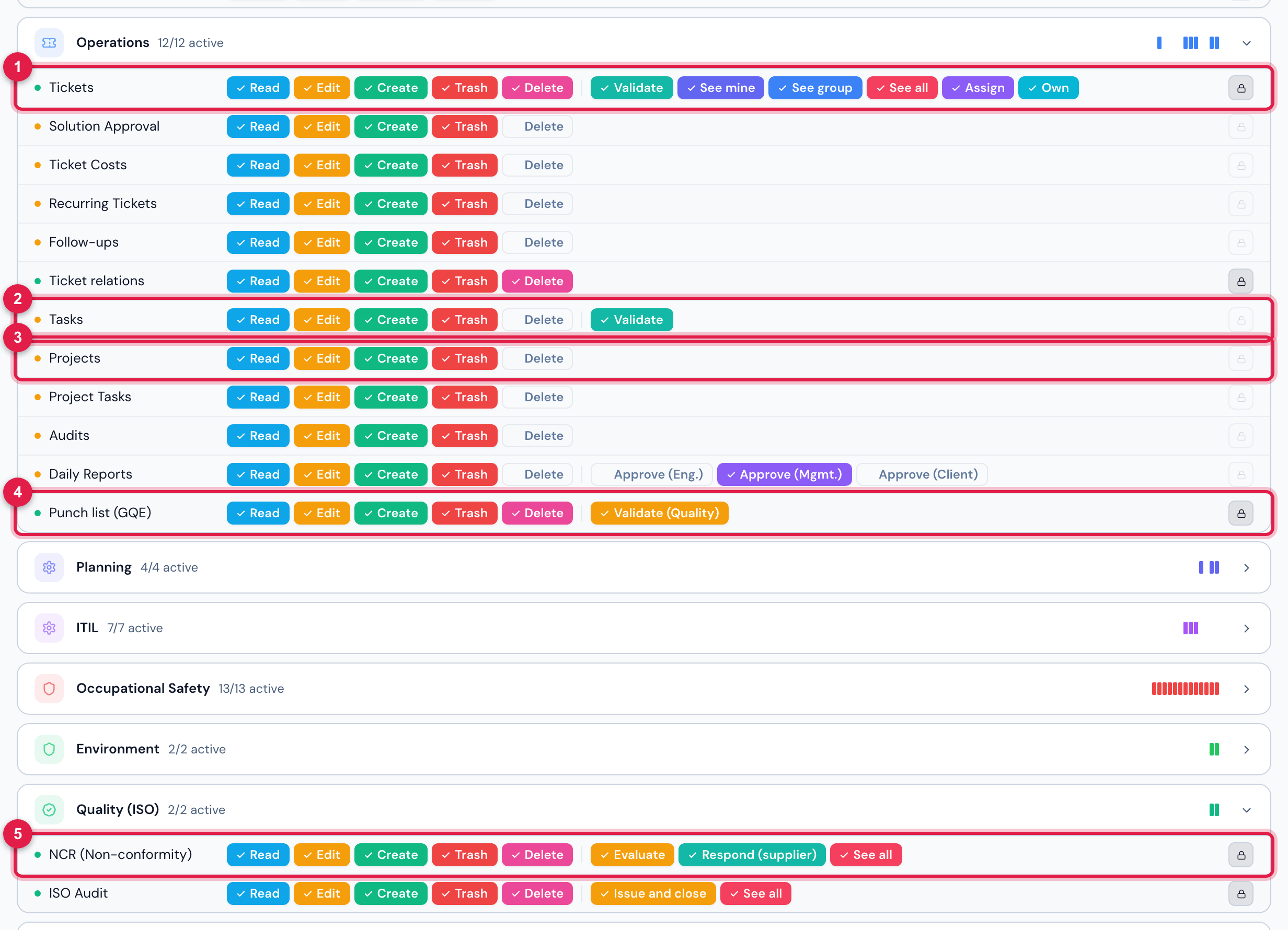
Figure 2. People › Profiles › Super-Admin › Permissions: the rows commissioning uses — Tickets, Tasks, Projects and Punch list (GQE) (Operations group) and NCR (Non-conformity) (Quality (ISO) group).
- 1Tickets row — Create is needed to generate tickets in a batch.
- 2Tasks row — Edit gives the test result on any task; the technician of the ticket does not need it.
- 3Projects row — levels, routines, phases and the matrix.
- 4Punch list (GQE) row.
- 5NCR (Non-conformity) row — Create is needed to escalate a GQE item.
| To… | You need |
|---|---|
| see the levels, the routines, the Commissioning tab of the project and the Gantt PDF | Read in Projects |
| Create default levels (L1–L5) and New type | Create in Projects |
| edit a type and change the template of a routine | Edit in Projects |
| delete a type | Trash in Projects |
| Generate tickets (batch) | Edit in Projects and Create in Tickets, both on the project site |
| record Approved / Failed / Retest and complete the task | Edit in Tasks or in Tickets on the ticket site, or being the technician of the ticket or of the task (directly or through the technician group); the ticket cannot be solved or closed |
| Escalate to NCR | Edit in Punch list (GQE) and Create in NCR |
| see the Commissioning tab of the asset and download the Dossier PDF | Read on the asset type (for example, HVAC) |
What changes and what does not
Section titled “What changes and what does not”- Nothing changes for tickets outside commissioning. The test result, the automatic failure handling, the retest and the GQE item only exist when the ticket is linked to a phase. A regular ticket — corrective, preventive, any project ticket without a phase — completes exactly as before, on the web and in the app.
- Completing a phase task asks for the result — on the web and in the app. The complete checkbox in the ticket Tasks tab, Mark Done on the task page, Finish in the checklist and completing in the app open the Test result question: Approved and Failed complete the task, Retest leaves it open. A phase task completed without a result, through a path that does not ask, counts as Approved (chapters 5 and 9).
- The previous-phase-incomplete warning blocks nothing. It warns that an asset is going to L4 without L3 approved, for example — but the ticket is generated, executed and counts normally. The team decides whether to go on or wait (chapter 6).
- Phases count in the project % like any task, when the project is in From tasks mode (the Projects manual, chapter 3).
Web and app
Section titled “Web and app”| I want to… | Web | App |
|---|---|---|
| register levels and routines, set up the phases | yes | no |
| generate the test tickets in a batch | yes | no |
| run the test (checklist, photos, signature) | yes | yes |
| record Approved / Failed / Retest | yes (when completing the task and in the ticket Tasks tab) | yes (when completing the task) |
| see the assets × phases matrix of the project | yes | no |
| see the commissioning of an asset | yes (Commissioning tab) | yes (Commissioning tab, also via the QR code) |
| handle the GQE item and escalate to NCR | yes | no |
| asset Dossier PDF and Gantt PDF | yes | no |
Was this page helpful?
Thanks for the feedback!
Got it — we will improve this page.