
SST dashboard and reports
Manual — Occupational Safety · chapter 11 of 13
The SST dashboard (Occupational Safety › SST dashboard) summarizes the period in cards and charts, with no people’s names — it is meant for the SST meeting, for the project manager and for the contract inspector.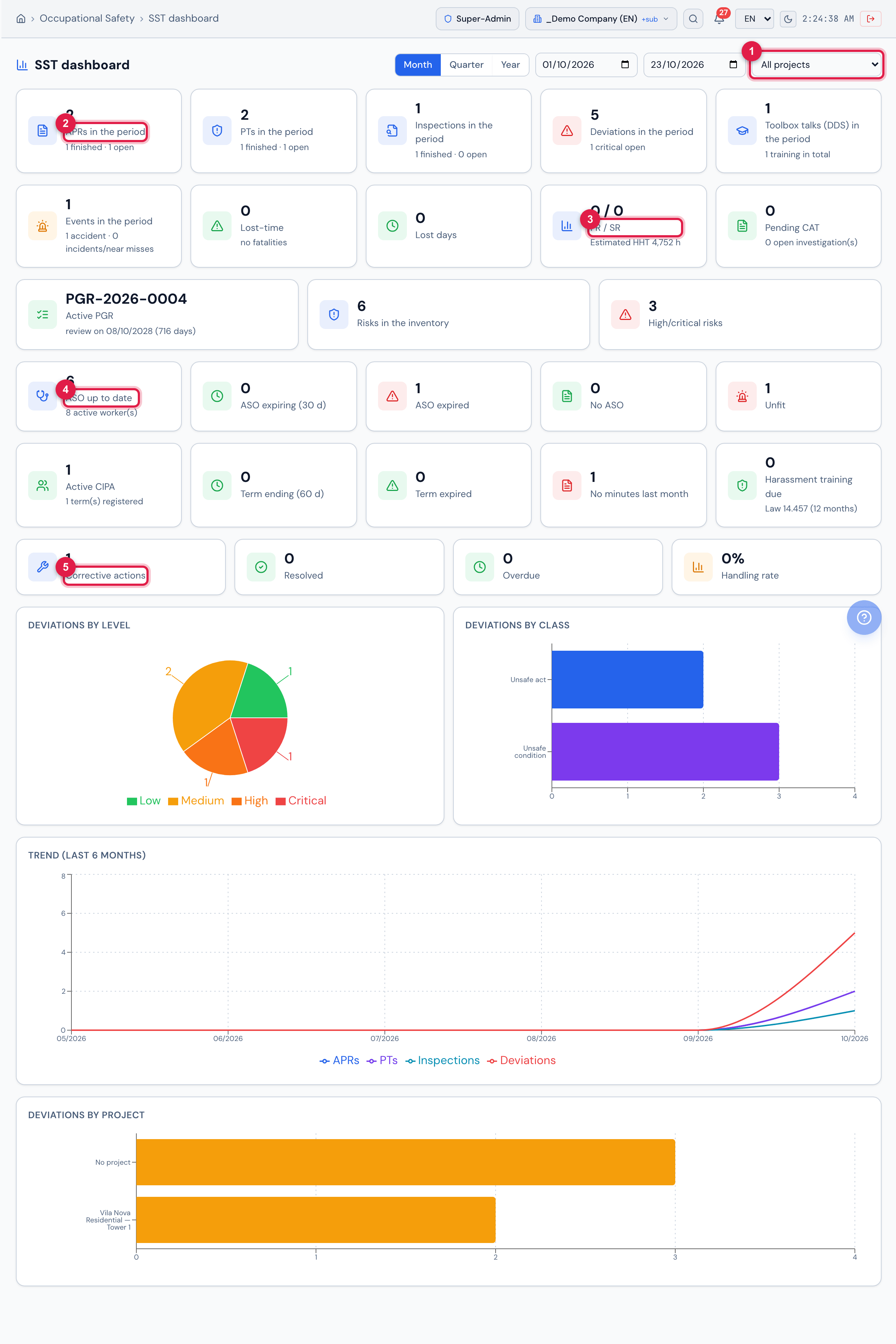
Figure 76. SST dashboard with the “Month” period and all projects. Rows: field documents (APR, PT, inspections, deviations, toolbox talks); accidents (events, lost-time, lost days, FR/SR, pending CAT); PGR and risks; ASO; CIPA; corrective actions.
- 1Project filter (All projects); on the left, the period: Month / Quarter / Year or dates.
- 2APRs in the period card (finished and open); on the same row, PTs, Inspections, Deviations and Toolbox talks (DDS).
- 3FR / SR per NBR 14280 (the Brazilian accident statistics standard), with estimated HHT (active × 176 h × months) or the value you enter.
- 4ASO up to date and the other ASO cards; on the next row, CIPA — counts only, names stay on their own screens.
- 5Corrective actions: total, resolved, overdue and handling rate.
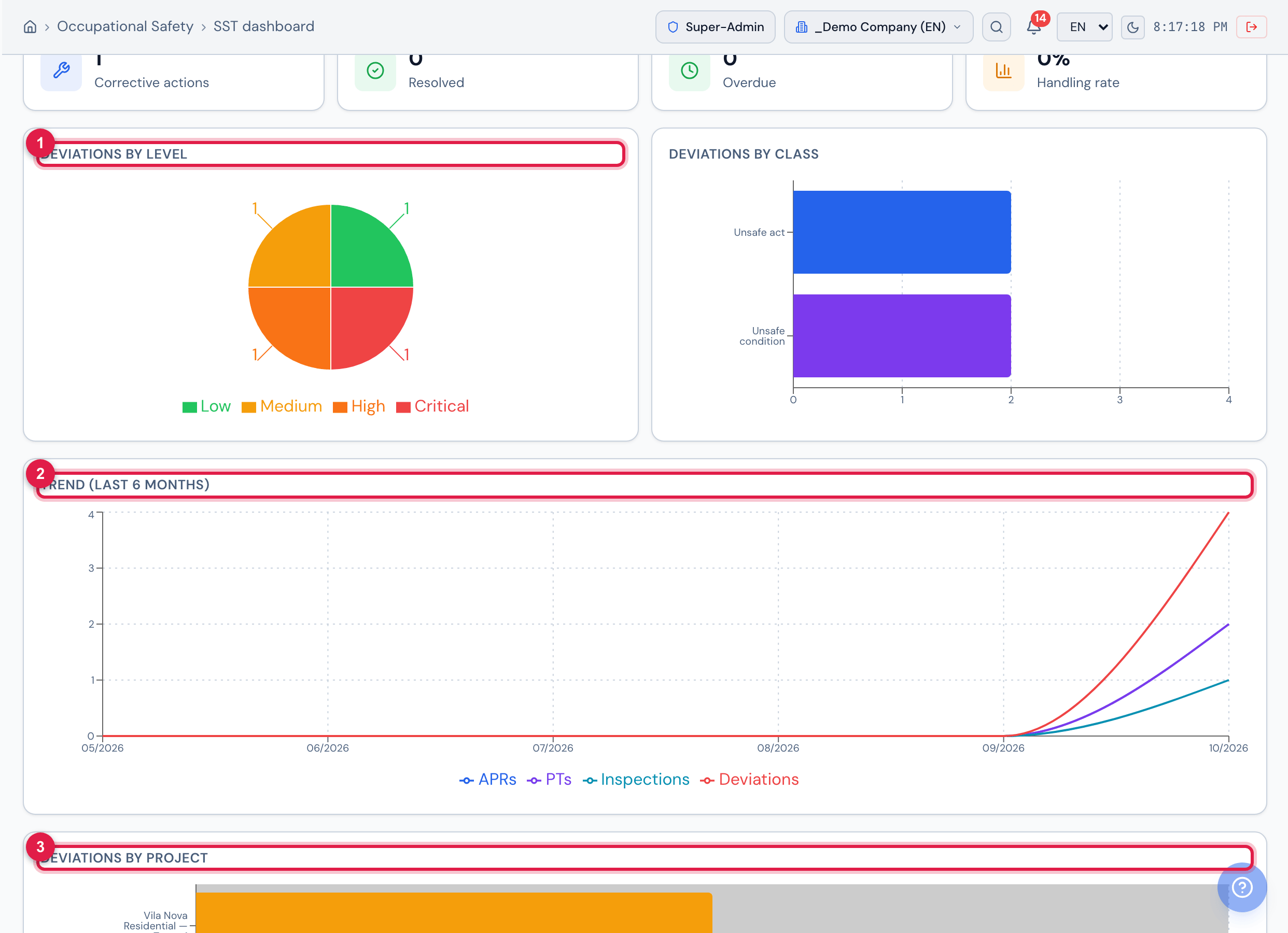
Figure 77. Dashboard charts: deviations by level (pie) and by class, trend of APRs/PTs/inspections/deviations over the last 6 months and deviations by project.
- 1Deviations by level (pie); next to it, by class.
- 26-month trend.
- 3Deviations by project.
SST dashboard in the app
Section titled “SST dashboard in the app”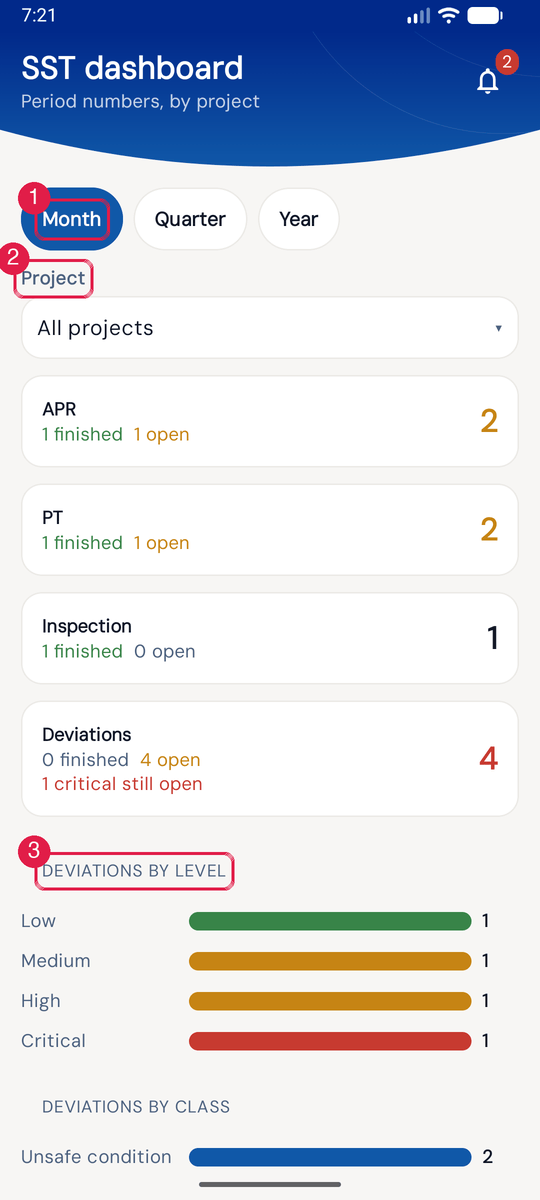
App H2OFigure 78. App SST dashboard: Month / Quarter / Year and Project filters; APR, PT, Inspection and Deviations cards (with “N critical still open”); bars of deviations by level and by class. Everything is calculated on the device, from what has been synced — it works for a field meeting without internet.
- 1Period (Month / Quarter / Year).
- 2Project; below, the APR, PT, Inspection and Deviations cards.
- 3Deviations by level; further down, by class.
Reports in Analytics
Section titled “Reports in Analytics”In Overview › Reports (Reports tab, list on the left) there are four SST reports, all with Excel/PDF export and a column picker (Reports right):
| Report | What for | Content |
|---|---|---|
| SST — Workforce compliance | who can go into the field today | per worker: ASO, training, OS, PPE, APRs, pending issues; indicators at the top |
| SST — Expirations | plan refreshers and renewals | from 30 to 365 days: ASO, training, contractor document, PPE CA, PGR (revision), CIPA (term and harassment training) |
| SST — Accidents & incidents | statistics for the period | FR/SR, pending CAT, not investigated; each row opens the event |
| SST — Documents & signatures | integrity audit | APR, PT, inspection, training and accident: finished, number of signatures, invalidated; eSocial events generated |
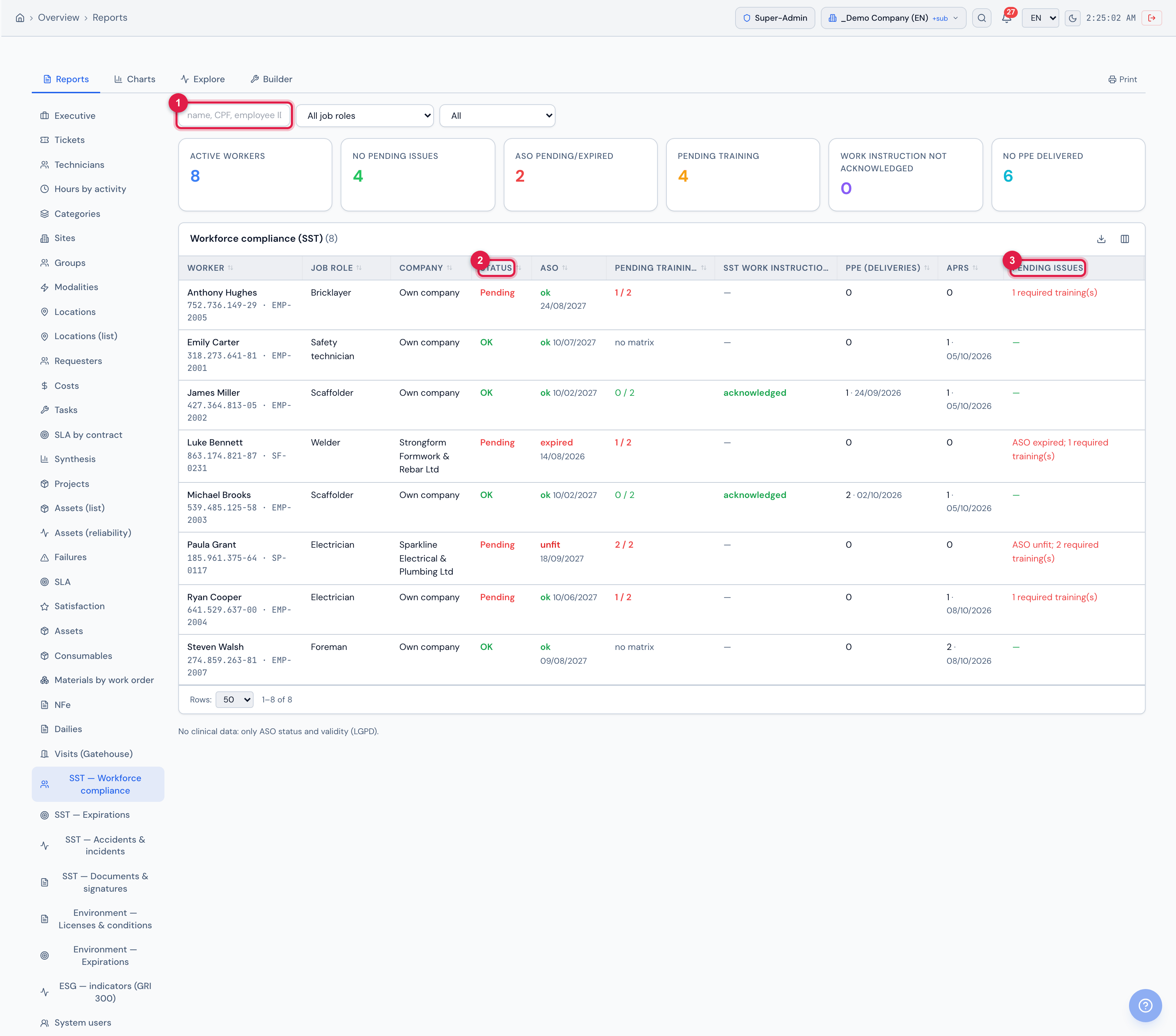
Figure 79. Reports › SST — Workforce compliance (side menu, Reports tab): filters (name/CPF/employee ID, job role, status); indicators — active workers (8), no pending issues (4), ASO pending/expired (2), pending training (4), work instruction not acknowledged (0), no PPE delivered (6); and the table per worker (job role, company, status, ASO, pending training, SST work instruction, PPE, APRs, pending issues), with the export and column picker icons in the corner of the header. Footer: “No clinical data: only ASO status and validity (LGPD)”.
- 1name, CPF, employee ID filter; next to it, job role and status.
- 2Status column — OK or Pending per worker.
- 3Pending issues column — what is missing (expired/unfit ASO, training).
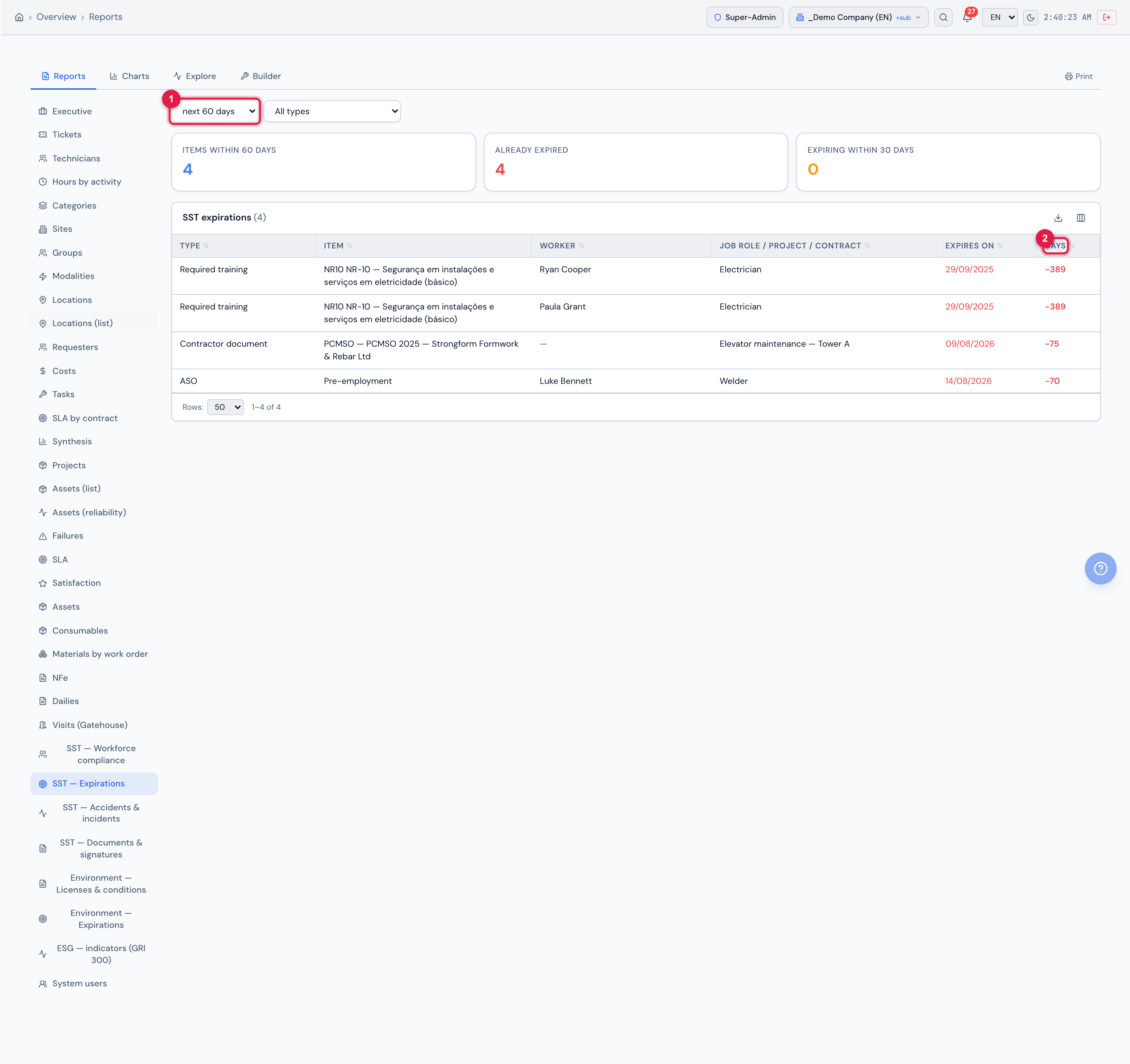
Figure 80. Reports › SST — Expirations: horizon (here, next 60 days), filter by type, cards (items within 60 days, already expired, expiring within 30 days) and the table — in the example, 4 items, all already expired (two NR-10 trainings, the contractor’s PCMSO and an ASO). The report shows only what belongs to the company chosen in the header; the contractor document is included by the contract’s site.
- 1Horizon (next 30 to 365 days).
- 2Days left column (negative = already expired).
Automatic e-mail alerts
Section titled “Automatic e-mail alerts”| Subject | To whom | When |
|---|---|---|
| Training expiring | person in charge/RT of the training | according to the validity |
| ASO expiring | users with the ASO right (Edit) | 30, 15, 7 and 0 days |
| PGR — revision | PGR technical lead | 60, 30, 7 and 0 days |
| CIPA — term / harassment training | users with the CIPA right (Edit) | term 60/30/7/0; harassment 30/7/0 |
SST e-mails do not include health data — only the name, the type and the date.
Was this page helpful?
Thanks for the feedback!
Got it — we will improve this page.