Engineering and Construction Management Software

Construction management from budget to measurement, with the daily report done on site

For builders, subcontractors and construction managers. The daily report (RDO) leaves the job site the same day, with automatic weather, workforce headcount by company and photos stamped with the project, then goes up for approval by engineering, management and the client. Service and material inspection checklists (FVS and FVM) on the phone, NF-e (Brazilian electronic invoice) pulled from SERPRO, plus SINAPI budgets, schedule, progress measurement and S-curve on the web.

  • Built by ATG Soluções para Engenharia, a consulting firm in maintenance planning and control (PCM), commissioning and RCM
  • Daily reports, FVS, safety forms, photos and signatures in the app, even with no signal on site
  • App for Android, iPhone/iPad and Windows, plus the web for the office and the client's inspectors
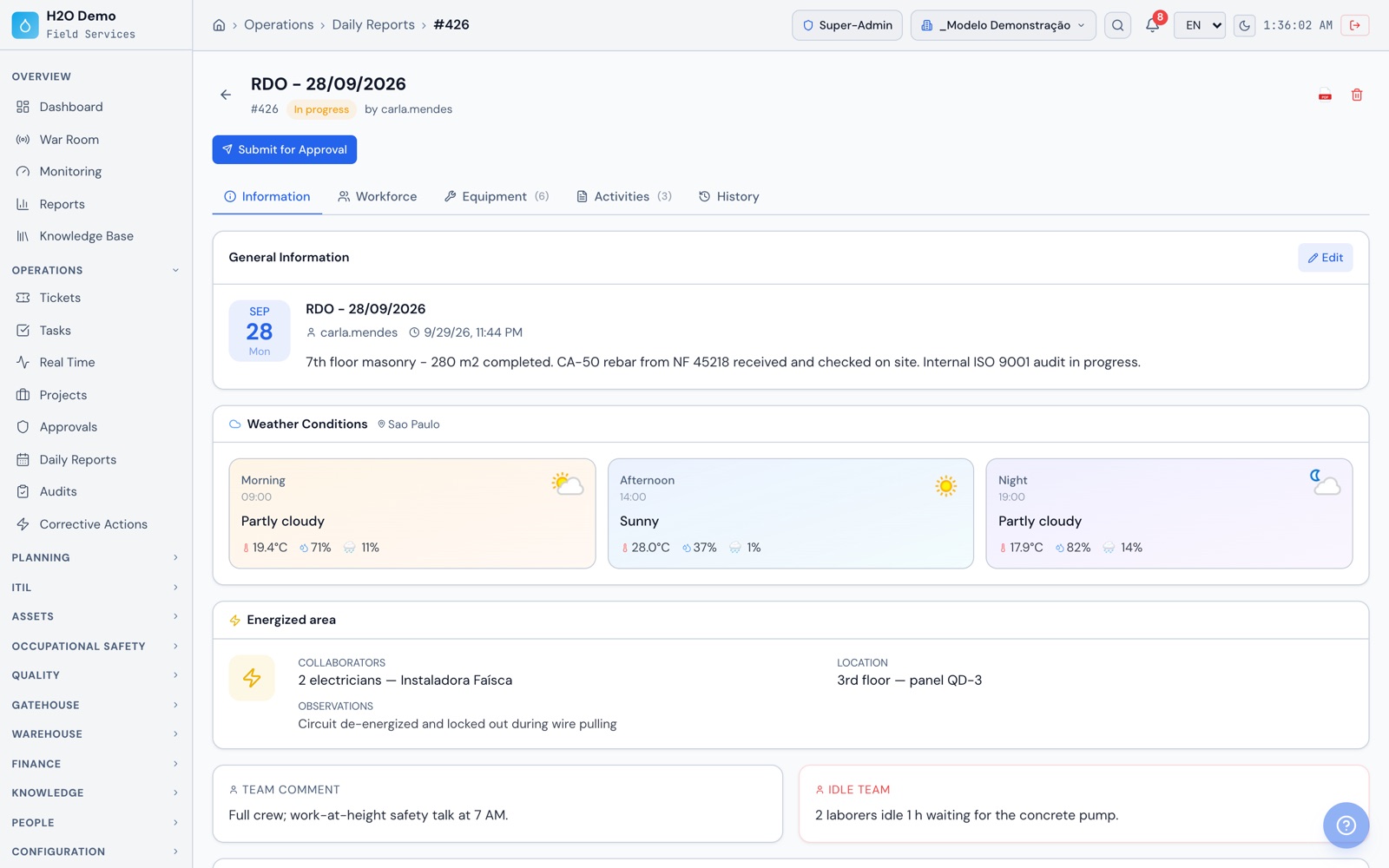
Operations › Daily Reports › #426
Daily report for 09/28/2026 in H2O web with the day summary, morning, afternoon and evening weather, the energized area and team comments
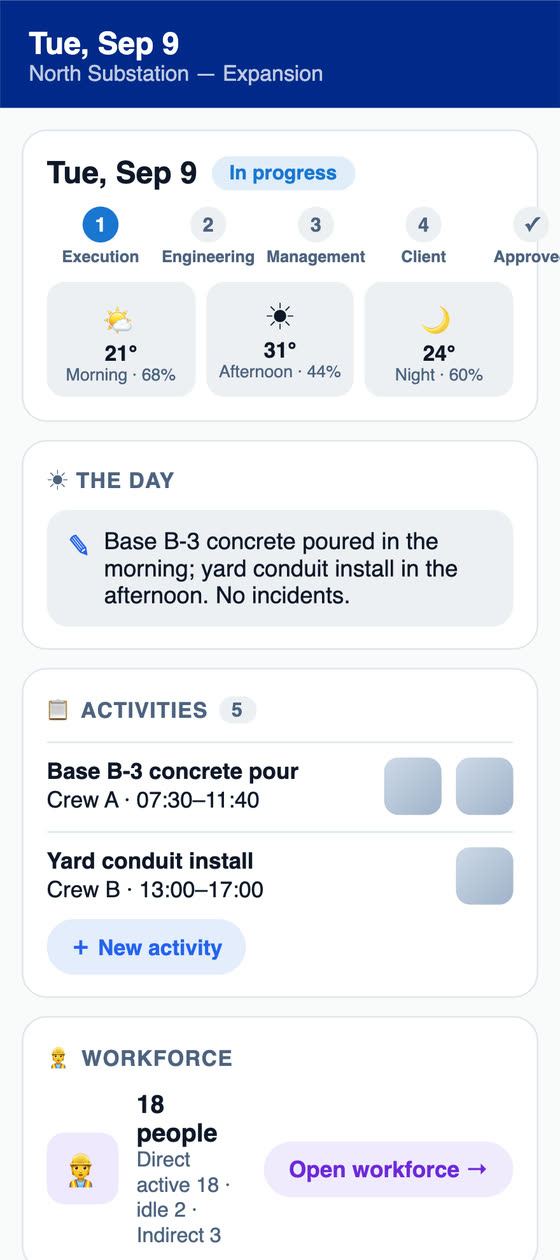
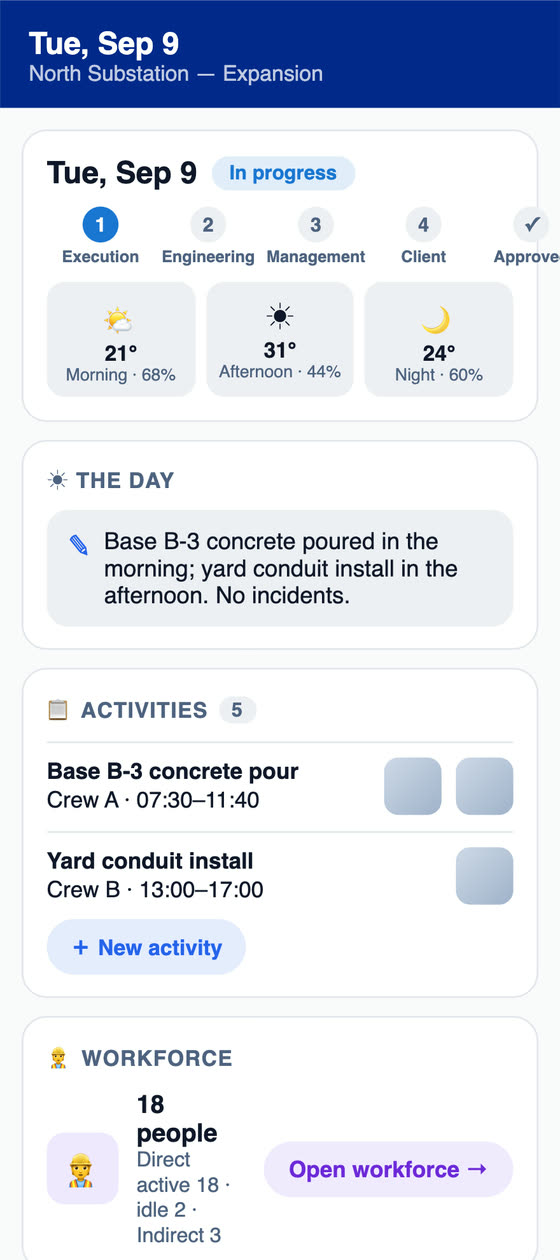
Daily report in the H2O app with the approval stage, morning, afternoon and evening weather and the day's activities with photos
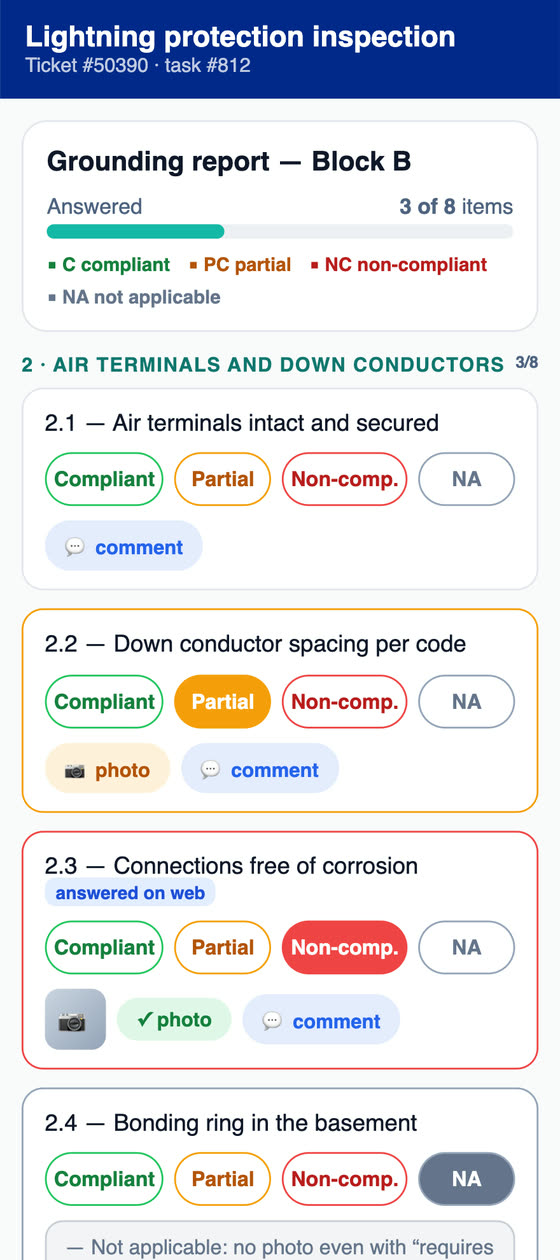
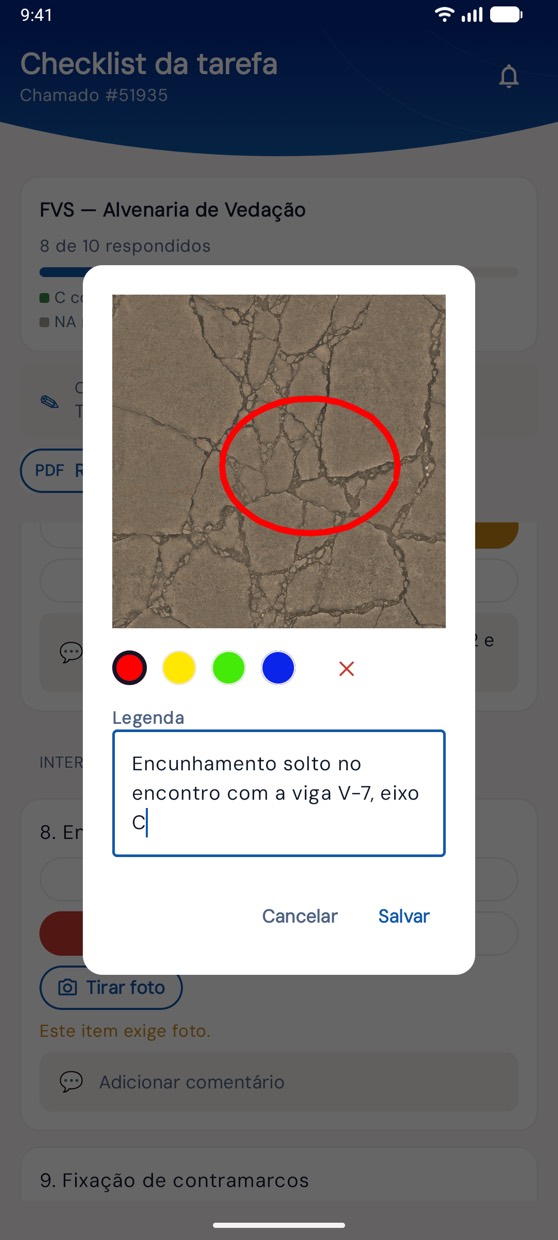
FVS for partition masonry in the H2O app with the wall-to-slab wedging item marked non-compliant, the annotated photo and the corrective action
Today's RDO sent for approvalengineering, management and client sign
FVS floor 7 · 1 item non-compliantcomment and corrective action logged
Who builds H2O

Built by an engineering company, from the job site to maintenance

H2O is developed by ATG Soluções para Engenharia, a consulting and technology company with experience in maintenance planning and control (PCM), commissioning, RCM and ISO 55000 methods, working with Maintenance 4.0 since 2018. The system was born inside mission-critical data centers, created by people who spent more than 10 years on those projects across Latin America, and it was used as the maintenance management tool in Uptime Institute® Operational Sustainability audit processes. Today it serves maintenance, engineering and facilities companies and large service buyers. At a construction company, the same traceability follows the project from the first day on site to handover: each day's report, each service inspection, every material delivery and each month's progress measurement. After handover, commissioning and preventive maintenance continue in the same system.

  • Daily report with weather, workforce headcount and photos stamped with the project, date and location, approved by engineering, management and the client
  • FVS with annotated photo, GPS and signature, and FVM with the NF-e pulled from SERPRO and checked item by item
  • Budget with SINAPI and BDI in the TCU model, schedule with critical path, and progress measurement with cumulative totals and S-curve
  • From job site to preventive maintenance: commissioning, asset records with warranty and documentation, and maintenance plans in the same system

Our goal is to build, together with our clients, an ecosystem of accurate indicators for highly relevant, predictable decisions.

Residential buildings under construction with tower cranes and safety netting on the facade
Towers under construction
Gloved hands tying the steel reinforcement of a slab with pincers
Slab reinforcement
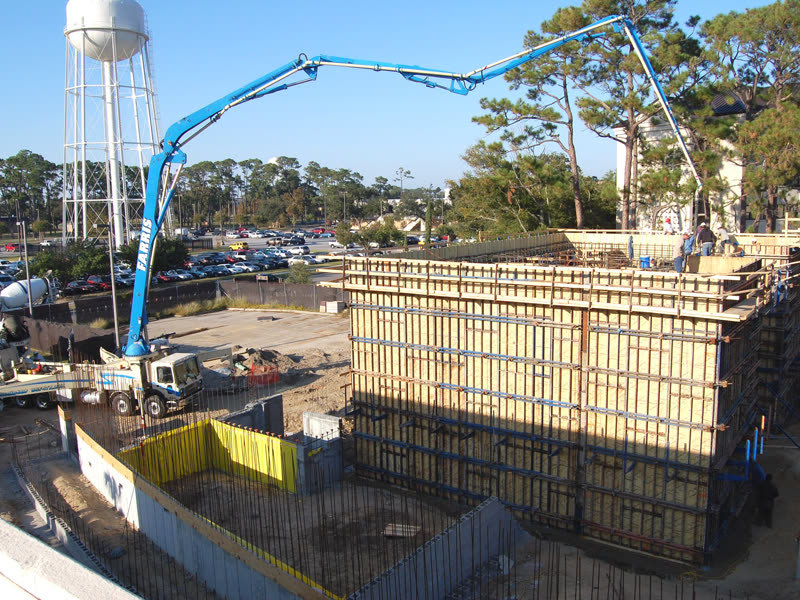
Boom pump pouring concrete walls with wooden formwork on the job site
Concrete pour
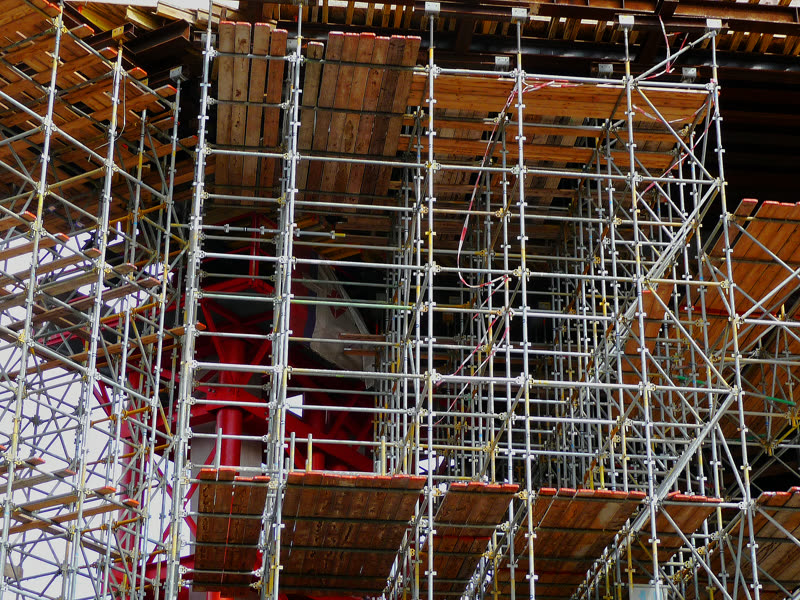
Steel shoring under the wooden formwork of a slab
Shoring and formwork
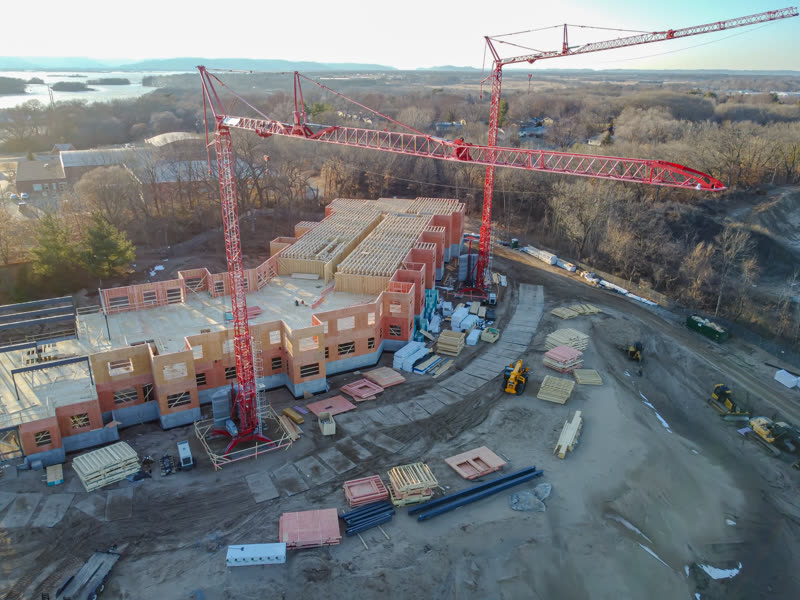
Job site seen from above, with tower cranes and the structure going up
Job site with tower crane

Uptime Institute® and Tier® are registered trademarks of Uptime Institute LLC. ATG has no partnership with Uptime Institute. Illustrative construction photos, unrelated to ATG clients (Wikimedia Commons, public domain and CC0).

Who uses it

Who uses H2O on the project

Project engineer

Approves the daily report, releases work through the FVS, checks material receiving and follows project progress on the Gantt.

Superintendent and foreman

Fills out the daily report on site with headcount by company, equipment and photos, and requests material for the work front, even with no signal.

Quality

Builds the FVS for each service, handles the NCR with the subcontractor and runs the ISO 9001 internal audit program.

Planning and estimating

Estimates with SINAPI and BDI in the TCU model, builds the schedule with dependencies and exports it to MS Project.

Contracts and measurement

Closes the monthly measurement with cumulative totals and deductions, issues the invoice with withholdings and follows the S-curve through payment.

Safety technician

Issues preliminary risk analyses (APR) and work permits (PT), collects signatures for the daily permit revalidation and logs safety talks (DDS), onboarding and PPE handouts with the CA number.

Warehouse keeper

Receives material against the NF-e, checks it item by item with photos and posts it to the project's stock.

Site gate

Checks people in with photo and badge, logs truck plates and sees who is inside the job site.

Client and inspectors

Approve the daily report and material receiving with a signature, using their own H2O login.

Before and after

What stops getting lost between the job site and the office

Situations every project knows, and where each one lives in H2O.

TodayThe daily report is filled out days later, from memory, in Word or on paper.
With H2OThe report is done on site, the same day, on the phone. Weather comes in automatically, and a new report can start by copying the previous day's activities, crew and equipment.
TodayRain and work stoppages go unrecorded when it's time to argue schedule and claims.
With H2OEvery daily report keeps the weather at 9 a.m., 2 p.m. and 7 p.m. with chance of rain, the day's incidents and the crew left idle for lack of a work front, with signatures from engineering, management and the client.
TodayThe printed report travels around for weeks waiting for the inspector's signature.
With H2OThe daily report goes to engineering, management and the client in the system, each one approves with their stored signature, and the PDF comes out with weather, headcount, photos, signatures and map.
TodayThe paper FVS disappears before the quality audit.
With H2OThe FVS stays in the system with photos, GPS, signature and PDF, linked to the floor and to the schedule task, and its status shows up in the Gantt PDF.
TodayThe subcontractor's non-conformance goes out on WhatsApp and nobody closes it.
With H2OThe non-compliant item becomes an NCR for the responsible supplier, with deadline, proposed actions, quality review, implementation evidence and closeout.
TodayThe invoice is typed in by hand at material receiving.
With H2OThe warehouse keeper scans the barcode on the DANFE (printed invoice slip) or types the access key, and the invoice comes from SERPRO with supplier, items and amounts, ready for item-by-item checking.
TodayThe measurement bulletin and the S-curve get rebuilt in Excel every month.
With H2OThe measurement opens by copying the previous month, with contracted, monthly and cumulative quantities per SINAPI item, and the S-curve shows planned, executed, invoiced and paid.
TodayThe job site is in a basement or a remote area with no 4G.
With H2OThe app stores daily reports, FVS, safety forms, photos and signatures on the device and sends everything when the network comes back.
The project path

From budget to S-curve, the whole project in one system

The sequence a project follows in H2O. Budget, schedule and measurement live on the web, and the job site records live in the app. Steps 3 to 6 repeat every month until handover.

  1. 1

    Budget with SINAPI

    The budget is built with SINAPI cost compositions and inputs for the state and reference month, with or without payroll tax relief, your own cost compositions and BDI in the model of TCU Ruling 2622/2013. It produces the bid spreadsheet, the calculation report, the ABC curve and the physical-financial schedule, and the budget goes through approval.

  2. 2

    Schedule on the Gantt

    Planning builds the project schedule with hierarchical tasks, milestones, dependencies and crew per task. The critical path and float come out in the Gantt PDF, and the XML opens in MS Project.

  3. 3

    Daily report, every day

    Every day, the report records weather, headcount by company, equipment, activities and incidents with stamped photos, and goes up for approval by engineering, management and the client. Planning updates task progress, and overall project progress is calculated from the tasks.

  4. 4

    FVS and FVM

    Each service is released through the FVS, with photo, GPS and signature, linked to the floor and to the schedule task. Each material arrives through the FVM, with the NF-e pulled from SERPRO, item-by-item checking and posting to the project's stock.

  5. 5

    Monthly measurement

    At month end, the measurement opens by copying the previous month or the contract baseline and brings the SINAPI items from the linked budget with contracted, monthly and cumulative quantities, staff positions, costs, BDI, the IMR deduction and the closing checklist.

  6. 6

    Approval and S-curve

    The measurement moves from measured to approved and invoiced and generates the invoice, with ISS, IR, INSS, COFINS and PIS (Brazilian taxes) and payment records. The S-curve shows planned, executed, invoiced and paid, with a cash flow projection.

A day on site

From the morning report to the material request, on the phone

Four screens from the H2O app, with sample data. What the engineer, the foreman and the warehouse keeper record on site reaches the office with photo and signature. The daily report, the FVS and the material request work even with no signal.

  1. The day's report, opened on site
    1Records

    The day's report, opened on site

    The daily report opens with morning, afternoon and evening weather already filled in. The foreman or engineer enters activities with photos, direct, indirect and idle headcount, and equipment. The approval path shows at the top, from execution to the client.

  2. Floor FVS, item by item
    2Inspects

    Floor FVS, item by item

    In the masonry FVS for floor 7, each item is marked compliant, partial, non-compliant or not applicable. The non-compliant item keeps the photo with the defect circled and the corrective action. If the template is set to generate non-conformances, the item becomes an NCR for the subcontractor when the FVS is finished.

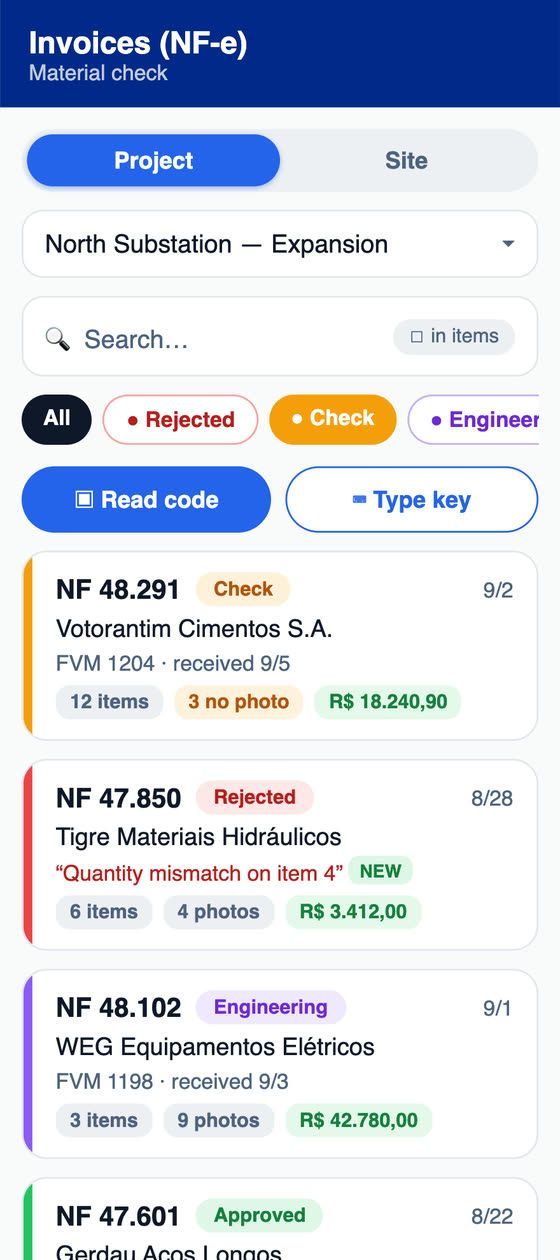
  3. Material checked against the NF-e
    3Receives

    Material checked against the NF-e

    The warehouse keeper scans the barcode on the DANFE or types the key. The invoice arrives from SERPRO linked to the project, with supplier, items and amounts, and each item is checked for quantity, quality and material, with a photo.

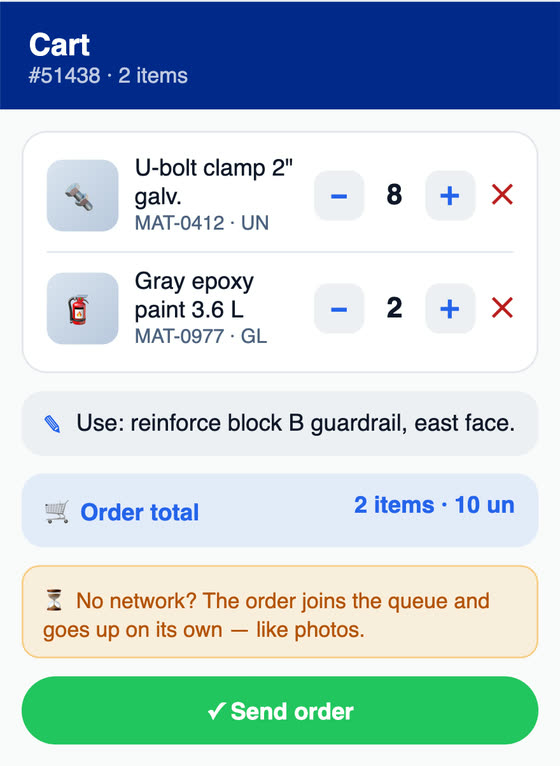
  4. Material for the work front
    4Requests

    Material for the work front

    The request goes out from the app with items, quantities and where the material will be used. With no network, it goes into the queue and uploads on its own. Then it moves through purchase approval, purchasing, release and delivery.

At the office

The project tracked by actual versus planned progress

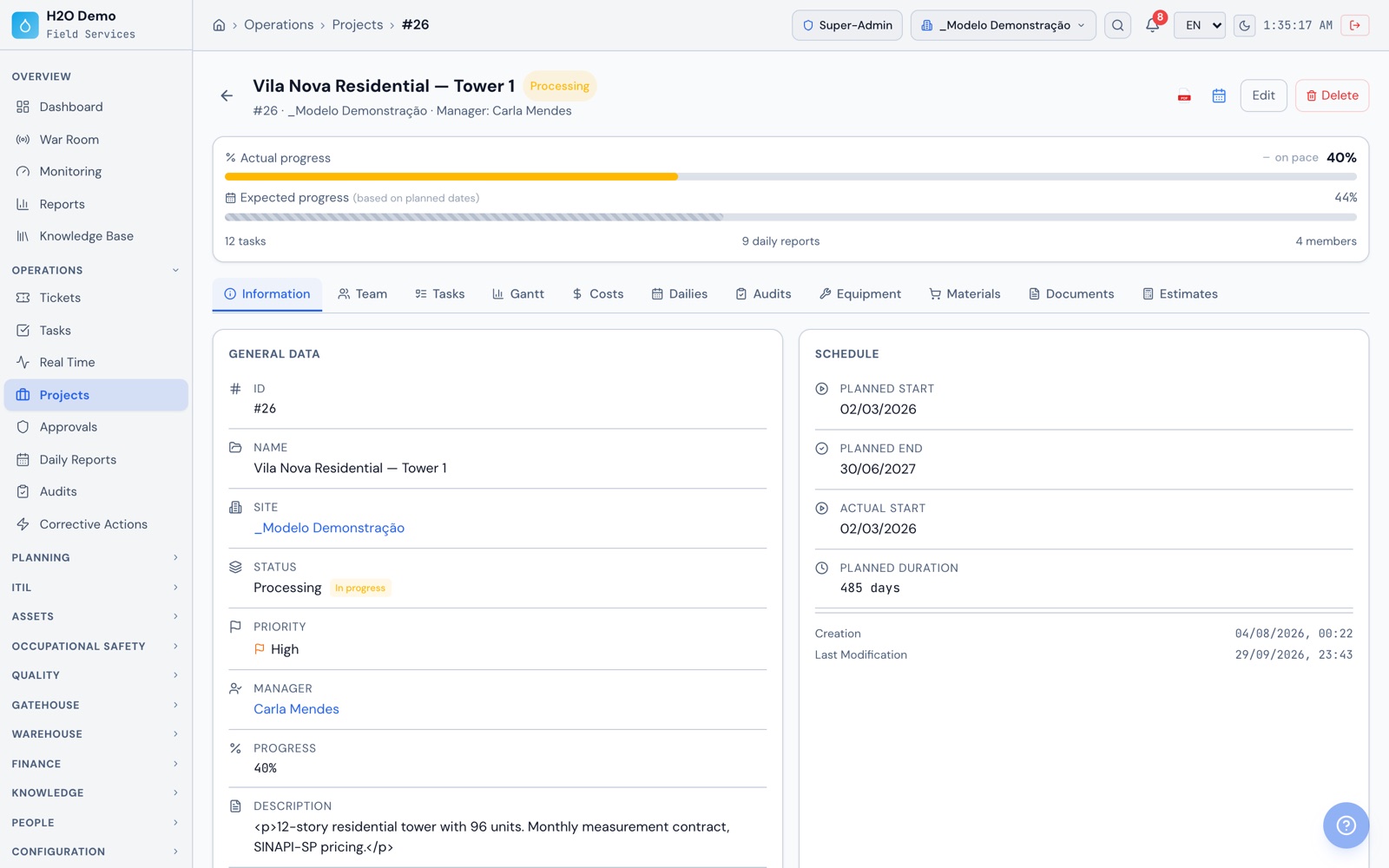
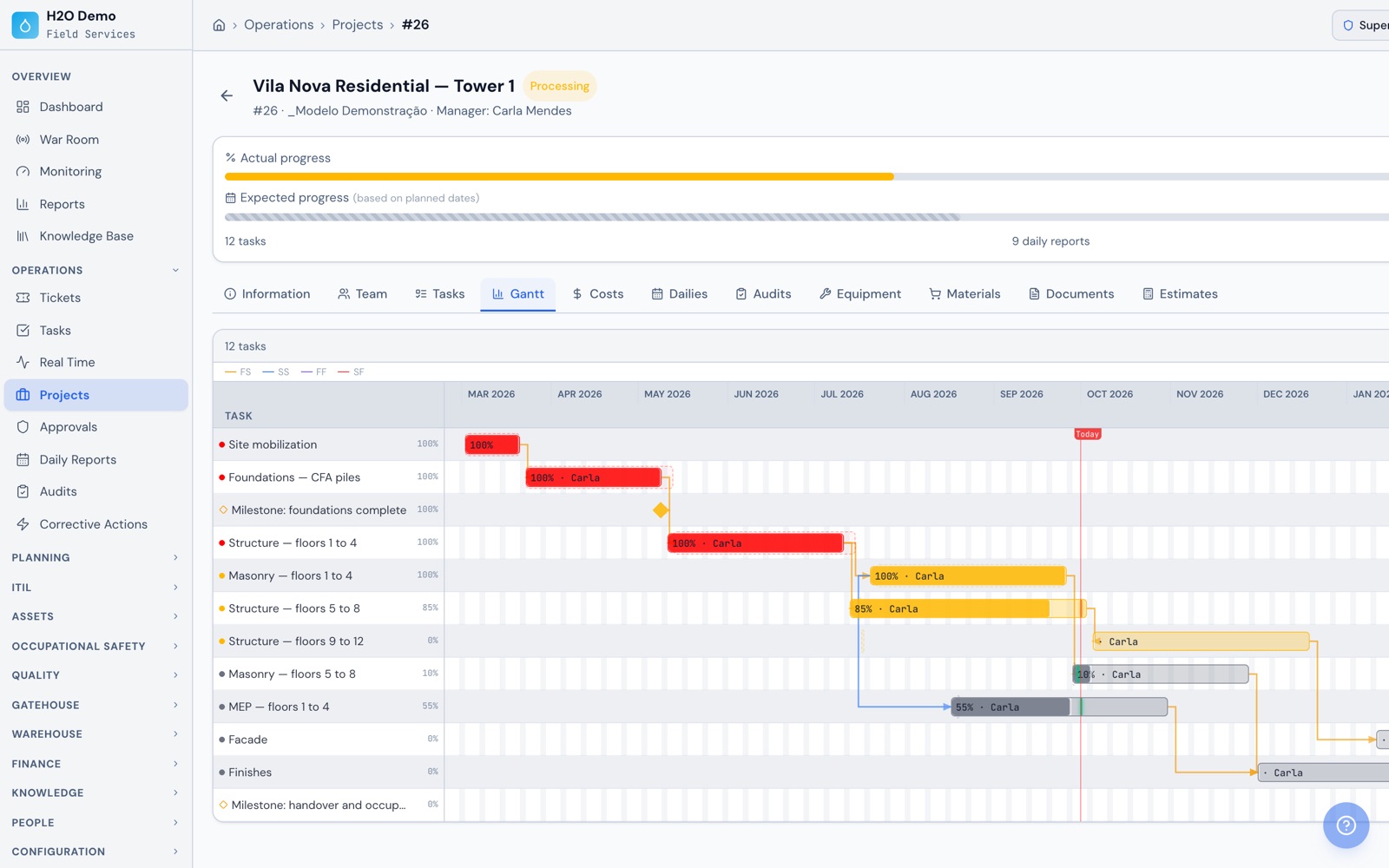
On the web, the project dashboard shows actual progress against what the planned dates expect, the manager, tasks, daily reports and team, with tabs for Gantt, costs, daily reports, audits, equipment, materials and budgets.

Operations › Projects › Residencial Vila Nova — Torre 1
The project tracked by actual versus planned progress
By area of work

Daily reports, quality, materials, schedule, cost, safety and site gate in one system

What the job site records on the phone, and what engineering, quality, planning and contracts follow on the web. Screens are from the demo environment.

Daily report (RDO)

Daily report done on site and approved all the way to the client

The report brings together the day summary, activities and incidents with photos, videos and attachments, equipment, general and client remarks, and the energized-area record for safety. Morning, afternoon and evening weather comes in automatically, and headcount is entered by role and by company.

  • Weather at 9 a.m., 2 p.m. and 7 p.m.: conditions, temperature, humidity and chance of rain, from the project's registered location
  • Direct and indirect headcount, active and idle for lack of a work front, for your own crew and each subcontractor
  • Activity photos stamped in the app with date, time, address and project name
  • Sequential approval by engineering, management and the client, each with their stored signature, and rejection with a reason
  • New report by copying a previous day: activities, media, crew and equipment
  • PDF with weather, headcount, photos, signatures and map, and up to 200 reports emailed at once
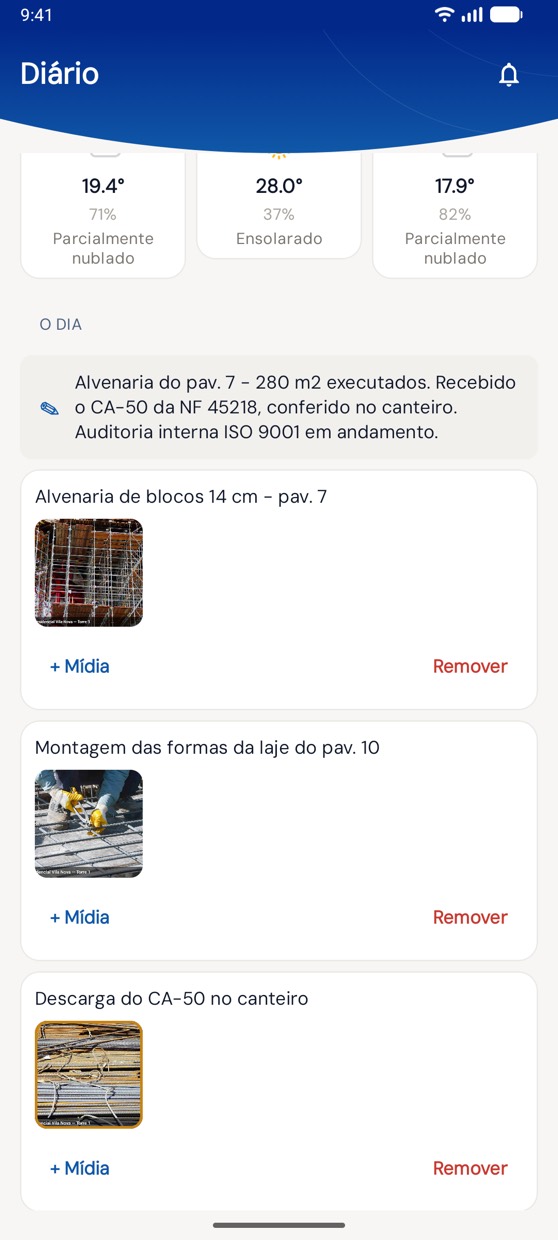
On the phoneIn the app, the day's activities with photos stamped with the project name, below the morning, afternoon and evening weather.
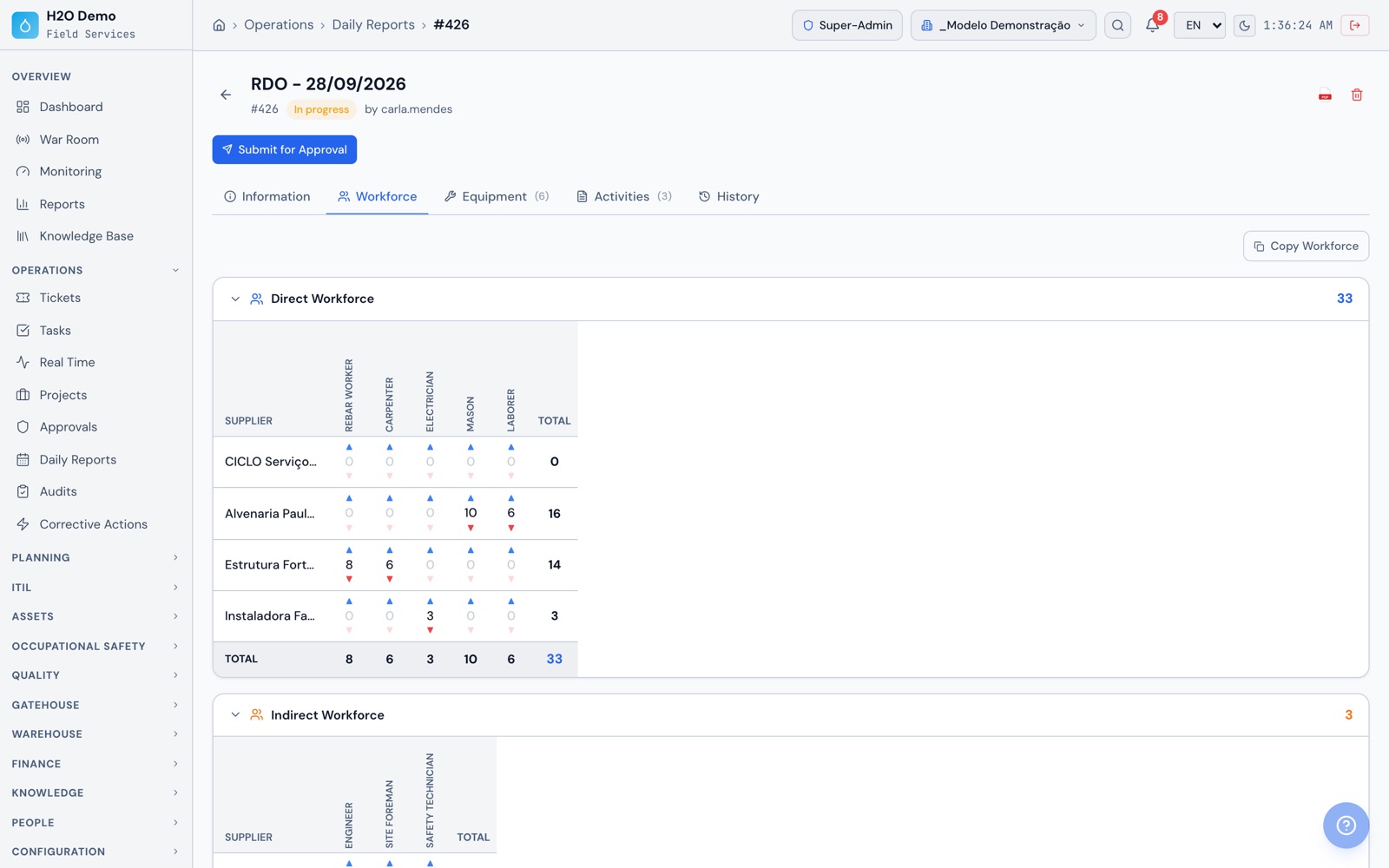
At the officeOn the web, the daily report's Labor tab with direct headcount by role and by company, for your own crew and three subcontractors, with the day's totals.
Operations › Daily Reports › #426 › Labor
H2O web: the daily report's Labor tab with direct headcount by role and by company, for your own crew and three subcontractors, with the day's totals.
H2O app: the day's activities with photos stamped with the project name, below the morning, afternoon and evening weather.
FVS

FVS by service, with annotated photos and AI to build the template

Build the FVS template for each service on the web, and the crew runs it in the app, item by item, with photo, drawing on the photo, comment and GPS. The FVS can be tied to a floor or location on the project and linked to the schedule task. To finish, the person in charge signs and generates the PDF right on the phone.

  • Items as Compliant/Partial/NC/NA, Yes/No/NA, numeric with minimum and maximum tolerance, score, text, selection and photo
  • Mandatory photo on the items you choose
  • AI that builds the FVS from the service, the setting, the standard and the level of detail, in Portuguese with an English translation, and shows similar templates first
  • AI that rewrites the technician's comment in technical language or builds it from the measured value, for the technician to accept or discard
  • PDF sent by email, one FVS or several at once
  • The term 'ticket' can be shown as FVS across the whole account
On the phoneIn the app, the photo of the wall-to-slab wedging with the defect circled in red and a caption, on an item that requires a photo.
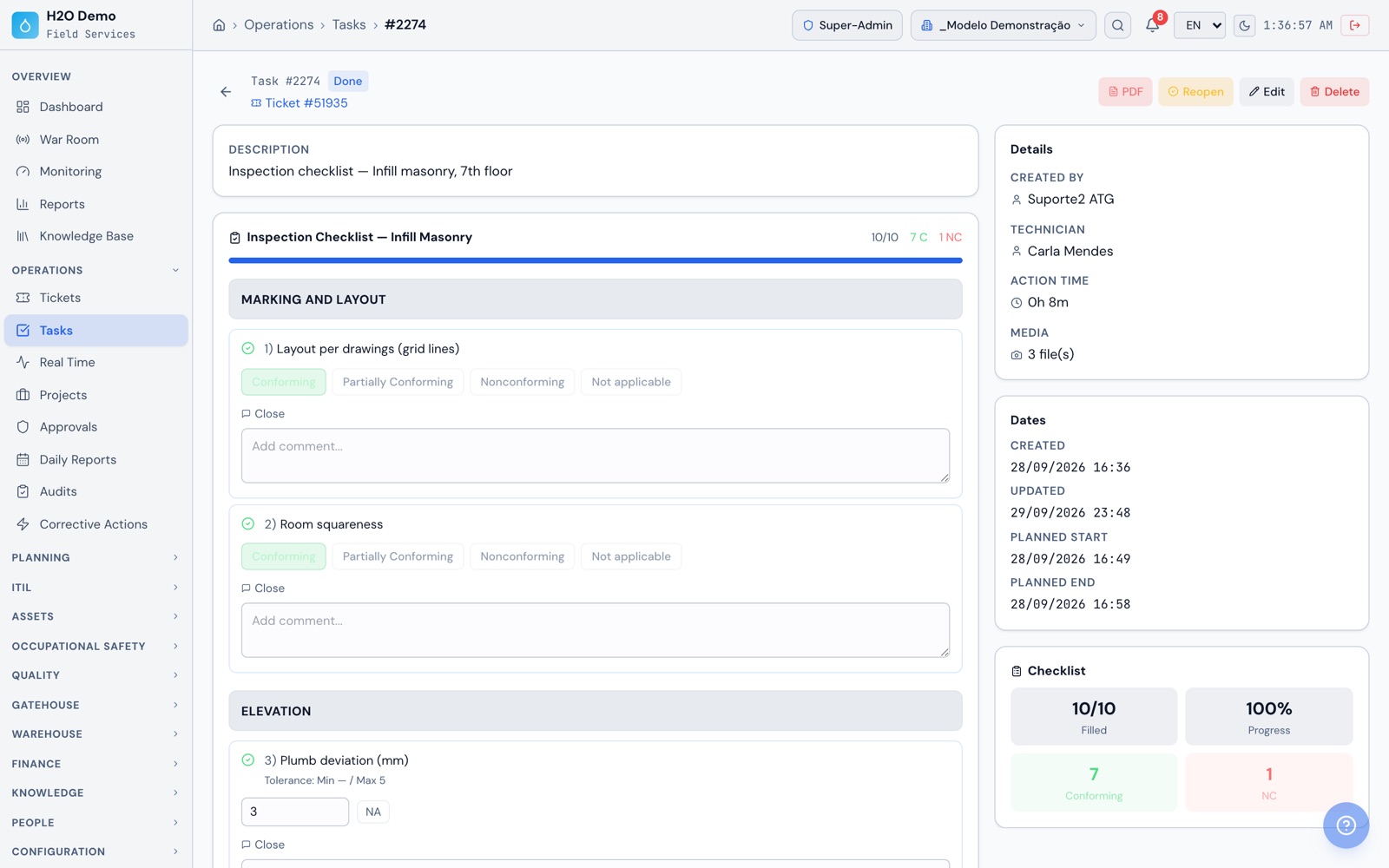
At the officeOn the web, the partition masonry FVS for floor 7 with items by stage, measurement tolerances, 7 compliant items and 1 non-compliant, and the technician in charge.
Operations › Tasks › FVS — Partition masonry floor 7
H2O web: the partition masonry FVS for floor 7 with items by stage, measurement tolerances, 7 compliant items and 1 non-compliant, and the technician in charge.
H2O app: the photo of the wall-to-slab wedging with the defect circled in red and a caption, on an item that requires a photo.
NCR and ISO 9001

Non-conformance with the subcontractor and ISO 9001 internal audits

If the FVS template is set to generate non-conformances, the non-compliant items become NCRs when the FVS is finished, with the photos as the record of fact, and go to the user of the responsible supplier. In the ISO 9001 internal audit, a finding also becomes an NCR in one click.

  • NCR with origin, major or minor classification, deadline, PDF and history
  • The supplier proposes actions, quality approves or sends them back, implementation is recorded with evidence and the NCR is closed
  • Annual audit program with approval and closeout
  • Session plan with time, area, auditor and auditee, sectors and findings with photos, and a PDF report
  • Quality dashboard and calendar, with NCRs by state, classification and origin
  • Job site audit by checklist on the project, with progress from one audit to the next
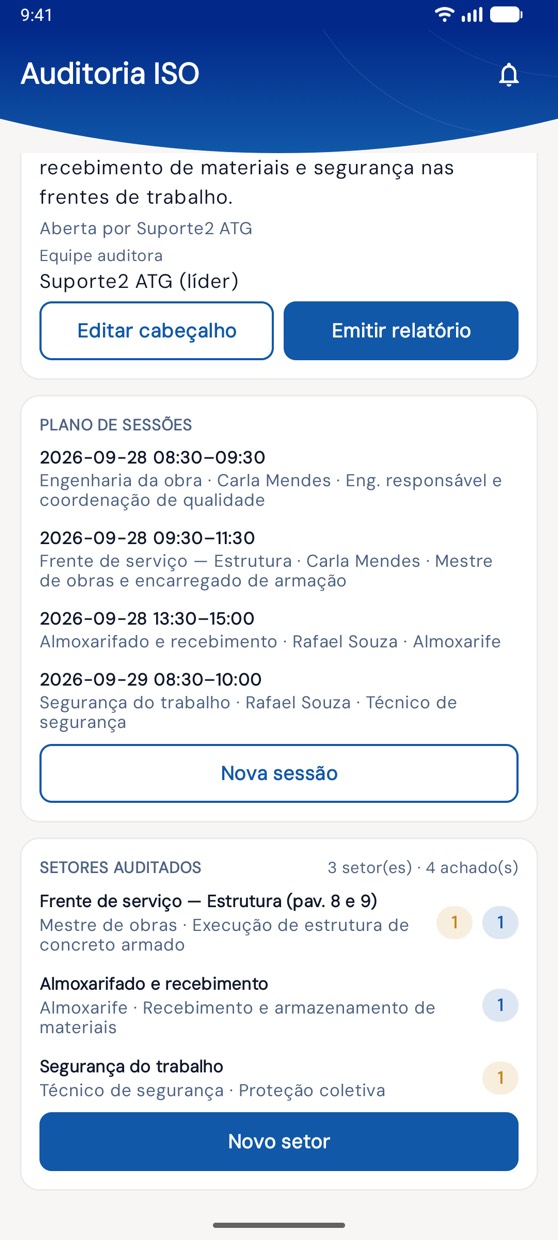
On the phoneIn the app, the audit with the project's session plan and the audited sectors with their finding counts.
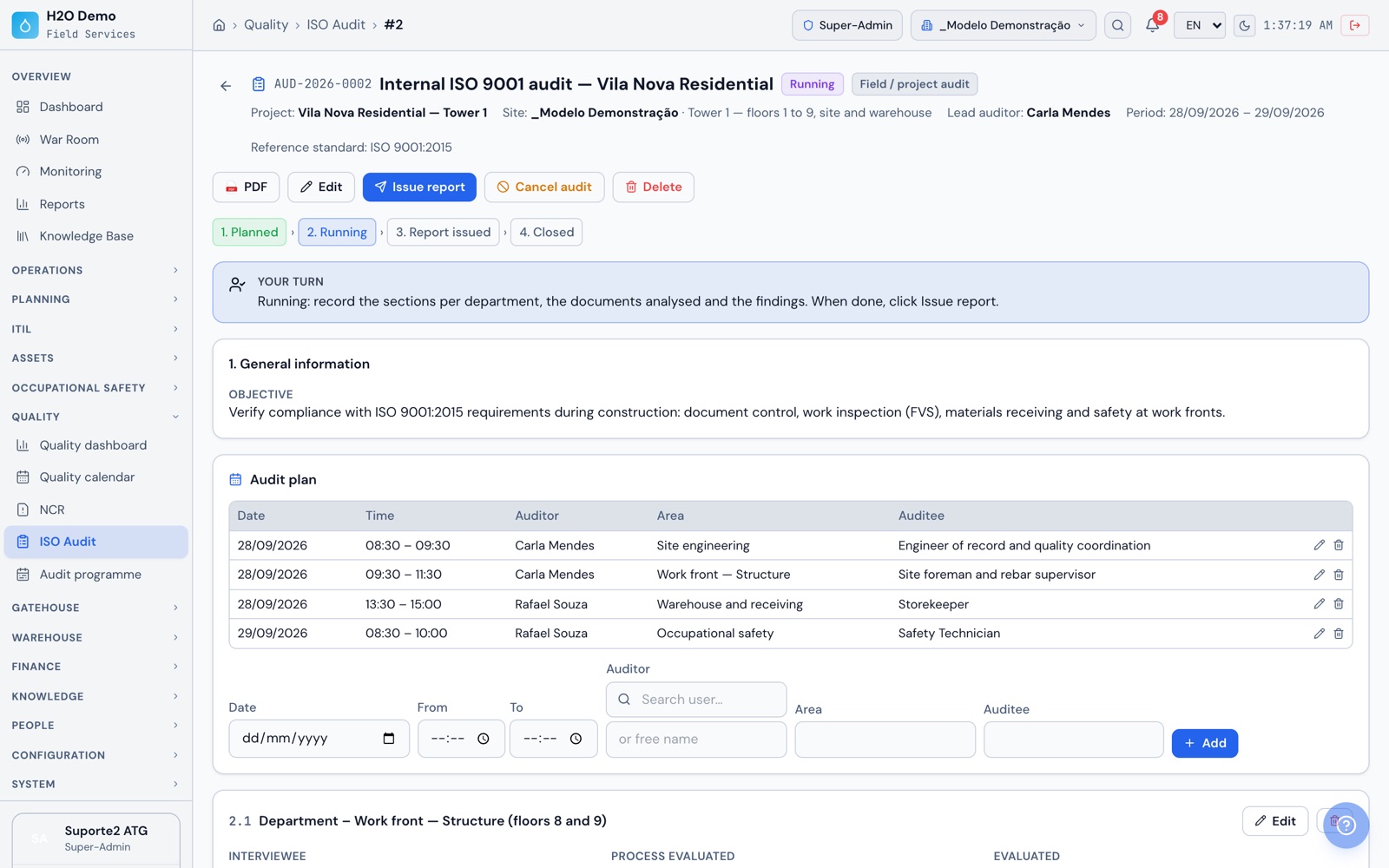
At the officeOn the web, the ISO 9001 internal audit for Residencial Vila Nova with its stages, objective and audit plan by area: engineering, structure, warehouse and safety.
Quality › ISO Audit › #2
H2O web: the ISO 9001 internal audit for Residencial Vila Nova with its stages, objective and audit plan by area: engineering, structure, warehouse and safety.
H2O app: the audit with the project's session plan and the audited sectors with their finding counts.
FVM and warehouse

Material received against the NF-e, checked item by item

At receiving, the warehouse keeper scans the DANFE barcode with the phone or types the 44-digit access key. H2O fetches the invoice from SERPRO and creates it linked to the project, with supplier, the purchase order number stated on the invoice, items and amounts. During checking, each item is marked for quantity, quality and material, with photos.

  • Attachments for the invoice, the purchase order and the material certificate
  • Signed workflow: receiving, engineering, client and approved, with commented rejection
  • Receiving report in PDF with the FVM number, sent by email
  • Stock entry on the web, with items matched to the catalog by barcode, supplier code or NCM code, and review
  • Project material requests: purchase approval, purchasing, release and delivery
  • Minimum stock with reorder alert and SINAPI code on the material record
On the phoneIn the app, the project's invoices awaiting checking, with the Read Code and Type Code buttons.
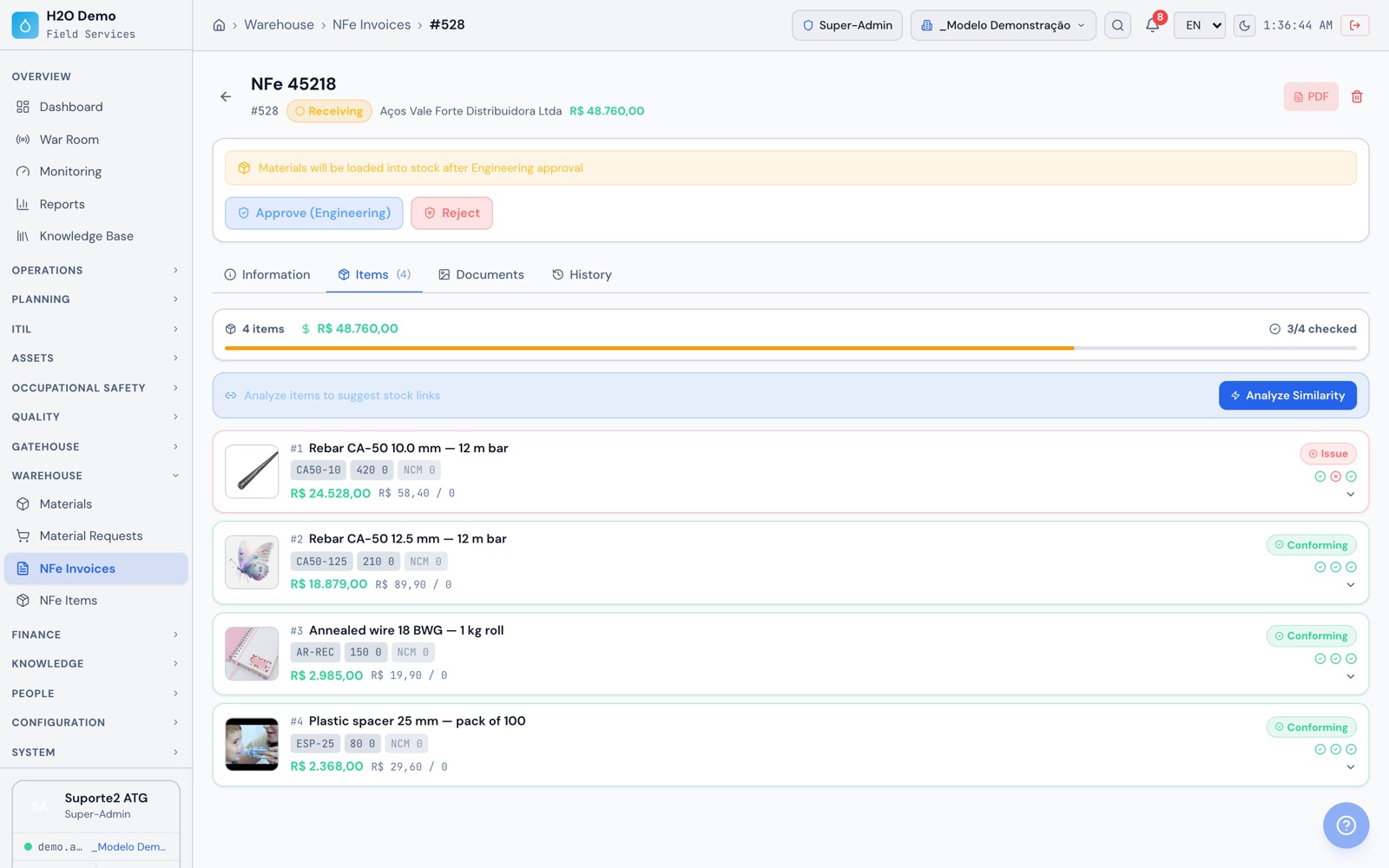
At the officeOn the web, the items on the steel NF-e checked one by one for quantity, quality and material, with one rebar flagged with a problem before engineering approval.
Warehouse › NFe Invoices › NFe 45218
H2O web: the items on the steel NF-e checked one by one for quantity, quality and material, with one rebar flagged with a problem before engineering approval.
H2O app: the project's invoices awaiting checking, with the Read Code and Type Code buttons.
Schedule

Gantt with dependencies, critical path and physical S-curve

The project schedule has hierarchical tasks, milestones, planned and actual dates, dependencies, crew per task and percent complete. Project progress is calculated from the tasks, and the project record shows planned and actual on one bar.

  • Finish-to-Start, Start-to-Start, Finish-to-Finish and Start-to-Finish dependencies
  • Progress updates for several tasks at once
  • Gantt PDF with executive summary, critical path, float analysis and physical S-curve, planned × actual, with SPI
  • Status of the FVS linked to each task in the same PDF
  • XML export to MS Project, which opens it and saves it as .mpp
  • Gantt view in the app
On the phoneIn the app, the project Gantt view.
At the officeOn the web, the Torre 1 Gantt with its 12 tasks and each one's progress, the foundation and handover milestones, the today line and the dependency arrows between structure, masonry and MEP.
Operations › Projects › Residencial Vila Nova — Torre 1 › Gantt
H2O web: the Torre 1 Gantt with its 12 tasks and each one's progress, the foundation and handover milestones, the today line and the dependency arrows between structure, masonry and MEP.
SINAPI budget

Budget with SINAPI, BDI in the TCU model and bid spreadsheet

Import the months of the SINAPI database (Brazil's official construction cost database, published by Caixa) available on the platform and build the budget by groups, with cost compositions and inputs by state, with or without payroll tax relief, your own compositions or manual items. During construction, compare planned with actual.

  • Your own cost compositions, including ones cloned from SINAPI
  • BDI (overhead and profit markup) built in the model of TCU Ruling 2622/2013 (Brazil's Federal Court of Accounts)
  • Spreadsheet in public bid format and calculation report in PDF
  • ABC curve of inputs, bill of materials and physical-financial schedule
  • Planned × actual with stock issues and logged hours
  • AI search: describe the service and get SINAPI codes from the database, with the month's price and a confidence level
  • Versions with comparison, price updates to another month, approval and export to Excel and PDF
  • Optional integration with OrçaFascio, using your own account credentials
At the officeOn the web, the Torre 1 budget with the Foundations, Structure and Masonry groups, the SINAPI compositions for the state and reference month, and the ABC curve, schedule, BDI and calculation report tabs.
Measurement and S-curve

Monthly measurement with cumulative totals and the contract S-curve through payment

The monthly measurement starts by copying the previous month or the contract baseline. It brings in staff positions, costs and the SINAPI items from the linked budget, with contracted, monthly and cumulative quantities. On invoicing, the monthly measurement generates an invoice in the contract execution for the net amount, with the deduction already applied.

  • BDI and discount on SINAPI in the included budgets
  • Deduction calculated by the IMR (the results measurement instrument used in Brazilian public contracts)
  • Closing checklist and a draft, measured, approved and invoiced workflow, with reopening
  • In the contract execution: measurements with approval and remeasurement, invoice with ISS, IR, INSS, COFINS and PIS, and payment records
  • Execution S-curve: planned × executed × invoiced × paid, with cash flow projection
  • Change orders, price adjustment with the index and percentage you enter, and export to Excel and PDF
At the officeOn the web, the contract execution S-curve with planned, executed, invoiced and paid lines month by month and the cash flow projection.
Safety (OHS)

APR, work permits and safety talks signed on site, even with no signal

Project safety lives in the app and on the web: preliminary risk analysis (APR) with attendance list, work permit (PT) with daily revalidation, safety inspections and deviations with photos. Contract workers go into the employee records with their home company, and sign attendance and PPE receipt on screen.

  • APR with checklist, signed attendance list, signing supervisors, incident record and PDF
  • Work permit with daily revalidation signed by the supervisor and by client and contractor safety, and closeout
  • Deviation classified as unsafe act, unsafe condition, environmental, quality or organization, with level from low to critical
  • Daily safety talks (DDS), onboarding and training with signed attendance list and PDF
  • Batch PPE handout with CA number (Brazil's PPE approval certificate) and signature, returns and PPE record (NR-06)
  • Safety dashboard by period and by project
On the phoneIn the app, APR, work permits, safety talks and PPE handouts with on-screen signature, even with no signal.
At the officeOn the web, the work-at-height permit with the workers, the checklist and the daily revalidation signed by the supervisor and by client and contractor safety.
Site gate

Who is on site, from which company and with which vehicle

The project gatehouse checks visitors in with a photo and a numbered badge, logs vehicle plate, model and color, and closes the visit at check-out when the badge is returned. Employees and contract workers use a personal badge with a QR code.

  • Visit scheduled by the host, or walk-in entry
  • Personal QR badges with expiration dates for employees and contract workers
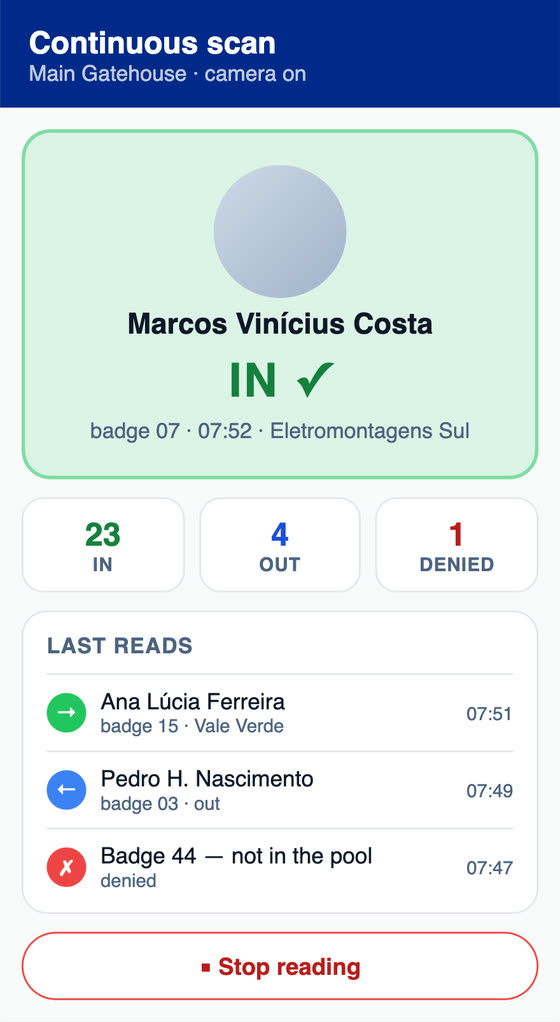
  • On scan, the holder's photo appears and H2O decides entry or exit
  • Expired or revoked badges, badges from another gate and badges of inactive workers are denied on scan
  • Continuous scanning for the morning line
  • List of unreturned badges, access log and visit report in PDF
On the phoneIn the app, the day's visits at the project gatehouse, with each visitor's company, badge and plate, continuous badge scanning and walk-in entry.
At the officeOn the web, the day's visits on site with company, badge, vehicle and arrival and departure actions.
H2O app: the day's visits at the project gatehouse, with each visitor's company, badge and plate, continuous badge scanning and walk-in entry.
Why H2O

Other project controls already in H2O

Mobilized equipment

Tower crane, boom pump or concrete mixer registered with rental company, plate, daily rate and operator. Arrival checklist, daily pickup and return checklist and departure checklist, each with a PDF, to settle billing with the rental company.

Subcontractors on the project

Each supplier joins the project team. Daily report headcount, safety workers, gate badges and NCRs stay linked to the subcontracted company.

Photo report

In the app, the inspection or progress report is built in sections, with GPS-tagged photos, drawing on top in four colors, signature and PDF.

Instrument calibration

Tape measure, level and rebound hammer with attached certificate, next calibration date and status as current, expiring or expired, with a configurable advance warning.

Project record

On the web, the project brings together team, tasks, Gantt, costs, daily reports, audits, equipment, materials, documents and budgets. In the app, the dashboard also shows the crew's attendance on each task, day by day.

Proposal accepted by link

The client opens the link, downloads the PDF, accepts or declines and can sign on the phone by scanning a QR code. Change orders are recorded on the contract.

From handover to maintenance

Equipment installed on the project can be registered as assets, with warranty and documents, and commissioning and preventive maintenance continue in the same system.

Many projects in one account

Companies, projects and sites in the same account, with role-based access. The client and the subcontractor log in with their own accounts to approve or respond.

Three languages

Web and app in Portuguese, English and Spanish, for the team and for the client.

Get the app

The same H2O on site, at the office and at the gate

Engineer and foreman on the phone, even with no signal. Site gate on a tablet, and warehouse, planning and contracts on Windows or in the browser. The same data and the same offline queue.

Android
Phones and tablets · Google Play
Open on Google Play
iPhone and iPad
iOS · App Store
Open on the App Store
Windows
Desktop and kiosk · Microsoft Store
Install from Microsoft Store
Free trial

Try H2O right now

Enter your name and email and get instant access to a demo environment with sample data, on the web and in the app. The data is reset every 72 hours.

Create your exclusive demo environment in seconds.

This will be your site name in H2O. You can use a fictional name.

No commitment · 7-day access · Your data will not be shared

Frequently asked questions

What people usually ask before starting

What goes into the H2O daily report?

Day summary, activities and incidents with photos, videos and attachments, the day's equipment, general and client remarks, and the energized-area block, which is a safety record. Headcount is entered by role and by company, splitting direct and indirect labor, active and idle, for your own crew and each subcontractor. Weather at 9 a.m., 2 p.m. and 7 p.m. comes in automatically, with conditions, temperature, humidity and chance of rain: forecast for today and future dates, history for past dates. It uses the coordinates or city registered for the company or unit of the project. A new report can start by copying a previous day, and every change stays in the history.

How does the client or inspector approve the daily report?

The daily report moves through In execution, Awaiting Engineering, Awaiting Management, Awaiting Client and Approved, and can then be archived or reopened. The order is always engineering, management and client, and the engineer can approve directly. Each approver signs with the digital signature stored in their profile, and a rejection records the reason. The inspector approves with their own H2O user, with that permission. When the contract waives the client step, it is turned off per project. The PDF comes out with weather, headcount, photos, signatures and map, and on the web you can send up to 200 reports at once to up to 30 recipients.

How do the FVS and FVM work in H2O?

The FVS (service inspection checklist) is a checklist per service. You build the template on the web with Compliant/Partial/NC/NA, Yes/No/NA, numeric with tolerance, score, text, selection and photo items, and set which items require a photo. The crew runs it in the app with photo, drawing on the photo, comment and GPS, finishes with the signature stored in their profile and generates the PDF on the phone. The FVS can be tied to a floor and linked to the schedule task. The FVM (material inspection checklist) is material receiving against the NF-e: the invoice comes from SERPRO (Brazil's federal data processing service), each item is checked for quantity, quality and material, with photos and the invoice, purchase order and certificate documents, and the receiving report comes out in PDF with the FVM number.

Does the FVS non-conformance reach the subcontractor?

Yes, when the template is set to generate non-conformances. When the FVS is finished, on the web or in the app, the non-compliant items become NCRs, one per item or one per checklist, with the photos as the record of fact. The NCR goes to the user of the responsible supplier or stays with quality to delegate. The supplier proposes actions, quality approves or sends them back, implementation is recorded with evidence and the NCR is closed. The supplier responds with their own H2O login, and the NCR is handled on the web.

Does the AI build the FVS checklist?

Yes. You enter the service, the setting, the standard and the level of detail. Before generating, H2O shows the similar templates that already exist. The AI proposes the items with the right response type and a photo where it serves as evidence, in Portuguese with an English translation of each item. You review and save. There is a daily usage limit per user. On an FVS item, the AI also rewrites the technician's comment in technical language or builds it from the measured value, and the technician accepts or discards it. Accepted text is marked as coming from the AI.

Does the app work on a job site with no internet?

Yes. Daily reports, FVS and other checklists, safety forms, photos and signatures stay on the device and upload on their own when the network comes back, with encrypted sync. Checking an invoice already downloaded to the device also works with no signal. Registering a new NF-e, which is looked up in SERPRO, the site gate and the AI features use the internet. The app is on Google Play (Android), the App Store (iPhone and iPad) and the Microsoft Store (Windows).

Can I estimate with SINAPI and calculate BDI?

Yes. You import the months of the SINAPI database from Caixa (Brazil's federal savings bank) available on the platform and build the budget with cost compositions and inputs by state, with or without payroll tax relief, your own compositions or manual items. BDI follows the model of TCU Ruling 2622/2013. You get the spreadsheet in public bid format, the calculation report in PDF, the ABC curve of inputs, the bill of materials and the physical-financial schedule. To find a composition, you describe the service in plain Portuguese and the AI suggests codes that exist in the database, with the month's price and a confidence level. You choose the item and the quantity. If you already use OrçaFascio, there is an optional integration using your own account credentials.

How do contract measurement and the S-curve work?

The monthly measurement opens by copying the previous month or the contract baseline and brings together staff positions, costs and the SINAPI items from the linked budget, with contracted, monthly and cumulative quantities. It includes BDI, discount, the IMR deduction and a closing checklist. The workflow is draft, measured, approved and invoiced, with export to Excel and PDF, and on invoicing it generates an invoice in the contract execution. The contract execution has its own measurements with approval and remeasurement, the invoice with ISS, IR, INSS, COFINS and PIS at the registered rates, and payment records, and that is where the S-curve comes from: planned, executed, invoiced and paid, with a cash flow projection. The Gantt PDF also includes the physical S-curve, planned × actual.

Does the H2O schedule work with MS Project?

H2O exports the schedule as XML, which MS Project opens and saves as .mpp. In H2O, the Gantt has hierarchical tasks, milestones, Finish-to-Start, Start-to-Start, Finish-to-Finish and Start-to-Finish dependencies, crew per task and percent complete, including updates to several tasks at once. The Gantt PDF includes an executive summary, critical path, float, physical S-curve with SPI and the status of each task's FVS.

Does H2O handle public works and government contracts?

It covers the documents these contracts usually require: budget with SINAPI with or without payroll tax relief, BDI in the model of TCU Ruling 2622/2013, spreadsheet in public bid format and calculation report. During execution, the monthly measurement includes staff positions with CATSER code (Brazil's federal services catalog), SINAPI items with cumulative totals, the IMR deduction (results measurement instrument), change orders, index-based price adjustment and an invoice with withholdings. The daily report approved by the inspector with a signature completes the project record.

Does H2O help with ISO 9001 and PBQP-H for a construction company?

It helps gather the records the quality management system requires in one place: FVS per service with photo, GPS, signature and PDF, FVM at material receiving with the certificate attached, NCRs with corrective action and evidence, annual program and ISO 9001 internal audits with findings that become NCRs, instruments with calibration certificates and the quality dashboard. Procedures, criteria and preparation for certification (including PBQP-H, Brazil's housing quality program) stay with your team.

How do safety and the site gate work for contract workers?

Subcontractor workers go into the records with photo, CPF (Brazilian taxpayer ID), role and company. They sign the attendance list for safety talks, onboarding and training, receive PPE with the CA number and a signature, and have a PPE record (NR-06, Brazil's PPE regulation). At the gate, they get a personal QR badge with an expiration date. On scan, the holder's photo appears and H2O denies expired or revoked badges, badges from another gate and badges of inactive workers.

Put your next project on H2O

Create your demo environment in seconds, with a sample project on the web and in the app, and open a daily report, an FVS and an invoice. For a guided walkthrough of the budget, schedule and measurement, message the team on WhatsApp.