
Reservations, delivery and return
Manual — Assets · chapter 8 of 12
Tools, vehicles, test equipment — everything that is lent out and has to come back — can be reserved through the Reservations tab of the record, in any asset type. The reservation marks the period; the delivery and the return record who took it, when, and in what condition it came back. The tab uses the profile’s Reservations right (Planning group).- In the Reservations tab, the asset starts as Not reservable. Click Enable Reservations (Edit right on Reservations): the badge changes to Reservable.
- Click New Reservation. Start and End come with today, from 08:00 to 17:00; adjust them. The screen shows the Duration. Write the reason in Notes and click Reserve.
- When the period starts and the asset leaves, click the row’s 📤 (Record Delivery): enter who it was delivered to and the notes and click Confirm Delivery.
- When it comes back, click the 📥 (Record Return): choose the condition — ✅ Good condition, ⚠️ Damaged, 📦 Incomplete or 📝 Other —, write the notes and click Confirm Return.
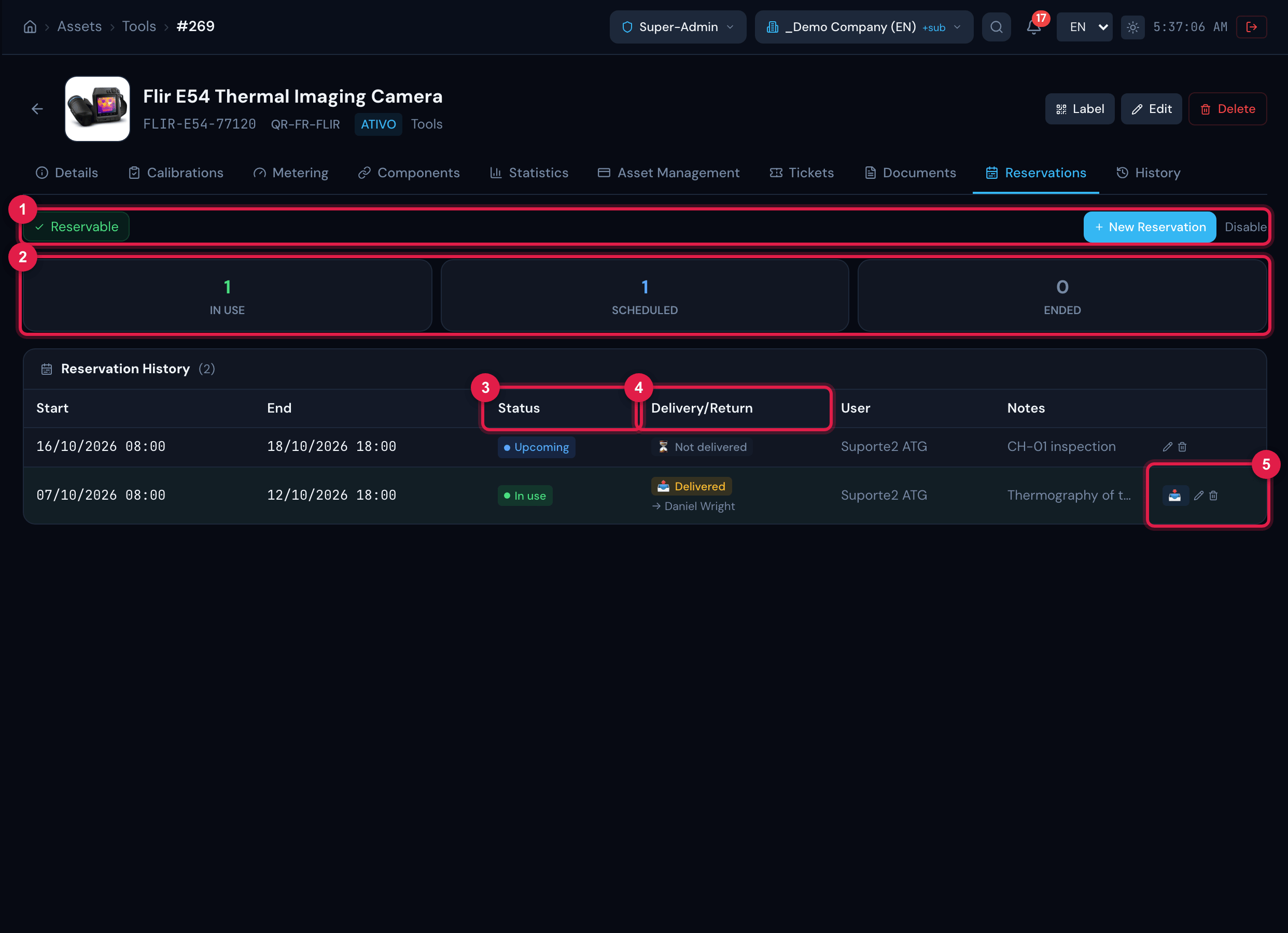
Figure 19. Reservations tab of a reservable tool: the In Use, Scheduled and Ended cards and the Reservation History — one reservation delivered and another scheduled —, with the Delivery/Return column.
- 1Reservable badge, New Reservation and Disable.
- 2In Use, Scheduled and Ended cards.
- 3Status column of the reservation (In use, Upcoming, Ended).
- 4Delivery/Return column (Not delivered, Delivered, Overdue, Returned), with the name of who received it.
- 5Row buttons: 📤 delivery (once the reservation has started and has not been delivered yet), 📥 return (after delivery), pencil and trash can.
| Status | When |
|---|---|
| Upcoming / In use / Ended | The period has not started yet / is under way / has already ended. |
| Not delivered | The reservation exists, but the delivery has not been recorded. The 📤 only appears when the period has already started. |
| Delivered | Delivery recorded and the end of the reservation has not passed yet. |
| Overdue | Delivered, the end of the reservation has passed and the return has not been recorded — the row turns reddish. |
| Returned | Return recorded, with the condition. |
Was this page helpful?
Thanks for the feedback!
Got it — we will improve this page.