
The punch list screen
Manual — Punch list (GQE) · chapter 3 of 11
The screen has three parts, from top to bottom: the Projects with items table, the indicators and the item list. With no project chosen, everything adds up the projects you can see; with a project chosen, everything is about that project only.Projects with items
Section titled “Projects with items”One row per project that already has at least one item, on the sites you can see. A project with no item does not appear: the first one is recorded with New item (chapter 4).
| Column | What it counts |
|---|---|
| Project | the name (click to choose the project; click again to go back to all) and the green bar of the % completed |
| Site | the site of the project |
| Total | all items of the project |
| Open | Triage / Under review, In progress, Under validation and Blocked |
| Overdue | with the Due date passed and still in Triage / Under review, In progress or Blocked (in red) |
| To validate | Under validation — waiting for Quality |
| Completed | the validated ones, with the % of the total |
| Last update | the date of the last change to an item of the project |
At the end of each row: Open (chooses the project), PDF (opens the report options) and the Spreadsheet icon (downloads the CSV). The PDF and the spreadsheet of the row take the list filters (chapter 9).
The indicators and the list
Section titled “The indicators and the list”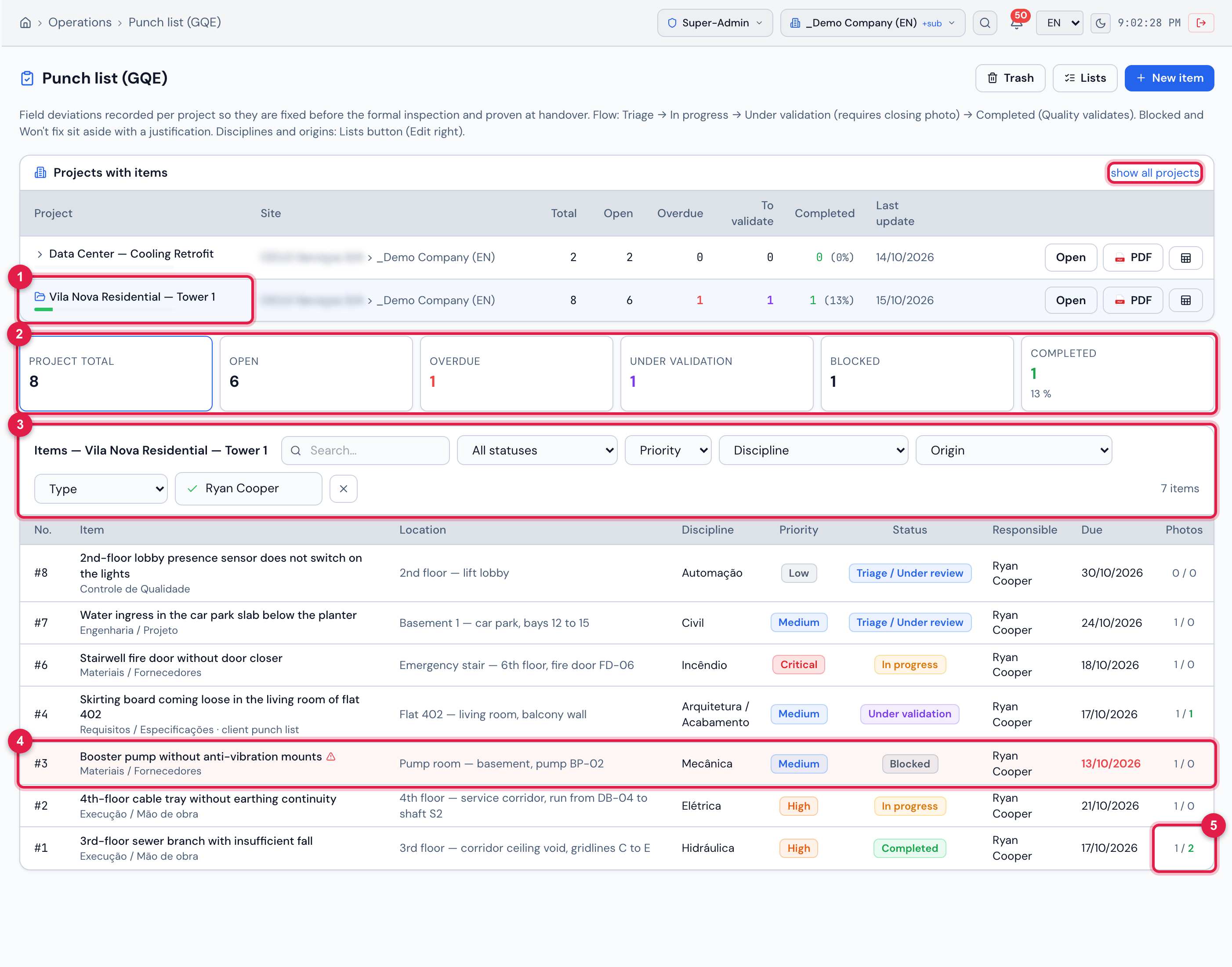
Figure 3. The project Vila Nova Residential — Tower 1 chosen, with the Project total card selected: the indicators and the list are now about that project only. The list is filtered by Responsible… = Ryan Cooper — the cards do not change with the list filters.
- 1The chosen project and show all projects, which goes back to the overview.
- 2The cards Project total, Open, Overdue, Under validation, Blocked and Completed — the selected card is the list filter.
- 3The filters: Search…, status, Priority, Discipline, Origin, Type and Responsible…, and the total (N items).
- 4An overdue item: row in red, ⚠ and the Due date in red.
- 5The Photos column: opening / closing; the closing count turns green once the evidence of the fix has been attached.
- The list opens showing only the Open items. To see everything, click the Total card (or Project total) or choose All statuses in the filter.
- The cards filter the list: Open, Overdue, Under validation, Blocked, Completed. Overdue only exists as a card.
- Search… looks in the title, the location, the description and the project name. Responsible… shows only one person’s items: type part of the name and pick it.
- The list brings all items of the filter, with no limit. With no project chosen, it gets the Project column; the order is by project and, within it, from the newest number to the oldest.
- Below the title, each item shows the Origin and, when it comes from the client, client punch list. Dates follow the company date format.
- Click any row to open the item page (chapter 5).
Was this page helpful?
Thanks for the feedback!
Got it — we will improve this page.