
Module overview
Manual — Occupational Safety · chapter 1 of 13
The H2O Occupational Safety (SST) module covers the full cycle of SST (Occupational Safety and Health) management for a field-based company — from the worker master data to reporting to eSocial (the Brazilian government’s employer reporting system) — in one place, with a traceable electronic signature on every document. It was designed for construction projects and public contracts: everything NR-01 (the Brazilian regulatory standard on general provisions and risk management) requires (risk inventory, PGR, work instruction, training, ASO), plus APR (Preliminary Risk Analysis), PT (Work Permit) and field inspections, deviations and corrective actions, accidents with CAT (Work Accident Report), CIPA, eSocial (S-2210/2220/2240) and the contractor oversight required by Law 14.133 (the Brazilian public procurement law).The module lives in two places: the web system (demo.atg.com.br), where management happens — master data, matrices, PGR, ASO, CIPA, eSocial, oversight, reports — and the H2O app (phone, tablet and desktop), where field work happens — APR, PT and inspection with checklist and on-screen signature, toolbox talks (DDS) with attendance, PPE delivery, deviation reporting with a photo. The app works offline: everything done in the field goes into a queue and is sent automatically on the next sync.
| Function | Web | H2O app | Chapter |
|---|---|---|---|
| Workers (master data) | add, edit, PPE record, NR/ASO/OS status | view and open the PPE record | 3 |
| Required training (NR catalog, matrix by job role, expirations) | yes | — | 3 |
| Trainings and toolbox talks (DDS) | create, attendance, result, certificate, RT signs | create toolbox talk/training, attendance with signature | 3 |
| SST work instructions by job role (NR-01 1.4.1) | draft, publish, collect acknowledgments | — | 3 |
| PPE (delivery, record, return, NR-06 acknowledgment) | delivery with signature, PDF of the record with acknowledgment, return | batch delivery with signature, return | 3 |
| ASO (NR-07) | record, validity, fitness, copy, LGPD | — | 3 |
| Risk inventory and PGR | inventory, action plan, publish revision | — | 4 |
| APR | create, import risks from the PGR, checklist, team, signatures, finish, reopen, PDF | create, checklist with photo, signed team acknowledgment, finish, PDF | 5 |
| PT | create with a linked APR, issuer/supervision, work crew, daily revalidation, finish | create, work crew signs, daily revalidation with 4 signatures, finisure | 5 |
| Safety inspection | create, checklist, responsible people sign, report deviation | create, checklist with photo, deviation from a non-compliant item | 5 |
| Deviations and corrective actions | record, classify, corrective action (child ticket) | report with photo (becomes a ticket on sync) | 5 |
| Accidents and incidents (CAT, investigation) | yes | — | 6 |
| CIPA (NR-05, Law 14.457) | yes | — | 7 |
| eSocial SST (XML S-2210/2220/2240) | yes | — | 8 |
| Contractor oversight (Law 14.133, IN 05/2017) | yes | — | 9 |
| Integrity and signature verification | trail, verification code, gov.br signature | signatures marked “app” in the trail | 10 |
| Dashboard and reports | SST dashboard + 4 reports in Analytics | SST dashboard (device numbers) | 11 |
Legal basis by function
Section titled “Legal basis by function”The module does not replace the SST professional — the technical content (risks, measures, reports) belongs to the engineer, the technician and the physician. What H2O guarantees is record, deadline, signature and traceability. The table below shows which standard each screen relies on; the text of the standard also appears inside the system, in page titles and in compliance items.
| Screen | Legal basis | What H2O controls |
|---|---|---|
| Risk inventory / PGR | NR-01 1.5.4 and 1.5.7 | six risk groups, likelihood × severity, action plan, revision every 24 months, RT signs |
| SST work instructions by job role | NR-01 1.4.1 “b” | one current OS per job role, version, acknowledgment signed by each worker |
| Required training and trainings | NR-01 1.7 (and the NR of each training) | minimum hours, validity/refresher, certificate with code, block in APR/PT with justification |
| ASO | NR-07 (PCMSO — occupational health monitoring program) | eSocial exam type, validity, fitness, logged access (LGPD), no ICD code |
| PPE | NR-06 | equipment CA (Certificate of Approval), signed delivery, acknowledgment of responsibility in the PDF, return |
| APR / PT / Inspection | NR-01, NR-35, NR-33, NR-18, NR-10 (depending on the template) | template checklist, responsible people and team sign, finishing only with everything signed, PT requires a finished APR |
| Accidents and incidents | NR-01 1.5.5.5, CAT (Law 8.213 art. 22), eSocial S-2210 | CAT deadline (1st business day; fatality immediately), signed investigation, frequency/severity rate per NBR 14280 |
| CIPA | NR-05 and Law 14.457/2022 | reported sizing, election, term, job security, signed minutes, harassment |
| eSocial | Layout S-1.3 (S-2210, S-2220, S-2240) | XML ready for payroll to transmit; H2O does not transmit |
| Contractor oversight | Law 14.133 art. 117/121; IN SEGES 05/2017 Annex VIII-B | contract workforce, contractor documents, oversight checklist, gate on the measurement |
| Signatures | MP 2.200-2 (ICP-Brasil), Law 14.063 (gov.br) | SHA-256 hash of the content, verification code, attachment of the PDF signed on gov.br/ICP |
Where it is on the web and in the app
Section titled “Where it is on the web and in the app”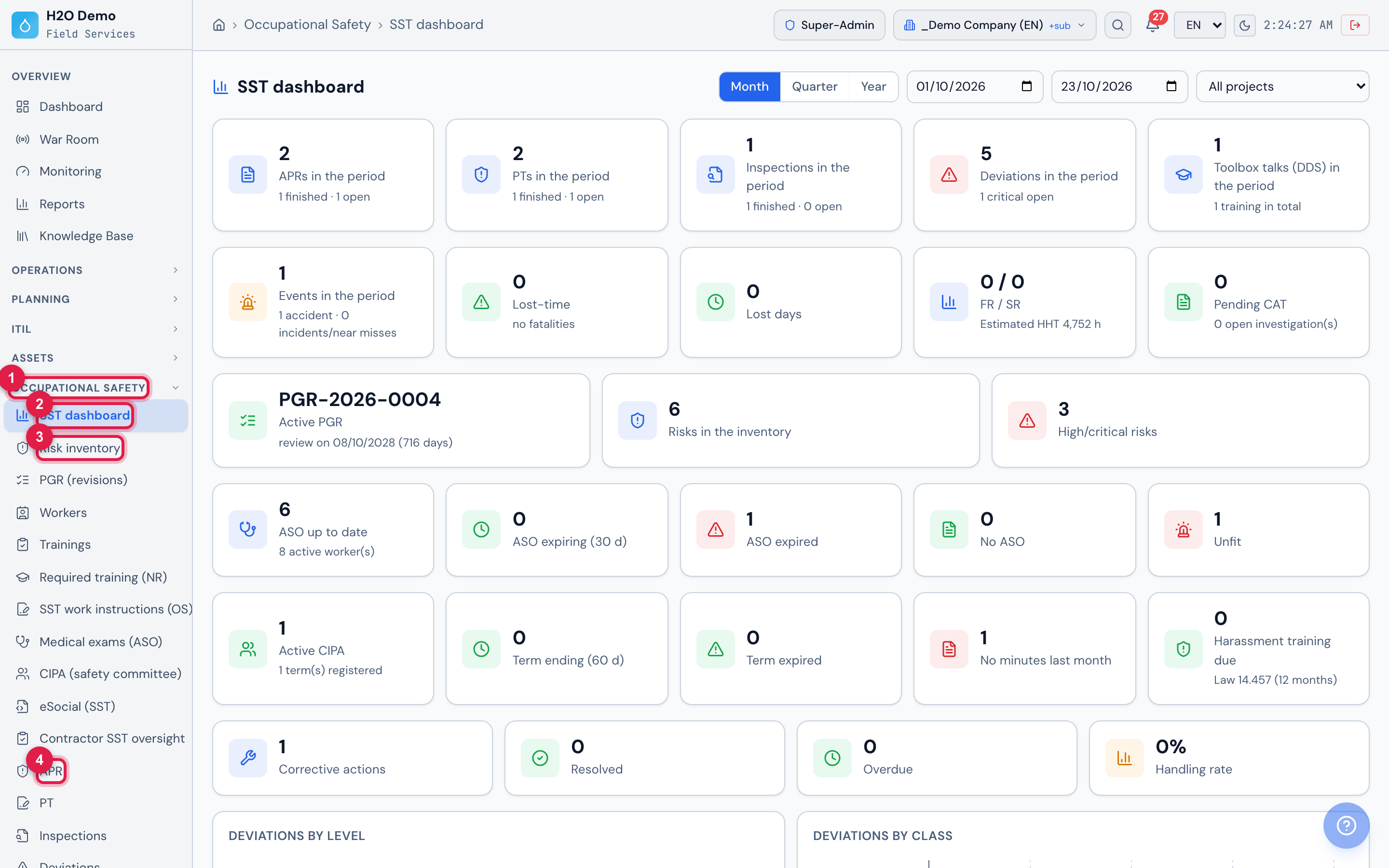
Figure 1. Web side menu, with the SST dashboard open on the right: the Occupational Safety section groups the module pages in the order of the workflow (dashboard, risks, people, field documents, accidents, PPE, verification). Each item appears only to users who have the matching right (chapter 2).
- 1Occupational Safety section of the menu.
- 2SST dashboard — period numbers, by project.
- 3Risk inventory — first management page; followed by PGR, Workers, Trainings, Required training, SST work instructions, ASO, CIPA, eSocial and Oversight.
- 4APR — first of the field documents; followed by PT, Inspections and Deviations.
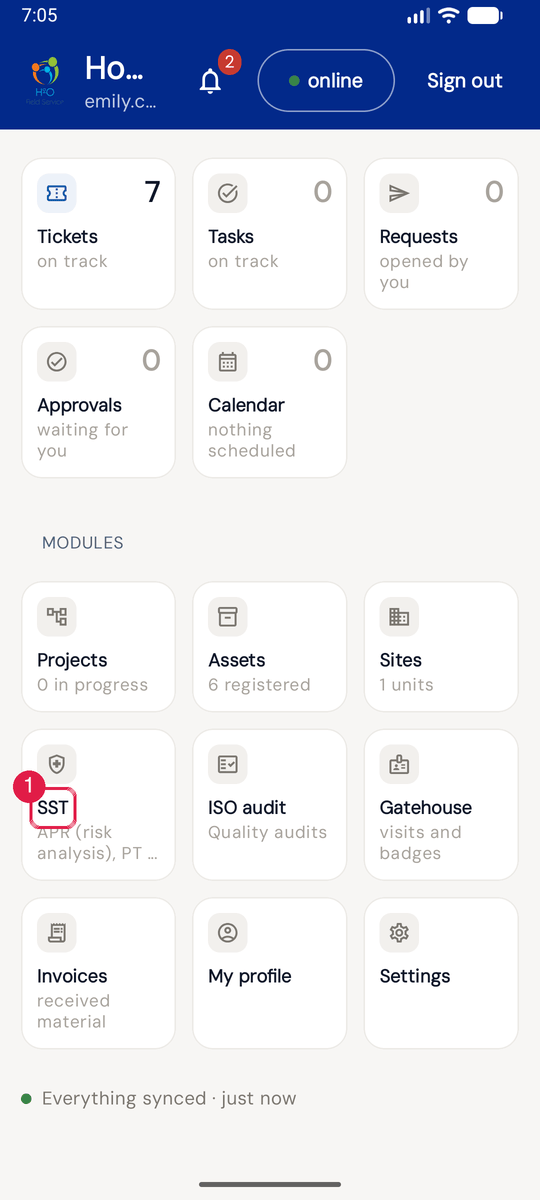
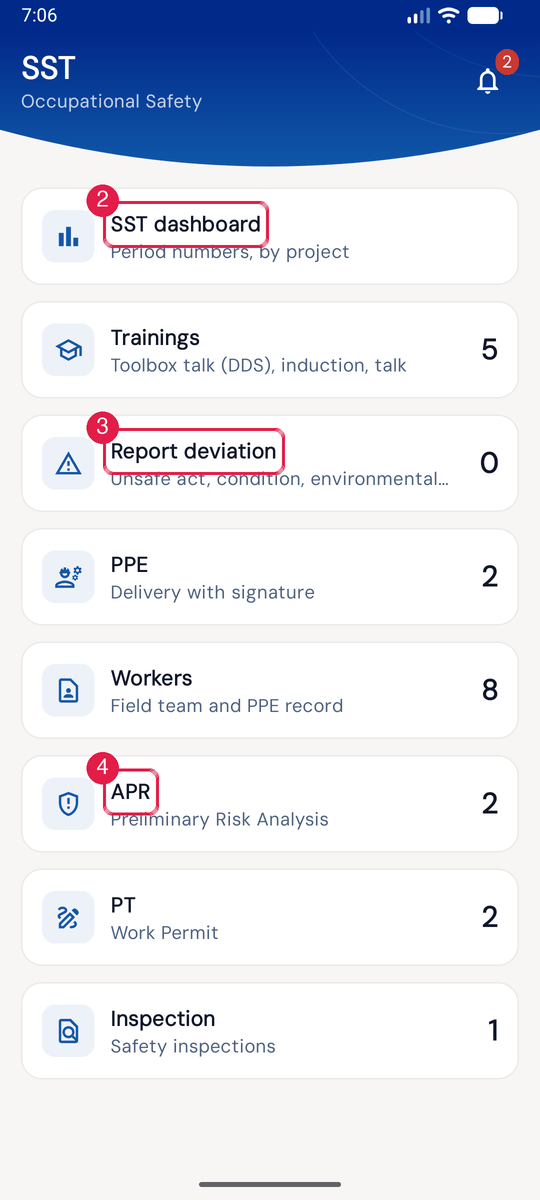
App H2OFigure 2. In the app, the module opens from the SST card on the home screen. The hub shows one card per function — Dashboard, Trainings, Report deviation, PPE, Workers, APR, PT and Inspection — with the total of documents on the device and, when something is waiting for a connection, “N waiting to be sent”. Function cards without the right do not appear.
- 1SST card on the home screen (subtitle “APR (risk analysis), PT (work permit), inspections”).
- 2SST dashboard — period numbers, by project.
- 3Report deviation — unsafe act, condition, environmental…
- 4APR — Preliminary Risk Analysis; the number on the right (2) is the total of documents on the device.
Was this page helpful?
Thanks for the feedback!
Got it — we will improve this page.