
Contractor SST oversight
Manual — Occupational Safety · chapter 9 of 13
In public contracts (and in any contract where the company is the client), the contract inspector must prove that the contractor meets its SST obligations: PGR and PCMSO valid, workers with ASO, training and PPE, and recorded periodic oversight (Law 14.133 — the Brazilian public procurement law — art. 117/121; IN SEGES 05/2017, Annex VIII-B). The Occupational Safety › Contractor SST oversight page does this by contract and by month, reading the data already in the module, and locks the approval of the measurement when there is a pending issue without justification.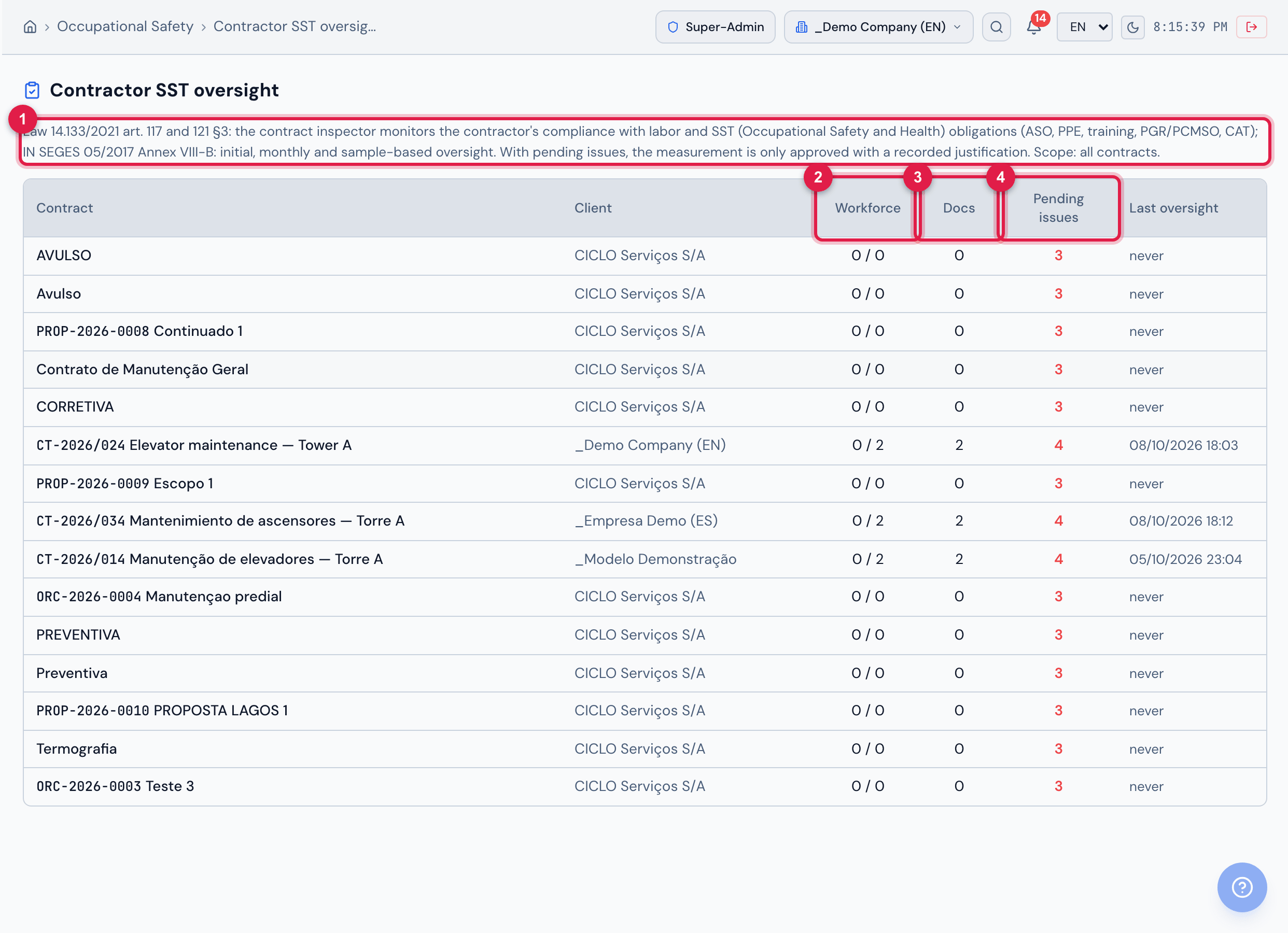
Figure 69. List of contracts under oversight: legal text with the scope (here “all contracts”; for an inspector, deputy or manager the scope is “contracts where you are inspector, deputy or manager”); columns Contract, Client, Workforce (without pending issues / total), Docs, Pending issues and Last oversight. In the example, CT-2026/024 (Elevator maintenance — Tower A, this company) is set up: 0 / 2, 2 docs, 4 pending issues, oversight on 08/10/2026 (the list also shows the other demo contracts set up the same way, CT-2026/034 and CT-2026/014); the others show 0 / 0, 3 pending issues and “never”.
- 1Legal basis (Law 14.133 art. 117 and 121 §3; IN SEGES 05/2017 Annex VIII-B) and the scope of the list.
- 2Workforce: workers without pending issues / total.
- 3Docs: contractor documents on file.
- 4Month’s Pending issues (red); next to it, the date of the last oversight.
| Contract tab | What it shows | What you do |
|---|---|---|
| Summary and pending issues | cards (pending issues, workforce ok, documents, active PGR, accidents without CAT), list of pending issues, Environment block (licenses and conditions), contractor PGR and CIPA | read and decide what to demand |
| Allocated workforce | each worker on the contract with ASO, training, SST work instruction, PPE, last APR and pending issues; suggestions of people who appeared in APRs/PTs of the projects in the last 120 days | Add / Record exit |
| Contractor documents | PGR, PCMSO, LTCAT, CIPA, SESMT/technical lead, ART, Insurance, Other — with issue date and validity | Record document (an expired one becomes a pending issue) |
| Oversight (Annex VIII-B) | Initial / Monthly / Sample-based checklist, item by item OK / Pending / N/A; history | Record (a pending issue requires a justification / action) |
Setting up the workforce and the documents
Section titled “Setting up the workforce and the documents”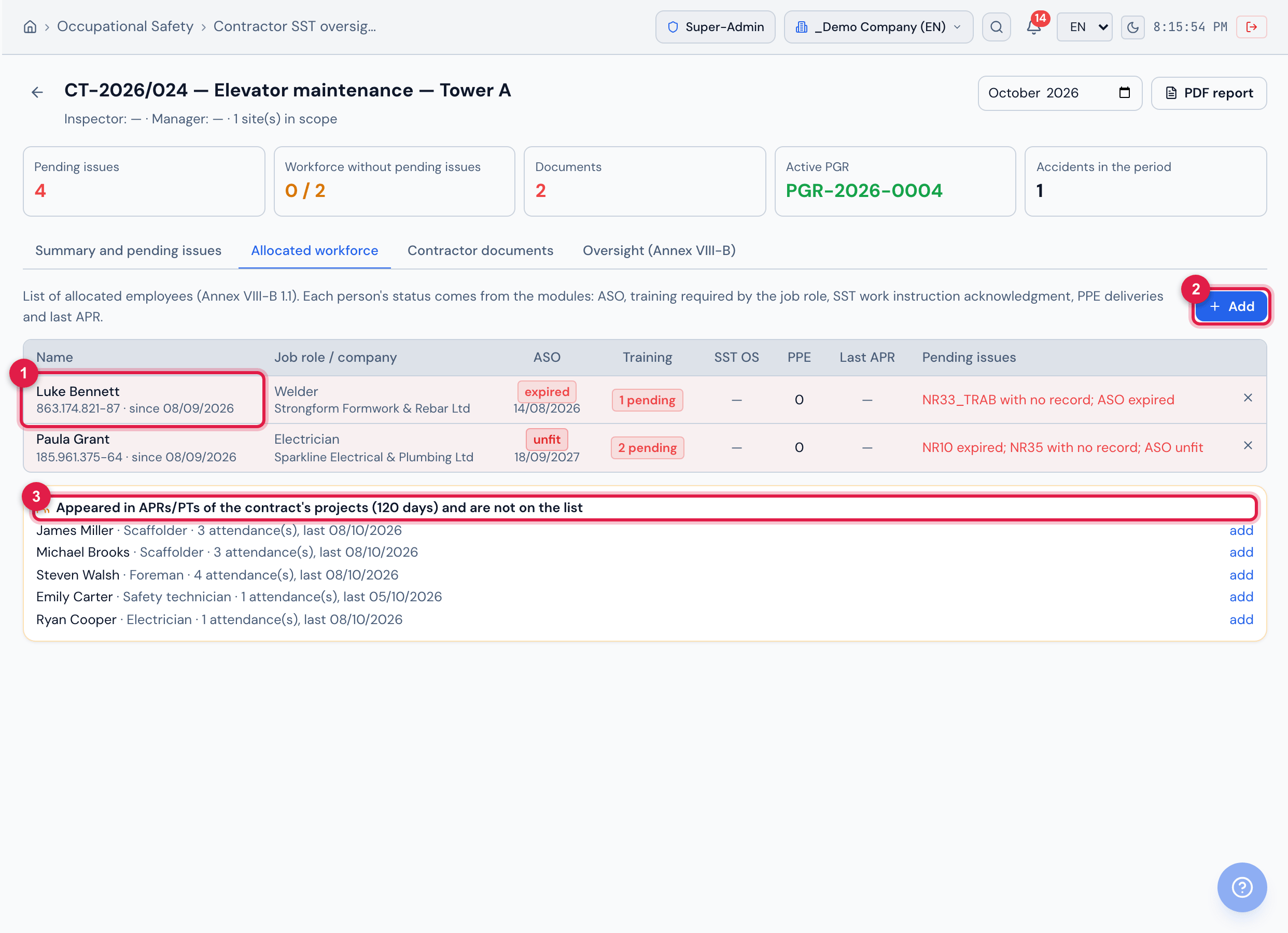
Figure 70. Contract CT-2026/024 — Elevator maintenance — Tower A, month 10/2026: cards Pending issues (4), Workforce without pending issues (0 / 2), Documents (2), Active PGR (PGR-2026-0004) and Accidents in the period (1); PDF report button. Allocated workforce tab: each worker with Job role / company, ASO, Training, SST OS, PPE, Last APR and named Pending issues; the × at the end of the row records the exit. Below, the suggestions of people who appeared in APRs/PTs of the contract’s projects.
- 1Contractor worker (Luke Bennett, since 08/09/2026) with an expired ASO and pending training — this becomes a named pending issue.
- 2Add a worker to the workforce.
- 3Suggestions: appeared in APRs/PTs of the contract’s projects (120 days) and are not on the list — add link next to each name.
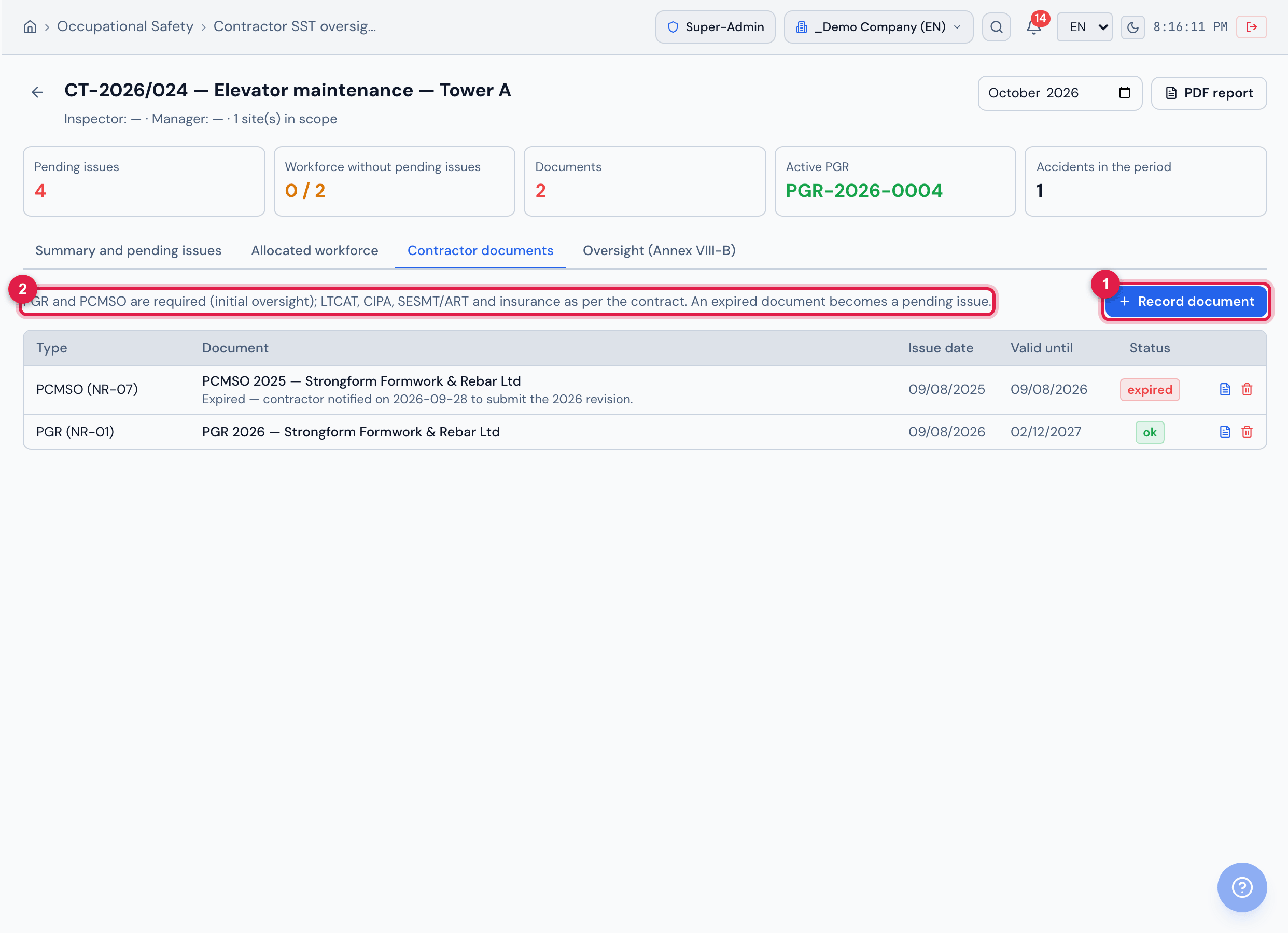
Figure 71. Contractor documents tab: columns Type, Document, Issue date, Valid until and Status, with view and delete icons. In the example, the PCMSO (NR-07) is expired (09/08/2026, in red) and the PGR (NR-01) is ok until 02/12/2027.
- 1Record document.
- 2Rule shown: PGR and PCMSO are required (initial oversight); LTCAT, CIPA, SESMT/ART and insurance according to the contract; an expired document becomes a pending issue.
- Open the contract and, in Allocated workforce, add the contractor’s workers (or accept the suggestions).
- In Contractor documents, record the PGR and PCMSO (and any others required by the tender) with their validity.
- Go back to the Summary: the pending issues appear by name (so-and-so’s expired ASO, expired PCMSO, accident without CAT…).
Recording the oversight
Section titled “Recording the oversight”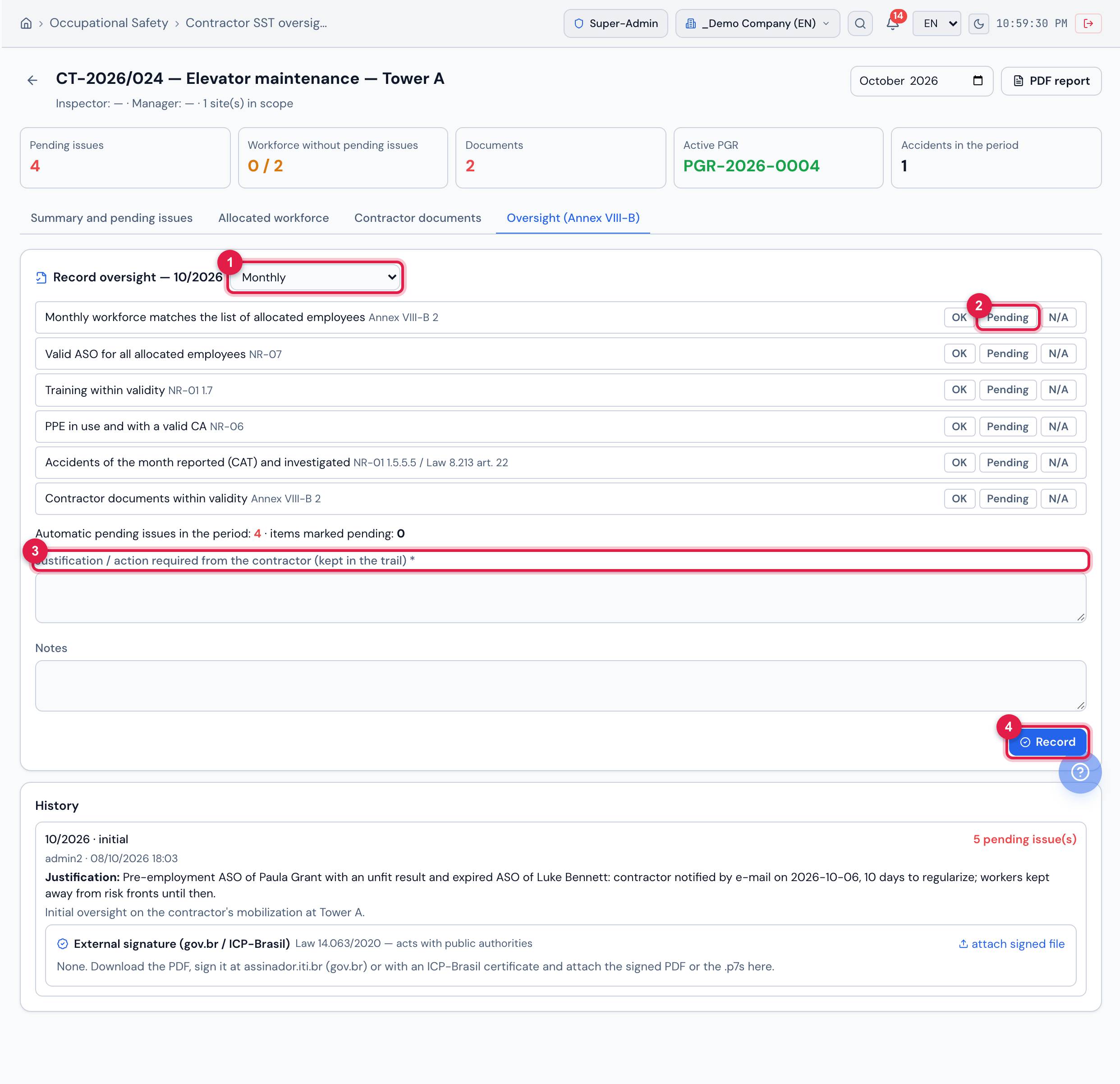
Figure 72. Oversight (Annex VIII-B) tab: “Record oversight — 10/2026” with the type (Monthly; also Initial and Sample-based), six items with their legal basis and OK / Pending / N/A buttons, the line “Automatic pending issues in the period: 4 · items marked pending: 0”, the Justification / action required from the contractor (required), Notes and Record. Below, the History (10/2026 · initial, 5 pending issue(s), justification) with the gov.br / ICP-Brasil external signature block.
- 1Oversight type (Monthly).
- 2Marking for each item: OK / Pending / N/A.
- 3Justification / action required from the contractor (kept in the trail) — required when there is a pending issue.
- 4Record; the history below keeps each oversight and accepts the file signed on gov.br.
The measurement gate
Section titled “The measurement gate”In Finance › Contract Measurements, when you approve the measurement of a contract that has an SST setup (workforce, documents or oversight already on file), the system checks the month’s summary. If there is a pending issue, the approval is refused with sst_pending and the modal shows the SST panel; the inspector can approve with a justification (sst_override_reason), which stays in the measurement trail. A contract without an SST setup is not affected.
The contract PDF report (button on the detail, by month) brings together workforce, documents, oversight records and pending issues — it is the evidence for the oversight process. For public contracts, sign the PDF on gov.br and attach it to the trail (chapter 10).
Was this page helpful?
Thanks for the feedback!
Got it — we will improve this page.