
List mode
Manual — Locations and calendars · chapter 3 of 9
The List mode shows one row per location, with the ticket and asset numbers of each one. It is the same table as the Locations (list) report, in Reports (Overview menu).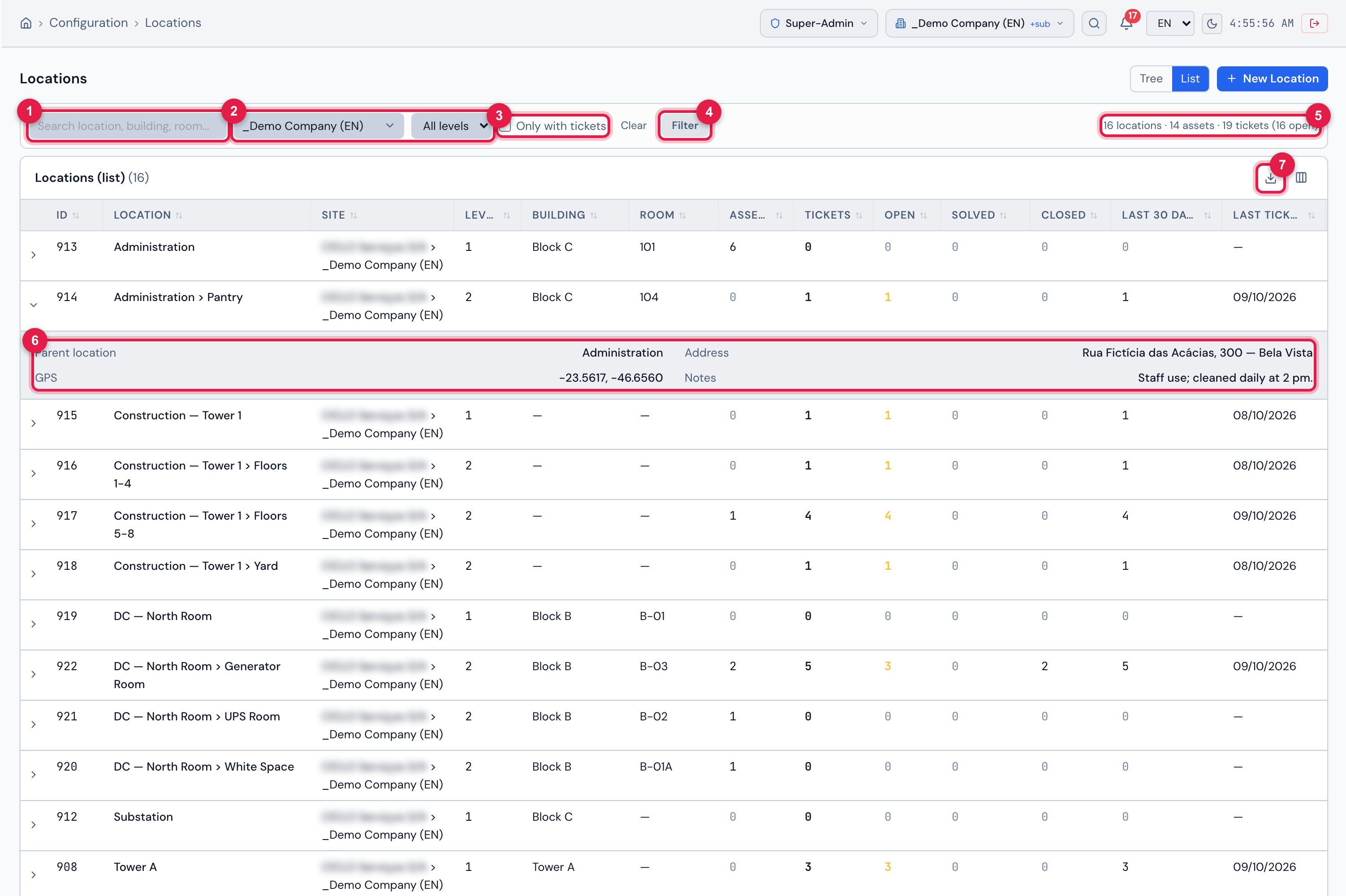
Figure 4. Configuration › Locations in List mode: the filters (here, the company site chosen and applied), the totals on the right, the table with Location, Site, Level, Building, Room, Assets, Tickets, Open, Solved, Closed, Last 30 days and Last ticket, and an open row with the details.
- 1Search — location, building, room or site.
- 2Site filter (All sites or one site — here, the company) and level filter (All levels).
- 3Only with tickets — hides the locations without any ticket.
- 4Filter — applies the filters (it turns colored when there is a change to apply); Clear resets them.
- 5Totals of the filter: locations, assets, tickets and open tickets.
- 6Open row: Parent location, Address, GPS and Notes.
- 7Export — Excel or PDF.
Filters
Section titled “Filters”- The filters only take effect after Filter (or Enter). Clear puts everything back to the start.
- The search looks in the name, the path, the building, the room and the site name.
- The site filter shows the sites within your reach. With Site + sub-sites in the header, choosing a site also brings the locations of the sites below it.
- The level filter lists the levels that exist among the locations within reach.
The columns
Section titled “The columns”| Column | What it shows |
|---|---|
| Location | the full path of the location |
| Site | the full name of the location’s site |
| Level, Building, Room | from the record |
| Sub-locations | how many sub-locations there are right below (hidden at first; switch it on in Columns) |
| Assets | assets of every type with this location, excluding deleted ones |
| Tickets | total tickets with this location, excluding deleted ones |
| Open | tickets not yet solved or closed (in amber when there is any) |
| Solved / Closed | solved / closed tickets |
| Last 30 days | tickets opened in the last 30 days |
| Last ticket | opening date of the most recent ticket |
| Created at | date the location was registered (hidden at first) |
- Click a column title to sort; Columns switches columns on and off.
- Click the arrow of the row to see Parent location, Address, GPS and Notes (or No address or notes recorded.). Click the row to open the record.
- Export generates the Excel file with the current page or with everything the filter reaches. The PDF is built by H2O with all the rows of the current filter.
Was this page helpful?
Thanks for the feedback!
Got it — we will improve this page.