
Punch list (GQE): concepts
Manual — Punch list (GQE) · chapter 1 of 11
The Punch list (GQE) module — GQE stands for Quality Assurance in Execution — records, per project, the deviations found on site: a loose conduit, rebar without cover, scaffolding without a guardrail, paint below standard. The goal is to fix them before the formal inspection and prove the fix with a photo at project handover. It is also the client’s punch list: what the client points out at the inspection goes in here, with the same routine.Each item gets a number within the project (GQE #1, #2…), goes through Triage / Under review, In progress and Under validation, and only ends when Quality checks the closing photo and completes it. Every step is kept in the History — who did it, when and with what comment — and that history goes into the handover report.
The concepts
Section titled “The concepts”| Concept | What it means |
|---|---|
| Item | a field deviation recorded on a project, with the project’s own number (GQE #n). The number is never reused, not even after an item is deleted. |
| Project | an H2O project (manual Projects). The item and its photos belong to the site of the project: only people who see that site can see the item and work on it. |
| Type | GQE (internal) — found by the team itself; Client punch list — pointed out by the client or the inspector at the inspection. |
| Priority | Critical, High, Medium or Low. |
| Discipline and Origin | the technical area (Civil, Elétrica, Mecânica…) and where the deviation came from (Engenharia / Projeto, Execução / Mão de obra, Materiais / Fornecedores…). They are company lists, editable, and the names appear as they were registered — the factory names are in Portuguese (chapter 10). |
| Responsible and Due date | who fixes it and by when. Once the date passes without a fix, the item is overdue (in red). |
| Opening photo | the evidence of the problem when it is recorded. |
| Closing photo | the evidence of the fix. Required to request validation. |
| Validation | the check by Quality — whoever has Validate (Quality) in the profile. Only Quality completes, rejects, closes without a fix and reopens — and whoever requested the validation does not approve it. |
Where items come from
Section titled “Where items come from”| How it is created | Who records it | Chapter |
|---|---|---|
| New item | anyone with Create in Punch list (GQE): engineering, quality, safety, the client’s inspector | 4 |
| failure of a commissioning test | H2O, by itself, when the test task is completed as Failed | 8 |
Apart from a commissioning failure, nothing is automatic: the work order and the NCR are only created when someone clicks the button (chapter 7).
Who does what
Section titled “Who does what”| Role | What they do |
|---|---|
| whoever points it out (engineering, quality, client/inspection) | records the deviation with a photo, priority, responsible and due date |
| responsible (foreman, technician, supplier) | starts fixing, attaches the closing photo and requests validation |
| Quality | checks the evidence and completes — or rejects with a comment; decides Won’t fix; reopens |
| project management | follows the indicators per project, follows up with the Pending PDF and hands over the Complete PDF with the acceptance |
Where to find it
Section titled “Where to find it”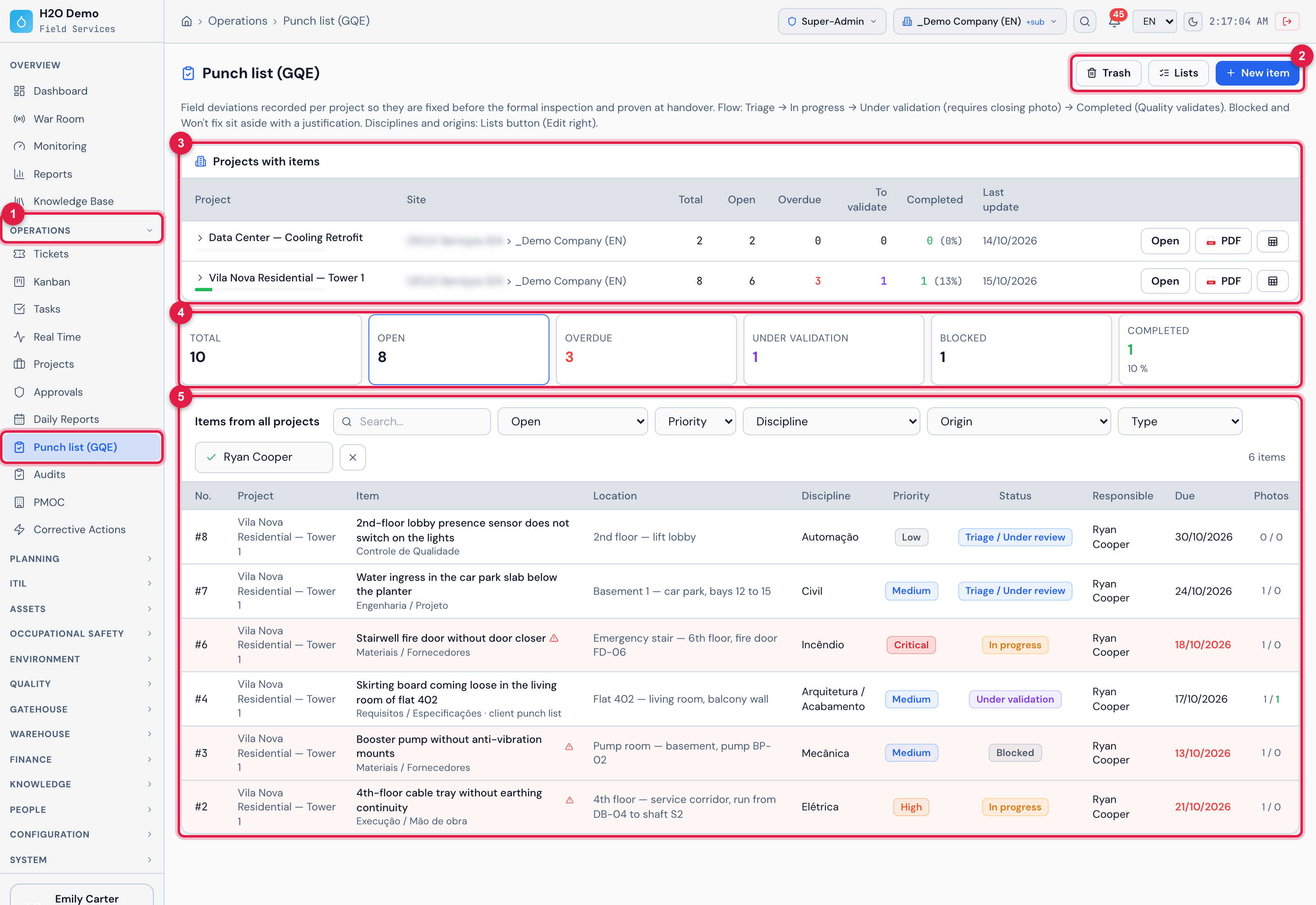
Figure 1. Operations › Punch list (GQE): the projects with items, the indicators and the list of open items of all projects — here filtered by the responsible Ryan Cooper.
- 1The Operations › Punch list (GQE) menu.
- 2Trash, Lists (disciplines and origins) and New item.
- 3The Projects with items table.
- 4The indicators — clickable.
- 5The Items from all projects list, with the filters (here, Responsible… = Ryan Cooper).
| Where | What you do there | Chapter |
|---|---|---|
| Operations › Punch list (GQE) | projects, indicators, filters, list, PDF and spreadsheet | 3 and 9 |
| New item | record | 4 |
| item page (click a row) | data, photos, flow, work order, NCR and history | 5, 6 and 7 |
| Lists | disciplines and origins | 10 |
| Trash | the deleted items: restore or delete permanently | 5 |
| People › Profiles › profile › Permissions, group Operations | the rights | 2 |
Was this page helpful?
Thanks for the feedback!
Got it — we will improve this page.