
My Profile
Manual — Getting started — web · chapter 11 of 13
My Profile gathers your data and preferences. Every user has access to it, whatever the profile. Open it through the card with your name, at the bottom of the menu (the My Profile button or a click on the name); in the self-service portal, through the My Profile tab.| Block | What it has | Details |
|---|---|---|
| Identification | photo, name, login, emails, Phone, Mobile | the photo is changed with the camera button over it; phone and mobile are saved with Save contact. Name and email cannot be edited here: Name and email are managed by the system administrator. The main email has the DEFAULT badge. |
| Digital Signature | the registered signature | Register signature / Update signature — draw it with the mouse or through the QR code on your phone. It is used to finish checklists and audits and in the Occupational Safety documents — see the SST manual. |
| Preferences | Language, Receive emails about my own actions, Platform tour | the language applies to the screens and to your emails (chapter 6); with Receive emails about my own actions off, you do not get emails about what you did yourself; Start tour / Restart tour (chapter 10). |
| Change Password | current password, new password and confirmation | see chapter 4. |
| Two-Step Verification | status, turn on, change app, trusted devices | see chapter 3. |
| Profiles and Entities | your user’s profiles and the site of each one | read only. The recursive badge shows that the profile also covers the sub-sites. The administrator is the one who assigns profiles. |
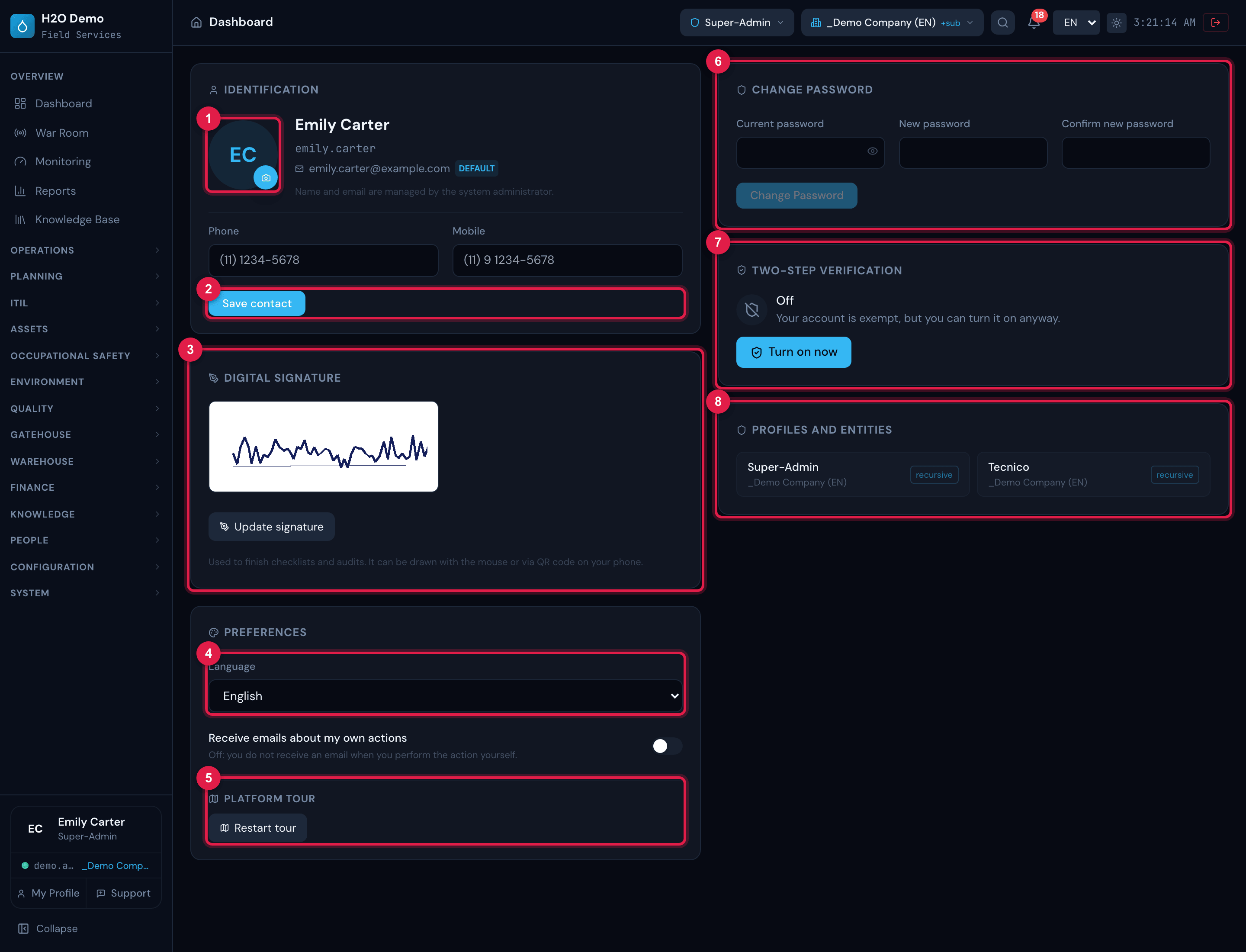
Figure 25. The My Profile page of Emily Carter: on the left, Identification (initials in place of the photo, not uploaded yet), Digital Signature and Preferences; on the right, Change Password, Two-Step Verification (off — the account is exempt) and Profiles and Entities (Super-Admin and Tecnico, recursive).
- 1Photo — the camera button changes the picture.
- 2Phone, Mobile and Save contact.
- 3Digital Signature and Update signature.
- 4Language and Receive emails about my own actions.
- 5Platform tour.
- 6Change Password.
- 7Two-Step Verification.
- 8Profiles and Entities (read only).
Was this page helpful?
Thanks for the feedback!
Got it — we will improve this page.