
eSocial (SST): S-2210, S-2220 and S-2240
Manual — Occupational Safety · chapter 8 of 13
H2O generates the three SST events of eSocial (the Brazilian government’s employer reporting system) as XML in layout S-1.3, ready for payroll to transmit with the company’s digital certificate. H2O does not transmit — it builds the events, validates them against the layout rules, stores the XML with its hash, exports them as a zip and records the receipt that payroll sends back.| Event | What it reports | Where H2O gets the data |
|---|---|---|
| S-2210 Work Accident Report (CAT) | each accident with a CAT, one event per victim | Accidents & incidents + complement of the event and of the victim (ICD, CEP/IBGE of the location, time, etc.) |
| S-2220 Health Monitoring (ASO) | each ASO | ASO + complement (Table 27 exams, physician, CRM) |
| S-2240 Environmental Conditions / Exposure to Risk Agents | the worker’s exposure | worker + risks from the inventory for the job role/project (Risk complement with the Table 24 code) + CAs from the PPE deliveries |
Settings
Section titled “Settings”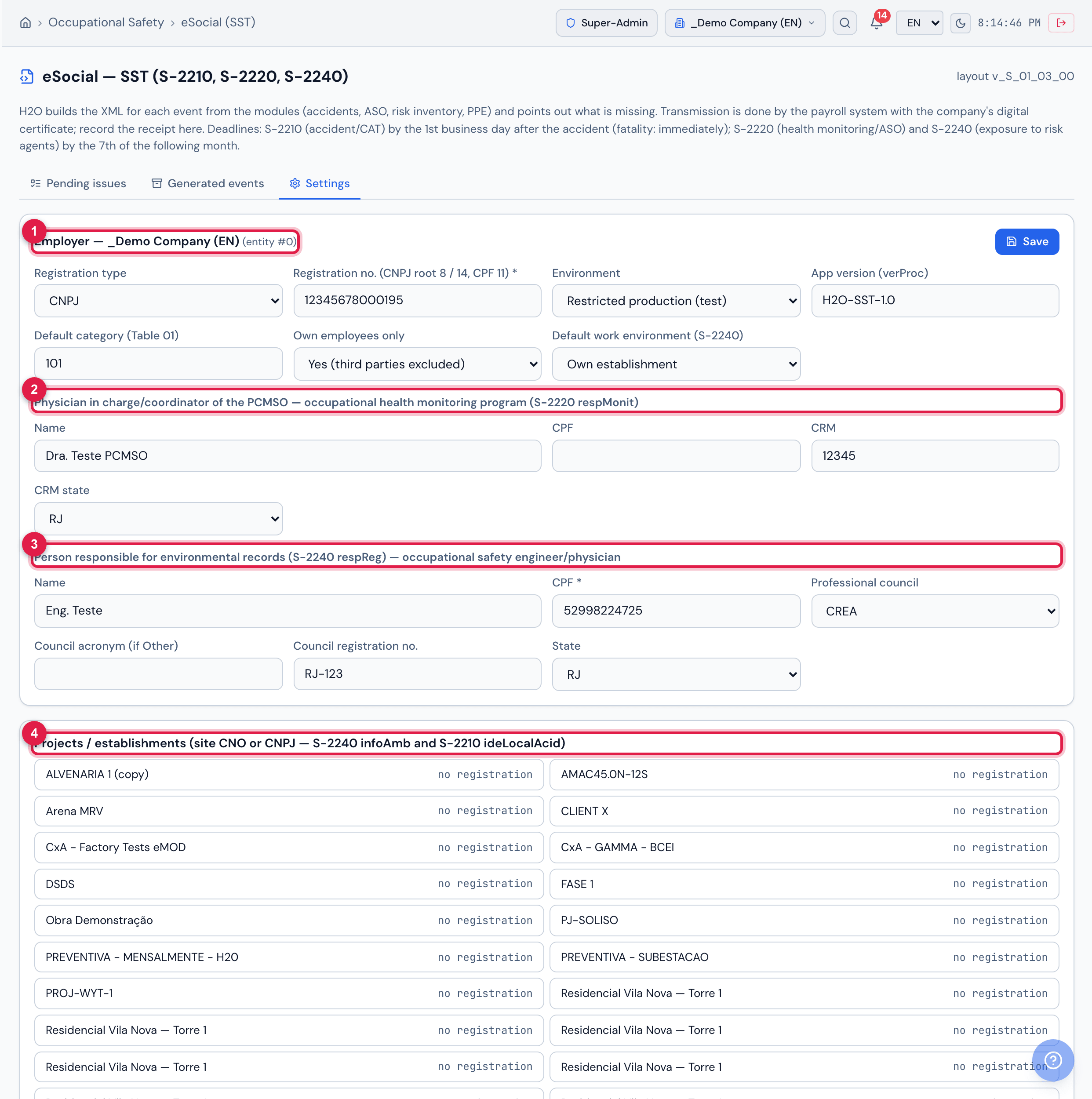
Figure 64. Settings tab (layout v_S_01_03_00): Employer block (Registration type and no., Environment — Restricted production (test)/Production —, verProc, Default category, Own employees only, Default work environment (S-2240)), Physician in charge/coordinator of the PCMSO (name, CPF, CRM, state), Person responsible for environmental records (name, CPF, professional council, no., state), Save button and, below, the list of Projects / establishments to enter the site CNO or CNPJ (all still “no registration”).
- 1Employer — registration and environment.
- 2Physician in charge/coordinator of the PCMSO (respMonit of the S-2220).
- 3Person responsible for environmental records (respReg of the S-2240).
- 4Projects / establishments: site CNO or CNPJ (infoAmb of the S-2240 and ideLocalAcid of the S-2210).
Start with the settings: until the employer is filled in, the Pending tab shows a warning and generates nothing.
Pending issues and generation
Section titled “Pending issues and generation”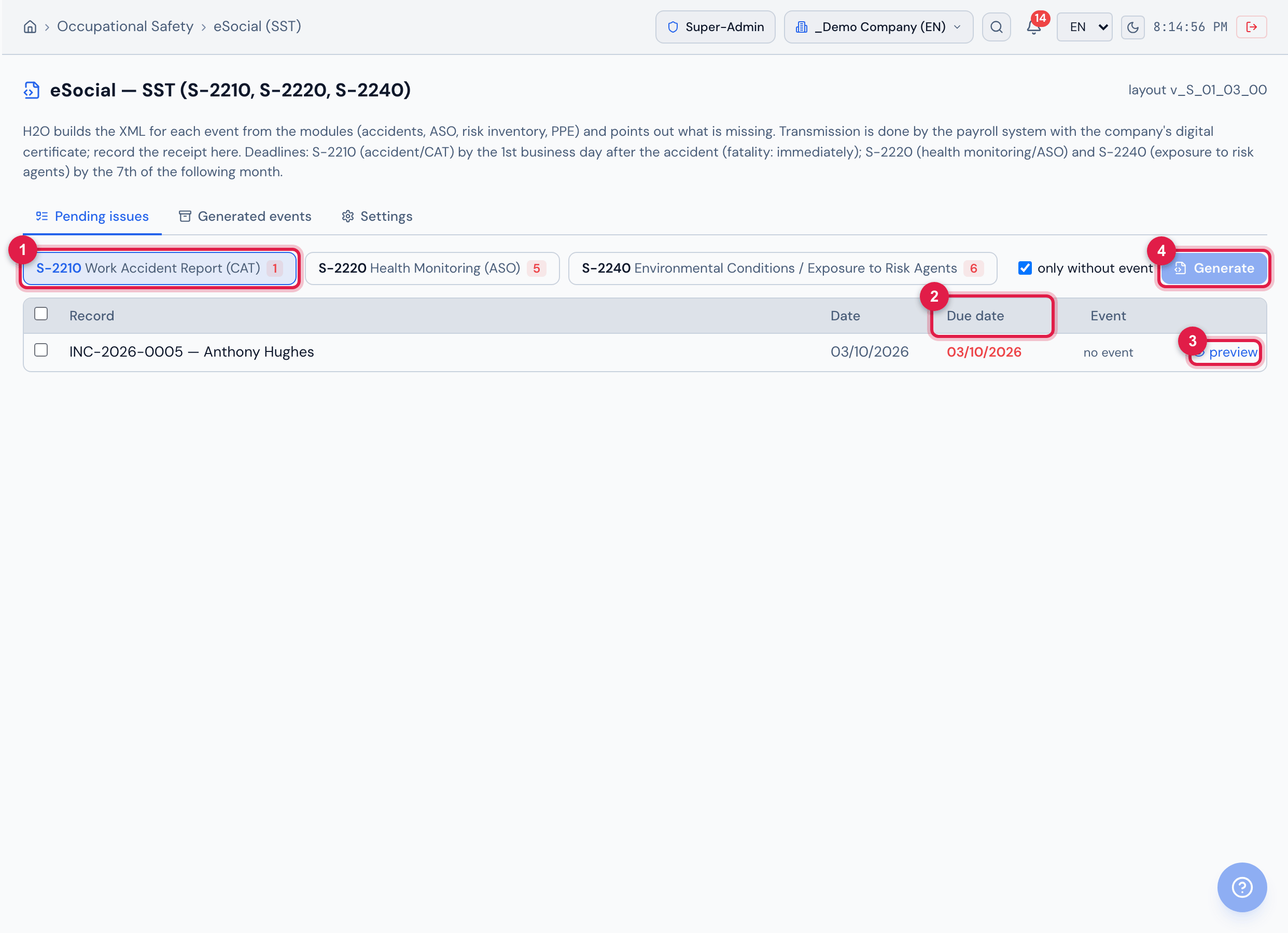
Figure 65. Pending issues tab: event selector with the record counter (S-2210: 1, S-2220: 5, S-2240: 6), only without event box and Generate button; the table shows Record, Date, Due date (red if overdue) and Event (“no event”). In the example, INC-2026-0005 — Anthony Hughes, deadline 03/10/2026. preview shows the ready XML or the “Missing to generate” list.
- 1Event selector — S-2210 Work Accident Report (CAT) (1 record); next to it, S-2220 (5) and S-2240 (6).
- 2Due date column — in red when overdue (03/10/2026 in the example).
- 3preview → XML or the pending issues of the complement.
- 4Generate — creates and stores the event for the selected records (with the only without event box next to it).
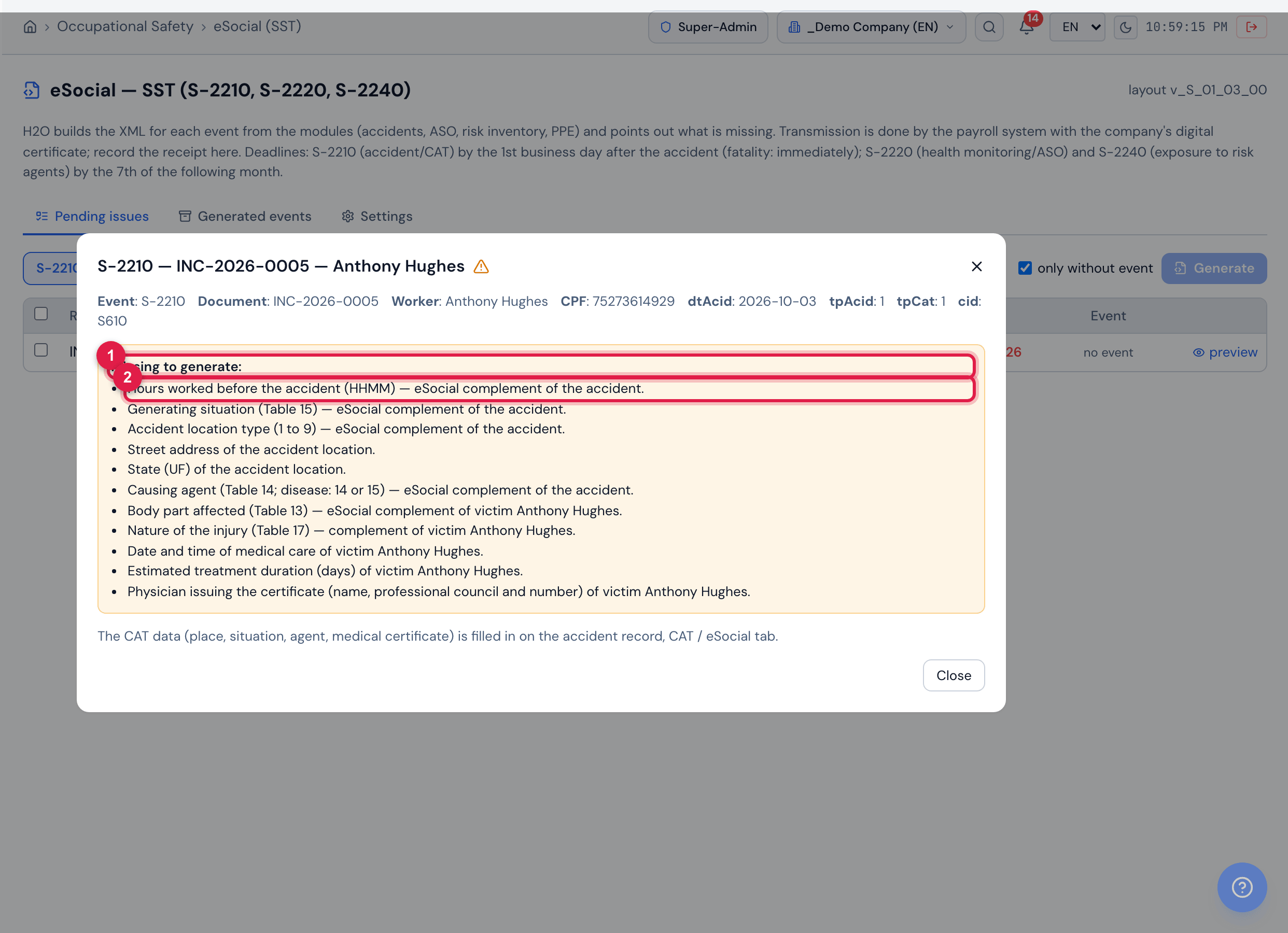
Figure 66. Preview of an S-2210 that is still incomplete (INC-2026-0005 — Anthony Hughes): the header shows Event, Document, Worker, CPF, dtAcid, tpAcid, tpCat and cid; the “Missing to generate” panel lists item by item (hours worked before the accident, generating situation — Table 15, accident location type, street/state, causing agent — Table 14, body part — Table 13, nature of injury — Table 17, medical care, treatment duration, issuing physician) and in which complement each one is filled in. The footer reminds you: the CAT data is on the accident record, CAT / eSocial tab.
- 1Missing to generate panel — the list of what blocks the XML.
- 2First item: Hours worked before the accident (HHMM) — filled in on the accident’s eSocial complement.
- Choose the event and check “only without event”.
- Click preview on the record. If “Missing to generate” appears, fill in the complement (ICD, exams, Table 24 code…) and check again.
- Click Generate and save (or Generate (n) for all the ready ones).
- On the Generated events tab, download the zip and hand it over to payroll. When payroll transmits, change the status to Sent to eSocial and, once the response comes back, to Receipt received (the system asks for the receipt number).
Generated events
Section titled “Generated events”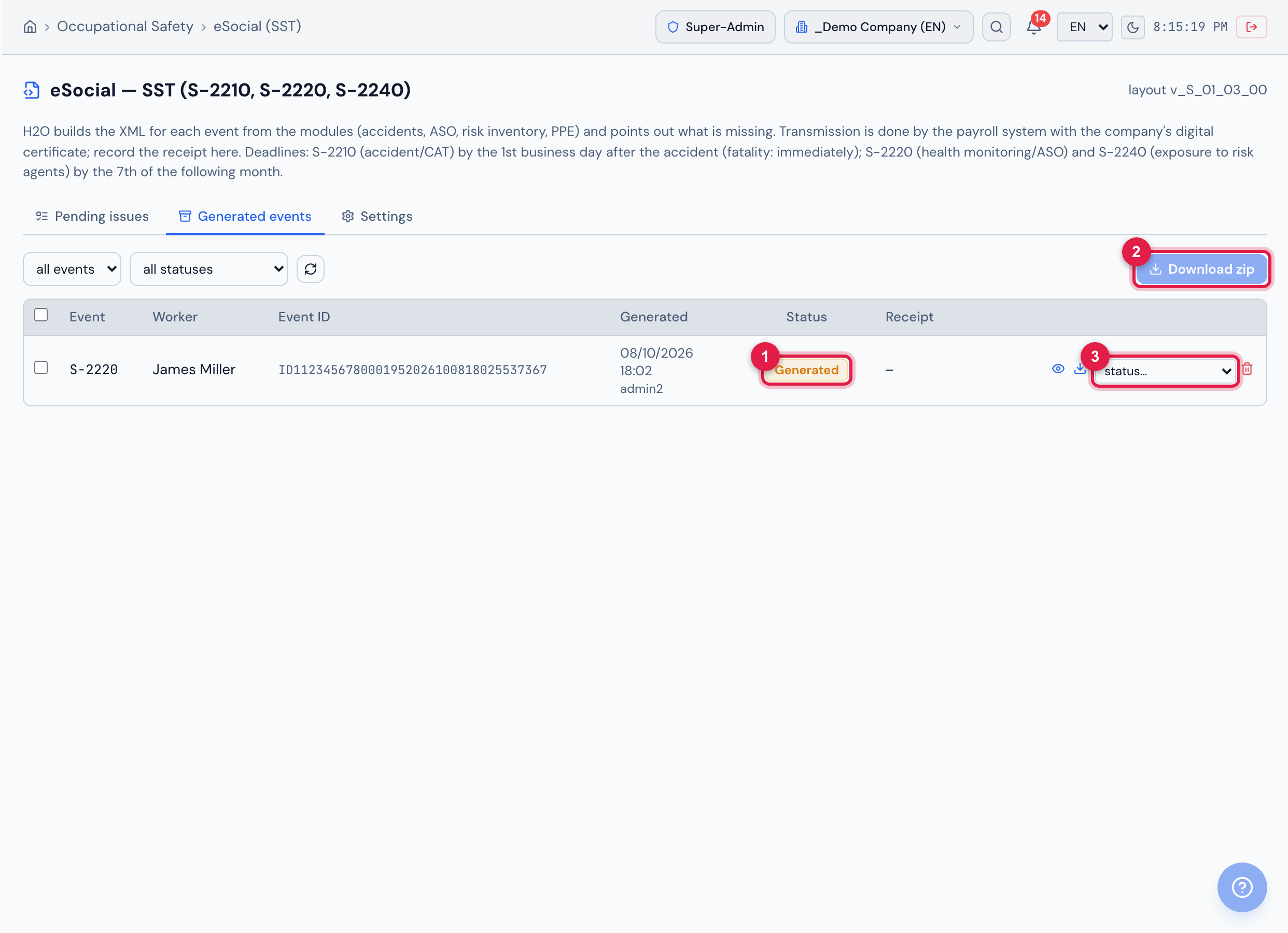
Figure 67. Generated events tab: “all events” and “all statuses” filters (Generated, Exported to payroll, Sent to eSocial, Receipt received, Rejected, Cancelled), Download zip button; columns Event, Worker, Event ID, Generated (date and user), Status, Receipt and, on the row, the view XML and download XML icons, the status… selector and delete. In the example, an S-2220 for James Miller, Generated on 08/10/2026.
- 1Cycle Status (here Generated).
- 2Download zip of the selected events.
- 3status… — changes the status; when you select Receipt received, it asks for the receipt number. Next to it: view XML, download XML and delete (unavailable for sent/receipt).
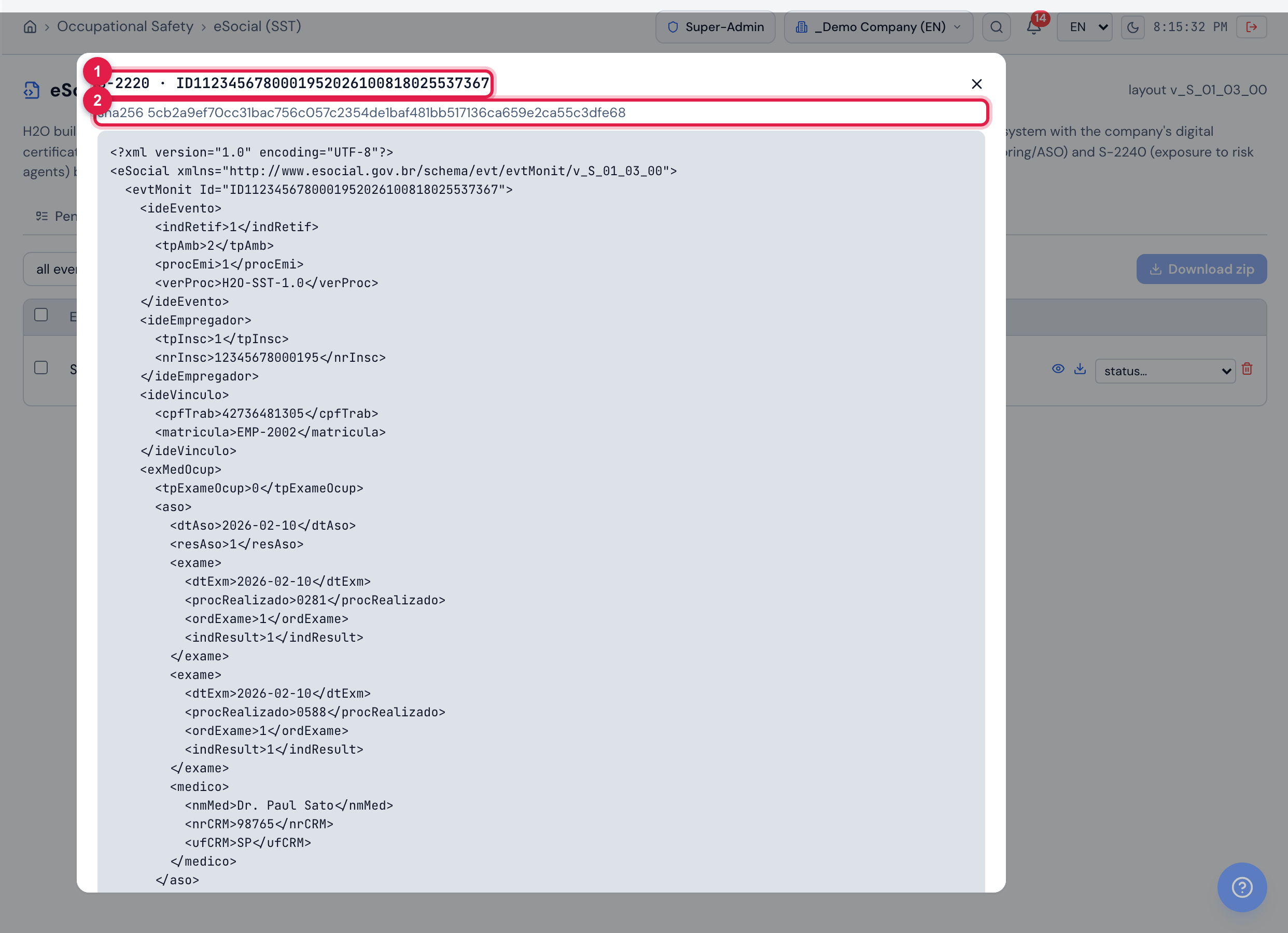
Figure 68. View XML of an S-2220 generated from an ASO: the event ID in the title, the SHA-256 of the file and the XML in the namespace of layout v_S_01_03_00 (evtMonit, with ideEvento, ideEmpregador, ideVinculo and exMedOcup/aso).
- 1Event modal: title S-2220 · ID… and the XML (evtMonit).
- 2sha256 hash of the generated file.
Layout rules the system enforces
Section titled “Layout rules the system enforces”- S-2210: one event per victim; ICD required; accident time and hours worked before only for a typical accident; CEP/IBGE and location identification according to the place type.
- S-2220: at least one Table 27 exam (clinical exam 0281 requires the order); ASO result 1/2 (fit/unfit); the physician in charge of the PCMSO comes from the settings.
- S-2240: harmful agents from the inventory for the job role/project, with the Table 24 code; a quantitative assessment requires intensity/unit/technique; the “other” agent requires a description; effective PPE → the CA comes from the deliveries; code 09.01.001 (no risk) without CPE/PPE.
- Supplier workers are left out when “Own employees only” is checked.
Was this page helpful?
Thanks for the feedback!
Got it — we will improve this page.